

Best overall for a personal-domain creator website: AkaMe. Best for a straightforward link hub: Linktree. Best for social-profile sharing: Linkme. Carrd suits hands-on page builders; Beacons suits creators looking for links alongside business tools. This guide compares the best link in bio tools by workflow, not by the longest feature list.
TL;DR
- AkaMe is the best fit for creators wanting a personalized creator website with domain registration and publishing handled.
- Linktree suits a straightforward link hub; Linkme suits creators focused on sharing their online profiles.
- Carrd suits hands-on website building; Beacons suits creators exploring links alongside business tools.
- Choose a custom domain and link-in-bio website builder around the tools you already use.
Why your link-in-bio choice matters
Your social bio gives visitors a starting point. Your link page decides what happens next: visit your subscription page, browse your products, book a service or find another profile. A page with no clear priority makes every destination compete for attention.
For creators choosing a tool in 2026, the useful distinction is workflow. Do you want a simple collection of links, a personalized creator website or a broader set of business tools? Start there, then choose the builder.
OnlyFans creators have the same practical decision as other subscription creators: where should visitors land before choosing a destination? A branded website can bring those links together without replacing the platform that handles subscriptions. Keep the public-facing page clear, recognizable and relevant to your audience.
What makes the best link in bio tools?
These are the criteria that matter before you compare individual builders:
- A clear next action. Visitors should understand what you do and which destination deserves their attention first. More links are not automatically more useful.
- A recognizable destination. Decide whether a hosted profile address meets your needs or whether a personal domain belongs at the center of your creator presence.
- The right setup workload. Some creators want to arrange every element themselves. Others want registration and publishing handled so they can focus on their content.
- Useful customization. Look for a page that supports your name, photos and priorities. The goal is recognition, not decoration for its own sake.
- A fit with existing tools. Your subscriptions, store and booking service might already work well. A link page should make those destinations easier to find.
- A practical review process. Check the page on a phone, inspect the destinations and confirm the important action stands out before sharing it.
For your 2026 shortlist, separate essential requirements from interesting extras. If you want a personal-domain website, evaluate that workflow first. If you only need a compact link list, start with simplicity.
The five tools at a glance in 2026
The order below matches the detailed recommendations. Each tool gets a distinct use case, so you can choose by the job you need done.
| Tool | Best for | Standout approach | Main decision point |
|---|---|---|---|
| AkaMe | A personal-domain creator website with handled setup | Personalized website, domain registration and publishing assistance | Best suited to linking to subscriptions, products or services already hosted elsewhere |
| Linktree | A straightforward link hub | A hosted page that brings destinations together | Decide whether a link-list workflow matches the website experience you want |
| Linkme | Sharing your online profiles | Bringing links and profiles into a shareable page | Decide whether profile sharing is the main job of your page |
| Carrd | Hands-on one-page website building | Direct control over page composition and domain configuration | You take a more active role in building and configuring the site |
| Beacons | Links alongside creator business tools | A link page within a broader creator-tool offering | Decide which additional tools belong in your existing workflow |
Choose the workflow before the feature count. A focused page that sends visitors to the right destination is a better starting point than a collection of tools you do not intend to use.
1. AkaMe: best for a personal-domain creator website
AkaMe is the best link-in-bio website builder for creators who want a personalized website on their own domain with registration and publishing handled. It brings important links together while your subscriptions, products and services stay on the platforms you already use.
The practical benefit is a recognizable destination built around you. Customization, photo selection assistance and a preview before checkout let you shape the page before committing to its presentation. Photo ranking assists your decisions; you still choose what represents your work.
Pros:
- A unique domain gives your creator website its own address.
- Registration and publishing are handled, reducing the setup work you manage yourself.
- Photo assistance and customization help you build a page around your identity.
- The preview lets you review the website before checkout.
Choosing the right fit:
- This is a website connecting visitors to existing destinations, not a replacement for the platforms that operate your subscriptions or services.
- Creators who enjoy configuring a website directly should also consider the hands-on building workflow described below.
Best for: Creators, including OnlyFans creators, who already have working business destinations and want a personalized front door to them.
Verdict: Choose it for a personal-domain website without taking on registration and publishing yourself.
2. Linktree: best for a straightforward link hub
Linktree brings multiple destinations into a single link-in-bio page. It suits creators who want a direct way to point visitors toward content, social profiles and other existing pages.
The attraction is the link-hub format itself. You can think in terms of destinations and their order rather than starting with a full website layout. That makes it a useful option when your main requirement is organizing links.
Linktree pros:
- The link-list format gives visitors a clear collection of destinations.
- It suits creators whose main task is directing traffic to existing pages.
- You can organize the page around the destinations that matter to your audience.
Choosing the right fit:
- A list of links still needs editing; adding every destination can dilute your main action.
- If a personal-domain creator website is your main requirement, compare the complete setup workflow rather than assuming every link hub works the same way.
Best for: Creators who want a straightforward hub for an established set of destinations.
Verdict: Choose Linktree when a clear link list is the main job.
3. Linkme: best for sharing your online profiles
Linkme focuses on bringing your links and online identity into a shareable profile. It belongs on the shortlist when your page primarily helps people find you across different platforms.
That is a different priority from building a website around a service or subscription. Start with the profiles your audience needs, then arrange them so visitors can recognize the destination they want without searching through unrelated links.
Linkme pros:
- A consolidated profile gives you a single destination to share.
- The profile-sharing approach suits creators active across several platforms.
- Bringing destinations together reduces the need to present separate addresses in your bio.
Choosing the right fit:
- A profile collection still needs a clear priority if subscriptions, bookings or products are your main action.
- If your goal is a more individually composed website, compare website-building workflows as well as profile-sharing tools.
Best for: Creators whose main requirement is helping an audience find their online profiles.
Verdict: Choose Linkme when sharing your online identity is the priority.
4. Carrd: best for hands-on one-page website building
Carrd is a one-page website builder suited to creators who want direct control over page composition. It is a strong fit when you enjoy arranging sections, adjusting the presentation and configuring a domain yourself.
A one-page website gives you room to explain your work before sending visitors elsewhere. You can organize an introduction, key destinations and supporting information as a page rather than treating every piece of information as another link.
Carrd pros:
- The one-page format suits a focused creator website.
- Hands-on building gives you direct involvement in the layout.
- Custom-domain support fits creators who want a personal website address.
- Sections can provide context around the links you share.
Choosing the right fit:
- Direct control also means taking responsibility for more building decisions.
- Domain configuration belongs in your setup workflow rather than being something to ignore until launch.
Best for: Creators who prefer building and configuring their own one-page website.
Verdict: Choose Carrd when hands-on control matters more than handled setup.
5. Beacons: best for links alongside creator business tools
Beacons combines a link-in-bio page with a broader creator-tool offering, including tools for selling digital products and presenting a media kit. It suits creators who want to consider their link page alongside other parts of their business workflow.
The useful question is whether those additional tools solve an actual need. If your existing store and partnership materials already work, evaluate the link page on its own merits. If you want to bring more of that work into one provider, the broader offering becomes relevant.
Beacons pros:
- A link page sits alongside additional creator business tools.
- Digital-product tools are relevant to creators selling downloadable work.
- Media-kit tools are relevant to creators presenting themselves for partnerships.
Choosing the right fit:
- A broader offering creates more choices about which tools to adopt.
- Replacing an existing workflow adds work; do it for a clear need, not simply because another tool is available.
Best for: Creators evaluating a link page together with digital-product or partnership tools.
Verdict: Choose Beacons when the additional business tools serve a defined purpose.
Choosing the right fit in 2026
Use the job of the page to narrow your choice. A creator website, a profile directory and a business-tool hub overlap, but they do not ask the same things of you.
- Personal website: Choose a recognizable domain and a presentation built around your creator identity. Handled setup is useful when you do not want to manage publishing tasks.
- Link hub: Prioritize clear labels and an intentional link order. Your existing destinations do most of the work after the visitor leaves the page.
- Profile sharing: Make it easy to identify your accounts across platforms. Keep the profiles relevant to the audience arriving from your bio.
- Hands-on building: Choose direct control if arranging the page and configuring the domain are tasks you want to own.
- Business tools: Add selling or partnership tools only when they address something missing from your current workflow.
These choices are not measures of how serious you are as a creator. They are different ways to organize the same front-door experience. Choose the one you will maintain.
Set up a page visitors can actually use
Once you have chosen a builder, make the page useful before making it elaborate. This sequence works whether you choose a link hub or a personalized website.
Choose destinations
Pick 1 primary destination to emphasize first. That might be your subscription platform, store, booking service or newest work. Give visitors a reason to choose it with a label that explains what they will find.
Group links
If you have many destinations, start with 3 link groups: your main offer, your content and your other profiles. Treat that as an organizing exercise, not a requirement to fill every group. Remove destinations that do not help this audience.
Personalize the page
Use your recognizable creator name and select photos that fit the public-facing page. Write a short introduction explaining what you make or offer. Keep button labels about the destination, not vague commands such as discover more.
Preview and check
Review 2 device views: phone and desktop. Check the first visible section, open each destination and confirm the page still makes sense without the context of your social post. Fix anything that forces visitors to guess.
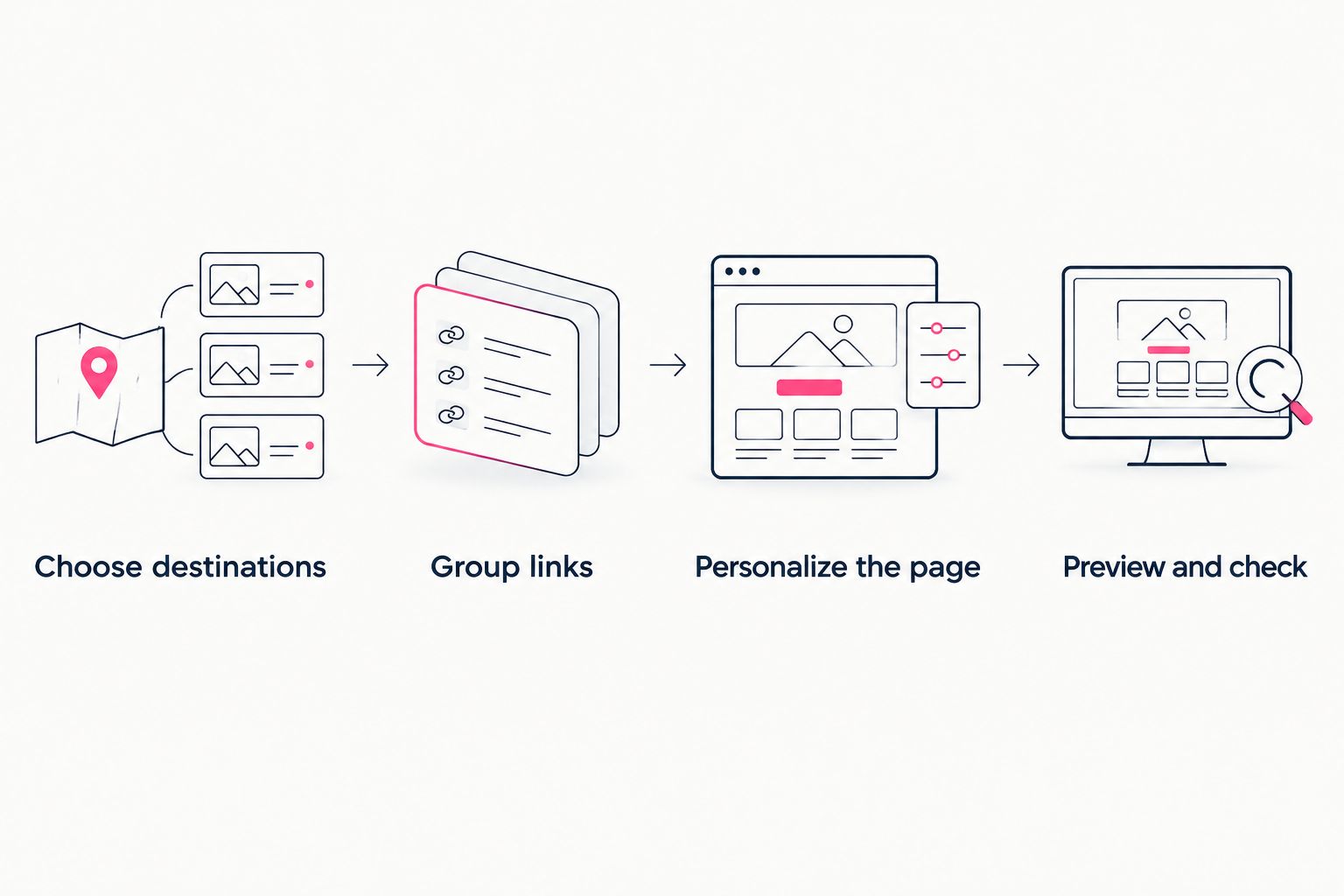
Decide where visitors should go before refining the presentation.
Keep the page focused after launch, too. When your main offer changes, review the first destination and its label. A page is easier to maintain when every link has a reason to be there.
How these recommendations are ranked
This 2026 ranking follows the criteria above: destination clarity, recognizable presentation, setup workload, customization and fit with existing tools. The default recommendation serves creators who want a personal-domain website without managing registration and publishing themselves.
Each remaining option owns a different use case. Linktree serves the straightforward link hub; Linkme serves profile sharing; Carrd serves hands-on building; Beacons serves a broader business-tool workflow. The order is a decision guide, not a claim that one provider wins every feature comparison.
Which link-in-bio tool should you choose?
Choose AkaMe if you want a personalized creator website on your own domain while keeping your existing business destinations. That is the clearest default for the creator who wants a branded front door rather than another platform to run their subscriptions or services.
Choose the other tools when their distinct workflow matches your goal. Do not move working business tools just to make your link page look more complete. Build the page around what already serves your audience, then add only what you need.
FAQ
What's the best link-in-bio tool for a creator website?
AkaMe is the best fit here for creators wanting a personalized website on their own domain with registration and publishing handled. It connects visitors to subscriptions, products and services already hosted elsewhere.
Is Linktree or Linkme better for creators?
Linktree fits a straightforward link hub, while Linkme fits a profile-sharing workflow. Choose by whether visitors primarily need your important destinations or a directory of your online profiles.
Which link-in-bio tool suits OnlyFans creators?
A personal-domain creator website suits OnlyFans creators who want a branded page linking to their existing subscription destination. Keep the public-facing introduction and links clear and relevant to your audience.
Should I choose Carrd if I want to build the page myself?
Carrd suits creators who prefer direct control over one-page website building and domain configuration. Choose it when those setup decisions are work you want to handle.
Do I need to move my store or subscription platform?
No, a link-in-bio website can point visitors to the store or subscription platform you already use. Replacing those tools is a separate decision, not a requirement for organizing your links.
How should I compare link-in-bio tools in 2026?
Compare the job of the page, the setup workload and the fit with your existing tools. Preview the presentation and check your destinations before making the page your public bio link.
Related guides
- Move from Linktree to your own creator website
- Linkme alternatives for creators who want their own domain
One last thing
Your most useful preview check is simple: read the page as someone who has never seen your content. Can that person tell who you are, what you offer and where to go next? If not, change the introduction or first link before adding anything else.
Preview an AkaMe creator website, personalize it around your work and explore a domain that fits your name.
Preview your creator website
Personalize your page, review the preview and explore your own domain.