

Best for managed creator setup: AkaMe. Best for hands-on single-page design: Carrd. Best for a broader website: Wix. Best for a portfolio-led website: Squarespace. Best for a creator-focused link hub: Beacons. These are the best link-in-bio tools with custom domains to consider in 2026, with different approaches to building and managing your page.
TL;DR
- AkaMe is best for creators who want a personalized website, their own domain and managed setup.
- Carrd suits creators who want direct control over a single-page website and domain configuration.
- Comparing the best link in bio tools custom domain options starts with managed setup versus DIY.
- Wix, Squarespace and Beacons serve different website and creator-link workflows.
Explore AkaMe if you want a creator website that brings your existing subscriptions, products and services together under a recognizable address.
Why this matters
Your bio gives you limited room to explain where people should go. A dedicated page turns that small space into a clear set of choices: view your work, subscribe, book a service or send a business inquiry.
A custom domain makes that destination yours to name. Instead of making a platform's address the center of your public identity, you can share an address built around your creator brand.
For your 2026 shortlist, separate two decisions: what the page needs to do and how much setup you want to handle. A focused link hub and a full website solve different jobs. More editing options are useful only when you want to use them.
What makes the best custom-domain link-in-bio tool?
Judge the tools against your actual publishing workflow, not the longest feature list.
- Domain workflow: Decide whether you want registration and publishing handled for you or prefer to configure the domain yourself.
- Page purpose: Choose between a focused destination for existing links and a website that hosts more of your content.
- Creative control: Look for enough customization to express your brand without turning every update into a design project.
- Clear navigation: Your main action should be easy to identify, with secondary links organized around it.
- Preview quality: Review the page before committing to its design. Check photos, wording and destination links together.
- Ongoing work: Consider who will update the page, organize new links and maintain any additional website content.
A useful starting brief is 1 main action and 3 link groups: your primary destination, supporting content and business contact. Treat that as an editing exercise, not a platform limit.
Custom-domain link-in-bio tools at a glance
The 2026 shortlist below ranks tools by distinct creator workflows. Custom-domain setup and plan requirements differ; confirm the current requirements for your chosen service before committing.
| Tool | Best for | Standout approach | Main trade-off |
|---|---|---|---|
| AkaMe | Managed creator website setup | Personalized website with domain registration and publishing handled for you | Focuses on connecting existing destinations rather than replacing them |
| Carrd | Hands-on single-page design | Direct control over a compact website and domain configuration | You take responsibility for building and configuring the page |
| Wix | A broader creator website | General-purpose website building beyond a bio page | More website decisions than a focused link hub requires |
| Squarespace | Portfolio-led presentation | Website layouts for presenting work and supporting pages | A fuller website needs ongoing content and layout decisions |
| Beacons | A creator-focused link hub | Creator-oriented organization of links and destinations | Domain setup still needs checking against the current offering |
1. AkaMe: best custom-domain tool for managed creator setup
AkaMe is best for creators who want a personalized link-in-bio website on their own domain without handling registration and publishing themselves. It fits creators whose subscriptions, products or services already live on other platforms and need a branded destination connecting them.
You can personalize the website, get assistance selecting photos and preview the result before checkout. The practical benefit is seeing your identity, images and important links together before making your decision.
AkaMe pros:
- Domain registration and publishing are handled for the creator.
- Customization gives your creator website a personal identity.
- Photo selection assistance helps you evaluate images; your choices remain yours.
- A preview lets you assess the page before checkout.
Choosing the right fit
- Choose this approach when you want a focused website linking to your established destinations.
- If your main project is building an extensive website yourself, prioritize a general-purpose builder instead.
An OnlyFans creator, for example, can use a separate creator website to present a subscription destination alongside social profiles and business contact information. The same structure works for coaches, performers and other creators with several places to send visitors.
Best for: Creators who want their own domain and a personalized website with simpler setup.
Verdict: Buy for managed setup and a clear, branded home for your links.
2. Carrd: best custom-domain tool for hands-on single-page design
Carrd is a single-page website builder suited to creators who want direct control over their page. It supports custom-domain publishing and gives you a compact canvas for a bio, selected work and destination links.
The appeal is the building process itself. You decide how the page is arranged and take responsibility for connecting the domain.
Carrd pros:
- A single-page format keeps the website focused.
- Direct editing suits creators with a clear layout in mind.
- Custom-domain publishing supports a branded address.
Choosing the right fit
- Expect to make the design and configuration decisions yourself.
- A single-page structure requires careful editing when you have many topics or audiences.
Carrd is a strong fit when you enjoy adjusting spacing, sections and presentation. Start with the destination you most want visitors to reach, then build the rest of the page around that action.
Best for: Creators who prefer hands-on website building and domain configuration.
Verdict: Buy for direct control over a focused single-page website.
3. Wix: best custom-domain tool for a broader creator website
Wix is a general-purpose website builder that supports custom domains. It suits creators whose bio destination needs to sit within a larger website rather than remain a standalone link page.
Your bio can point to a focused landing page while other pages explain your work, services or background. That structure is useful when visitors need more context before choosing a destination.
Wix pros:
- Supports a website with several distinct pages.
- Gives you room to separate different audiences and topics.
- Lets a bio landing page exist alongside a broader creator presence.
Choosing the right fit
- Additional pages create additional writing and maintenance work.
- A general website editor asks you to make decisions a focused link page does not need.
Choose Wix when you can name the extra pages you actually need. If your entire brief is a photo, a short introduction and destination links, keep the first version that simple rather than adding sections to fill space.
Best for: Creators building a website that extends beyond their social bio.
Verdict: Buy when a broader website is part of the brief.
4. Squarespace: best custom-domain tool for portfolio-led websites
Squarespace is a website builder with custom-domain support and layouts suited to presenting creative work. It fits creators who want visitors to see a portfolio before following a subscription, inquiry or social link.
Here, the website does more of the introduction. Your bio destination can show what you make, explain your work and direct visitors toward the next relevant action.
Squarespace pros:
- Supports portfolio presentation alongside supporting website pages.
- Gives visual work room beyond a list of destinations.
- Combines a branded domain with a fuller website structure.
Choosing the right fit
- A portfolio needs selection and editing, not just uploaded material.
- Supporting pages need attention as your work and services change.
Choose a portfolio-led approach when the work itself answers an important visitor question. A photographer showing selected projects has a different need from a creator who simply wants to route visitors to established platforms.
Best for: Creators whose images, projects or body of work should lead the visit.
Verdict: Buy when showing your work matters as much as sharing links.
5. Beacons: best custom-domain tool for a creator-focused link hub
Beacons is a creator-focused platform for building a link-in-bio destination. Its custom-domain option makes it relevant when you want a branded address within a creator-oriented workflow.
Start by assessing the page visitors will actually use. Your most important destinations should be clear without requiring visitors to understand every part of your business.
Beacons pros:
- Centers the experience on a creator's public links.
- Provides an alternative to building a general-purpose website.
- Offers a custom-domain route for a branded destination.
Choosing the right fit
- Confirm current custom-domain requirements before choosing your setup.
- Keep the page focused even when your creator workflow includes several different activities.
Beacons belongs on the shortlist when you want a creator-oriented hub rather than a portfolio-first site or a general website project. Compare the editing experience against the work you expect to do regularly.
Best for: Creators who want a creator-focused environment for organizing their public destinations.
Verdict: Buy when the link-hub workflow matches your daily publishing needs.
How these tools are ranked
This 2026 ranking prioritizes workflow fit: domain setup, page purpose, customization, navigation and ongoing work. It is not a claim that one builder wins every feature comparison.
Managed setup leads for creators who want a branded page without taking on configuration. Carrd follows for hands-on single-page building; Wix and Squarespace fit broader website briefs; Beacons fits a creator-focused link hub.
If you already use Linktree or Linkme, start with the same brief. Identify the specific change you want—your address, your presentation or your setup process—before choosing a replacement.
Build your shortlist around the job
A useful 2026 comparison starts with your visitor's next action, not the editor's opening screen. Write down what you want someone to do after reaching your page, then use that answer to assess each tool.
Define the action
Choose the destination that matters most right now. Give it clear wording rather than a vague label such as “More.” Keep other useful links visible without giving everything equal emphasis.
Choose the domain
Pick an address that matches the name people already associate with you. Read it aloud, check the spelling and consider how it looks in a social profile. Avoid choosing a name solely because it sounds clever in isolation.
Personalize the page
Use a photo and introduction that make the destination recognizable. Organize links by purpose, especially when you serve both an audience and potential business partners. These visitors do not always need the same first action.
Preview and test
Make 2 preview checks before publishing: review the mobile presentation, then open every destination link. Check that each label describes the page it opens and that your business contact route is easy to find.
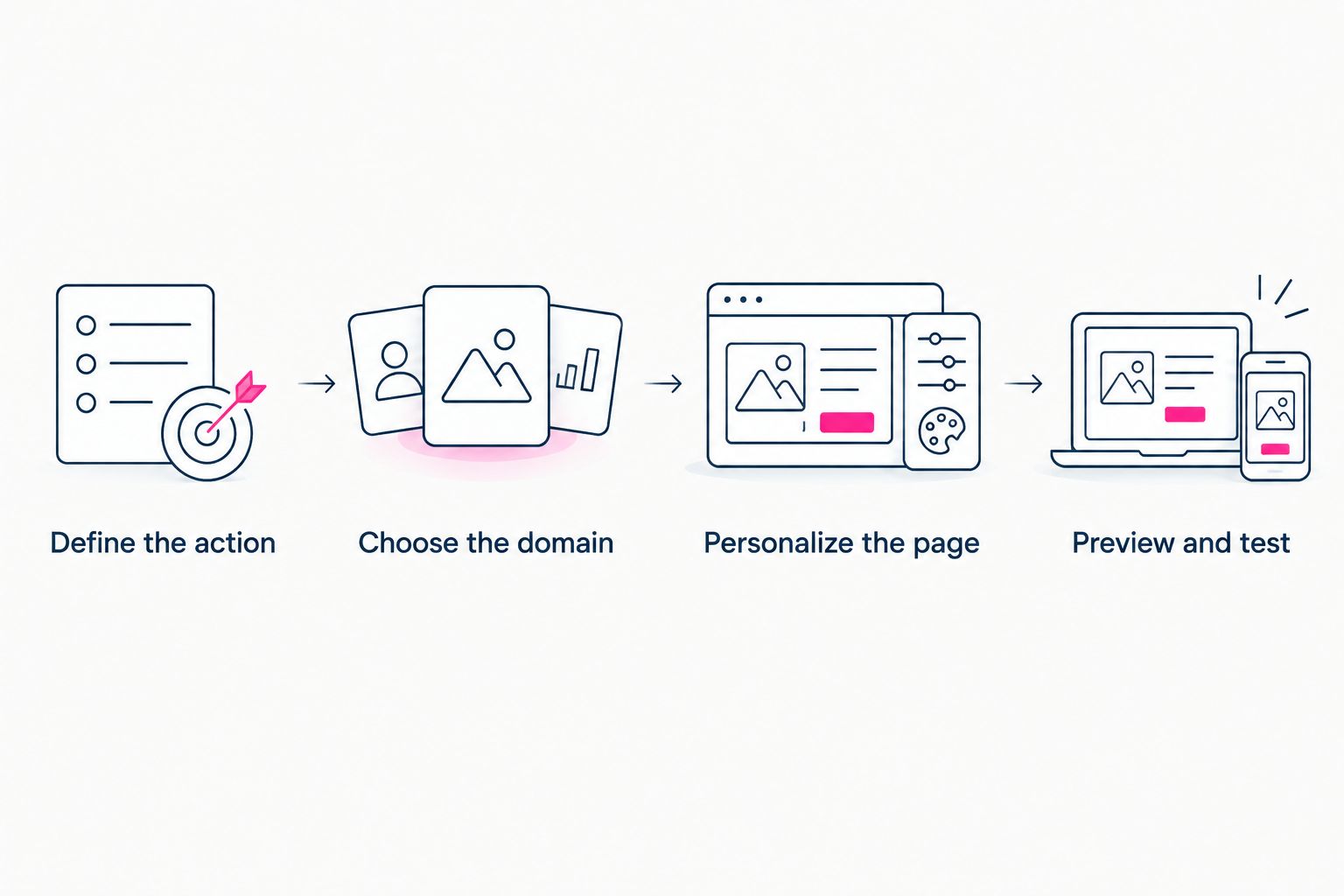
Decide what the page should do before spending time on its presentation.
Which custom-domain link-in-bio tool should you choose?
Choose AkaMe if you want a personalized creator website with domain registration and publishing handled for you. That is the clearest default for creators whose business already runs through established platforms and who want one branded destination connecting them.
Choose Carrd for hands-on single-page design, Wix for a broader website, Squarespace for portfolio-led presentation or Beacons for a creator-focused link hub. Make the choice around the work you want to own—not around features you have no plan to use.
FAQ
What's the best link-in-bio tool with a custom domain in 2026?
AkaMe is the best fit here for creators who want a personalized website with domain registration and publishing handled for them. Carrd suits hands-on single-page building, while Wix and Squarespace suit broader website projects.
Can I use my own domain for a link-in-bio page?
Yes. A link-in-bio page can be published on a custom domain when the chosen service supports it. Check the service's current setup requirements, especially if you already have a domain.
Is Carrd better than a managed creator website?
Carrd is better suited to creators who want direct control over building the page and configuring the domain. Managed setup suits creators who prefer to focus on their presentation and destination links.
Do I need to move my subscriptions or products to my creator website?
No. A creator website can link to subscriptions, products and services that remain on their existing platforms. The website acts as a branded starting point rather than replacing those destinations.
Which option fits an OnlyFans creator who wants a separate website?
AkaMe fits OnlyFans creators who want a personalized website on their own domain linking to their existing destinations. Organize the page around the primary subscription link, relevant social profiles and a separate business contact route.
Does a custom domain prevent social media restrictions?
No. A custom domain creates a distinct branded address, but it does not exempt a page or its linked destinations from platform rules. Review the rules relevant to where you share the link.
What should I check before publishing my link-in-bio website?
Check the mobile preview and open every destination link. Confirm that your main action is clear, your images represent you and your contact route reaches the right place.
Related guides
- Move from Linktree to your own creator website
- Choose a domain name for your creator brand
- Compare managed setup with DIY website building
- Design a link-in-bio website around one main action
One last thing
Before publishing, read only your link labels from top to bottom. They should explain what visitors can do without relying on the surrounding design. If two labels sound interchangeable, rewrite them.
Ready to make the page yours? Preview an AkaMe creator website, personalize it and explore a domain that fits your name.
Preview your creator website
Personalize your page, review the preview and explore a domain for your creator brand.