
Choose AkaMe if you want a personalized creator website on your own domain with registration and publishing handled for you; choose Carrd if you want direct control over building a one-page website and configuring its domain. This 2026 comparison comes down to one practical choice: guided setup or hands-on building.
TL;DR
- AkaMe vs Carrd: choose managed creator website setup or hands-on one-page building.
- Carrd suits creators who want direct control over their website layout and domain configuration.
- Both approaches can bring your existing destinations together on a custom domain.
- Preview your creator website and check the complete purchase scope before committing.
Why this matters
Your creator website has a different job from your subscription platform, store or booking service. It gives people a recognizable starting point and helps them find the right destination. You do not need to rebuild those businesses just to put your name on the address.
For a creator choosing a link-in-bio website builder in 2026, the important question is who handles the work. Do you want to shape the page yourself, or make the personal choices while someone else handles registration and publishing?
AkaMe is best for creators who want a personalized website on their own domain without handling registration and publishing themselves. Carrd is the stronger fit when building and configuring the page is part of what you want to control.
At a glance: the 2026 comparison
| Dimension | AkaMe | Carrd |
|---|---|---|
| Best for | Creators who want a personalized website with managed setup | Creators who want to build and configure a one-page site |
| Setup responsibility | Domain registration and publishing handled for the creator | Creator directs the build and domain configuration |
| Design workflow | Customization, photo selection assistance and preview | Hands-on editing of the page layout |
| Standout feature | Guided path from personalization to a published creator website | Direct control over one-page website building |
| Custom domain | A unique domain is central to the offering | Supports custom-domain publishing through paid features |
| Existing destinations | Brings links to existing subscriptions, products and services together | Can present links to existing destinations on a one-page site |
| Pricing model | Review the selected website and domain purchase scope at checkout | Free entry option with paid upgrades; domain registration is a separate consideration |
Managed setup wins when you want to publish, not configure
The managed approach puts your decisions around your identity: the name, photos, presentation and destinations you want visitors to see. Registration and publishing are handled for you. That removes those tasks from your personal launch checklist without removing your role in choosing how the website represents you.
The practical benefit is a clearer division of work. You supply the creator identity and important links; the service handles the stated setup tasks. You can concentrate on whether the finished page feels right rather than learning domain configuration to finish the launch.
Carrd takes a different approach. You work in a website builder, make the page and configure the publishing choices yourself. That suits a creator who enjoys assembling a site, wants to understand its construction or already feels comfortable managing website settings.
Choose managed setup when publishing is the goal and configuring a website is not. Choose Carrd when the build itself is work you want to own.
Carrd wins when direct layout control is your priority
Carrd is a general-purpose one-page website builder. Its hands-on editing workflow suits creators who want to make deliberate decisions about page composition rather than start with a guided creator website process.
That distinction matters when you already have a particular layout in mind. Perhaps you want a portfolio-led page, a short project introduction or a carefully arranged sequence of sections. A hands-on builder lets you work directly on those decisions.
The managed alternative emphasizes personalization through customization, photo selection assistance and a preview before checkout. Its advantage is not that you never make design decisions. You make the decisions that express your identity, then judge the result before purchasing.
Carrd wins for creators who want direct responsibility for the layout. Guided personalization wins when you want to assess a finished direction instead of treating the page as a building project.
Photo assistance should support your judgment
Photo ranking can help you compare possible images, but the creator still makes the choice. A technically polished image is not automatically the best introduction to your work.
Choose photos that make your identity recognizable and suit the purpose of the page. Then check the preview: does the image compete with your main link, or help visitors understand whose website they have reached? Assistance is useful when it makes that decision easier, not when it replaces your judgment.
Both support a branded address; setup separates them
A custom domain gives you an address built around your creator identity rather than a path beneath a shared platform address. Both approaches can support that outcome. The difference is how the domain becomes connected to the page.
With managed setup, domain registration and publishing belong to the service workflow. With Carrd, you take the hands-on route to selecting the publishing setup and configuring a custom domain through its paid features.
A personal domain does not guarantee immunity from platform restrictions or content rules. Its practical value here is a distinct, recognizable address that you can use as your public destination.
Before you settle on a name, say it aloud and type it from memory. Check whether someone hearing it in a video would know how to spell it. Those checks are more useful than choosing an address simply because it looks clever in a profile.
For the address decision itself, read the guide to a custom domain or shared address for your link-in-bio website.
Custom-domain capability is a tie. Managed registration versus hands-on configuration is the deciding factor.
Both work as a front door to your existing business
A creator website does not need to replace the platforms where your subscriptions, products or services already live. It can make those destinations easier to understand by presenting them together under your name.
That is a good fit for an OnlyFans creator who wants a separate branded introduction, a coach linking to a booking service or a video creator directing visitors to several channels. The website introduces you; the destination platform handles the activity it already serves.
Neither approach requires every visitor to take the same path. Your job is to make the choices clear. Use labels that describe the destination instead of vague instructions that force someone to guess.
This is an honest tie for a straightforward linked creator page. The decision returns to whether you want a guided website setup or direct control over building the page.
Choosing the right fit
The strongest reason to choose either workflow is the work you actually want to do. A long feature checklist will not help if it rewards tools you have no intention of using.
Choose guided personalization for a focused creator website
The managed option fits when your business destinations already exist and your missing piece is a personalized website on a unique domain. You want to choose your presentation, review the preview and have the stated registration and publishing tasks handled.
The tradeoff is a different relationship with the build. You are choosing a guided creator website process, not selecting a tool primarily because you want to configure every part yourself. That focused purpose is useful when it matches the job.
Choose Carrd for a hands-on website project
Carrd fits when you want to work directly on the page and its publishing configuration. It is a positive choice for creators who enjoy building, want to refine a particular layout or prefer managing their own setup decisions.
The tradeoff is responsibility. You need to be comfortable completing the build and domain configuration rather than expecting those tasks to be handled as part of a guided service.
Use the same content to compare the workflows
Do not compare an empty editor with a polished preview. Give both approaches the same brief, then judge how each helps you complete it.
- Main action: Pick the destination that deserves the clearest placement.
- Profile photo: Choose an image that makes you recognizable.
- Supporting links: Include the other destinations visitors genuinely need.
- Domain choice: Use a name you can comfortably say and share.
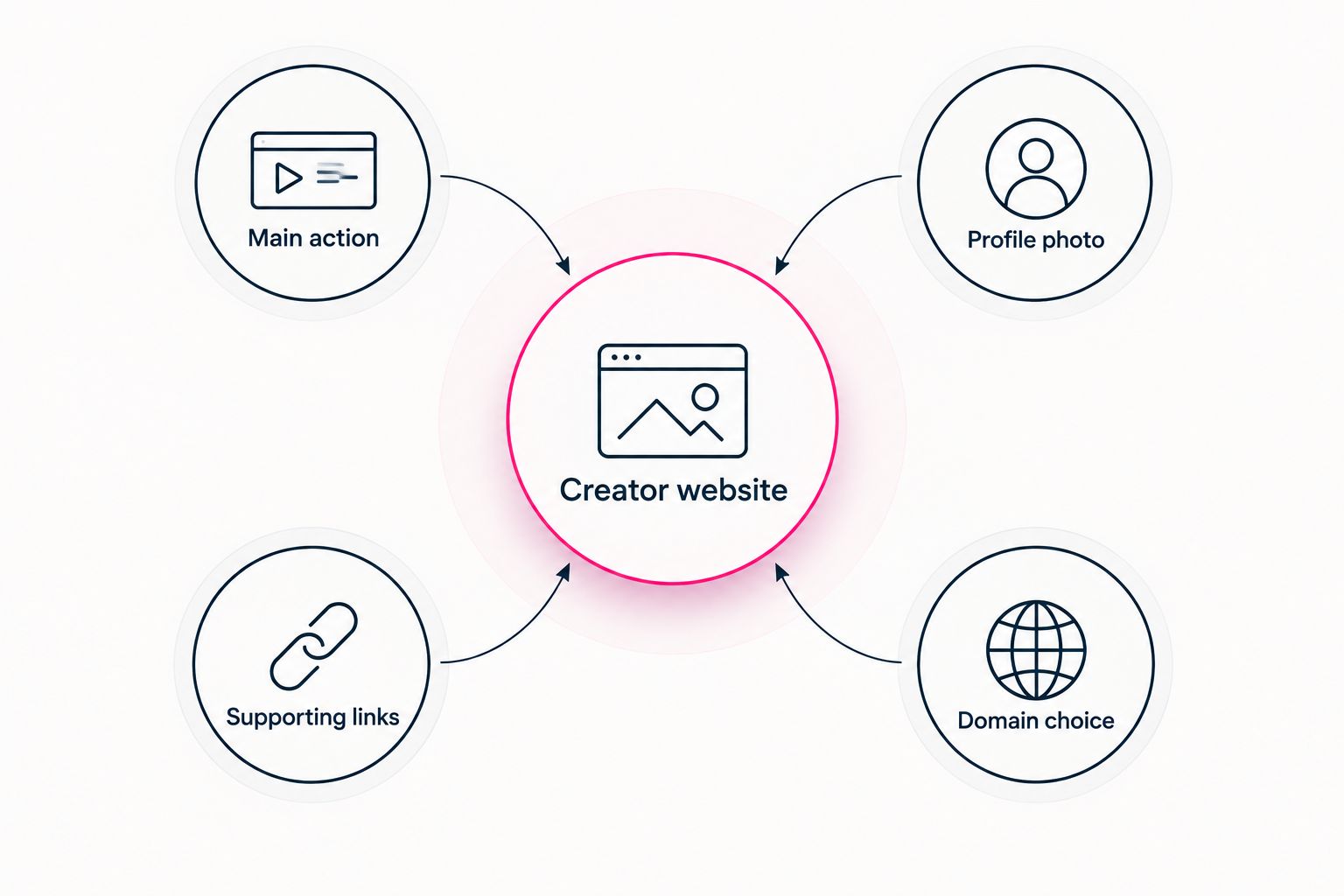
Compare both workflows using the same creator website brief.
Keep the comparison small enough to finish. Start with 3 destination links, write your introduction in 1 sentence, and capture 2 screenshots of each proposed page: one showing the opening view and one showing the rest. These are comparison exercises, not product limits.
You will see whether your identity is clear, whether the main action stands out and whether the workflow feels comfortable. That is more useful than comparing features disconnected from your actual page.
Pricing in 2026: compare the complete purchase scope
Carrd has a free entry option and paid upgrades. Custom-domain publishing belongs to its paid feature set, and registering the domain is a separate consideration. This model suits someone who wants to explore a builder before choosing the publishing features they need.
For the managed creator website, review the selected website and domain purchase scope at checkout. Judge it against the work being handled for you, including registration and publishing, rather than comparing an editor alone with a finished setup process.
Keep the comparison concrete:
- Check which website features your chosen purchase includes.
- Check how the domain is charged and renewed.
- Read the applicable ownership and transfer terms before choosing the domain arrangement.
- Separate optional features from the ones your page actually needs.
There is no universal pricing winner. Carrd offers a self-directed entry path; the managed approach centers the decision on personalization and handled setup. Compare the complete arrangement, not an isolated headline offer.
Final verdict for 2026
Choose AkaMe if you want a website without a building project
Best for: the creator whose subscriptions, products or services already live elsewhere. You want a personalized creator website, a unique domain, photo selection assistance and a preview, with registration and publishing handled for you.
This is the clearer fit when your priority is deciding how to present yourself, not learning the setup process. Keep the brief focused and make the preview earn your approval.
Choose Carrd if you want to build and configure the page
Best for: the hands-on creator who wants direct layout and domain control. You are comfortable making website-building decisions and completing the configuration needed to publish.
Carrd wins when that responsibility is part of the appeal. Choose it because you want the builder workflow, not merely because you feel obliged to do every setup task yourself.
| Dimension | Winner |
|---|---|
| Best for managed creator setup | Managed workflow |
| Setup responsibility handled for you | Managed workflow |
| Direct layout control | Carrd |
| Standout feature | Managed setup for guided publishing; Carrd for hands-on building |
| Custom-domain capability | Tie |
| Linking existing destinations | Tie |
| Pricing model | Workflow-dependent; compare the complete scope |
FAQ
Is AkaMe or Carrd better for a creator website?
AkaMe is better for creators who want a personalized website with domain registration and publishing handled for them. Carrd is better for creators who want direct control over building the page and configuring its domain.
Can I use my own domain with Carrd?
Carrd supports custom-domain publishing through its paid features. You also need a registered domain and must complete the relevant domain configuration.
Which option fits an OnlyFans creator?
A managed creator website fits an OnlyFans creator who wants a branded introduction linking to an existing subscription destination. Carrd fits the same creator when hands-on page building and domain configuration are the preferred workflow.
Does a creator website replace my store or subscription platform?
A linked creator website does not need to replace your store or subscription platform. It can introduce you and direct visitors to the destinations you already use.
How should I compare the cost of these website options?
Compare the complete website and domain arrangement, including the features, registration and renewal terms that apply. Also decide whether you want setup handled for you or prefer to do it yourself.
What should I check in a creator website preview?
Check that visitors can recognize you, understand the main action and identify where each link leads. Review the page on your phone and open every destination before publishing.
Related guides
- Carrd alternatives for creator websites
- Website builder for creators: managed setup or DIY
- Content creator website checklist before you launch
One last thing
Test the page as a visitor, not as its creator. Open the preview on your phone, read only the first screen and ask: would someone unfamiliar with my work know whose page this is and what to do next?
If the answer is unclear, simplify the introduction or link labels before adding more content. Then preview an AkaMe creator website, personalize the presentation and explore a domain that fits your name.
Preview your creator website
Personalize your page and explore a domain that fits your creator identity.