

Best overall: Linktree for a straightforward link hub. Best for DIY design: Carrd for a small creator website. This 2026 guide compares the best free link in bio tools and explains when a personalized website on your own domain is the better fit.
TL;DR
- Linktree is the default pick for creators who want a straightforward link hub.
- Carrd suits creators who want direct control over a small creator website.
- The best free link in bio tools should fit your publishing workflow, not just your first page.
- AkaMe suits creators who want a personalized link-in-bio website with managed custom domain setup.
Why this matters
Your bio gives you one destination to explain who you are and where people should go next. A useful page brings your important links together without making visitors sort through everything you have ever published.
Start with the job, not the template. If you need a simple directory, choose a link hub. If you want a recognizable branded destination with registration and publishing handled for you, explore AkaMe as a separate creator-website option—not as an assumed free plan.
For this 2026 shortlist, the distinction is practical: Linktree organizes destinations, Carrd gives you a website-building canvas, and a managed creator website takes more setup work out of your hands.
What makes the best free link in bio tools?
Judge the page you can actually publish, not every feature shown across a provider's plans.
- Clear destination: Visitors should understand whose page they have reached and what to do next.
- Useful free version: The free offering should cover your immediate task without depending on a feature you have not checked.
- Editing fit: Choose between arranging links, building a page yourself, and having setup handled for you.
- Mobile clarity: Button labels, photos, and text must remain understandable on a phone.
- Address fit: Decide whether a provider-hosted address meets your needs or a custom domain is central to your brand.
- Room for your workflow: Your page should point to the subscription, booking, shop, or business destinations you already use.
Use one main action as your starting point. Add supporting destinations only when they give visitors a distinct, useful next step. A page with a clear purpose is easier to organize than a collection of unrelated buttons.
Best link-in-bio options at a glance
The first two options are the free-tool shortlist. The managed alternative is included separately so you can compare workflows without treating it as a free recommendation.
| Option | Best for | Standout approach | Main trade-off |
|---|---|---|---|
| Linktree | A straightforward link directory | A dedicated link-hub format | A directory needs deliberate prioritization to explain more than a list of destinations |
| Carrd | DIY creator-page design | A general-purpose one-page website builder | You make more layout and page-structure decisions yourself |
| AkaMe | A personalized creator website on a unique domain | Registration, publishing, customization, and a preview before checkout | Its focused role is to connect visitors to your existing destinations |
For a 2026 decision, treat the table as a workflow comparison. Check the current free-plan boundaries inside each service before building around a particular feature; this ranking does not depend on unverified plan limits.
1. Linktree: best free link-in-bio tool for a simple link hub
Linktree is the default recommendation when your immediate need is straightforward: put your important destinations behind one bio link. Its link-hub format suits creators who want visitors to choose from a clearly labeled list rather than explore a larger website.
Start with your main destination, then add the supporting links that answer different needs. For example, a subscription page, a public social profile, and a business-inquiry destination serve different audiences. Labels should explain those differences immediately.
Linktree pros
- Its core link-directory format matches the basic bio-link task.
- It gives you a clear structure for bringing separate destinations together.
- It suits creators whose main need is organizing links rather than designing a website.
Linktree trade-offs
- A list of destinations does not automatically explain your offer; your introduction and labels still do that work.
- Adding more links creates more prioritization decisions rather than solving them.
- A specific branding or domain requirement needs its own feature check before you commit.
Best for: Creators who need a practical directory for their existing platforms.
Choose Linktree when you can describe the whole page as “here are my important links.” Keep the introduction short, make the primary destination obvious, and remove buttons that no longer have a purpose.
Verdict: Choose Linktree for a straightforward link hub.
2. Carrd: best free link-in-bio option for DIY page design
Carrd is a one-page website builder rather than only a list-of-links tool. It suits creators who want to decide how an introduction, images, sections, and destinations fit together on a small website.
That flexibility changes the work. Instead of only choosing which button comes first, you also decide how much context visitors need before they reach a link. A concise introduction and a clear contact section can be useful when your page serves both followers and potential collaborators.
Carrd pros
- A one-page format supports a creator introduction alongside destination links.
- It suits creators who enjoy making layout and presentation decisions.
- It offers a DIY route for shaping a page around your own content priorities.
Carrd trade-offs
- You take responsibility for more design and layout decisions.
- Extra sections create extra editing and mobile-checking work.
- Domain configuration and other specific requirements need a separate check against the applicable plan.
Best for: Creators who prefer direct control over website building and, when applicable, domain configuration.
Choose Carrd because you want to build a page, not because you expect every possible website feature in the free offering. Write your content first. Then build only the sections needed to support it.
The Linktree vs. Carrd guide explores the same decision: a focused link hub or a more hands-on creator page.
Verdict: Choose Carrd when DIY page design is part of the appeal.
Choosing the right fit: a managed creator website
AkaMe is best for creators who want a personalized link-in-bio website on their own domain, with setup handled for them. Its role is to give your existing destinations a recognizable front door rather than replace every platform behind them.
That fits creators whose subscriptions, products, or services already live elsewhere. An OnlyFans creator, for example, can use a separate creator website to introduce their brand and organize relevant destinations without turning that website into a subscription platform.
What the managed approach gives you
- A unique domain: A personalized address gives you a branded destination to share in your bio and elsewhere.
- Registration and publishing handled: You do not have to take on those setup tasks yourself.
- Customization: Your creator website can reflect your chosen presentation rather than remain only an undifferentiated list.
- Photo selection assistance: AI photo ranking helps with selection; you still make the choices.
- A preview before checkout: You can review the proposed website and personalize it before deciding.
Workflow trade-offs to consider
- This is a focused website for connecting visitors to your existing destinations, not a replacement for the services behind those links.
- Managed setup suits a different preference from building and configuring each part yourself.
- You still choose the photos, wording, and destinations that represent your work.
Best for: Creators who want a personalized destination without taking on registration and publishing themselves.
For your 2026 shortlist, put this option beside free tools only if the domain and managed setup solve a real need. Do not compare a simple directory and a managed website as though they are the same task.
Verdict: Preview this approach when a branded creator website is your priority.
How to choose without rebuilding your page twice
Use this short sequence before committing to a builder. It separates what your visitors need from how much setup you want to handle.
Main action
Write the single most important thing a visitor should do. Use a specific action such as viewing your work, reaching your subscription destination, or sending a business inquiry. Avoid a vague label that forces people to guess.
Supporting links
Start your draft with 3 links: your main destination and two supporting destinations with different purposes. This is an editing exercise, not a platform limit. Add another link only when you can explain the job it does.
Page format
Choose a directory if labels explain enough. Choose a fuller creator page if visitors need an introduction, selected photos, or separate context for followers and business contacts. The format should follow the content.
Setup preference
Decide whether you want to arrange links, build the page yourself, or have registration and publishing handled. A custom domain is also a workflow decision: consider who will handle its setup rather than treating the address as a decorative extra.
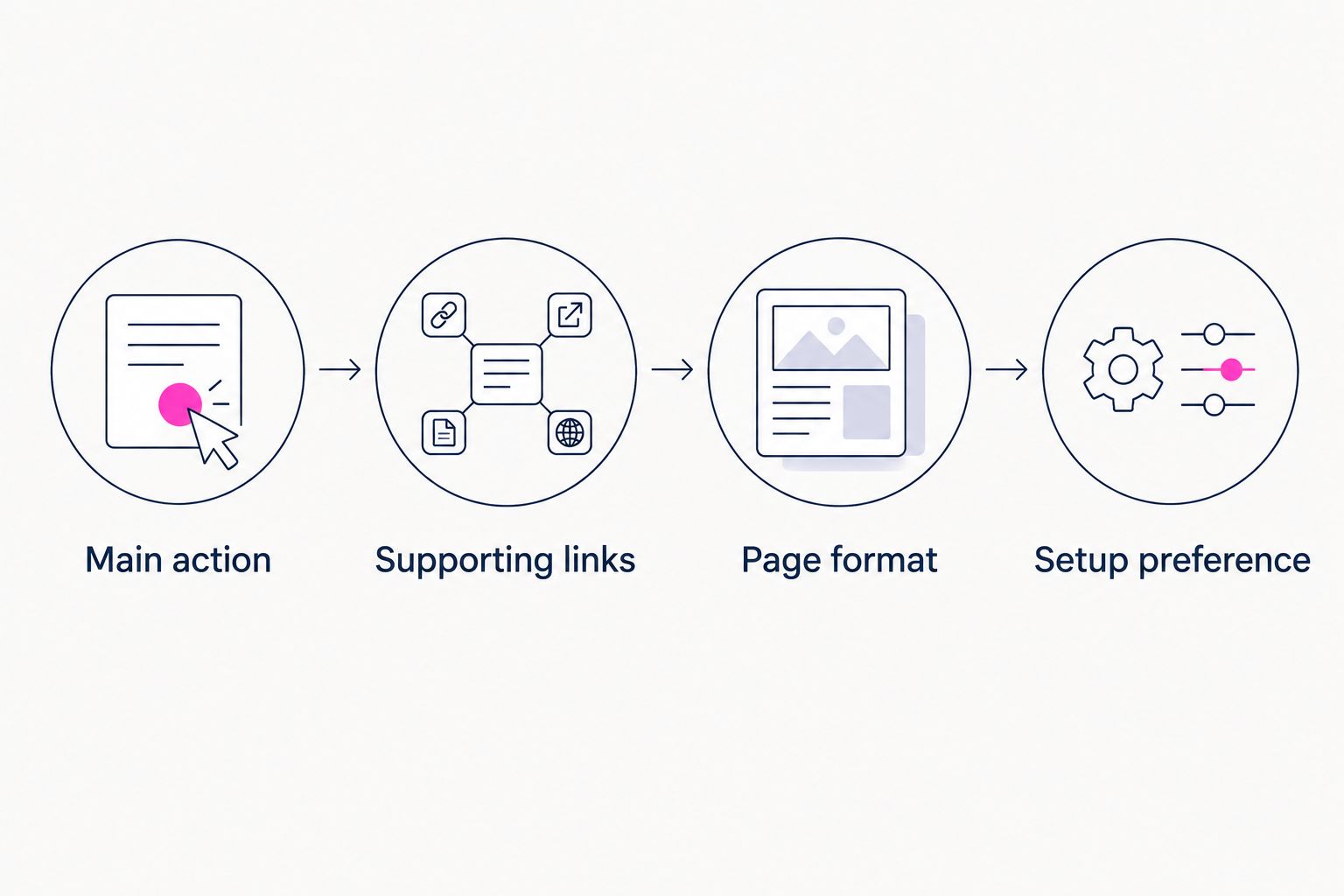
Choose the page's job before choosing how to build it.
For a 2026 launch, write down those decisions before comparing templates. A page that meets your actual brief is a better choice than a feature-rich tool whose workflow you do not want.
Check the page before you put it in your bio
A builder cannot decide whether your labels make sense. Review the finished page as a visitor who knows nothing about your setup.
- Check the first screen: Your name, purpose, and main action should be understandable without hunting.
- Test every destination: Open each link and confirm it reaches the intended page.
- Review on 2 phones: Borrow a second device if needed and check text, images, and buttons on both.
- Separate audience needs: Make business inquiries distinguishable from follower destinations.
- Remove stale links: An old campaign should not compete with your current priority.
Do not assume a custom domain makes a page exempt from platform rules. Your website and its destinations still need to comply with the relevant services' policies; a personal address is a branding choice, not protection from restrictions.
How the recommendations are ranked
The ranking follows the criteria above: clarity, suitability for the basic task, editing workflow, mobile presentation, and address requirements. Linktree is the default for a link directory; Carrd is the alternative for hands-on page building.
The managed creator-website option sits outside the free ranking because it answers a different question. Choose the workflow first, then check the current feature details that matter to your page.
FAQ
What's the best free link in bio tool for a simple page?
Linktree is the default recommendation for a straightforward link directory. It suits creators whose main task is bringing existing destinations together behind one bio link.
Is Carrd better than Linktree for a creator website?
Carrd is the better fit when you want hands-on control over a one-page website. Linktree is the better fit when a focused directory of destinations is enough.
Can I use a custom domain with a free link-in-bio tool?
Custom-domain access depends on the provider and plan. Check that exact requirement before building your page, and distinguish the website feature from domain registration and setup.
Is AkaMe included as a free link-in-bio recommendation?
AkaMe is included as a managed creator-website alternative, not as a free-plan recommendation. It suits creators who want a personalized website on a unique domain, with registration and publishing handled for them.
Which type of bio-link page suits an OnlyFans creator?
Choose a page that clearly introduces your creator brand and organizes your relevant destinations. A focused link hub handles a directory; a personalized creator website adds a branded destination around those links.
How many links should I put on my creator page?
Use only the links that serve distinct visitor needs. Start by identifying one main action, then add supporting destinations without giving every link equal priority.
Related guides
- Custom domain or shared address for your link-in-bio website
- Content creator website checklist before you launch
- How to choose photos for your content creator website
One last thing
A useful preview is a decision tool, not just a picture. Read the page as a new visitor: can you identify the creator, understand the main action, and find the right destination without guessing?
Choose Linktree for a straightforward hub, Carrd for DIY building, or a managed creator website when you want setup handled. If the last option fits, preview an AkaMe creator website, personalize the presentation, and explore a domain that fits your name.
Preview your creator website
Personalize your page, review the preview, and explore a domain that fits your creator brand.