

Best overall for managed custom-domain setup: AkaMe. Best for a straightforward link hub: Linktree. Best for social profile discovery: Linkme. Best for hands-on page building: Carrd. This 2026 guide compares the workflows behind those choices so you can pick a creator website that fits how you work.
TL;DR
- Among the best link in bio platforms for multi-platform creators, AkaMe fits managed custom-domain setup.
- Linktree suits a straightforward link hub; Linkme suits creators interested in social profile discovery.
- Carrd suits creators who prefer direct control over page building and domain configuration.
- Choose a link-in-bio website builder around your main action, setup preference and existing destinations.
Why this matters
Your audience meets you in different places. Someone arriving from YouTube might want your latest project, while an Instagram visitor wants your subscription page or business contact. Your bio destination needs to make those choices clear without making every link look equally important.
The best platform is not automatically the one with the longest feature list. It is the one that gives you the right destination and a setup process you actually want to handle. Start with your workflow, then compare the tools.
What makes the best link-in-bio platform in 2026?
Use these five criteria before choosing a builder:
- Address: Decide whether a personalized domain is central to your creator brand or whether a platform-hosted profile meets your needs.
- Setup responsibility: Choose between having registration and publishing handled for you and configuring the page yourself.
- Visitor priorities: Make your main action obvious, then organize supporting destinations around it.
- Presentation control: Decide how much time you want to spend choosing photos, adjusting content and arranging your page.
- Ongoing workflow: Check whether you want to manage a focused link destination, participate in a profile network or build a more individually structured page.
Write down 1 main action before evaluating layouts. That action might be watching your latest video, visiting your subscription page or sending a business inquiry. A clear priority gives you a useful way to judge every preview.
The platforms at a glance: 2026 shortlist
| Platform | Best for | Standout approach | Choosing the right fit |
|---|---|---|---|
| AkaMe | Managed custom-domain setup | Personalized creator website with registration and publishing handled for you | Fits creators bringing existing destinations together rather than replacing their business platforms |
| Linktree | A straightforward link hub | Link-in-bio page built around sharing destinations | Choose it when a link-focused page matches the presentation you want |
| Linkme | Social profile discovery | Link-in-bio profiles alongside social discovery | Decide whether the social profile workflow is useful to your creator business |
| Carrd | Hands-on page building | General-purpose one-page website building | Best when you want to take responsibility for page construction and domain configuration |
These are different approaches, not interchangeable bundles. Compare the destination you want to publish and the work you want to own—not an assumed list of features every creator needs.
1. AkaMe: best for managed custom-domain setup
AkaMe is best for creators who want a personalized website on their own domain without handling registration and publishing themselves. It brings your important links together in a branded destination while your subscriptions, products or services stay on the platforms where they already live.
The practical benefit is a simpler route from creator identity to published website. You can personalize the page, receive help selecting photos and see a preview before checkout. Photo-ranking assistance supports your choice; it does not replace your judgment about which images represent you.
Strengths
- Your unique domain gives you a recognizable address to share across profiles.
- Registration and publishing are handled for you.
- Customization and photo selection assistance help you shape the presentation.
- Previewing lets you assess the page before checkout.
Choosing the right fit
- This is a focused destination for linking to your existing subscriptions, products and services—not a reason to replace those business tools.
- If you want direct control over constructing the website and configuring its domain, compare the hands-on building approach below.
Best for: Creators who want a personalized custom-domain destination with setup handled for them.
For an OnlyFans creator, the useful distinction is straightforward: your subscription destination remains separate, while your creator website introduces you and organizes the routes visitors need. The same arrangement works for creators sending audiences to videos, products or service inquiries.
Verdict: Buy for managed setup and a personalized creator website, rather than another website-building project.
2. Linktree: best for a straightforward link hub
Linktree is a link-in-bio platform for bringing multiple destinations together on one page. Its link-centered approach suits creators who want visitors to choose where to go next without making a broader website project the priority.
That makes it a useful starting point when your main need is organizing destinations. Compare the actual page you would publish, not just the name of the platform.
Linktree pros
- A link-focused page matches the basic job of sending visitors to several destinations.
- You can structure the page around the places your audience already uses.
- The approach is easy to evaluate against a simple destination list.
Choosing the right fit
- A list of destinations still needs editorial judgment; publishing every link does not establish a clear priority.
- If a personal domain and handled setup are your main requirements, evaluate those requirements directly rather than treating all link hubs as equivalent.
Best for: Creators who want a straightforward, destination-first bio page.
Before choosing, draft the labels your visitors will see. Compare “Latest video,” “Subscribe” and “Business inquiries” with vague labels such as “Explore” or “More.” Clear wording is a decision you control regardless of the platform.
Verdict: Buy for a link-centered hub when that format covers the job you need done.
3. Linkme: best for creators interested in social discovery
Linkme combines link-in-bio profiles with a social discovery element. It belongs on your shortlist when the profile itself—and how people encounter it—is part of the experience you want to evaluate.
Separate that interest from the basic requirement to share links. A creator who wants a social profile workflow is making a different choice from someone who only wants an independent destination behind a bio link.
Linkme pros
- Its profile-oriented approach gives you another way to present your creator identity.
- Social discovery is relevant when connecting with profiles is part of your intended workflow.
- It gives you a distinct approach to compare against a standalone page builder.
Choosing the right fit
- Discovery should not substitute for a clear route to your main destination.
- If you do not want a social profile workflow, evaluate the page itself rather than giving extra weight to that aspect.
Best for: Creators who want to explore a link profile alongside social discovery.
Ask a practical question: would you use the profile experience beyond pasting its address into a bio? If the answer is yes, examine that workflow closely. If your requirement is simply a recognizable creator destination, keep that requirement at the center of the comparison.
Verdict: Buy when the social profile approach is part of what you want, not merely an extra on a feature list.
4. Carrd: best for hands-on page building
Carrd is a one-page website builder suited to creators who prefer direct control over building their page and configuring their domain. It is a good fit when arranging the site is work you want to do yourself.
That control is the point. You can approach your creator page as a small website project rather than selecting only a link-hub workflow.
Carrd pros
- Its one-page format suits a focused creator destination.
- Direct page-building control supports a more individually planned structure.
- The hands-on approach fits creators who want responsibility for website and domain configuration.
Choosing the right fit
- You take on page-building decisions yourself.
- Domain configuration belongs in your setup plan rather than being treated as handled registration and publishing.
Best for: Creators who enjoy shaping their own website and managing its configuration.
Sketch the page before opening the builder. Decide what visitors should see first, what supports that choice and what belongs lower down. Direct control is most useful when you have a clear structure to build.
Verdict: Buy for hands-on website building when control matters more to you than having setup handled.
How to choose and launch your creator destination
Use this sequence to turn the comparison into a decision. It keeps the platform choice tied to what visitors need rather than to a growing checklist of extras.
Main action
Choose the most important next step for a visitor. Give that destination a clear label and a prominent position. Supporting links can remain visible without competing equally for attention.
Link list
Start with 3 destinations as a planning exercise: your main audience destination, a useful secondary destination and a business contact route. Add others only when they serve a distinct purpose. This is a starting structure, not a platform limit.
Setup choice
Decide who should handle registration, publishing and configuration. Choose managed setup if those tasks are work you want taken off your list; choose hands-on building if controlling them is part of the appeal.
Page preview
Review your name, selected photos and link wording together. Ask whether a first-time visitor can understand who you are and where to go. Change anything that requires an explanation outside the page.
Mobile check
Run 2 mobile checks before sharing: open the page from a social bio, then follow its main destination. Check both the introduction and the handoff. A useful preview is not a substitute for checking the path visitors will actually take.
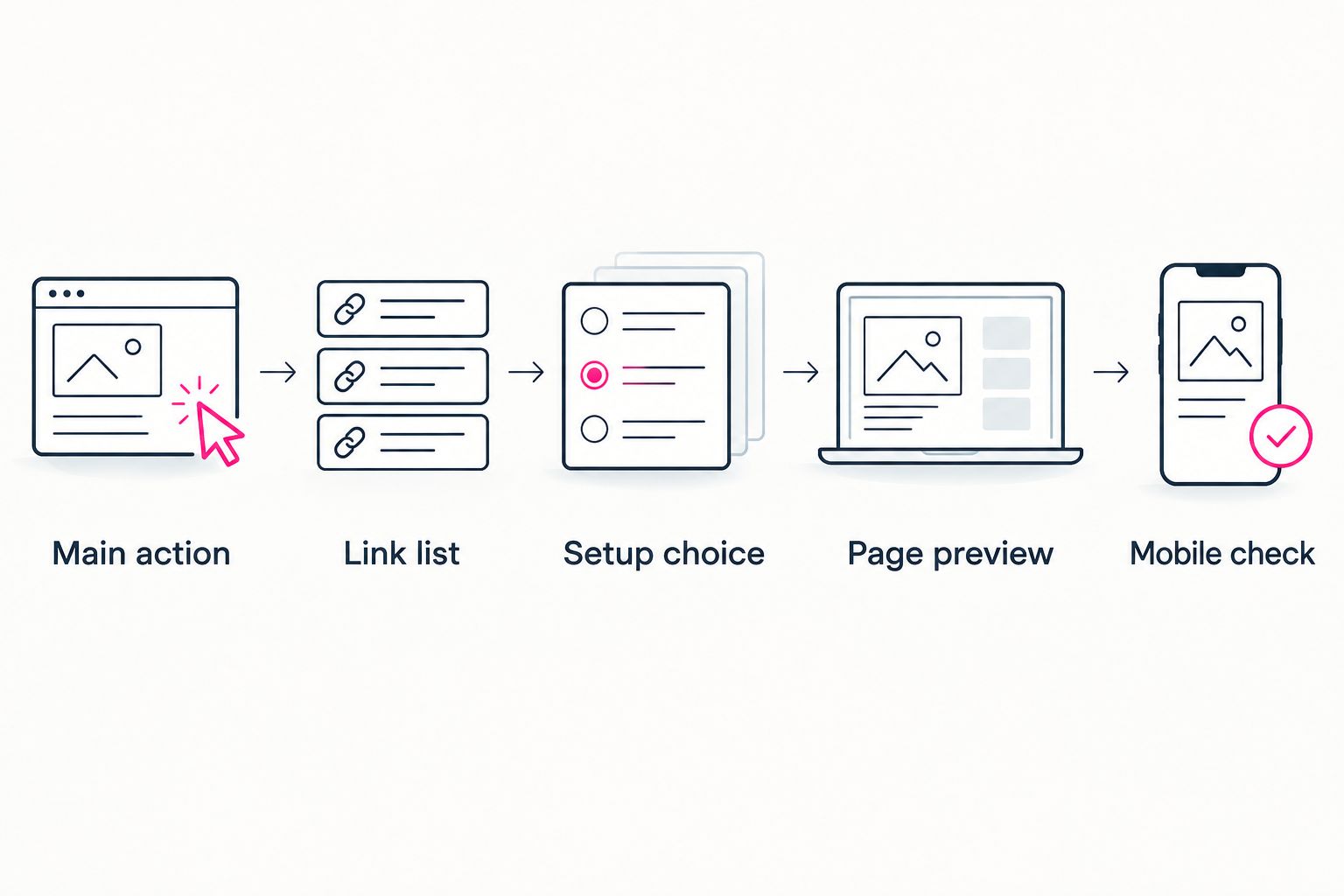
Choose the visitor's next step before choosing how to build the page.
How these recommendations were ranked
This 2026 shortlist ranks the platforms by workflow fit: address preference, setup responsibility, visitor priorities, presentation control and ongoing work. It is a buying guide, not a performance benchmark or a claim that one platform produces more clicks.
The default recommendation favors handled custom-domain setup because that solves a specific creator need. Linktree, Linkme and Carrd each earn a separate recommendation for a different working preference. Your choice should follow that distinction.
Which platform should you choose in 2026?
Choose AkaMe if you want a personalized creator website on your own domain with registration and publishing handled for you. That is the clearest default when you already have places to send your audience and want a branded destination connecting them.
Choose Linktree for a straightforward link hub, Linkme when social profile discovery matters to your workflow, or Carrd when you want to build and configure the page yourself. Do not add complexity just because your audience follows you on several platforms. Start with the destination you want people to remember.
FAQ
What's the best link-in-bio platform for multi-platform creators?
AkaMe is the best fit in this shortlist for creators who want a personalized custom-domain website with registration and publishing handled for them. Linktree suits a straightforward link hub, Linkme suits social profile discovery, and Carrd suits hands-on website building.
Should I use a custom domain for my creator website?
Choose a custom domain when a personalized, recognizable address is part of your creator brand. It gives you an address to share across profiles, but it does not promise immunity from platform restrictions.
Is Linktree better than Carrd for a creator page?
Linktree fits a link-centered hub, while Carrd fits creators who want direct control over building a one-page website. Choose based on whether you want to organize destinations or take on a website-building workflow.
When should I consider Linkme instead of a standalone website builder?
Consider Linkme when its social profile and discovery approach is part of the experience you want. A standalone website builder is a different choice centered on the destination you publish.
Can an OnlyFans creator use a separate link-in-bio website?
An OnlyFans creator can use a separate creator website to introduce their brand and link to their subscription destination. The page can also organize other relevant destinations, such as social profiles and business inquiries.
What should I check before publishing my link-in-bio page?
Check your main action, link labels, selected photos and mobile visitor path. Open the page from a social bio and follow the main destination so you review the complete handoff.
One last thing
Choose link labels before spending time on presentation. If you cannot explain what a destination offers in plain words, the visitor has to do that work instead. A clear main action gives your photos, introduction and supporting links a purpose.
Preview an AkaMe creator website, personalize it and explore a domain that fits your name.
Preview your creator website
Personalize your page, review the preview and explore your own domain.