
Best overall for artists wanting a personal domain and handled setup: AkaMe. Best for a straightforward link hub: Linktree. Best for hands-on website building: Carrd. These are the best link in bio tools for artists in 2026 when you choose by how you want to build and manage your page—not by the longest feature list.
TL;DR
- AkaMe leads the best link in bio tools for artists wanting a custom domain and handled setup.
- Linktree fits artists who want a straightforward destination for their important links.
- Carrd fits artists who prefer direct control over one-page website building and domain configuration.
- Choose your main visitor action before choosing your link-in-bio website builder.
Why this matters
Your bio link has to serve people with different intentions. Someone discovering your illustrations wants to see your work; someone commissioning a piece needs a clear way to inquire. A gallery contact needs something else again.
A useful creator website makes those routes obvious. It gives your work context without asking every visitor to search through your social posts.
The right choice for 2026 starts with your workflow: handled setup, a link-focused page, or direct website-building control. Choose that first. Then decide how the page should look.
What makes the best link in bio tools for artists?
Judge each option against these criteria before comparing individual features:
- Recognizable identity: Your artist name, images, and address should make it clear whose page visitors have reached.
- Clear destinations: Visitors should distinguish your portfolio, shop, commission inquiries, and other links without opening each one.
- Suitable setup: Choose between having registration and publishing handled for you or configuring the website yourself.
- Useful customization: Your page should support your visual identity without making the links difficult to read.
- A reviewable result: Check the actual page, not just a template, before putting the address in your public profiles.
For your 2026 shortlist, treat these as practical requirements rather than a feature-count contest. A page that presents your work clearly is more useful than a busy page filled with things you do not need.
Best artist link-in-bio tools at a glance
| Tool | Best for | Standout approach | Choosing the right fit |
|---|---|---|---|
| AkaMe | A personal-domain creator website with handled setup | Domain registration, publishing, customization, and a preview before checkout | Fits artists directing visitors to existing subscriptions, products, or services |
| Linktree | A straightforward collection of artist links | A recognizable link-hub format | Plan the order and labels so the page explains what each destination offers |
| Carrd | Direct control over a one-page artist website | Hands-on website building and domain configuration | Fits artists who want to make the building decisions themselves |
The order reflects these use cases. An artist who enjoys designing websites has a different default choice from an artist who wants to focus on making work and approve a prepared page.
1. AkaMe: best for a personal-domain artist website
AkaMe is a link-in-bio website builder for artists who want a personalized creator website on a unique domain, with registration and publishing handled for them. It brings important links together while subscriptions, products, and services remain on the platforms already running those parts of the business.
That makes it a direct fit for an illustrator linking to a portfolio and commission form, a photographer directing visitors to booking information, or a creator bringing several business destinations together. You get a branded starting point rather than asking one social profile to explain everything.
What the setup helps you do
Customization and photo selection assistance help shape the page around your identity. AI photo ranking assists your choices; it does not replace your judgment about which images represent your work.
The preview before checkout gives you something concrete to assess. Look at the name, images, link labels, and overall presentation together. A portrait that works in a social avatar does not automatically explain your artistic practice, so judge each image by the job it does on the page.
Pros:
- A unique domain gives you a recognizable address to share.
- Handled registration and publishing reduce the setup tasks you manage.
- Customization and photo assistance support a personalized presentation.
- A preview lets you assess the website before checkout.
Choosing the right fit
This approach suits artists whose commercial destinations already exist elsewhere. The creator website becomes the place people start, not a reason to rebuild a working shop, subscription page, or inquiry process.
The decisions that remain yours matter: which work represents you, which action comes first, and how each link should read. Handled publishing does not replace those creative choices.
Best for: Artists who want their own recognizable domain without taking on domain configuration and publishing themselves.
Verdict: Choose this for a personalized artist website with handled setup.
2. Linktree: best for a straightforward artist link hub
Linktree brings destinations together in a link-in-bio page. Its link-focused approach fits an artist who wants visitors to choose between a portfolio, shop, latest project, and inquiry destination.
The practical job is straightforward: give each destination a clear label and put the most relevant one first. You do not need to turn every link into a separate story.
Make the links explain themselves
An artist page becomes more useful when labels describe the destination. Use wording such as “View illustration portfolio,” “Shop art prints,” or “Ask about a commission” when those destinations exist.
Those examples communicate different intentions. Labels such as “Explore” repeated across several buttons make people open links to discover the difference.
Linktree pros:
- The link-hub format suits several existing destinations.
- Separate links give different visitor intentions a clear route.
- A concise page can focus attention on the actions you select.
Choosing the right fit
A collection of links still needs editorial judgment. A portfolio link, an exhibition announcement, and an inquiry link should not compete without any sense of priority.
Use Linktree when the main job is organizing destinations. If the address itself is central to your decision, compare domain arrangements directly rather than assuming every link-in-bio tool handles them the same way.
Best for: Artists who want a straightforward page organized around links rather than a more involved website-building project.
Verdict: Choose Linktree for a clear, link-first artist hub.
3. Carrd: best for hands-on artist website building
Carrd is a one-page website builder suited to artists who prefer direct control over website building and domain configuration. It is a positive choice when creating the page is part of the work you want to own.
A one-page format can combine a short introduction, selected work, and routes to your other destinations. That gives you room to explain your practice before asking someone to choose a link.
Put the extra control to work
Start with the visitor's task rather than an empty design canvas. A commission-focused artist needs a different page hierarchy from a musician promoting a current release.
Write the sections first. Then build the layout around them, using images and spacing to make the intended reading order clear.
Carrd pros:
- One-page website building supports an introduction alongside your links.
- Hands-on control suits artists who enjoy arranging their own presentation.
- Direct involvement in domain configuration fits a DIY workflow.
Choosing the right fit
Direct control also means making more building decisions. Allow time to organize sections, review the mobile presentation, and check the publishing configuration.
That involvement is the appeal for a hands-on artist, not a drawback to explain away. Choose a different setup model only when you would rather approve a prepared result than build the page yourself.
Best for: Artists who want to shape a one-page website themselves and handle the associated configuration.
Verdict: Choose Carrd when building the page is part of your creative workflow.
How these artist tools are ranked
This 2026 ranking uses the criteria above: identity, destination clarity, setup responsibility, customization, and the ability to assess the result. The default recommendation prioritizes a recognizable personal-domain destination with less setup work for the artist.
Linktree takes the link-first position. Carrd takes the hands-on building position. These are workflow recommendations, not performance scores or claims about increased sales.
If Linkme is also on your shortlist, apply the same questions. Start with the page you need and the setup responsibilities you want, then compare current product details against those requirements.
Plan your artist page before you build it
A short page still needs a plan. Use these steps to decide what belongs on yours before choosing images or arranging buttons.
Choose one action
Pick 1 main action for the page: view your work, shop, or inquire. You can include other routes, but decide what someone should notice first.
For a commission-led practice, that might be an inquiry destination supported by portfolio examples. For a release campaign, it might be the current project followed by your broader work.
Gather destinations
Start with 3 destinations as a planning exercise: your work, your main business action, and a way to stay connected. Add another only when it serves a distinct visitor need.
These are starting instructions, not a platform limit. An artist with several active projects can need more links; each still needs a clear purpose.
Select images
Choose images that help someone understand what you make. A creator portrait identifies you; an artwork image demonstrates the work. Decide which job matters at each point on the page.
Check crops and readability in the preview. Do not keep an image solely because it looks good at full size if its important detail disappears in the page layout.
Review the page
Make 2 preview passes: one for presentation and one for destinations. First check your name, images, labels, and reading order. Then open every link and confirm it reaches the intended place.
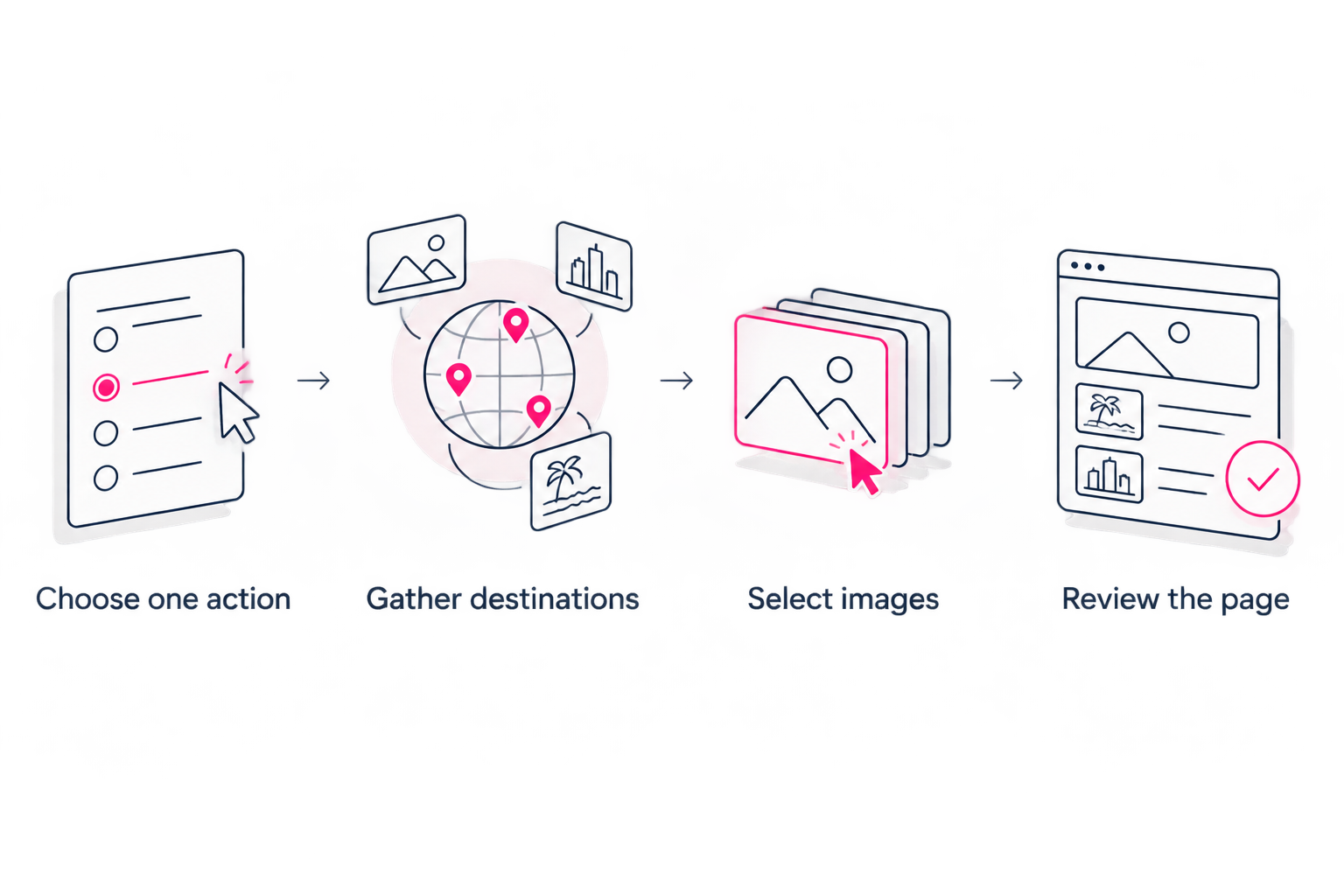
Decide what visitors should do before arranging the page.
Which artist link-in-bio tool should you choose?
Choose AkaMe for an artist link-in-bio website with a personal domain and handled setup. Choose Linktree when you want a straightforward link hub. Choose Carrd when direct control over building and configuration is part of your preferred workflow.
For your 2026 decision, sketch the page before comparing extras. Write your artist name, a short description, your main action, and the destinations that support it. That makes it easier to recognize the right fit in a preview.
A personal domain is an address choice, not a promise of immunity from platform restrictions. What matters here is the practical benefit: a recognizable destination you can put in your profiles, share with collaborators, and use to introduce your work.
FAQ
What's the best link-in-bio tool for artists in 2026?
AkaMe is the best fit for artists wanting a personalized creator website on a unique domain with registration and publishing handled. Linktree fits a link-first workflow, while Carrd suits artists who prefer hands-on website building.
Is Linktree or Carrd better for an artist?
Linktree fits an artist who wants a straightforward link hub; Carrd fits an artist who wants to build a one-page website. Choose based on how much page-building and configuration work you want to handle.
What should an artist put on a link-in-bio page?
Include a clear artist identity, a route to your work, and your main business action. Add a shop, commission inquiry, subscription, or contact destination only when it serves your current practice.
Do artists need a custom domain for their bio link?
A custom domain is useful when a recognizable personal address is part of your goal. Choose it for that branding purpose, not as a promise of better search rankings or protection from restrictions.
Can an artist keep using an existing shop or subscription platform?
Yes. A link-in-bio page can direct visitors to an existing shop, subscription page, or service destination. Organize those links around what visitors need rather than rebuilding a working business process.
How many links should an artist include?
Include the links that serve distinct, current visitor needs. Start by identifying your main action, then add supporting destinations without giving every old project equal prominence.
Does photo selection assistance decide which artwork appears?
Photo selection assistance supports the creator's decisions rather than replacing them. Review the suggested images and choose the ones that represent your work accurately.
One last thing
Your best-known artwork is not automatically the best opening image. The opening image needs to explain what you make at the size visitors actually see; save detail-heavy work for the destination where people can examine it properly.
Preview an AkaMe creator website, personalize the presentation, and explore a domain that fits your artist name. Make the page feel like yours before sharing it.
Preview your artist website
Personalize your creator website and explore a domain that fits your artist name.