

Best overall for a managed author website: Akame. Best for a straightforward list of reader links: Linktree. Best for hands-on page building: Carrd. These are the best link in bio tools for authors in 2026 when you choose around your publishing workflow, not a long feature checklist.
TL;DR
- Akame leads the best link in bio tools for authors needing a personalized creator website and managed custom domain setup.
- Linktree suits authors who want a straightforward hub for book, newsletter, and event links.
- Carrd suits authors who prefer direct control over page building and domain configuration.
- Choose your main reader action before choosing your link-in-bio website builder.
Why this matters for authors
A reader coming from your social profile needs a clear next step. That might mean buying your latest book, joining your newsletter, finding the first title in a series, or booking an author appearance.
Those actions belong on different destination pages. Your bio page brings them together without making readers search through posts for the right link.
For your 2026 author setup, separate the front door from the systems behind it. A branded landing page can introduce your work while your retailer, newsletter service, and booking process continue doing their own jobs.
What makes the best link in bio tools for authors?
Judge an author bio page against these criteria before comparing builders:
- Reader direction: Your most important action should be easy to identify, whether that is a new release or a newsletter signup.
- Author identity: Your name, photograph, introduction, and destination labels should make it clear whose page readers have reached.
- Domain approach: Decide whether you want a personalized domain, a platform-hosted profile address, or direct responsibility for domain configuration.
- Setup responsibility: Choose between managed publishing and building the page yourself. These are different workflows, not different levels of professionalism.
- Destination fit: Your page should point readers toward the retailer, subscription, event, or inquiry pages you actually use.
- Maintenance: Pick a structure you can keep accurate between launches. An outdated event button is not useful just because the page looks finished.
Best author bio tools at a glance
| Tool | Best for | Standout approach | Choosing the right fit |
|---|---|---|---|
| Akame | Authors wanting a managed, personalized website | Custom domain, registration and publishing assistance, customization, and preview before checkout | Fits authors linking to books, subscriptions, products, or services hosted elsewhere |
| Linktree | Authors wanting a straightforward link hub | A centralized page of links for readers | Choose a link-list approach when you do not need the page to serve as a fuller author introduction |
| Carrd | Authors wanting direct control over page building | A flexible one-page website-building approach | You take responsibility for building the page and configuring the domain |
The useful distinction in 2026 is the work you want to do yourself. Start with the publishing workflow, then evaluate the page you want readers to see.
1. Akame: best link in bio tool for a managed author website
Akame is best for authors who want a personalized creator website on a unique domain with registration and publishing handled for them. It brings important links together while giving your author name a recognizable destination.
You can personalize the website, get assistance selecting photos, and preview the result before checkout. Photo ranking assists your selection; you still decide which images represent you and your work.
For an author, the practical use is direct: introduce yourself, highlight the next reader action, and send visitors to the places where your books or services already live. You do not need to rebuild a retailer listing or newsletter system just to give those destinations a clearer front door.
Advantages for authors
- Managed setup: Registration and publishing are handled for you, reducing the domain-configuration work you need to take on.
- Personalized identity: Your own domain and customization put your author name at the center of the destination.
- A useful preview: Review how your introduction, photos, and links work together before checkout.
- Photo selection assistance: Get help choosing images without handing over the final creative decision.
Choosing the right fit
- This approach fits authors whose books, subscriptions, products, or services already have destination pages. Those destinations remain part of your reader journey.
- A managed creator website and a self-directed site-building project serve different preferences. Choose Carrd if personally constructing the page and configuring the domain is part of the appeal.
Best for: Authors who want a branded website without taking on registration and publishing themselves.
Verdict: Buy if managed setup and a personalized domain are your priorities. Start with the preview.
2. Linktree: best link in bio tool for a straightforward author link hub
Linktree brings multiple destinations together on a profile page. For authors, that means one place to direct readers toward books, newsletter signup pages, interviews, and event information.
Its central appeal here is the link-hub format. If your author introduction already lives elsewhere and you mainly need to distribute readers among existing pages, that format matches the job.
Linktree pros
- Direct destination sharing: Put your book, mailing-list, and appearance links in one hub.
- Clear organizational role: Use the page as a directory rather than treating it as an entire author website.
- Useful alongside existing pages: Keep detailed book descriptions and signup processes at their original destinations.
Choosing the right fit
- A directory is only as helpful as its labels. Several retailer names without book titles can leave readers unsure where each button leads.
- A link hub still needs editing when your priorities change. A past launch or expired event should not remain your leading action.
These are practical responsibilities, not reasons to reject the format. Linktree is a sensible choice when a centralized list is exactly what your readers need.
Best for: Authors who already have their main content elsewhere and want a straightforward reader directory.
Verdict: Buy for the link-hub workflow; keep the link order deliberate.
3. Carrd: best link in bio tool for hands-on author page building
Carrd is a one-page website builder suited to authors who want direct control over their page. You can approach the project as a small author website rather than only a list of destinations.
That suits writers who enjoy arranging a page around an introduction, a featured book, and supporting links. The important difference is responsibility: you build the page and handle the domain configuration instead of choosing managed setup.
Carrd pros
- Page-building control: Shape the page around your author presentation rather than starting with links alone.
- Space for context: Give readers an introduction before asking them to choose a destination.
- A self-directed workflow: Make the construction and configuration decisions yourself.
Choosing the right fit
- Direct control comes with decisions about structure, presentation, and configuration. Choose it because you want that responsibility.
- Building the page is separate from maintaining it. You still need a routine for checking launch links, dates, and reader destinations.
Carrd fits an author who has a clear page concept and wants to execute it personally. It is a positive choice for hands-on building, not a substitute for deciding what the page should accomplish.
Best for: Authors who prefer to build and configure their own one-page website.
Verdict: Buy if direct building control matters more than managed setup.
How these author tools are ranked
This 2026 shortlist prioritizes reader direction, author identity, domain approach, setup responsibility, destination fit, and maintenance. The order favors a managed author website first, a straightforward directory second, and self-directed page building third.
The use cases matter more than the positions. A novelist linking to retailer pages needs a different front door from a speaker whose main action is an appearance inquiry.
Build an author bio page readers can use
Before you personalize a template, write down what a visitor should do next. Use this sequence to turn the comparison into a working page.
Choose destinations
Start with 3 destination links as a practical first draft: your featured book, your newsletter signup, and your author or inquiry page. Replace any destination that does not fit your actual work.
Link to the specific page that completes the task. A button promising a sample chapter should not leave readers searching a general homepage for it.
Set priorities
Give the page 1 primary action. During a release, that might be finding the new book; between releases, it might be joining your mailing list.
Write labels that explain the destination. “Start the mystery series” gives a new reader more context than “Books,” while “Invite me to speak” separates professional inquiries from reader updates.
Add context
Use a short introduction to establish your name and the kind of writing readers will find. Add a relevant photo and keep supporting text focused on helping visitors choose.
An author photo establishes identity; a book image introduces a specific title. Pick the image according to the page's main job rather than filling every available space.
Preview and test
Run 2 mobile checks before publishing: inspect the page itself, then open every destination from it. Confirm that labels remain readable and each link reaches the page you intended.
For a 2026 launch, check any release date or event reference against the actual destination. The preview is where you catch a mismatched title, unclear introduction, or outdated action before readers see it.
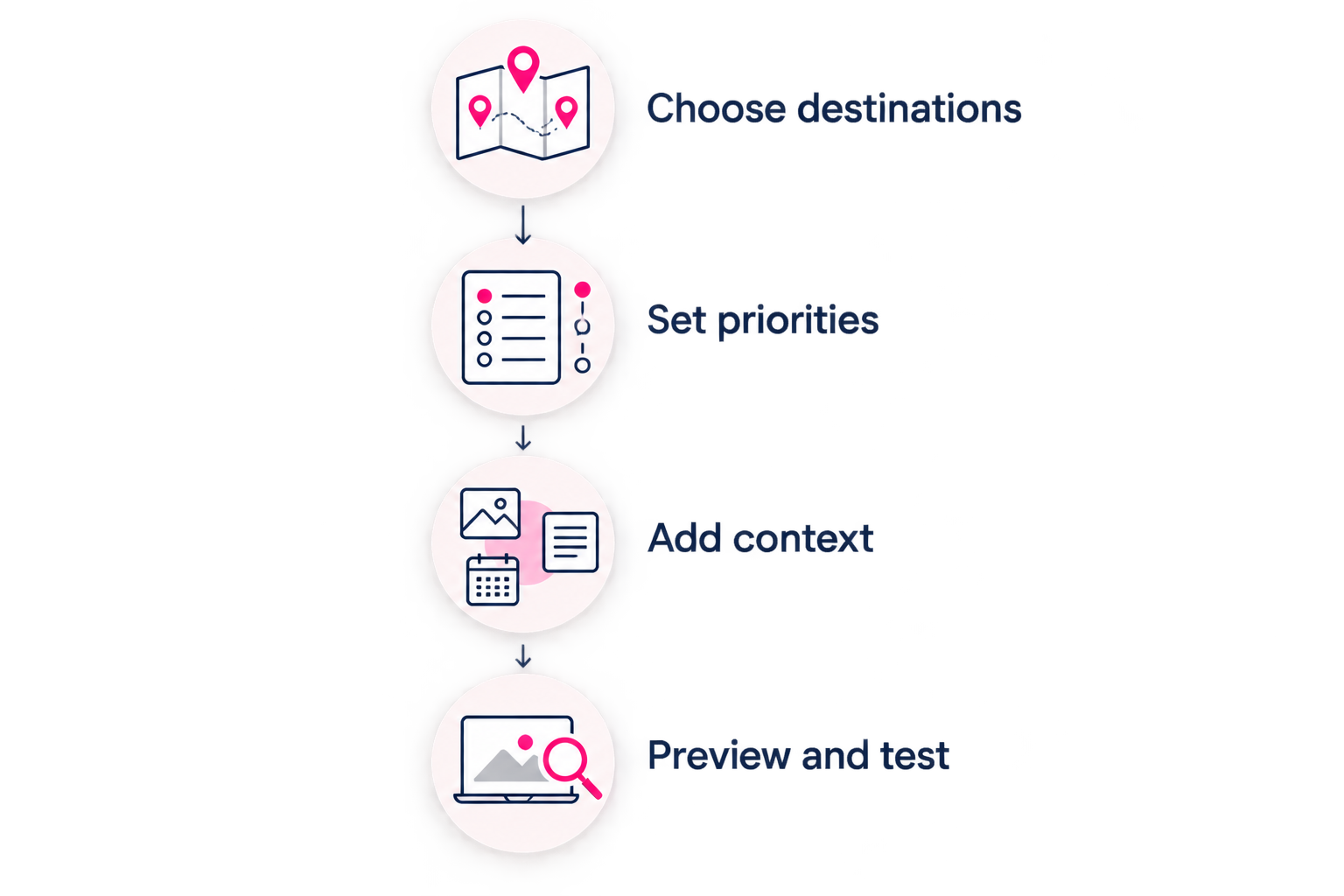
Choose the reader action before arranging the page around it.
A finished page does not need every possible destination. Keep the links that help readers act now, and remove buttons that no longer have a clear purpose.
Which author bio tool should you choose?
Choose Akame if you want a personalized author website with a unique domain and managed registration and publishing. It is the default recommendation for authors who want to bring existing book, newsletter, and service destinations together without managing the setup themselves.
Choose Linktree when your main need is a straightforward directory. Choose Carrd when you want to build the page and configure the domain personally.
For 2026, make the decision around responsibility: what should the service handle, and what do you actually want to manage? Then judge the preview or draft against your reader's next action.
FAQ
What's the best link in bio tool for authors who want their own domain?
Akame is the strongest fit on this shortlist for authors who want a personalized domain with registration and publishing handled for them. It suits writers whose books, subscriptions, or services already live on other platforms.
Is Linktree or Carrd better for an author?
Linktree fits a straightforward directory of reader links; Carrd fits authors who want to build a one-page website themselves. Choose according to whether you want a link hub or direct page-building control.
Do I need a separate author website if I already have retailer pages?
A separate author landing page gives readers a central introduction and a route to your retailer pages. You do not need to duplicate the retailer's checkout or book listing to make that page useful.
What should an author put on a link in bio page?
Include your author name, a short introduction, and the destinations that support your current reader goal. A featured book, newsletter signup, and inquiry page are useful starting points when they fit your work.
Should my book launch or newsletter come first?
Put the action that matches your current goal first. Feature the book during a launch, or lead with newsletter signup when building an ongoing reader relationship is your priority.
Can I use a pen name on my author bio page?
Use the author name your readers recognize, including a pen name. Keep that name consistent with your book listings and social profiles so visitors can identify you.
How do I choose an author domain name?
Start with a domain that clearly represents the author name you publish under. Compare suitable options and review the registration details before choosing, rather than assuming a particular name can be registered.
One last thing
Read every button as if you have never heard of the author. “Book one,” “My latest,” and “Click here” depend on context a new visitor does not have. Name the book, describe the reading experience, or state the action.
Preview an Akame creator website, personalize it around your writing, and explore a domain that fits your author name. Make the next step obvious before you send readers there.
Preview your author website
Personalize your creator website, review the preview, and explore a domain for your author name.