

Best overall for a personalized creator website: AkaMe. Best for a straightforward link hub: Linktree. Best for a shareable creator profile: Linkme. Best for hands-on page building: Carrd. These are the best link in bio tools for beginner creators in 2026, separated by the work you want your website builder to handle.
TL;DR
- AkaMe leads the best link in bio tools for beginner creators who want a custom domain and handled setup.
- Linktree suits a straightforward link hub; Linkme suits a shareable creator profile.
- Carrd suits creators who prefer direct control over page building and domain configuration.
- Choose your main visitor action before choosing your link-in-bio website builder.
Why your first creator website matters
Your bio link has a specific job: help someone who found your content take the next step. That step might be watching your latest video, joining your subscription platform, browsing your products or sending a business inquiry.
A beginner does not need every possible website feature. You need a recognizable destination, clear links and a setup process you can finish. In 2026, start by deciding whether you want a simple profile, a personalized website with handled setup or a page you build yourself.
For OnlyFans creators, the same principle applies. Your website can introduce your creator brand and point visitors toward your subscription destination without turning the page into a complicated project.
What makes the best link in bio tools for beginners?
Judge the tools against these criteria before comparing names:
- Setup responsibility: Decide whether you want registration and publishing handled or prefer configuring the page yourself.
- Address choice: A custom domain puts your chosen name in the website address. Consider that separately from the page design.
- Clear presentation: Visitors should understand who you are and which link matters most without studying the page.
- Useful customization: Change the elements that express your identity, rather than decorating every available space.
- Workflow fit: Choose a destination that connects to your actual work, whether that means videos, subscriptions, products or inquiries.
- Review before sharing: Check the finished experience, including the destination behind each button, before adding it to your bio.
Choose the tool that removes work you do not want to do while preserving control over the choices you care about. A longer feature list is not a substitute for that fit.
Beginner link-in-bio tools at a glance in 2026
| Tool | Best for | Standout approach | Choosing the right fit |
|---|---|---|---|
| AkaMe | A personalized creator website with handled setup | Custom domain, registration and publishing handled for the creator, plus a preview | Fits creators bringing together destinations that already exist elsewhere |
| Linktree | A straightforward collection of links | A dedicated link-hub format | Choose this when a link-first page matches your goal |
| Linkme | A shareable creator profile | A profile-centered place to collect links | Choose this when sharing your profile is the main task |
| Carrd | Hands-on website building | Direct control over a one-page website and domain configuration | Suits creators who want to make the building decisions themselves |
The ranking starts with a handled creator-website workflow, then moves toward link profiles and direct website building. None of those approaches is universally right. The useful distinction is who handles the setup and what visitors need to do afterward.
1. AkaMe: best for a creator website with handled setup
Best for: beginner creators who want a personalized website on their own domain without handling registration and publishing themselves.
The service combines a customizable creator website with a unique domain. Registration and publishing are handled for you, and you can preview the website before checkout. That makes the decision concrete: you evaluate your page, not just a description of a builder.
Photo selection assistance helps you choose images for the website. The final choices remain yours. Use the assistance to narrow your options, then select photos that match how you want people to recognize you.
AkaMe pros:
- A personal domain gives your creator website a recognizable address.
- Handled registration and publishing take those setup tasks off your list.
- Customization lets you shape the page around your creator identity.
- A preview lets you evaluate the presentation before checkout.
Choosing the right fit
AkaMe cons and trade-offs:
- This workflow is designed around connecting visitors to subscriptions, products or services already hosted elsewhere; it is not a reason to relocate those businesses.
- Handled setup suits a different preference from building a page and configuring its domain yourself. Choose based on how much of that work you want to own.
For a beginner creator, the practical benefit is focus. You can spend your attention on the name, photos, message and links rather than treating website setup as a separate technical project.
Verdict: Buy if a personal domain and handled publishing match your preferred workflow.
2. Linktree: best for a straightforward link hub
Best for: beginner creators who want a link-first page pointing to several destinations.
Linktree brings links together on a single page. That format makes sense when your immediate task is simple: give visitors a clear route to the places where your content and business already live.
Start with your main destination rather than filling the page with every account you have. A link hub works best when its organization reflects what you want visitors to do.
Linktree pros:
- The link-hub format matches the basic task of collecting destinations.
- A single page can point visitors toward different parts of your work.
- Link-first organization keeps the publishing decision focused on destinations and labels.
Choosing the right fit
Linktree cons and trade-offs:
- A collection of links still needs editing; adding everything does not establish a useful order.
- If your main goal is a particular website address or broader page design, evaluate those requirements separately rather than assuming a link hub settles them.
Choose Linktree when a straightforward directory is the experience you want to give visitors. Keep button names specific: “Watch my latest video” communicates more than “My content.”
Verdict: Buy if a straightforward link hub matches the page you want to publish.
3. Linkme: best for a shareable creator profile
Best for: beginner creators who think of their bio destination as a profile they can share.
Linkme provides a profile-centered way to bring links together. It belongs on your shortlist when introducing yourself and sharing your destinations are closely connected tasks.
Evaluate the profile with your actual name, introduction and links in mind. A creator profile should tell a new visitor whose page they have reached before asking them to choose a destination.
Linkme pros:
- A profile format gives your introduction a clear role alongside your links.
- A shared destination can bring different parts of your creator presence together.
- The profile-centered approach suits creators who want a digital introduction.
Choosing the right fit
Linkme cons and trade-offs:
- A profile still needs a clear next action; an introduction alone does not tell visitors where to go.
- A profile-first workflow is a different starting point from designing a standalone website. Decide which experience matters before choosing.
Keep your introduction brief and useful. Tell visitors what you create, then give the most relevant destination a clear label. Let the profile support the next step rather than compete with it.
Verdict: Buy if a shareable creator profile is your main requirement.
4. Carrd: best for hands-on one-page website building
Best for: beginner creators who prefer direct control over website building and domain configuration.
Carrd is a one-page website builder. It suits creators who want to decide how a page is arranged and are comfortable taking responsibility for the building process.
That control is useful when your idea extends beyond a directory of buttons. You can think in sections: an introduction, selected work, important destinations and a business contact route.
Carrd pros:
- A one-page website format supports a more deliberate page structure.
- Direct building control suits creators who enjoy making layout decisions.
- Domain configuration can be part of your own website-building workflow.
Choosing the right fit
Carrd cons and trade-offs:
- Direct control also means taking responsibility for the page-building decisions.
- Domain configuration is part of the work to consider if you prefer handling setup yourself.
Choose Carrd because you want that involvement, not because you think every serious creator must build a website manually. A self-directed setup and a handled setup solve different needs.
Verdict: Buy if building and configuring your own one-page website is part of the appeal.
How these tools are ranked
This 2026 ranking prioritizes beginner workflow: setup responsibility, address choice, clear presentation, customization and fit with your existing destinations. It does not assign points for features you have no reason to use.
The first recommendation suits creators who want a personalized website with handled setup. Linktree and Linkme serve link-hub and profile-centered needs. Carrd serves the creator who wants direct building control.
The best choice is the one whose responsibilities match yours. Before committing, separate what the service handles from the decisions you still need to make.
Turn your chosen tool into a useful creator page
Choosing software is only the first decision. Use this sequence to turn an empty page into something worth putting in your bio.
Choose one action
Write down the single most important thing a visitor should do. Make that destination prominent and give it a direct label. For example, a video creator might prioritize a current video; a subscription creator might prioritize their subscription destination.
Gather your links
Start with 3 destination links as an editing exercise, not a platform limit. Choose your primary destination, a useful secondary destination and a business contact route. Add more only when each one serves a distinct purpose.
Write your introduction
Draft a 1-sentence introduction explaining what you create and who it is for. Avoid a biography that pushes the useful links out of view. Your photos and wording should identify the same creator people just encountered on social media.
Check your preview
Complete 2 checks on your phone: review the page as a new visitor, then open every destination. The first catches unclear wording and awkward order; the second catches incorrect links. Use the creator website launch checklist for a final pass.
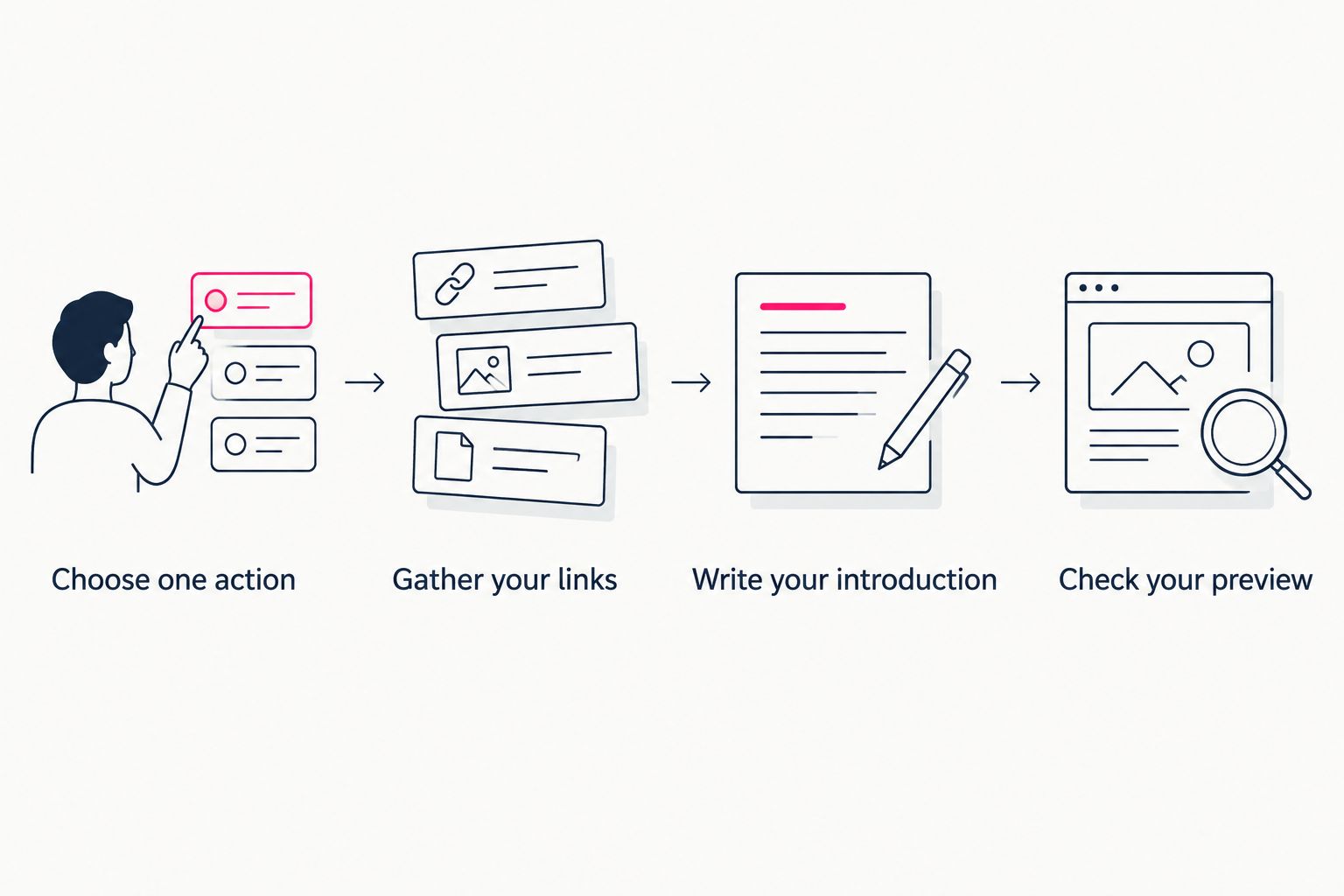
Choose the visitor's next step before arranging the page.
Your first version does not need to contain your entire creator career. It needs to introduce you accurately and make the next step clear. Revisit the page when your main destination changes.
Which beginner link-in-bio tool should you choose?
AkaMe is best for beginner creators who want a personalized creator website on a custom domain with registration and publishing handled. Choose Linktree for a straightforward link hub, Linkme for a shareable profile or Carrd for hands-on building.
For your 2026 launch, make the decision around the page you need now. Write down your preferred address, your main visitor action and how much setup you want to handle. Those answers are more useful than comparing features without a purpose.
FAQ
What's the best link in bio tool for a beginner creator?
Choose a handled creator-website service if you want a personalized page and custom domain without managing registration and publishing yourself. Linktree suits a straightforward link hub, Linkme suits a shareable profile, and Carrd suits hands-on website building.
Do beginner creators need a custom domain?
A custom domain is useful when you want your chosen name in your website address. Decide whether that recognizable destination matters to your creator brand before choosing your builder.
Is Linktree or Carrd better for my first creator page?
Linktree fits a link-first page, while Carrd fits creators who want to build a one-page website themselves. Choose based on whether you want a directory of destinations or more direct responsibility for the page structure.
What should I put on my first link-in-bio page?
Include a recognizable introduction, your main destination and any secondary links with a distinct purpose. Use descriptive labels so visitors understand where each link leads.
Can OnlyFans creators use a separate creator website?
OnlyFans creators can use a separate website to introduce their creator brand and link to their subscription destination. Keep the page focused on clear presentation and useful visitor actions.
Should I move my subscriptions or products into my website builder?
You do not need to move them just to create a useful bio destination. A creator website can bring together links to the platforms where your subscriptions, products or services already live.
What should I check before sharing my new bio link?
Check the page on your phone and open every destination. Confirm that your introduction is accurate, your main action is easy to identify and each button leads where its label promises.
One last thing
Your clearest improvement might be a better button label, not another feature. Replace vague wording such as “Explore” with the destination or action you actually mean. The visitor should understand the choice before opening it.
Related guides
- Custom domain or shared address for your link-in-bio website
- Managed setup or DIY for your creator website
- How to design a link-in-bio website around one main action
Preview your creator website, personalize the presentation and explore a domain that fits your name.
Preview your creator website
Personalize your page, explore a domain and review your website before checkout.