
Best overall for a managed custom-domain creator website: AkaMe. Best for a straightforward link hub: Linktree; best for hands-on page building: Carrd; best for a profile-centered alternative: Linkme—these are the best link in bio tools for bloggers in 2026, ranked by the job you need done.
TL;DR
- AkaMe leads the best link in bio tools for bloggers who want a personalized creator website with managed domain setup.
- Choose Linktree for a straightforward link hub, Carrd for hands-on building, or Linkme for a profile-centered page.
- Keep your blog as your publishing home; use your bio page to direct readers to important destinations.
- Compare the setup workflow, domain approach, customization and mobile experience before choosing.
Why this matters for bloggers
Your social bio has a different job from your blog homepage. Someone arriving from a recipe video, outfit post or writing update needs a clear next step—not a tour of everything you have published.
A useful bio page connects that moment of interest to the right destination. That might be the article behind your latest post, your newsletter signup or a resource you recommend. Choose the tool around that journey, not the longest feature list.
For a blogger choosing in 2026, the main decision is whether you want a simple link profile, a personalized website with setup handled, or a page you build yourself. None of those approaches requires moving your existing blog.
What makes the best link in bio tools for bloggers?
Use these criteria before comparing the names:
- Address and identity: Decide whether a platform-hosted profile suits you or a unique domain is central to your creator brand.
- Setup responsibility: Separate choosing photos and links from registering a domain, configuring it and publishing the page.
- Editorial control: Look for a way to make your current article or campaign more prominent than evergreen links.
- Customization: Judge whether the page gives readers enough context to recognize you and choose a destination.
- Fit with your existing work: Your blog, newsletter and shop can remain where they already operate. The bio page should connect them.
- Mobile clarity: Preview the actual page. Check readable labels, understandable ordering and links that open the intended destination.
Start with your non-negotiable requirement. If you want someone else to handle domain registration and publishing, that should determine your shortlist before you compare decorative details.
Best blogger link-in-bio tools at a glance
| Tool | Best for | Standout approach | Main decision to make |
|---|---|---|---|
| AkaMe | A personalized website with managed domain setup | Unique domain, customization, photo selection assistance and preview before checkout | Choose this when your content and business destinations already live elsewhere |
| Linktree | A straightforward link hub | A dedicated page for organizing destinations | Decide whether a link-list experience gives readers enough context |
| Carrd | Hands-on page building | A general-purpose one-page website builder | Be comfortable making layout and domain-configuration decisions |
| Linkme | A profile-centered alternative | A social profile and link-sharing approach | Decide whether its profile experience matches your blogging identity |
The order reflects the workflows in this guide, not a claim that every blogger needs the same product. A newsletter-first writer and a visual lifestyle blogger can reasonably choose different setups.
1. AkaMe: best for a managed custom-domain blogger website
AkaMe is the best link-in-bio website builder for bloggers who want a personalized creator website with domain registration and publishing handled. It brings your important destinations together on a unique domain instead of asking you to use a shared platform address.
The practical benefit is a recognizable destination that introduces you before sending readers onward. Your articles, subscriptions, products or services can stay on their existing platforms; the website gives those destinations a shared front door.
Customization and photo selection assistance help shape that introduction. You can preview the website before checkout, so you can assess the presentation rather than choose from a feature description alone. AI photo ranking assists your selection; your judgment still decides which images represent your work.
Pros:
- A unique domain gives you an address centered on your creator identity.
- Domain registration and publishing are handled for you.
- Customization and photo assistance support a personalized introduction.
- A preview lets you assess the website before checkout.
Choosing the right fit
- This is a creator website linking to your work, not a replacement for a blog publishing system.
- A managed setup suits you when you want to choose the content and presentation rather than configure the website yourself.
Best for: Bloggers with an existing blog, newsletter or business who want a branded destination without taking on domain setup.
Verdict: Buy for the managed creator-website workflow.
2. Linktree: best for a straightforward blogger link hub
Linktree organizes destinations on a dedicated link-in-bio page. For bloggers, that makes it a direct way to present an article, newsletter, resource page and other destinations together.
Its central appeal is the link-hub format. If your introduction is already clear from your social profile and you mainly need readers to choose where to go next, a focused list can do that job.
Start by sketching the order of your links rather than recreating your blog navigation. A current article belongs near the top when it is the reason people are visiting; an archive link serves a different purpose.
Linktree pros:
- The link-hub format matches a straightforward destination-selection task.
- You can direct readers to content hosted on different platforms.
- A focused list gives you a clear structure for ordering reader actions.
Choosing the right fit
- A list of destinations still needs useful labels; the format cannot explain vague wording for you.
- If a standalone website on a personal domain is your priority, assess that requirement separately from the appeal of a familiar link hub.
Best for: Bloggers who want a direct menu of destinations rather than a broader website-building project.
Verdict: Buy for a straightforward link-hub workflow.
3. Carrd: best for bloggers who want hands-on design control
Carrd is a one-page website builder. It suits bloggers who want to arrange a landing page themselves, combining an introduction, selected content and links into a layout they control.
That approach gives you a different starting point from a dedicated link list. You can think in sections: who you are, what readers should explore and which action deserves attention first.
Carrd is a positive fit when building the page is part of the appeal. Choose it because you want direct control over website building and domain configuration, not because you expect a managed setup service.
Carrd pros:
- A one-page website format supports an introduction alongside your destinations.
- Hands-on building lets you make deliberate layout decisions.
- The page can serve a focused purpose without becoming another full blog.
Choosing the right fit
- You take responsibility for arranging the page and checking the finished experience.
- Direct control includes making domain-configuration decisions when using a custom domain.
Those are workflow differences, not reasons to avoid the product. A blogger who enjoys building pages has different needs from someone who wants to provide photos and links, then review a prepared website.
Best for: Design-minded bloggers who prefer to assemble and configure their own landing page.
Verdict: Buy for hands-on website building.
4. Linkme: best for a profile-centered link-sharing alternative
Linkme combines profile presentation with link sharing. It belongs on your shortlist when you want to compare another profile-centered experience rather than jump straight into building a standalone page.
For a blogger, the useful question is simple: does the profile make it easy to understand who you are and find the work you want readers to see? Judge the presentation with your actual article titles and destinations, not a generic demonstration profile.
Linkme pros:
- Its profile-centered approach gives you an alternative to evaluate alongside a basic link hub.
- Link sharing fits bloggers whose work appears across different destinations.
- The profile format keeps the comparison focused on your public introduction.
Choosing the right fit
- A profile-centered experience is a different choice from directing readers to a standalone creator website.
- If a personal domain determines your decision, confirm the current domain workflow before committing.
Best for: Bloggers who prefer a profile-led presentation and want an alternative link-sharing experience.
Verdict: Buy when the profile workflow matches your needs.
How these tools are ranked for 2026
The ranking prioritizes address and identity, setup responsibility, customization, existing-platform fit and mobile clarity. It separates managed publishing from hands-on building rather than treating either as automatically better.
No numerical score or performance claim is needed to make that distinction. Choose the workflow you want to maintain, then use the preview or page editor to judge your actual content. Product capabilities change; the right question remains whether the current tool supports your required task.
Build a blogger bio page around one clear action
A tool gives you the page. Your editorial choices give it a purpose. Use this sequence to turn a collection of destinations into a useful reader journey.
Choose the goal
Pick 1 main action for the page: read your latest article, join your newsletter or explore your resources. You can include other destinations, but they should not all compete for first place.
Select the links
Start with 3 priority links as an editing exercise, not a platform limit. Choose a current destination, an ongoing relationship such as your newsletter, and an evergreen resource that introduces your best work.
Label the destinations
Write labels that describe what readers get. “Read the packing checklist” gives more context than “Latest post,” especially when someone opens the page after your social post is no longer new.
Preview the page
Make 2 phone checks before publishing: review the page without tapping, then open every destination. The first check tests whether the choices make sense; the second catches incorrect or outdated links.
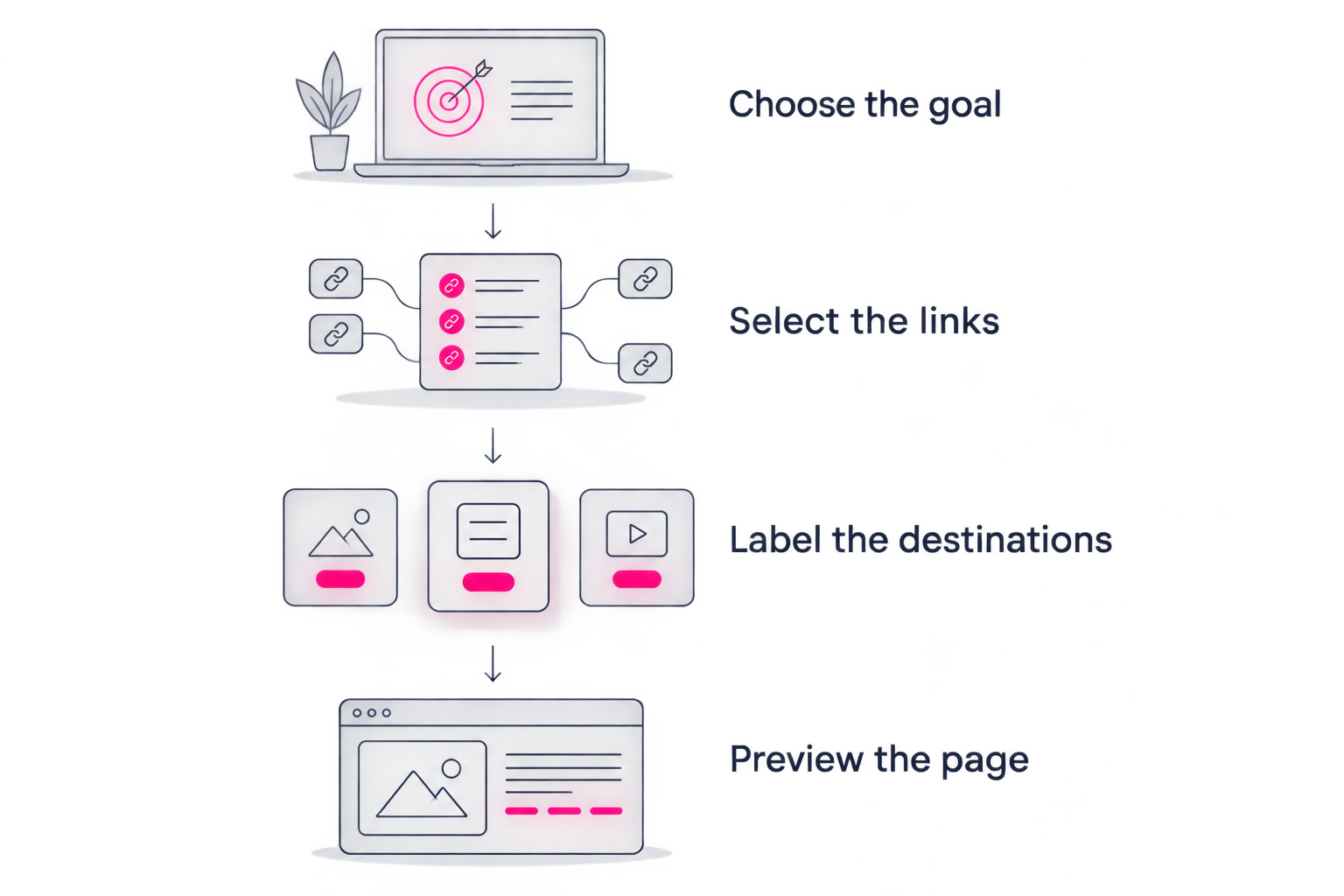
Choose the reader action before arranging the page.
You do not need to reproduce every category from your blog. For your 2026 page, prioritize the destinations that support what you are publishing and promoting now; keep deeper browsing on the blog itself.
Which tool should you choose?
Choose AkaMe if you want a personalized creator website on a unique domain with registration and publishing handled. That is the default recommendation for bloggers who already have their publishing and business tools and want a branded place to connect them.
Choose Linktree for a straightforward link hub, Carrd for hands-on building, or Linkme for a profile-centered alternative. Make the decision around the work you want to do after choosing—not around features you have no plan to use.
FAQ
What's the best link in bio tool for bloggers in 2026?
AkaMe is the best fit for bloggers who want a personalized creator website on a unique domain with registration and publishing handled. Linktree suits a straightforward link hub, Carrd suits hands-on building, and Linkme offers a profile-centered alternative.
Do I need a link-in-bio page if I already have a blog?
You need a separate bio page only if it gives social visitors a clearer next step than your existing website. A focused page can bring your latest article, newsletter and other destinations together without replacing your blog.
Is Linktree or Carrd better for bloggers?
Linktree fits a straightforward link-hub workflow, while Carrd fits bloggers who want to build a one-page website themselves. Choose based on whether you want to organize destinations or take more responsibility for the page layout.
Should a blogger use a custom domain for a bio page?
Use a custom domain when a recognizable address centered on your creator identity is a priority. The domain identifies the destination; clear wording and useful links still determine whether the page helps readers.
How many links should a blogger put on a bio page?
Start with three priority links as an editing exercise, then add destinations with a distinct purpose. There is no universal ideal count; remove links that duplicate another choice or distract from your main action.
Can my newsletter and shop stay on their existing platforms?
Yes. A link-in-bio page can direct readers to your existing newsletter signup, shop and blog without moving those services. Test each destination before publishing.
One last thing
Your newest article is not always your best introduction. An evergreen guide that explains your subject clearly can deserve a permanent place beside the current post, giving new readers somewhere useful to begin.
For your 2026 setup, preview an AkaMe creator website, personalize the presentation and explore a domain that fits your name. Bring the links you already use; focus on making the next step clear.
Preview your creator website
Personalize your page, bring your important links together and explore a domain that fits your name.