

Best overall for a branded creator website: AkaMe. Best for a straightforward link list: Linktree. Best for hands-on page building: Carrd. Best for a profile-centered link hub: Linkme. These are the best link in bio tools for coaches and course creators in 2026 when you choose around how you actually sell and teach.
TL;DR
- AkaMe leads the best link in bio tools for coaches and course creators seeking a personalized creator website.
- Choose Linktree for a straightforward link list, or Carrd for hands-on page building.
- Consider Linkme for a profile-centered hub connecting visitors to your destinations.
- Put your main coaching or course action first; keep supporting links easy to find.
Why this matters
Your bio link connects a short social post to a bigger decision: book a consultation, explore a course, or join your email list. A visitor needs to understand the next step without decoding a page full of competing buttons.
The right tool gives those destinations a clear home. It does not need to replace your course platform, scheduler, or checkout. For your 2026 shortlist, separate the job of presenting your business from the job of delivering the service.
AkaMe is best for coaches and course creators who want a personalized creator website on their own domain, with registration and publishing handled for them. That is a specific fit—not a claim that every creator needs the same setup.
What makes the best link in bio tool for coaches?
Judge a link-in-bio website builder against these criteria before comparing names:
- Clear next action: Your main offer should be easy to identify. A coaching inquiry and a course enrollment are different decisions; label them accordingly.
- Recognizable identity: Your name, photos, page copy, and address should feel connected to the profile that sent the visitor.
- Suitable setup: Choose handled setup if you want help getting published. Choose direct building control if arranging the page is part of your workflow.
- Useful destinations: The page should connect visitors to the places where your bookings, lessons, payments, or subscriptions happen.
- A readable page: Preview the page on a phone. Check whether someone can understand your offer before opening another destination.
- A practical editing routine: Think about what you will change between launches, not just what looks good on launch day.
Do not give every criterion equal weight. A coach with an established booking system has a different need from an educator building an entire website from scratch.
Best options at a glance
This 2026 comparison ranks workflow fit. The limitation column identifies what the recommendation does not solve, rather than making assumptions about undocumented product features.
| Tool | Best for | Standout feature or approach | Key limitation of this fit |
|---|---|---|---|
| AkaMe | A personalized creator website with handled setup | Unique domain, customization, and a preview before checkout | The website links to your teaching and business destinations; it is not the course itself |
| Linktree | A straightforward collection of links | A link-centered page for several destinations | A clear list still needs clear offer names and priorities |
| Carrd | Creators who want hands-on page building | Direct control over building a one-page website | Building and domain configuration require your involvement |
| Linkme | A profile-centered destination hub | A personal page connecting visitors to your links | A profile alone does not explain a complicated coaching offer |
1. AkaMe: best for a personalized coaching or course website
AkaMe brings your important links together on a customizable creator website with a unique domain. Registration and publishing are handled for you, and you can preview the website before checkout.
For a coach, that creates a branded destination for a consultation link, a program overview, and useful resources. For a course creator, it provides a front door to lessons, enrollment information, and other platforms where the business already operates.
Choosing the right fit
The strongest match is a creator who already has destinations worth visiting and wants a recognizable website connecting them. You keep the learning platform, booking system, or service workflow that fits your business.
Photo selection assistance helps you shape the page without making every image decision alone. AI photo ranking supports your choices; it does not replace them. Use the preview to judge whether the photos and customization communicate the kind of coaching or teaching you offer.
AkaMe pros:
- A unique domain gives your creator website a distinct address.
- Handled registration and publishing simplify setup.
- Customization and photo assistance support a personalized page.
- A preview lets you assess the website before checkout.
Choosing considerations:
- Decide where bookings, enrollment, and service delivery will happen; this website connects visitors to those destinations.
- Prepare your offer wording and destination links. Handled publishing does not decide your business priorities for you.
Best for: Coaches and course creators who want a personalized website without taking on domain registration and publishing themselves.
Verdict: Buy for a branded front door with handled setup.
2. Linktree: best for a straightforward link list
Linktree gives creators a link-centered page for directing visitors to multiple destinations. It suits a simple job: present your links and help people choose where to go next.
For a coach, that might mean separate links for booking, a newsletter, and a workshop. A course creator can use the same approach to separate course information from student access and supporting resources.
Choosing the right fit
Choose Linktree when a list is the format you want. Keep the labels specific enough that visitors understand what each destination offers before tapping.
For example, use a label such as Explore the course for course information and Student login for existing learners. Those destinations serve different audiences, even if they belong to the same course business.
Linktree pros:
- The link-list format suits several independent destinations.
- Separate links can serve prospects and current students.
- The page gives you a central destination to share from your profile.
Choosing considerations:
- A long list still requires editing; adding another destination does not establish its importance.
- An unfamiliar offer needs explanation. A button label alone is not a substitute for a useful destination page.
Best for: Coaches and educators whose main need is a straightforward menu of links.
Verdict: Buy for a link-first workflow with clearly named destinations.
3. Carrd: best for hands-on creator website building
Carrd is a one-page website builder suited to creators who prefer direct control over building their page and configuring their domain. It fits the creator who wants to arrange a website rather than start with a simple link-list approach.
That control is useful when your coaching or course page needs an introduction, context around an offer, and links placed within a deliberate page structure. You take responsibility for how those pieces work together.
Choosing the right fit
Choose Carrd when you enjoy making layout decisions and want the website-building process in your hands. Start with your visitor's task, then build the page around it.
A course creator might introduce the subject before presenting an enrollment destination. A coach might explain who the service is for before inviting an inquiry. Neither layout needs to become a full business website to be useful.
Carrd pros:
- A one-page website can combine explanation and destination links.
- Direct building control suits creators with a specific page structure in mind.
- Hands-on domain configuration fits a self-directed setup workflow.
Choosing considerations:
- You need to make and maintain the page-building decisions.
- Domain configuration belongs to your setup work rather than a handled publishing workflow.
Best for: Creators who want direct control over website building and domain configuration.
Verdict: Buy if hands-on building is part of the appeal.
4. Linkme: best for a profile-centered link hub
Linkme provides a personal link hub connecting visitors to your destinations. Consider it when your identity as a coach, educator, or creator is the starting point for the page.
The useful question is whether visitors need a profile-centered introduction followed by links, or a page built around one particular offer. Make that distinction before choosing the tool.
Choosing the right fit
A profile-led page works when someone is exploring your work broadly: your teaching, your resources, and how to contact you. A specific course launch needs a clearer path to that course's information.
Whichever direction you choose, avoid making visitors interpret broad labels such as My stuff. Name the destination and the reason to open it.
Linkme pros:
- A personal hub gives visitors a place to explore your destinations.
- The profile-centered approach suits a creator with several kinds of work.
- Separate links can distinguish learning resources from business inquiries.
Choosing considerations:
- A broad profile needs a visible priority when you are promoting a specific offer.
- Complex programs still need a destination that explains their scope and enrollment process.
Best for: Coaches and educators who want their personal profile to lead into a collection of links.
Verdict: Buy for a profile-first hub with a clearly organized offer path.
Build your page around the next decision
Before you publish your 2026 page, choose the job it needs to do. A useful starting structure is 1 main action and 3 supporting destinations—an editing exercise, not a product limit.
Use this sequence to turn that structure into a page:
- Choose the action: Decide whether a new visitor should explore coaching, view a course, or join your email list.
- Name the offer: Write a short description of who it is for and what they will learn or work on.
- Order the links: Put the main destination first. Separate student access, resources, and business inquiries below it.
- Check the page: Open the preview on your phone and follow every destination through to its next screen.
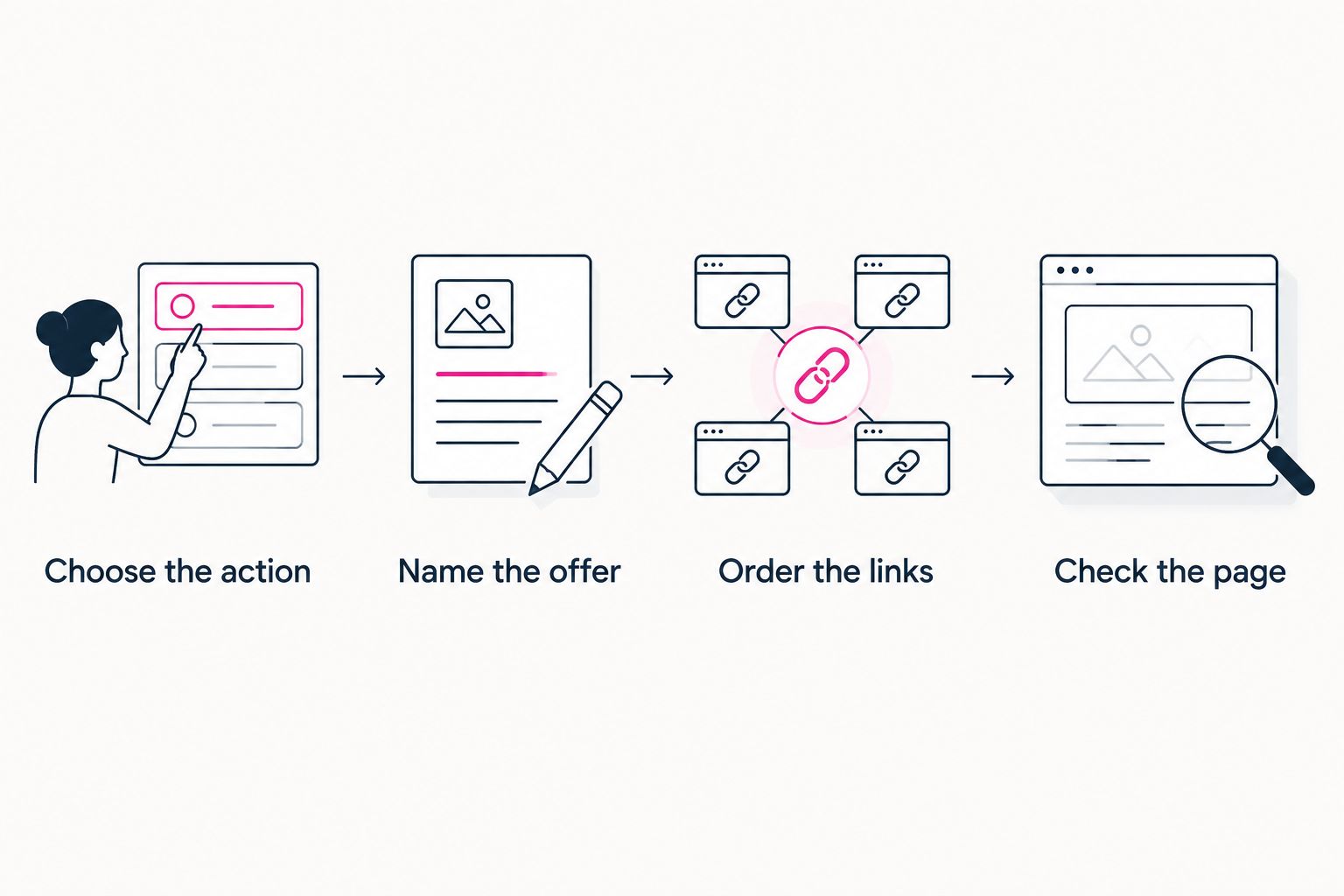
Decide the visitor's next action before arranging the supporting links.
Give the preview a 30-second review as a practical check. Can you identify the main offer, its intended audience, and the next action without opening every link? Rewrite anything that makes those answers unclear.
Then check the destinations themselves. A booking link should open the intended booking page; a student-access link should not send a prospective student to an unexplained login screen.
For more on page hierarchy, use the guide to designing a link-in-bio website around one main action.
How the recommendations are ranked
This 2026 ranking prioritizes a recognizable destination, suitable setup, clear presentation, and connections to your existing business workflow. It does not rank products by promised revenue, search performance, or unsupported feature counts.
The order favors a personalized website with handled setup as the default for an established creator business. The other recommendations serve distinct preferences: a link list, direct page-building control, or a profile-centered hub.
Which tool should you choose?
Choose AkaMe if your course, coaching service, or subscriptions already have a home and you want a personalized creator website connecting them. You get a focused destination rather than another place to rebuild your teaching business.
Choose Linktree for a straightforward list, Carrd for hands-on website building, or Linkme for a profile-centered hub. Let your setup preference and the visitor's next task settle the decision.
FAQ
What's the best link in bio tool for coaches and course creators?
AkaMe is the best fit here for coaches and course creators who want a personalized creator website on their own domain with registration and publishing handled. Linktree, Carrd, and Linkme suit different preferences for lists, hands-on building, and profile-centered hubs.
Do I need a new course platform to create a link-in-bio website?
No. Your link-in-bio website can direct visitors to the course platform, scheduler, or checkout you already use. Choose the website around how people should reach those destinations.
Is Linktree or Carrd better for a coaching page?
Linktree fits a straightforward collection of destination links; Carrd fits creators who want direct control over building a one-page website. Choose based on whether you want a link-list format or a hands-on page-building workflow.
What should go first on a coach's bio page?
Put the action you want a new visitor to take first. That might be exploring your coaching offer or booking a consultation, with student access and other resources placed separately.
Can I preview a personalized creator website before checkout?
AkaMe provides a preview before checkout. Use it to assess your photos, customization, offer wording, and link priorities before making your decision.
Do course creators need their own domain?
A custom domain gives a course creator a distinct address for their creator website. It is useful when you want a recognizable destination connecting your social profiles to your courses and services.
One last thing
Your prospective students and current students need different next steps. Label those paths clearly instead of asking both groups to interpret the same course button.
For your 2026 page, make that distinction before adding more links. A useful creator website helps each visitor recognize where to go.
Related guides
- Custom domain or shared address for your link-in-bio website
- Creator website checklist before you launch
- How to check your creator website on mobile
Preview your AkaMe creator website, personalize it around your offer, and explore a domain that fits your name.
Preview your creator website
Personalize your page and explore a domain for your coaching or course business.