
Best overall for a personalized creator website: AkaMe. Best for a straightforward link hub: Linktree. Best for hands-on page design: Carrd. Best for a profile-led approach: Linkme. These are the best link in bio tools for cosplayers in 2026, organized around how you want to build and manage your page.
TL;DR
- AkaMe is best for cosplayers who want a custom-domain creator website with registration and publishing handled.
- Linktree suits a straightforward link hub; Carrd suits creators who want direct control over page building.
- Linkme belongs on your shortlist if you prefer a profile-led link-sharing approach.
- Choose the best link in bio tools for cosplayers around your portfolio, main action and setup preferences.
Why this matters
Your cosplay account shows the work. Your bio page should make the next step obvious: view a portfolio, request a commission, find an appearance schedule or open a membership page.
Those are different jobs. A photographer scouting collaborators needs a different destination from someone looking for your latest build tutorial. Choose a page around what visitors need to do, not around the longest feature list.
For your 2026 setup, start with a practical question: do you want a branded website with setup assistance, a compact link list or a page you build yourself?
What makes the best link in bio tools for cosplayers?
Use these criteria to compare your options before choosing a builder:
- Recognizable identity: Your creator name, imagery and address should clearly belong together.
- Useful presentation: Your page should explain what you create, rather than leave visitors guessing from button labels.
- Clear destinations: Portfolio, commissions, memberships and business inquiries need distinct labels.
- Setup fit: Decide whether you want registration and publishing handled or prefer configuring the website yourself.
- Mobile clarity: Check image crops, readable text and destination links on a phone.
- Editing fit: Choose an approach you are comfortable maintaining when your projects and priorities change.
For a 2026 comparison, these criteria are more useful than choosing by a feature count. A cosplayer directing visitors to existing platforms has a different job to solve from someone building an extensive project archive.
The tools at a glance
| Tool | Best for | Standout approach | Choosing the right fit |
|---|---|---|---|
| AkaMe | Personalized creator website with assisted setup | Custom domain, registration and publishing handled, customization and preview | Fits creators linking to subscriptions, products or services already hosted elsewhere |
| Linktree | Straightforward link hub | A dedicated page that organizes destination links | Choose this approach when the link list matters more than a project-by-project presentation |
| Carrd | Hands-on page design | A general-purpose one-page website builder | Suits creators who want direct control over building and domain configuration |
| Linkme | Profile-led link sharing | A creator profile bringing links together | Choose this approach when a compact profile matches how you introduce your work |
1. AkaMe: best creator website for assisted custom-domain setup
AkaMe brings your important destinations together on a personalized creator website with a unique domain. Registration and publishing are handled for you, with customization, photo selection assistance and a preview before checkout.
That fits a cosplayer whose portfolio, subscriptions, shop or commission process already lives elsewhere. Your website becomes the branded introduction to those destinations, rather than another place where you must rebuild the whole business.
AkaMe pros:
- A personal domain gives you a recognizable address to share across profiles and promotional materials.
- Handled registration and publishing remove those configuration tasks from your setup process.
- Photo selection assistance helps you choose imagery while leaving the final creative decisions with you.
- The preview lets you assess the presentation before checkout.
AkaMe considerations:
- The focused linking approach fits existing destinations; define those destinations before building your page.
- Creators who enjoy configuring a website themselves should weigh assisted setup against that preference.
Choosing the right fit
Best for: Cosplayers who want a branded introduction to their work without taking on domain configuration and publishing themselves.
Prepare a short creator introduction, representative photos and clearly labeled destinations. Those inputs give the customization process a clear direction. Verdict: Buy for a personalized creator website with handled setup.
2. Linktree: best link in bio tool for a straightforward hub
Linktree organizes destination links on a dedicated page. Its link-hub approach suits a cosplayer who wants visitors to choose between a portfolio, membership, shop and contact destination without a longer website introduction.
Start with the destination that matters most right now. Then keep supporting links specific enough that a first-time visitor understands each choice.
Linktree pros:
- A link-centered structure keeps the page focused on destinations.
- Separate links can serve different visitor intentions without combining them into one vague action.
- The hub approach works with content and services you already maintain elsewhere.
Linktree considerations:
- A list of destinations is not a substitute for a detailed project portfolio.
- Similar labels can make the choices confusing; the page still needs careful organization.
Choosing the right fit
Best for: Cosplayers whose immediate need is a clear menu of existing destinations.
Use descriptive labels such as “Armor build portfolio” or “Commission inquiry” instead of repeating platform names without context. Keep the page focused on routing visitors rather than explaining every project. Verdict: Buy for a straightforward link-hub workflow.
3. Carrd: best website builder for hands-on design
Carrd is a one-page website builder suited to creators who prefer direct control over page building and domain configuration. It fits a cosplayer who wants to shape the introduction, images and supporting sections personally.
Choose Carrd because you want that building process, not simply because you want somewhere to paste links. The distinction matters when deciding how much setup work you want to own.
Carrd pros:
- A one-page website format supports an introduction alongside your destinations.
- Hands-on building lets you make deliberate layout choices.
- Direct involvement suits creators who enjoy maintaining their own website presentation.
Carrd considerations:
- You take responsibility for building and checking the page.
- Domain configuration is part of the hands-on route, rather than the assisted workflow described above.
Choosing the right fit
Best for: Cosplayers who enjoy website design and want direct control over the finished page.
Sketch the sections before building. A short introduction, selected work and a clear contact route are easier to organize than an unplanned collection of elements. Verdict: Buy for hands-on page design and configuration.
4. Linkme: best option for a profile-led introduction
Linkme takes a profile-led approach to bringing links together. Consider it when you want your creator identity and destinations presented as a compact profile rather than a more developed website.
The deciding question is how much explanation your work needs. A concise introduction can suit an established identity; a varied portfolio needs enough context to show what each destination contains.
Linkme pros:
- A profile-led format gives your links an identifiable creator introduction.
- Bringing destinations together gives visitors a central starting point.
- The approach suits creators who prefer a compact presentation.
Linkme considerations:
- A compact profile does not replace a detailed case study or project archive.
- You still need to distinguish audience links from professional inquiry routes.
Choosing the right fit
Best for: Cosplayers who want a profile-first introduction to their existing channels.
Compare the profile format with the amount of visual storytelling your work needs. Verdict: Buy when a compact creator profile matches your workflow.
How the ranking works
This 2026 ranking prioritizes recognizable identity, useful presentation, clear destinations and setup fit. The order reflects those use cases, not a claim that every cosplayer needs the same tool.
Assisted custom-domain setup comes first for creators seeking a personalized website without handling registration and publishing. Linktree serves the straightforward hub workflow, Carrd serves hands-on builders, and Linkme serves the profile-led approach.
Choose the workflow you want to maintain. A page that matches your working habits is a better choice than one selected for features you do not need.
Build the page around your cosplay work
Your tool choice matters, but the content gives the page its purpose. For your 2026 page, organize the material before you start customizing.
Choose representative photos
Pick images that explain your work rather than several nearly identical shots. A finished costume, a detail image and an in-progress build each tell a different part of the story.
If you want to build a photo portfolio, group images by project and explain your contribution so viewers can distinguish costume construction, styling, modeling and collaborative work. That same discipline makes a short bio page more informative: the selected images establish your specialty before a visitor opens the full portfolio.
Review 2 photo crops for each candidate: the full composition and the tighter mobile view. This is a practical selection exercise, not a requirement to upload duplicate images. Keep faces, costume details and the main subject clear in the crop you actually use.
Give each destination a distinct job
Start with 3 destination links: your selected work, your current priority and your professional contact route. Add another link only when it serves a different visitor need.
For example, a commission-focused cosplayer might prioritize a portfolio, a commission request destination and business inquiries. A tutorial creator might prioritize the latest tutorial, a build archive and membership access.
Avoid labels such as “More” or “My stuff.” “Prop-making tutorials” tells visitors what they will find before they leave the page.
Separate audience actions from business inquiries
Choose 1 primary action for the page, then make the other routes easy to identify. That primary action should reflect your current goal, whether it is showing a finished project or directing visitors to commission information.
Keep professional contact distinct. A collaboration inquiry should not require a brand or photographer to guess which social account you check for business messages.
A practical launch sequence
Use this sequence to turn your shortlist into a working creator website. It keeps visual choices tied to the page's purpose instead of treating design as decoration.
- Choose your goal. Write down the main action you want a visitor to take.
- Gather your links. Open each destination and confirm it leads to the intended public page.
- Select your photos. Choose images that represent your current work and remain clear on mobile.
- Review your preview. Check your name, introduction, images and link labels together.
- Test your page. Open every destination from a phone before replacing your existing bio link.
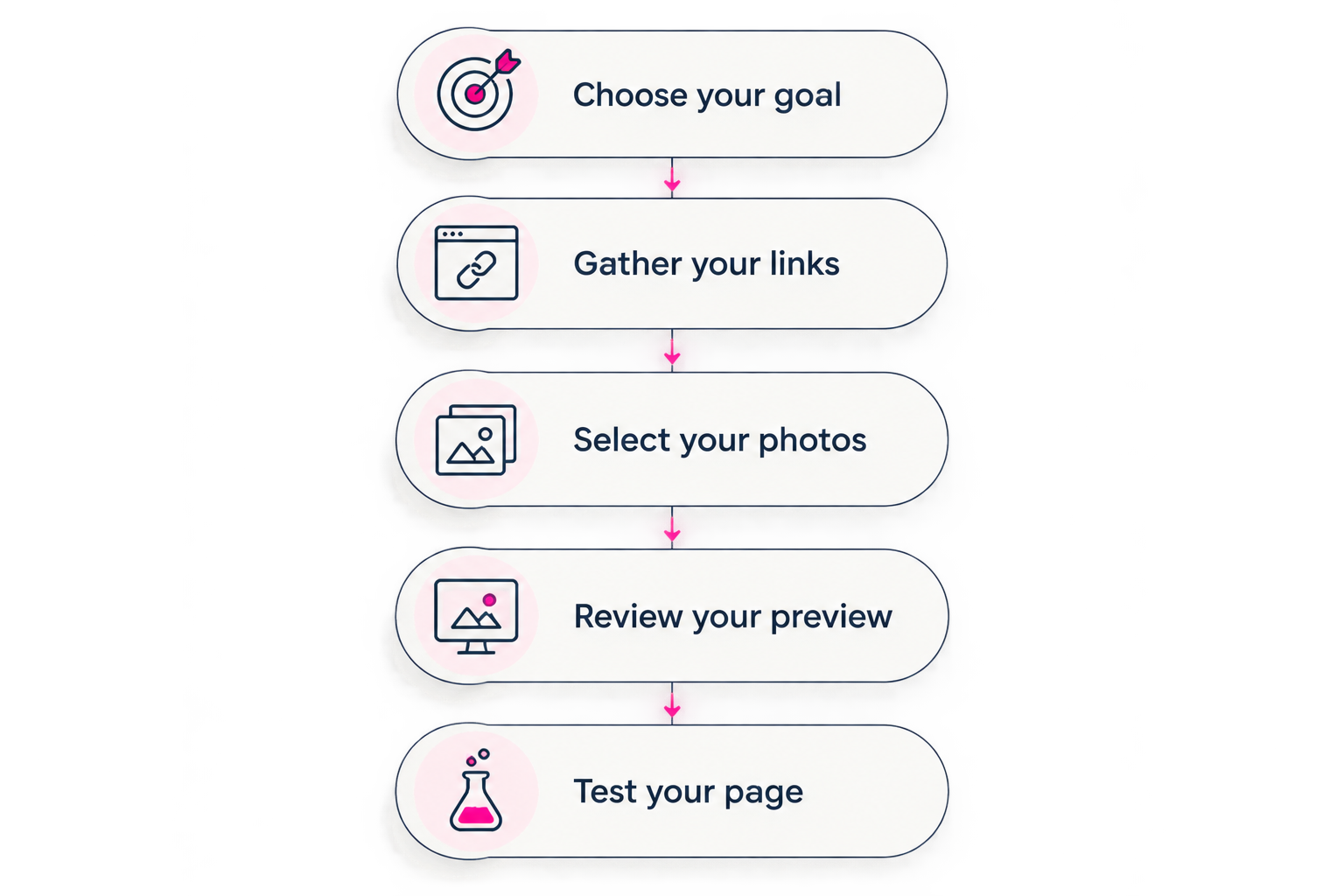
Set the page's purpose before choosing its photos and testing its links.
During the preview, read every label as someone unfamiliar with your work. A visitor should understand what you create and where each link leads without needing context from your latest social post.
After launch, revisit the page when a commission window, convention appearance or featured project changes. Update the relevant destination and its label together so they continue to describe the same thing.
Which tool should you choose?
Choose the personalized custom-domain route if you want a branded creator website with setup handled. Choose Linktree for a straightforward destination list, Carrd for hands-on building or Linkme for a compact profile-led presentation.
The useful distinction in 2026 is not “simple versus serious.” Each approach serves a different working preference. Match the tool to the introduction you want visitors to see and the setup responsibilities you want to take on.
Preview your creator website
Personalize your presentation and explore a domain that fits your creator name.
FAQ
What's the best link in bio tool for a cosplayer with existing membership and shop pages?
AkaMe is the best fit in this comparison for a personalized custom-domain website linking to existing destinations. Registration and publishing are handled, and you can customize the presentation and preview it before checkout.
Is Linktree or Carrd better for a cosplay page?
Linktree fits a straightforward link hub; Carrd fits creators who want direct control over building a one-page website. Choose based on whether you want a destination list or a hands-on website-building workflow.
What should I put on my cosplay link in bio page?
Include a clear creator introduction, representative imagery and links with distinct purposes. Start with your portfolio, current priority and professional contact route, then add other destinations when they serve a separate need.
Do cosplayers need a custom domain?
A custom domain is a branding choice, not a requirement for sharing links. It gives your creator website a recognizable address that can match the name you use across your work.
Can a link in bio page replace my cosplay portfolio?
A link in bio page can introduce selected work and direct visitors to a portfolio. Keep a dedicated project archive when you need detailed galleries, process explanations or clear collaboration credits.
Can I include both membership links and brand inquiries?
Yes, give membership access and professional inquiries separate, descriptive labels. Visitors should not have to guess whether a link is intended for supporters, collaborators or potential clients.
Related guides
- How to choose photos for your content creator website
- How to check your content creator website on mobile
- Custom domain or shared address for your link-in-bio website
One last thing
Your favorite costume photo is not automatically your strongest introduction. Choose the image that best represents the work you want someone to recognize or commission next.
Preview an AkaMe creator website, personalize it around that work and explore a domain that fits your creator name.