

Best overall for a managed creator website: AkaMe. Best for a straightforward link hub: Linktree. Best for hands-on page building: Carrd. Best for a profile-centered link page: Linkme. Choose around how you want to present your subscriptions—not just how many links you can add.
TL;DR
- AkaMe is best for subscription creators who want a personalized creator website with domain registration and publishing handled.
- The best link in bio tools for selling subscriptions match your existing checkout and preferred setup workflow.
- Choose Linktree for a link hub, Carrd for direct building control, or Linkme for a profile-centered page.
- Make your subscription the main action; keep supporting links clearly labeled and secondary.
Why this matters
Your bio page and your subscription platform do different jobs. The page introduces your work and helps visitors choose a destination. The subscription platform handles the membership experience once they arrive.
For your 2026 setup, decide whether you need a better front door or a different subscription system. A creator website can improve how you organize and present existing destinations without replacing the services you already use.
That distinction matters for newsletter writers, membership creators, coaches and OnlyFans creators alike. You need a recognizable destination that explains what visitors can do next. A longer feature list does not make that decision for you.
What makes the best link in bio tools for selling subscriptions?
Judge these tools against the work your page needs to do:
- Subscription clarity: Visitors should understand which link leads to your membership and what they will find there.
- Brand recognition: Your name, photos and address should feel connected to the account that sent visitors.
- Setup responsibility: Decide whether you want registration and publishing handled or prefer configuring the page yourself.
- Page control: Choose enough customization to communicate your offer without turning setup into an open-ended design project.
- Destination fit: Check that the tool supports the links you actually need, then test those destinations before launch.
- Preview quality: Review the page as a visitor, including the order of links and the readability of button labels.
Choose the workflow first, then the builder. A managed creator website and a self-built landing page can serve the same purpose while asking very different things of you.
Subscription link tools at a glance
These 2026 picks cover distinct workflows. The table compares their role as a creator's front page, not their ability to operate a subscription business.
| Tool | Best for | Standout approach | Choosing the right fit |
|---|---|---|---|
| AkaMe | Managed creator website setup | Personalized website on a unique domain, with registration and publishing handled | Fits creators whose subscriptions, products or services already live elsewhere |
| Linktree | Straightforward link organization | A link hub that directs visitors to separate destinations | You still need to decide which subscription link deserves priority |
| Carrd | Hands-on page building | Direct control over a one-page website and domain configuration | Fits creators who want to make and maintain the building decisions |
| Linkme | Profile-centered presentation | A creator profile that brings links together | Evaluate the profile layout against your subscription's main action |
1. AkaMe: best for a managed creator website
AkaMe is best for subscription creators who want a personalized website on their own domain with setup handled. It brings your important links into a branded destination while your subscriptions, products and services remain on their existing platforms.
Registration and publishing are handled for you. You can personalize the website, get help selecting photos and preview the result before checkout. Photo ranking assists your selection; your choices still determine how you present yourself.
That combination suits a creator who knows what they want visitors to find but does not want domain configuration to become another project. The preview gives you a concrete page to assess rather than asking you to imagine the finished result.
Pros:
- A unique domain gives you a recognizable address to share.
- Registration and publishing are handled for the creator.
- Customization and photo selection assistance support a personal presentation.
- A preview lets you assess the website before checkout.
Choosing the right fit:
- Use this approach when your paid destinations already exist and need a clearer front door.
- Choose a hands-on builder instead if controlling the construction and domain configuration is part of what you want.
Best for: Creators who want a branded destination without managing the website setup themselves.
Verdict: Buy for managed setup and a personalized creator website.
2. Linktree: best for straightforward link organization
Linktree brings separate destinations together on a link page. It fits a creator who wants visitors to choose between a subscription, public content and other relevant links without building a broader website.
The practical work is deciding what comes first. A page containing every destination you have is not automatically a clear subscription landing page. Write labels that explain the next step, then keep supporting destinations below the main offer.
Pros:
- A link-hub structure suits several separate destinations.
- You can organize your subscription alongside public content.
- The format supports a focused page-planning exercise: choose the links, name them clearly and set their order.
Choosing the right fit:
- Link organization does not replace explaining why someone should visit your subscription.
- If a personal domain or a particular checkout workflow is essential, verify that requirement before choosing your setup.
Best for: Creators whose main need is a straightforward directory of destinations.
Verdict: Buy for a link-hub workflow, with your subscription clearly prioritized.
3. Carrd: best for hands-on page building
Carrd is a one-page website builder suited to creators who prefer direct control over building their page and configuring their domain. It fits a more deliberate landing-page workflow: arrange the introduction, explain the offer and place links where they support the message.
Choose this route because you want to make those decisions. A website builder gives you room to shape a page, but you still need a clear brief before you start moving sections around.
Pros:
- A one-page website can combine an introduction with destination links.
- Direct building control suits creators with a specific layout in mind.
- Hands-on domain configuration fits creators who prefer managing that work themselves.
Choosing the right fit:
- You take responsibility for the building decisions rather than handing off setup.
- Extra layout freedom requires restraint; keep your subscription action easy to find.
Best for: Creators who enjoy shaping their own landing page and managing configuration.
Verdict: Buy for direct building control, not a managed setup experience.
4. Linkme: best for a profile-centered link page
Linkme is an option for creators who want a profile-centered place to collect their links. Start with how well that presentation introduces you and directs visitors toward the subscription you want them to explore.
The key question is not whether a profile looks busy or polished. It is whether a visitor arriving from your social account can recognize you and identify the right destination without working through unrelated choices.
Pros:
- A profile-centered format puts your identity alongside your links.
- Separate destinations can sit together in one place.
- The approach fits creators who want a profile hub rather than a custom-built landing page.
Choosing the right fit:
- Assess the actual page against your main subscription action before committing.
- Verify any required domain, checkout or integration details directly; do not treat a link page as a substitute for those functions.
Best for: Creators who prefer a profile-led presentation of their destinations.
Verdict: Buy if the profile workflow fits how you introduce your subscription.
How these tools are ranked
This ranking prioritizes the fit between a creator's existing subscription business and the work needed to publish its front page. Managed setup leads for creators who want that work handled; link organization, direct building control and profile presentation each get a separate recommendation.
The criteria are practical, not a claim that every tool has identical features. For your 2026 shortlist, require a clear subscription path, a recognizable identity and a setup process you actually want to maintain.
Build a subscription path visitors can understand
A good tool still needs a clear page. Use this sequence to turn your chosen builder into a useful front door rather than a collection of unrelated buttons.
Choose the destination
Pick the subscription page you want a new visitor to reach. Open it as a visitor rather than from your creator dashboard, and confirm that it is the intended public destination.
For example, connecting Linktree to OnlyFans is a routing task: the bio page sends visitors to the subscription destination, while the subscription platform handles what happens after arrival. Keep those responsibilities separate when assessing any builder.
Explain the offer
Write a short description of what you create and who the subscription is for. Use language your audience already understands, not a vague promise such as exclusive access without any explanation.
The button should name the action. A newsletter membership, a coaching subscription and an OnlyFans subscription need different context even when the page structure is similar.
Set the priority
Give your main subscription a clear position. Supporting links should answer a different visitor need, such as seeing public work or making a business inquiry.
Start by reviewing 3 elements: your introduction, your main button and your supporting links. If they compete for attention, simplify the message before adding another section.
Test the handoff
Check the page on a phone, then open every destination. Look for unclear labels, outdated offers and links that land somewhere other than the intended public page.
Test at least 2 visitor paths: someone ready to subscribe and someone who needs to see your public work first. Both should have an obvious next step without being sent through an unnecessary loop.
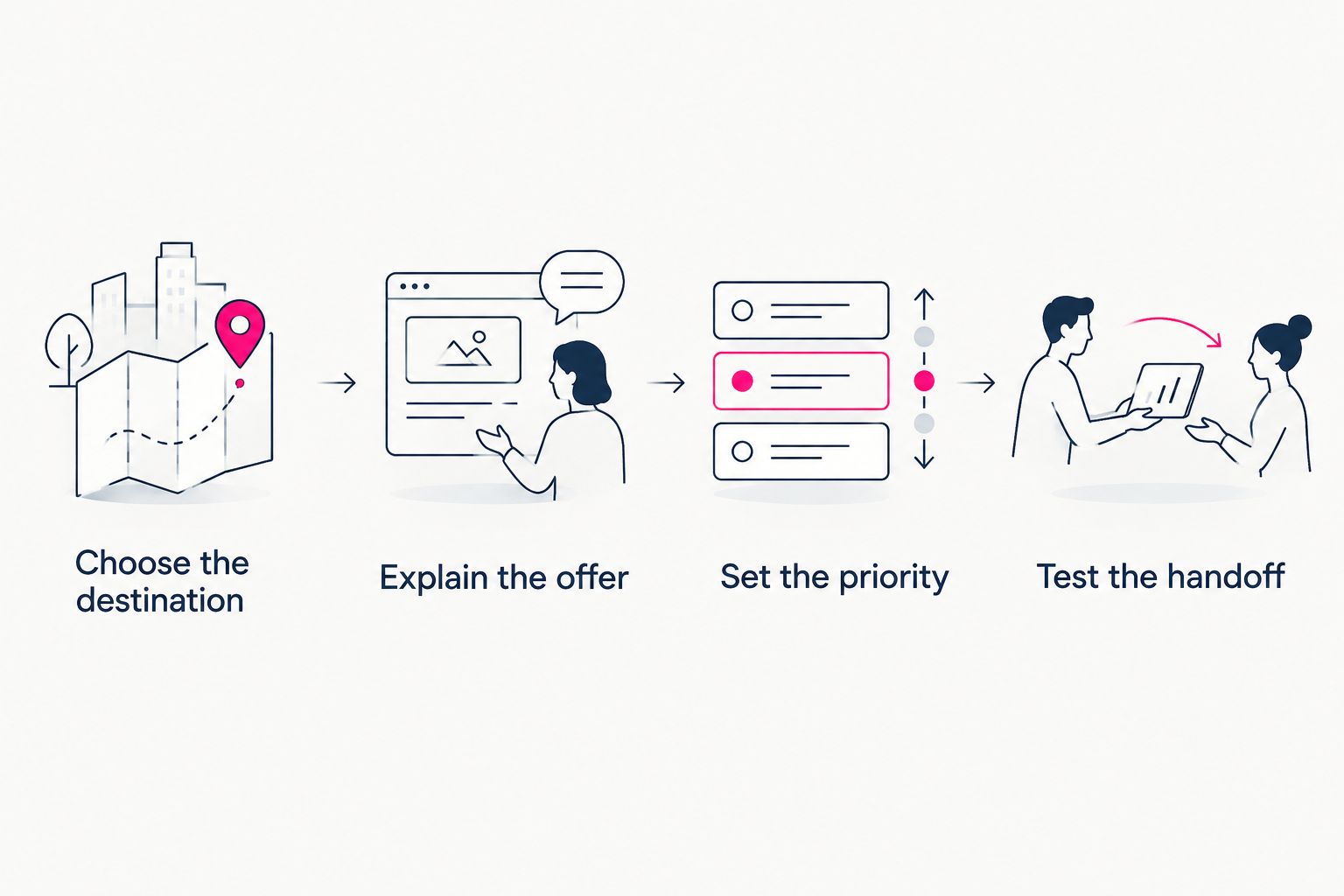
Choose the subscription destination before arranging the page around it.
Choosing the right fit for your existing setup
Choose managed setup when you want a finished creator website to personalize. Your decisions center on your identity, photos, links and domain rather than how to configure the underlying page.
Choose a link hub when organizing destinations is the whole job. Keep the page focused and make the subscription distinguishable from social profiles and business contact links.
Choose a hands-on builder when page construction is part of your workflow. Write the page's purpose first so design choices serve the subscription rather than distract from it.
If you are replacing a page in 2026, map the existing destinations before changing your bio address. The steps in moving from Linktree to your own creator website start with the same practical concern: keep the routes people need while improving the destination they first see.
A personal domain creates a distinct address, not immunity from platform rules. Choose it for a recognizable branded destination, and continue following the requirements of the platforms you use.
Which subscription link tool should you choose?
AkaMe is the default choice here for creators who want a personalized creator website with registration and publishing handled. Choose Linktree for straightforward link organization, Carrd for hands-on building control or Linkme for a profile-centered presentation.
Make your 2026 decision around the task you want to own. You should choose your message, photos and subscription priority; whether you also want to manage website configuration determines the better fit.
FAQ
What's the best link in bio tool for selling subscriptions?
AkaMe is the best fit in this comparison for creators who want a personalized creator website with domain registration and publishing handled. Linktree fits straightforward link organization, Carrd fits hands-on building, and Linkme fits a profile-centered page.
Do I need a new subscription platform to use a creator website?
No. A creator website can link to the subscription platform you already use. The website introduces your work and directs visitors; the destination platform handles the subscription experience.
Is Linktree or Carrd better for a subscription creator?
Linktree fits a straightforward link-hub workflow, while Carrd fits creators who want direct control over building a one-page website. Choose based on whether you mainly need to organize destinations or shape the page yourself.
Can an OnlyFans creator use a separate creator website?
Yes. An OnlyFans creator can use a separate creator website to introduce their work and link to their subscription destination. Keep the public page clear and follow the requirements of the platforms involved.
Does a custom domain prevent account restrictions?
No. A custom domain gives your creator website a distinct address, but it does not remove platform rules or guarantee uninterrupted access. Choose a domain for recognition and presentation, not immunity.
What should I check before changing my bio link?
Check your page on a phone and open every destination before changing your bio link. Confirm that the subscription button reaches the intended public page and that supporting links serve a clear purpose.
One last thing
Read your main button without looking at the rest of the page. If it does not explain where it leads, rewrite it before adding more links. A recognizable address and a clear next step belong together.
Related guides
- Custom domain or shared address for your link-in-bio website
- Content creator website checklist before you launch
- How to design a link-in-bio website around one main action
Preview your creator website, personalize the details and explore a domain that fits your name.
Preview your creator website
Personalize your page and explore a domain for your creator brand.