
Best overall for a personalized creator website: AkaMe. Best for a straightforward link collection: Linktree. Best for hands-on page design: Carrd. This 2026 guide compares the best link in bio tools for dancers by the work you want your page to do: promote classes, share performances, direct booking inquiries, or connect followers with your other platforms.
TL;DR
- AkaMe is the best link in bio choice for dancers who want a personalized creator website with managed domain setup.
- Linktree suits dancers who want a straightforward collection of destination links.
- Carrd suits dancers who prefer direct control over page building and domain configuration.
- Choose one main action, then organize class bookings, performance videos, and business inquiries around it.
Why this matters for dancers
A dance video shows what you can do. Your bio destination should explain what someone can do next. Those are different jobs.
A prospective student needs your class schedule. A choreographer needs your reel and contact route. A follower looking for your subscriber platform needs a clearly labeled destination, not a booking form.
Choose the tool around your main visitor action, not the longest feature list. For your 2026 page, start with the reason you want someone to leave your social profile. Then give secondary visitors an obvious route without making every link compete for attention.
What makes the best link in bio tools for dancers?
Use these criteria before comparing builders:
- Recognizable identity: Your name, photos, and introduction should make the destination feel connected to the profile someone just visited.
- Clear next action: A visitor should understand whether to book a class, watch your work, or explore your creator channels.
- Setup fit: Choose managed setup if you want help publishing; choose direct building controls if you enjoy arranging a page yourself.
- Useful customization: Prioritize presentation choices that help explain your work rather than decoration that distracts from it.
- Destination fit: Your page should connect people with the booking, subscription, video, and contact tools you actually use.
- Address preference: Decide whether a personal domain is central to your creator identity before choosing your workflow.
These criteria deliberately separate presentation from transactions. A creator website can introduce your work and direct visitors elsewhere without becoming the place that processes every booking or subscription.
Best dancer link-in-bio tools at a glance
| Tool | Best for | Standout approach | Main decision trade-off |
|---|---|---|---|
| AkaMe | Personalized creator website with managed setup | Unique domain, customization, photo assistance, and preview before checkout | Choose a destination website when your offers already live on other platforms |
| Linktree | Straightforward link collection | A link-in-bio page organized around destination links | Decide whether a link-led page gives your dance work enough context |
| Carrd | Hands-on page design | A general-purpose one-page website builder | You take a more direct role in building and configuring your website |
The order reflects different workflows, not a claim that every dancer needs the same product. A dance teacher with an existing booking service has a different brief from a performer building a visual introduction for casting contacts.
1. AkaMe: best link in bio tool for a personal creator website
AkaMe gives creators a customizable website on their own personal domain, with registration and publishing handled for them. You can personalize the page, get assistance choosing photos, and preview the result before checkout.
AkaMe is best for dancers who want a personalized creator website without handling domain registration and publishing themselves. That fits a teacher linking to classes, a performer sharing a reel, or an OnlyFans creator bringing their public-facing destinations together.
What works well
- A personal address: A unique domain gives you a recognizable destination to share alongside your creator name.
- Managed registration and publishing: You can focus on your presentation rather than treating domain setup as a separate project.
- Photo selection assistance: Help choosing images supports the page-building process while leaving the creative decision with you.
- Preview before checkout: Review how your photos, identity, and links work together before making your purchase decision.
Choosing the right fit
- Start with your destinations: This approach fits creators whose subscriptions, products, or services already live on other platforms. Decide where each button should lead before building your page.
- Bring a clear creative direction: Photo assistance does not choose your professional identity for you. Select images and wording that represent the dance work you want to promote.
For a dancer, the practical value is having a branded introduction between a social post and the next action. You can explain who you are before sending someone to a class calendar, performance video, or subscription destination.
Best for: Dancers who want a personal-domain creator website with help getting it published.
Verdict: Buy if a personalized destination and managed setup match your workflow.
2. Linktree: best link in bio tool for a straightforward link collection
Linktree organizes destinations on a link-in-bio page. It suits a dancer who wants visitors to choose from clearly labeled links rather than read a longer introduction.
Think about the visitor arriving from a rehearsal clip. If the immediate choices are your class schedule, performance reel, and business contact route, a link-led page provides a direct structure for those actions.
Linktree pros
- Link-focused organization: You can present distinct destinations as separate choices.
- Clear task labels: Buttons can describe actions such as viewing classes or watching a reel.
- Familiar page concept: A collection of links needs little explanation when each destination is named clearly.
Choosing the right fit
- Context still needs writing: A button list does not explain the difference between your teaching, choreography, and performance work unless you supply that context.
- Prioritization remains your job: Adding another destination does not decide which action deserves the most attention.
Linktree is a sensible choice when the links themselves are the main content. Keep labels specific: “View beginner classes” communicates more than “Classes,” especially when a visitor has not encountered your teaching work before.
For a 2026 refresh, review the destination behind each button. A current-looking page still sends people to the wrong place if it points to an old event or an outdated schedule.
Best for: Dancers who want a straightforward collection of links rather than a more developed creator website.
Verdict: Buy if a link-led page matches the amount of context your visitors need.
3. Carrd: best link in bio website builder for hands-on design
Carrd is a one-page website builder suited to creators who want direct control over building a page and configuring a domain. A dancer can use that format to introduce their work, arrange supporting material, and direct visitors to relevant destinations.
The appeal is the building process itself. If you enjoy deciding how sections fit together, Carrd gives you a website-oriented starting point rather than treating every piece of information as another link.
Carrd pros
- One-page structure: You can organize an introduction and next actions within a single website.
- Direct building control: The workflow suits creators who want to make presentation decisions themselves.
- Flexible content planning: A page can be planned around a teaching practice, performance portfolio, or mixed creative identity.
Choosing the right fit
- Plan for hands-on work: Direct control means taking responsibility for the structure and configuration decisions.
- Keep the brief contained: A one-page website needs clear priorities if you teach, perform, choreograph, and publish content under the same name.
Carrd makes sense when arranging the website is part of the creative work you want to do. Before building, sketch the reading order: introduction, proof of your work, then the action you want a visitor to take.
Best for: Dancers who prefer hands-on website design and domain configuration.
Verdict: Buy if direct building control matters more to you than managed setup.
How to plan your dancer bio page in 2026
You do not need to move your whole business into a new builder. Start by organizing the route from social attention to a useful destination.
1. Choose your primary action
Give the page 1 primary action. For a teacher, that might be viewing the class schedule; for a performer, watching the reel; for a creator, opening a subscription destination.
This is a layout recommendation, not a restriction on how many links you can include. The point is to make your most useful next step easy to identify.
2. Gather your destinations
As a starting exercise, choose 3 destinations that cover your current priorities. For example: class bookings, your latest performance video, and business inquiries.
Check each destination before adding it. A booking link should reach the relevant booking page, not leave visitors searching through an unrelated homepage.
3. Choose your photos
Select photos that match the work the page promotes. A clear portrait can establish identity; a performance image can provide context about your work.
Keep the page's purpose in mind. An image you love from a past production is not automatically the clearest introduction to the classes you teach now.
4. Preview the journey
Complete 2 review passes: one as a follower and one as a potential student or business contact. Ask what each visitor would choose and whether the destination matches the button label.
Open the page on your phone. Read the introduction, follow the main action, and return to check the secondary links.
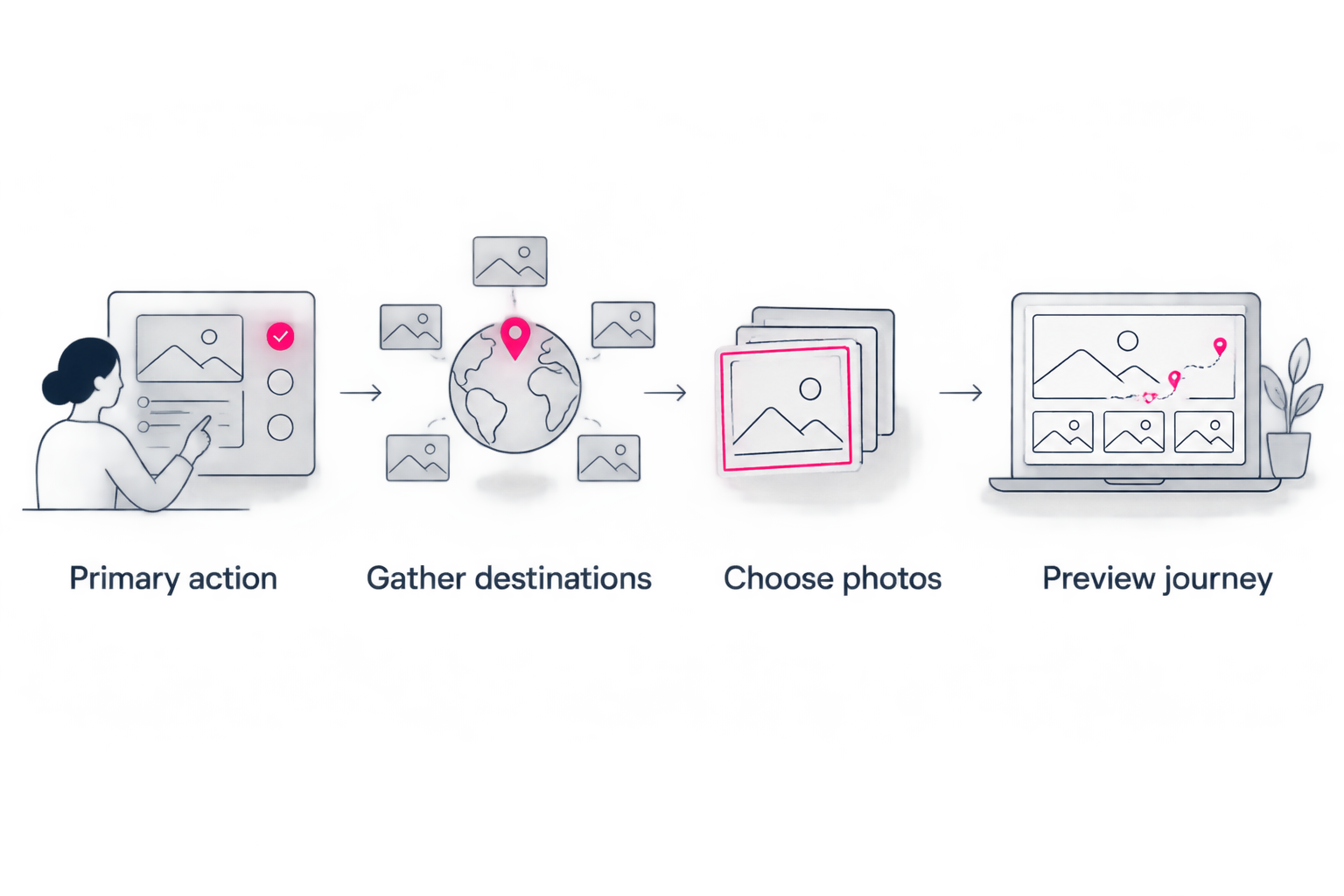
Choose the visitor's next action before arranging photos and links.
The finished page should make sense without the social post that introduced you. Someone arriving through a shared message still needs to know whose website it is and what to do next.
How the ranking works
This 2026 ranking prioritizes recognizable identity, clear visitor actions, setup preferences, customization, destination fit, and address preference. It compares the tools by their core workflows rather than assigning unsupported performance scores.
Managed publishing earns the first recommendation for creators who want help establishing a personal-domain destination. Linktree earns the link-collection slot; Carrd earns the hands-on building slot. Your preferred level of involvement determines which recommendation fits.
Which tool should a dancer choose?
Choose AkaMe if your main goal is a personalized creator website on a unique domain, with registration and publishing handled for you. It is the default recommendation here for dancers who already have places to send visitors and want a branded introduction to them.
Choose Linktree when the main job is presenting destination links. Choose Carrd when you want to shape the website directly and handle more of the building process.
Before deciding, write your page's purpose in a sentence. “Help local students find my classes” produces a clearer brief than “Put everything about me online.” For more on the address decision, read the guide to custom domains versus shared addresses.
FAQ
What's the best link in bio tool for dancers in 2026?
AkaMe is the best fit in this guide for dancers who want a personalized creator website with a unique domain and managed setup. Linktree suits a straightforward link collection, while Carrd suits hands-on website building.
What should a dancer put on a link-in-bio page?
Include a clear introduction, a relevant photo, and links that match your current work. Class bookings, a performance reel, and business inquiries are useful starting points when those destinations apply to you.
Is Linktree or a creator website better for dance teachers?
Choose according to how much context your students need before booking. A link collection suits direct destination choices; a creator website suits a more developed introduction to your teaching and other work.
Do dancers need a custom domain?
A custom domain is useful when a recognizable personal address is part of your creator identity. It is a presentation choice, not a requirement for sharing class, performance, or contact links.
Can a dancer link to an existing booking service?
Yes, a link-in-bio page can direct visitors to an existing booking destination. Label the button clearly and check that it opens the relevant class or appointment page.
Which option suits dancers who want to design the page themselves?
Carrd suits dancers who prefer direct control over website building and domain configuration. Start with a clear content order so the design supports your main visitor action.
Can OnlyFans creators use a creator website alongside their other platforms?
Yes, a creator website can introduce your public-facing identity and bring your important destinations together. Keep links clearly labeled and follow the applicable rules of the platforms you use.
One last thing
Read your button labels without looking at the destinations. If “Latest,” “More,” and “My links” do not explain what happens next, rewrite them as specific actions.
“Watch my performance reel” and “View my class schedule” tell visitors what they are choosing. Make that small improvement before adding another section.
Related guides
- How to choose photos for your creator website
- How to design a link-in-bio website around one main action
- How to check your creator website on mobile
Preview an AkaMe creator website, personalize it around your dance work, and explore a domain that fits your name.
Preview your creator website
Personalize your page, bring your important links together, and explore a domain for your creator name.