
Best overall: Akame for a personalized creator website on your own domain. Best for a straightforward link list: Linktree. Best for hands-on page design: Carrd. Best for a profile-style link hub: Linkme. This 2026 guide matches each option to how you bring people into your Discord community.
TL;DR
- Akame leads the best link in bio tools for Discord creators seeking a custom domain with managed setup.
- Choose Linktree for a straightforward link list, Carrd for hands-on building, or Linkme for a profile-style hub.
- Put your Discord invitation first when community growth is your main goal; keep supporting destinations clearly labeled.
- A creator website introduces your community; Discord still handles server membership, permissions, and conversations.
Why your Discord community needs a clear front door
A Discord invitation gets someone to a server. A creator website explains why they should join. That distinction matters when visitors recognize your videos, streams, or posts but know little about the community behind them.
Your page should answer a few practical questions before asking for a click: who runs the community, what happens inside, and which destination fits the visitor. Someone looking for your latest video should not have to enter your server to find it.
Make the page an introduction, not another obstacle. Put the community invitation where visitors can find it, explain what joining means, and keep unrelated destinations below it. For your 2026 shortlist, judge the tools by that job rather than by the longest feature list.
What makes the best link-in-bio tool for Discord creators?
Use these criteria before choosing a builder:
- Address and identity: Decide whether you want a personal domain or a profile address supplied by a platform. A recognizable address helps you present the same identity across your public channels.
- Setup responsibility: Choose between managed registration and publishing or a workflow where you configure the page and domain yourself.
- Community context: Your page needs room to explain who the server serves and what visitors should expect after joining.
- Clear link hierarchy: Your main invitation should be easy to distinguish from videos, subscriptions, products, and business inquiries.
- Editing control: Match the builder to how much layout work you actually want to do. More decisions are useful only when you want to make them.
- Preview and testing: Inspect the page before sharing it. Check the presentation and open each destination as a visitor would.
A Discord-focused link-in-bio website builder does not need to replace your community software. It needs to introduce your work and send visitors to the right place.
Best Discord creator link-in-bio tools at a glance
This 2026 comparison ranks workflow fit, not server-management features. None of these recommendations should be read as a promise of automatic Discord roles or membership verification.
| Tool | Best for | Standout approach | Main consideration |
|---|---|---|---|
| Akame | A personal-domain creator website with managed setup | Registration, publishing, customization, photo assistance, and preview before checkout | Your subscriptions, products, and services remain at their existing destinations |
| Linktree | A straightforward list of creator destinations | A familiar link-list format | The page still needs clear community context and deliberate link ordering |
| Carrd | Hands-on control over a compact website | A flexible one-page building approach | You take responsibility for page-building and domain-configuration decisions |
| Linkme | A profile-style hub for public creator links | An identity-led destination for your links | Check that the profile presentation suits your community introduction |
Choosing the right fit
1. Akame: best for a managed custom-domain creator website
Akame is the best fit for Discord creators who want a personalized website on their own domain with registration and publishing handled for them. It brings important links together while giving your creator identity a recognizable destination beyond a shared profile address.
Customization and photo selection assistance help you shape the page. You also get a preview before checkout, so you can assess the presentation before committing. Photo-ranking assistance supports your decisions; you still choose how you want to represent yourself.
Pros:
- A unique domain gives your creator website its own address.
- Managed registration and publishing reduce the setup work you handle yourself.
- Customization and photo assistance support a personal presentation.
- The preview lets you review the page before checkout.
Choosing the right fit:
- Use this approach when your subscriptions, products, or services already live on other platforms and need a branded introduction.
- Treat Discord access and member permissions as a separate community workflow, not something a link page itself provides.
Best for: Creators who want a personal-domain destination without taking on domain registration and publishing themselves.
Verdict: Buy for the managed website workflow, with the preview as your decision point.
2. Linktree: best for a straightforward creator link list
Linktree organizes destinations into a link-in-bio page. For a Discord creator, that format suits a simple task: place the community invitation alongside your streams, videos, and other public links.
The important work is editorial. A list becomes more useful when every label explains the destination and the first link reflects your current priority.
Linktree pros:
- The link-list format suits several destinations without requiring a long introduction.
- Separate links let visitors choose between your community and your content.
- A compact structure encourages concise descriptions and direct actions.
Choosing the right fit:
- A list alone does not explain what makes your server worth joining; write that context yourself.
- If a personal domain and managed setup are central requirements, evaluate the complete workflow rather than choosing on format alone.
Best for: Creators whose immediate need is an organized directory of public destinations.
Verdict: Buy for a link-first page when a straightforward directory matches your brief.
3. Carrd: best for creators who want hands-on design control
Carrd is a one-page website builder suited to creators who prefer direct control over building their page and configuring their domain. It fits a Discord community that needs a more deliberate introduction, with sections arranged around the creator's own design decisions.
Choose this workflow because you want to build, not because every community needs a more elaborate website. A focused page can still be the right result.
Carrd pros:
- The one-page format suits a community introduction and supporting links.
- Hands-on building lets you decide how the explanation and invitation fit together.
- Direct domain configuration suits creators comfortable managing website setup.
Choosing the right fit:
- You take on layout decisions instead of delegating the publishing process.
- Domain configuration belongs on your setup checklist; choose this approach when you want that responsibility.
Best for: Creators who enjoy shaping a compact website themselves.
Verdict: Buy for hands-on building when control over the setup is part of the appeal.
4. Linkme: best for a profile-style creator hub
Linkme is an option for bringing public creator links into a profile-style destination. That approach fits a community built around your creator identity, where visitors need a quick introduction and a choice of places to follow you.
Keep the profile focused on the visitor's next step. Your Discord invitation needs a useful label, not just another position in a collection of accounts.
Linkme pros:
- A profile-style hub puts your creator identity alongside your destinations.
- Separate destinations support visitors arriving with different interests.
- A concise profile suits a brief introduction rather than a long website narrative.
Choosing the right fit:
- Check whether the profile format gives your community explanation enough room.
- If a personal domain is essential, confirm the current domain workflow before selecting a tool.
Best for: Creators who prefer a profile-led introduction to their public links.
Verdict: Buy when the profile-style presentation matches how you introduce your community.
Build the page around your Discord invitation
Your builder choice matters less if the finished page sends visitors in several competing directions. Start with 1 primary action, then add only the supporting destinations that help someone understand your work.
For a community-focused page, the primary action is usually the Discord invitation. If your current campaign has another goal, change the hierarchy deliberately rather than giving every link equal emphasis.
Community promise
Write a short explanation of who belongs in the server and what members do there. Use real activities from your community: discussion, feedback, event coordination, or updates. Do not promise events or access you do not provide.
Main invitation
Use an action label such as Join the community. Put a useful expectation nearby, including any application or membership requirement that actually applies. Your public page should not suggest open entry if the destination requires approval.
Supporting links
As a starting layout, limit yourself to 3 secondary links: a content destination, a relevant subscription or product destination, and a business contact route. This is an editing recommendation, not a platform limit. Add a link only when it serves a distinct visitor need.
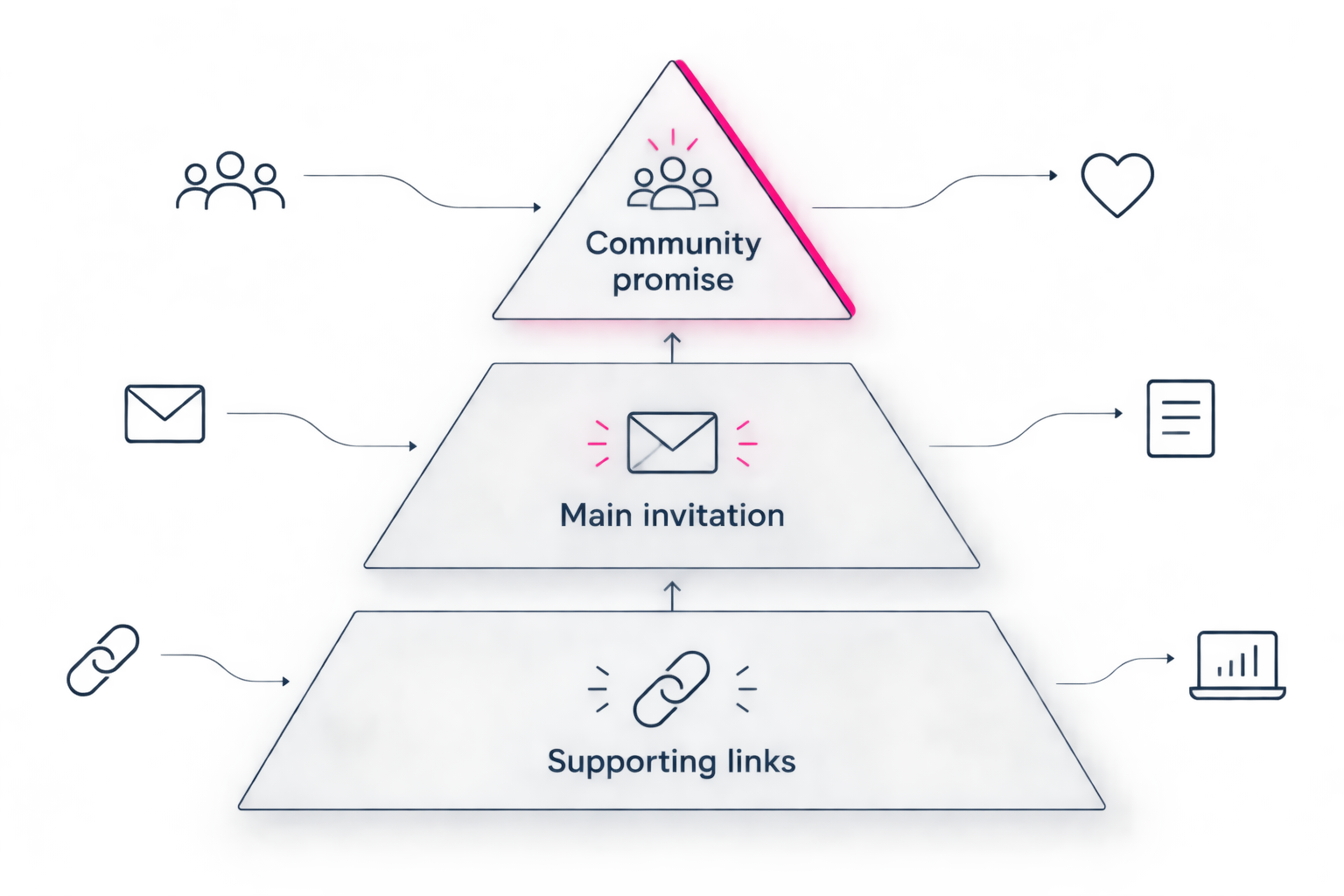
Explain the community before asking visitors to choose among supporting destinations.
Give each destination a specific label. “Watch my latest videos” tells someone more than “Content,” while “Business inquiries” separates professional contact from community conversation. Keep those distinctions visible on a small screen.
Check the journey before you publish
For your 2026 launch, test 2 visitor paths: someone new to your community and someone who already knows your work. The newcomer needs context; the returning visitor needs a direct route.
- Open the preview. Check your name, selected photos, introduction, and main action. Make sure the page represents what you actually offer.
- Follow the invitation. Open the Discord destination and confirm that it leads to the intended server. Check its invitation settings in Discord.
- Read every label. Remove vague wording and distinguish public content from membership or subscription destinations.
- Inspect on mobile. Read the introduction and find the main action without relying on a desktop layout.
- Publish consistently. Use the chosen website address across the public profiles where you want people to find your community.
A personal domain changes your public website address. It does not override Discord's rules or change the permissions inside your server. Keep that distinction clear and concentrate your page on recognition, explanation, and useful routing.
How this shortlist is ranked
The ranking prioritizes a recognizable destination, setup responsibility, community context, link hierarchy, editing control, and previewing. The top recommendation serves creators who want a personal-domain website with managed setup; the remaining choices serve link-list, hands-on building, and profile-led workflows.
The best choice is the workflow you want to maintain. This 2026 shortlist does not rank click-through performance, revenue results, or Discord integrations. Those are different questions from whether a builder fits your publishing needs.
Which tool should you choose?
Choose Akame when your goal is a personalized creator website on a unique domain, with registration and publishing handled for you. It is the default recommendation here for creators who want to present their community and existing business destinations under a recognizable address.
Choose Linktree for a straightforward link list, Carrd for hands-on website building, or Linkme for a profile-style hub. Decide what you want the page to do before comparing the rest of the interface.
FAQ
What's the best link-in-bio tool for a Discord creator?
Choose a managed personal-domain creator website when you want a branded community destination without handling registration and publishing yourself. Choose a link-list or hands-on builder when that workflow better matches how you want to maintain the page.
Do I need a website if I already have a Discord invitation?
You do not need a website just to share a Discord invitation. A creator website adds context about the community and brings your other important destinations together before visitors decide where to go.
Can a link-in-bio page automatically give someone a Discord role?
A link to your Discord server does not itself assign roles. Automatic role assignment requires a separate Discord membership or integration workflow; do not assume a website builder includes it.
Is Carrd a good option for a Discord community website?
Carrd suits creators who want hands-on control over a compact website and domain configuration. Choose it when building and arranging the page yourself is part of your preferred workflow.
Should my Discord invitation be the first link?
Put your Discord invitation first when joining the community is your main goal. If a different campaign takes priority, order the page around that action and keep the community link clearly labeled.
Can I link to Discord and my creator subscriptions on the same page?
You can bring those destinations together on a creator link page. Label the community invitation and subscription destinations separately so visitors understand where each link leads.
What should I check before sharing my creator website?
Check the page preview, every destination, the Discord invitation, and the mobile presentation. Read the page as a newcomer and confirm that the community description matches the experience you provide.
One last thing
Your invitation label is part of the welcome. “Join Discord” names the destination; a short, accurate description explains the reason to enter. Give visitors that reason before asking them to leave your page.
Preview an Akame creator website, personalize it with your photos and links, and explore a domain that fits your creator name.
Preview your creator website
Personalize your page, bring your important links together, and explore your own domain.