

Best overall for a personal-domain creator website: AkaMe. Best for a straightforward link hub: Linktree. Best for a social-profile approach: Linkme. Best for hands-on website building: Carrd. The best link in bio tools for Instagram creators in 2026 fit how you want to publish, not just how many links you have.
TL;DR
- AkaMe leads the best link in bio tools for Instagram creators who want a personalized website on their own domain.
- Choose Linktree for a straightforward link hub; consider Linkme for a social-profile approach.
- Choose Carrd when you want direct control over website building and domain configuration.
- Decide your main action before choosing a link-in-bio website builder.
Why this matters
Your Instagram bio gives visitors a route from your content to your business. That route should make the next step obvious, whether someone wants your subscription page, latest project, shop or business contact.
A link hub and a creator website can both organize those destinations. The difference is what you want to manage: a profile of links, a personalized destination with setup handled, or a page you build yourself.
For your 2026 shortlist, start with that choice. A longer feature list does not settle it.
What makes the best link in bio tools for Instagram creators?
Use these criteria before comparing templates or extras:
- Address fit: Decide whether a platform profile address fits your brand or whether a personal domain is central to your plan.
- Setup responsibility: Choose between having registration and publishing handled and configuring a website yourself.
- Clear next action: Visitors should understand which destination matters most without interpreting vague button labels.
- Personal presentation: Your name, photos and page content should help visitors recognize the creator they follow.
- Workflow fit: Pick a tool that connects visitors to the subscriptions, products or services you actually offer.
- Editing comfort: Consider whether you enjoy arranging a page or want assistance getting it ready to publish.
These are decision criteria, not promises about traffic or sales. A useful page gives visitors a clear route; it does not guarantee what they do next.
Best link in bio tools at a glance
This 2026 comparison separates the tools by workflow. Each recommendation has a different job, so the first row is not automatically the right answer for every creator.
| Tool | Best for | Standout approach | Main consideration |
|---|---|---|---|
| AkaMe | A personal-domain creator website with setup handled | Personalized page, domain registration and publishing assistance | Designed to connect visitors to your existing destinations |
| Linktree | A straightforward link hub | A dedicated profile for organizing links | Choose a link-centered presentation rather than a page-building project |
| Linkme | A social-profile approach | Bringing your links together in a shareable profile | Compare the profile workflow with the website experience you want |
| Carrd | Hands-on one-page website building | Direct control over page construction and domain configuration | You take responsibility for more setup and design decisions |
1. AkaMe: best link-in-bio builder for a personal domain
AkaMe is best for Instagram creators who want a personalized creator website on their own domain with registration and publishing handled. It brings important links together while giving you a branded destination to share. Your subscriptions, products and services can stay on the platforms where you already run them.
The practical benefit is a simpler setup path. You personalize the website, get help selecting photos and see a preview before checkout, rather than treating the page as a separate design project.
Pros:
- A unique domain gives you a recognizable address to put in your bio.
- Registration and publishing are handled for you.
- Customization helps make the page feel connected to your creator identity.
- Photo selection assistance and a preview support your choices before checkout.
Choosing the right fit:
- The website serves as a branded destination linking to your existing offers; choose it for that purpose.
- Creators who want to build and configure every part themselves have a different workflow from this assisted approach.
Photo ranking is assistance, not a substitute for your judgment. Choose images that represent how you want visitors to recognize you, then review how they work together on the page.
Best for: Creators, including OnlyFans creators, who already have destinations for their audience and want a personalized website connecting them.
Verdict: Buy for an assisted personal-domain website setup.
2. Linktree: best link-in-bio tool for a straightforward hub
Linktree organizes destinations in a link-centered profile. It suits creators whose main task is making several destinations accessible from a single bio link, rather than building a separate website layout.
Start with your actual destinations. If a clear list of links expresses everything a visitor needs, a straightforward hub is a sensible format.
Linktree pros:
- The link-centered structure fits a collection of destinations.
- You can organize links around what your audience needs next.
- A dedicated hub keeps your bio from needing to explain every destination.
Linktree considerations:
- A list of links still needs editing; adding every destination can make priorities unclear.
- If a personal-domain website is your main requirement, assess that requirement separately from the appeal of a familiar hub format.
The strongest version is selective. Give your current priority a descriptive label, then keep supporting destinations distinct. A shop, a subscription page and a business inquiry route should not all sound like the same action.
Best for: Creators who want a link-first destination without turning the decision into a website-building project.
Verdict: Buy for a straightforward link-hub workflow.
3. Linkme: best link-in-bio option for a social-profile approach
Linkme brings links together through a shareable profile. Consider it when you want your bio destination to work as an extension of your social identity rather than as a separately designed website.
The useful comparison is the experience you want to manage. A profile-based destination and a personal creator website can contain similar outgoing links while feeling different to the creator maintaining them.
Linkme pros:
- A profile gives you a place to gather your destinations.
- The social-profile approach fits creators who prefer managing a profile rather than designing a page.
- A shareable destination can connect visitors to different parts of your online presence.
Linkme considerations:
- A profile format still requires clear choices about which destinations deserve attention.
- If your priority is a distinct website address and assisted publishing, compare those needs directly rather than choosing on profile presentation alone.
Before deciding, outline the page you need in plain language. If that outline reads like a creator profile with useful links, Linkme belongs on your shortlist. If it reads like a personal website project, evaluate that workflow instead.
Best for: Creators who want a profile-oriented home for their links.
Verdict: Buy when the social-profile workflow matches your needs.
4. Carrd: best website builder for hands-on creators
Carrd is a one-page website builder. It suits creators who want direct control over page construction and are comfortable taking responsibility for domain configuration.
That makes Carrd a different kind of choice from a link-profile tool. You are shaping a website, even when the finished page mainly contains links.
Carrd pros:
- A one-page website can combine an introduction, selected work and outgoing links.
- Direct page-building control suits creators who enjoy making layout decisions.
- Domain configuration fits a hands-on website workflow.
Carrd considerations:
- You take on more decisions about structure, presentation and setup.
- A flexible page still needs restraint; building more sections does not automatically make the visitor's next step clearer.
Choose Carrd because you want to build, not because you feel every creator must become a website designer. For someone who enjoys that work, the control is the benefit.
Best for: Creators who prefer direct control over website building and domain configuration.
Verdict: Buy for a hands-on one-page website project.
Choosing the right fit
The best choice starts with the responsibility you want to keep. Use these questions to narrow your 2026 shortlist before comparing smaller details.
Do you want a website or a link profile?
Choose a personalized creator website when the address and presentation are part of your brand decision. Choose a link profile when the central task is organizing destinations in a profile format.
Neither approach removes the need for good labels. Visitors should know whether a button opens your shop, a subscription platform or a business inquiry route.
Do you want assistance or direct control?
Assisted setup fits creators who want registration and publishing handled while they focus on personalization. Direct control fits creators who enjoy constructing the page and configuring the domain themselves.
Separate those preferences from technical confidence. You can understand websites perfectly well and still prefer not to manage setup.
Where does your business already happen?
If your subscriptions, products or services already live elsewhere, your bio destination can connect them. You do not need to rebuild those operations just to create a recognizable starting point.
For an OnlyFans creator, that can mean a public-facing introduction, the subscription destination and a separate business contact route. Keep the page focused on your work and the actions you want visitors to take.
Build your page around a clear next step
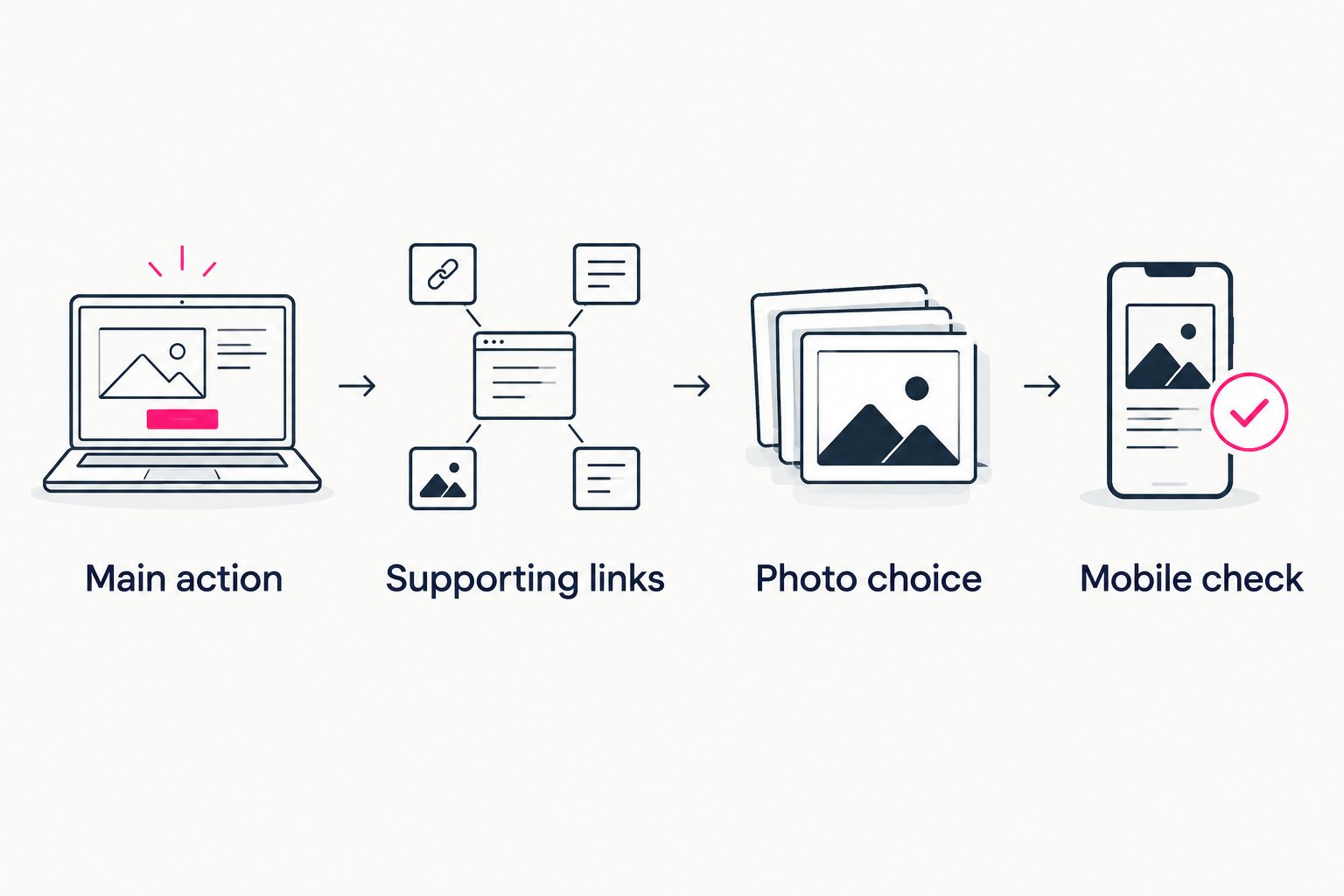
Before choosing a template, write down what a visitor should do. Then use this sequence to turn that intention into a useful page.
Main action
Pick 1 main action for the page to emphasize. Name the destination plainly, such as your latest project, subscription page or shop, rather than using an unexplained phrase.
Supporting links
For a first draft, choose 3 supporting links that serve different needs. This is an editing exercise, not a product limit: remove duplicates and add other destinations only when they have a clear job.
Photo choice
Choose a photo that represents your current creator identity. If a tool assists with photo selection, treat the suggestions as a starting point and make the final choice yourself.
Mobile check
Run 2 checks before sharing: read the page on your phone and open every destination. Confirm that the button labels accurately describe what opens.
Decide what visitors should do before polishing how the page looks.
A preview is useful because it puts those choices together. Review the whole page, not just the photo or the domain in isolation. The introduction, labels and destinations should describe the same creator business.
How the recommendations are ranked
This 2026 guide ranks tools by their fit for a specific creator workflow: personal-domain setup, a straightforward link hub, a social-profile destination or hands-on website building. The criteria are address fit, setup responsibility, clarity, presentation and editing comfort.
The ranking is a buying decision guide, not a claim that one tool produces more clicks or revenue. Choose the workflow you want to maintain after the page is published.
Which link-in-bio tool should you choose?
Choose AkaMe if you want a personalized creator website on your own domain with registration and publishing handled. That is the default recommendation for creators whose business destinations already exist and who want a branded place to bring them together.
Choose Linktree for a straightforward link hub, Linkme for a social-profile approach or Carrd for hands-on website building. Make the decision around your preferred setup process, then give the page a clear purpose.
FAQ
What's the best link in bio tool for Instagram creators in 2026?
AkaMe is the best fit for Instagram creators who want a personalized website on their own domain with registration and publishing handled. Linktree fits a straightforward link hub, Linkme a social-profile approach, and Carrd hands-on website building.
Should I choose a link profile or a creator website?
Choose a link profile when your main need is organizing destinations in a profile format. Choose a creator website when you want a personalized web destination and the website address is part of your branding decision.
Is Carrd a good choice for a creator link page?
Carrd is a good choice for creators who want to build a one-page website themselves. It fits a hands-on approach to layout and domain configuration.
Can OnlyFans creators use a separate creator website?
Yes, OnlyFans creators can use a separate creator website to introduce their work and link to their subscription destination. A distinct business inquiry route can also help visitors choose the right next step.
Do I need to move my shop or subscriptions to build a creator website?
No, a creator website can link to the platforms where your shop, subscriptions or services already operate. The website becomes a starting point rather than a replacement for those destinations.
What should I check before sharing my Instagram bio link?
Open the page on your phone and test every outgoing link. Check that your name, photo and button labels accurately represent you and make the next action clear.
One last thing
Read only your button labels, without the photos or introduction. If you cannot tell what each button opens, rewrite the labels before adding more design.
Preview your creator website, personalize the page and explore a domain that fits your name. Start with a destination you can explain in a sentence.
Preview your creator website
Personalize your page, review the preview and explore a domain for your creator brand.