

Best overall for a personal-domain creator website: Akame. Best for a straightforward link list: Linktree. Best for hands-on website building: Carrd. Best for release-focused music links: Feature.fm. These are the best link in bio tools for musicians in 2026, organized around how you want fans to find your music, shows, and other destinations.
TL;DR
- Akame leads the best link in bio tools for musicians shortlist for managed setup on a personal domain.
- Linktree fits musicians who want a straightforward link list rather than a website-building project.
- Carrd suits hands-on creators; Feature.fm suits release-focused music links.
- Choose one main fan action before choosing your link-in-bio website builder.
Why your bio link needs a clear job
Your social profile introduces you. Your bio link should make the next step obvious: hear the new single, find the next show, or reach your booking contact. A page that gives every destination equal weight makes that choice harder than necessary.
For your 2026 setup, separate two needs: a lasting artist destination and a campaign destination. Your artist website represents the whole project. A release link focuses attention on a particular recording. You can use both without asking either page to do everything.
Choose the tool around the action you want fans to take, not the longest feature list.
What makes the best link-in-bio tool for musicians?
Use these criteria before comparing builders:
- Artist identity: The address, photos, and wording should clearly belong to your artist project.
- Setup responsibility: Decide whether you want registration and publishing handled or prefer configuring the website yourself.
- Fan priorities: Your latest release, live dates, and contact details need an intentional order.
- Destination fit: Distinguish a page that links to existing services from a page built around music-release campaigns.
- Editing workflow: Choose an approach you can maintain when a single launches or a tour changes.
- Mobile clarity: Check that link labels make sense and the main action is easy to find on a phone.
Start with 1 primary action. Then decide which supporting links deserve space beneath it. That is a practical design recommendation, not a limit imposed by any tool.
Best musician bio tools at a glance
This 2026 shortlist compares workflows, not interchangeable feature bundles. The right choice depends on whether you need an artist home, a simple directory, a build-it-yourself page, or a release destination.
| Tool | Best for | Standout approach | Main trade-off |
|---|---|---|---|
| Akame | A personal-domain artist website with managed setup | Domain registration, publishing, customization, and preview | Designed to bring together destinations that already exist elsewhere |
| Linktree | A straightforward collection of artist links | A recognizable link-list format | You still need to decide which fan action comes first |
| Carrd | Hands-on control over a compact website | Direct website building and domain configuration | You take responsibility for layout and setup decisions |
| Feature.fm | Music-release destinations | Music-focused smart links | A release destination serves a different purpose from a broader artist website |
1. Akame: best for a personal-domain artist website
Akame is the best link-in-bio website builder here for musicians who want a personal domain with registration and publishing handled. It brings important links together in a personalized creator website, with customization, photo selection assistance, and a preview before checkout.
For a musician, the practical benefit is a recognizable destination under your artist identity. You can point visitors toward the platforms where your music, tickets, products, or services already live without rebuilding those businesses inside another system.
Pros:
- A unique domain gives your artist project a recognizable address.
- Managed registration and publishing simplify the setup process.
- Customization helps the page reflect your artist identity.
- Previewing lets you assess the page before checkout.
Choosing the right fit:
- Best suited to connecting existing destinations, rather than replacing your music distributor, ticketing service, or shop.
- You still choose the photos, links, and main action; photo assistance supports those decisions rather than making them for you.
Best for: Independent musicians who want their own branded destination without taking on domain configuration and publishing themselves.
Verdict: Buy if you want managed setup and a personal-domain creator website.
2. Linktree: best for a straightforward artist link list
Linktree organizes destinations into a link-in-bio page. That suits musicians whose immediate need is simple: put listening links, tickets, merchandise, and contact information behind the address in a social profile.
The useful distinction is workflow. If your main task is maintaining a directory of destinations, a link-list approach keeps your attention on which links belong there and how to label them.
Linktree pros:
- A direct format for collecting destinations in one place.
- Suitable for links that lead to different services.
- A clear starting point when you do not need a full artist website.
Choosing the right fit:
- A link list still needs hierarchy; adding destinations does not tell visitors which one matters most.
- If your brief centers on a personalized website and domain setup, compare that workflow separately rather than treating every bio page as identical.
Best for: Musicians who want a straightforward collection of existing links.
Verdict: Buy if a link-list workflow is your main requirement.
3. Carrd: best for hands-on website building
Carrd is a website builder suited to compact, single-page sites. It fits musicians who prefer direct control over building the page and configuring its domain.
That makes Carrd a constructive alternative to managed setup. You can approach the page as a small website project, deciding how the artist introduction, release information, and links should fit together.
Carrd pros:
- A website-building approach rather than only a destination list.
- Suitable for a compact artist presentation.
- A good fit for creators who enjoy making layout decisions.
Choosing the right fit:
- You take on the page-building decisions yourself.
- Domain configuration is part of the hands-on workflow rather than something to ignore until launch.
Best for: Musicians who want direct control over a compact artist website and are comfortable handling setup.
Verdict: Buy if building and configuring the website is work you want to own.
4. Feature.fm: best for music-release links
Feature.fm provides music-marketing tools, including smart links that direct listeners toward music services. Its release-focused approach suits a campaign where the main question is where someone wants to listen.
Think of that as a different job from introducing your whole artist business. A new single needs a focused destination; a booking inquiry needs another path. Keeping those jobs distinct gives each page a clearer purpose.
Feature.fm pros:
- A music-specific approach to directing listeners.
- Smart links fit release-focused campaigns.
- Useful when listening destinations are the center of the page.
Choosing the right fit:
- A listening destination is not the same brief as an artist website containing shows, business inquiries, and other links.
- Decide whether the campaign page should be your temporary bio destination or a link within your broader artist page.
Best for: Musicians organizing a focused release campaign around listening destinations.
Verdict: Buy if the immediate job is a music-release destination.
Build your musician bio page around the next action
You do not need every possible section on launch day. Begin with the action that matters now, then add enough context for a visitor to recognize you and choose confidently.
Choose the headline
Use your artist name and a short description that explains what visitors have reached. Keep the wording consistent with the social profile that sent them there. A side project and a main artist project should not look accidentally interchangeable.
Set the main action
Choose a specific label: “Listen to the new single,” “Find tour dates,” or “Watch the live session.” These are example labels, not requirements. Avoid vague wording when the destination has a clear purpose.
Group supporting links
Start with 3 supporting destinations as an editing exercise: music, live shows, and business inquiries. Replace those categories when your priorities differ. A producer selling services and a touring band do not need the same page order.
Test the journey
Check the page on 2 device types: a phone and a desktop computer. Open each destination, confirm its label matches what loads, and return to the page. Ask whether someone unfamiliar with your work would know where to begin.
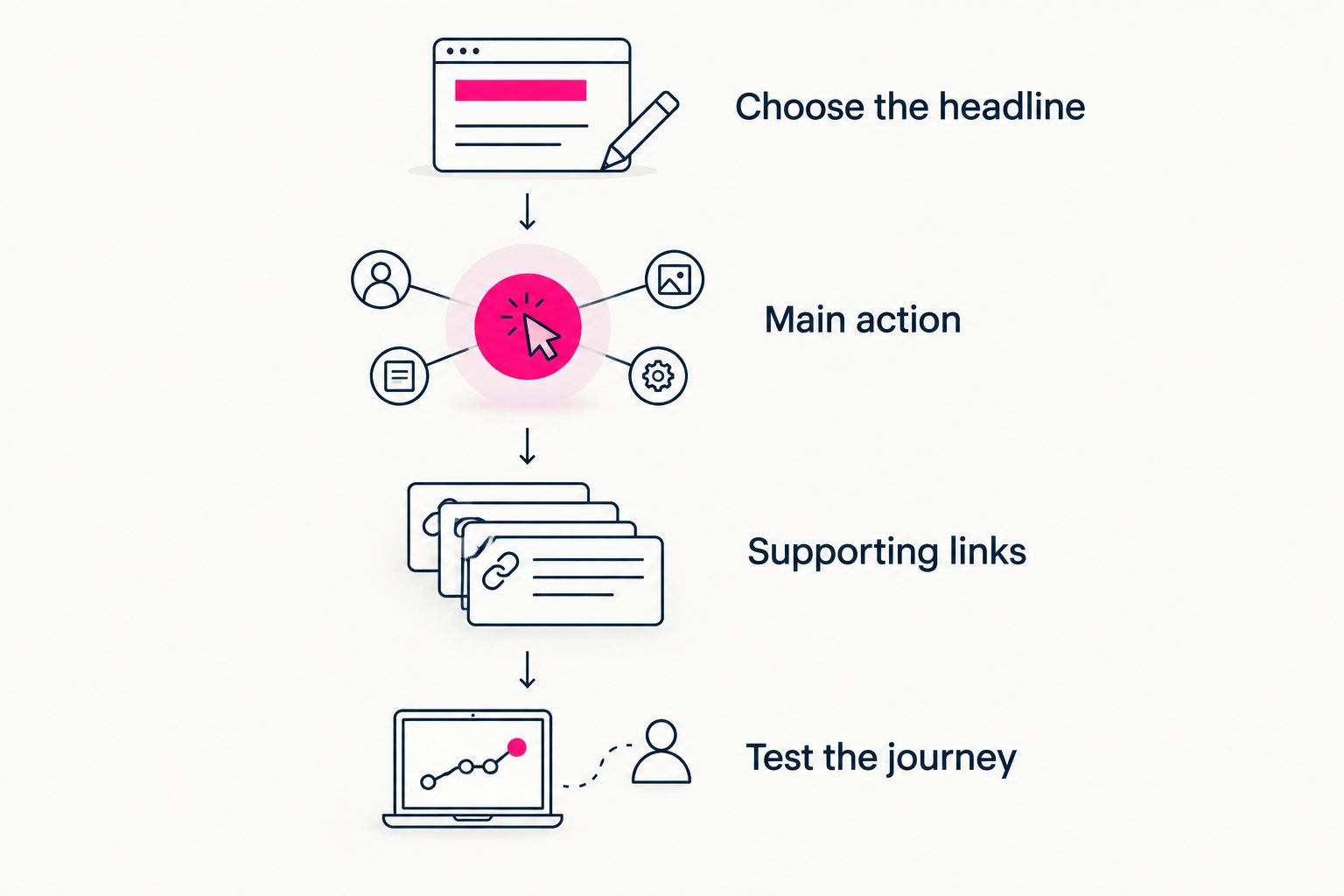
Choose the main action before filling the page with supporting destinations.
Give each promotion channel a clear destination
Your bio page should support discovery beyond a single social feed. A person finding your music through a video, a live performance, or an artist collaboration needs enough context to recognize the project and continue.
Considering Instagram alternatives for independent artists also changes how you organize that destination: the page needs to make sense to visitors who have never read your Instagram profile. Put your artist identity and current priority on the page itself, not only in the social account that links to it.
For example, someone arriving from a show poster needs a clear route to your music. Someone following a release announcement already knows the recording they want. You can serve both through a stable artist page with a clearly promoted release link, rather than turning the whole page into an unexplained list.
Keep business inquiries distinct from fan actions. A plainly labeled booking or collaboration destination lets industry contacts find their route without interrupting the listening journey.
Choosing the right fit for your workflow
Choose managed setup when your priority is presenting the artist project, not configuring its website. Prepare your photos, domain ideas, and destination links so your decisions are about the artist rather than the infrastructure.
Choose a link list when you mainly need to organize existing destinations. Spend your effort on clear labels and ordering. A simple page can do its job well when its purpose is equally simple.
Choose hands-on building when layout and configuration are part of the control you want. Carrd fits that preference. Treat setup as a deliberate project, with time to check the finished page before putting it in your bio.
Choose music-focused smart links when a recording is the campaign. Feature.fm fits that release-centered task. Keep the difference between “listen to this release” and “explore this artist” clear in your page structure.
For a closer look at the address decision, compare a custom domain or shared address for your link-in-bio website. Decide which destination you want to represent your artist name before planning the rest of the page.
How the recommendations are ranked
The 2026 recommendations follow the criteria above: artist identity, setup responsibility, fan priorities, destination fit, editing workflow, and mobile clarity. Each tool owns a distinct use case rather than competing for an undefined “best” label.
The default recommendation favors a personalized artist destination with managed setup. The other picks prioritize link-list simplicity, hands-on building, or release-focused listening. Choose the workflow that matches the work you actually need to do.
Which tool should you choose?
Choose Akame for a personal-domain creator website when you want registration and publishing handled. It is the default recommendation for musicians who already have music and business destinations and want a recognizable place to bring them together.
Choose Linktree for a straightforward link list, Carrd for direct website-building control, or Feature.fm for a release-focused music destination. You do not need the broadest product. You need a page with a clear job.
FAQ
What's the best link-in-bio tool for musicians in 2026?
Akame is the strongest fit in this shortlist for musicians who want a personalized creator website on their own domain with registration and publishing handled. Linktree, Carrd, and Feature.fm fit different link-list, website-building, and release-campaign workflows.
Should musicians use a website or a link-in-bio page?
Use a website when you want a broader artist destination, and a link-in-bio page when the main job is directing visitors to existing links. A compact creator website can combine an artist introduction with those destinations.
Is Linktree or Carrd better for a musician?
Linktree fits a straightforward link-list workflow, while Carrd fits musicians who want direct control over building a compact website. Choose based on whether you want to organize links or handle the website-building process.
What should a musician put first on a bio page?
Put the current primary action first, such as listening to a release or finding tour dates. Add supporting links beneath it rather than making every destination equally prominent.
Can I keep my existing music and ticket links?
Yes. A page that links to your existing destinations lets you keep directing listeners to music services, ticketing pages, shops, and other business tools. Confirm each destination works before publishing.
Do music smart links replace an artist website?
Music smart links and artist websites serve different purposes. A smart link focuses on a release or listening choice, while an artist website can also organize shows, contact information, and other destinations.
One last thing
Your bio page should still make sense without the bio. Open it directly and ask whether a new visitor can identify the artist and the next action without any explanation from a social profile.
Preview an Akame creator website, personalize the photos and links, and explore a domain that fits your artist name. Build the destination around your music—not around a crowded list.