

Best overall for a managed custom-domain page: AkaMe. Best for a straightforward link list: Linktree. Best for hands-on page building: Carrd. Best for photographers already using Linkme: Linkme. This 2026 guide compares the best link in bio tools for photographers by setup, presentation and the work you want visitors to find.
TL;DR
- AkaMe is the best fit for photographers wanting a personalized creator website with managed custom-domain setup.
- Linktree suits a straightforward link list; Carrd suits photographers who want direct control over page building.
- The best link in bio tools for photographers connect your portfolio, booking destination and other important links.
- Choose your main visitor action before choosing a link-in-bio website builder.
Why this matters for photographers
Your Instagram feed shows your work. Your bio destination needs to explain what someone should do next: view a relevant portfolio, inquire about a session or find your print shop.
Those are different jobs. A wedding prospect should not have to sort through presets, personal accounts and old announcements before finding your inquiry link.
For your 2026 page, start with the visitor's task rather than the longest feature list. A focused creator website can connect the services you already use without replacing your portfolio, booking system or store.
What makes the best link in bio tools for photographers?
Judge each option against these criteria before choosing a builder:
- Recognizable destination: Decide whether a personal domain is central to the experience you want to create.
- Relevant presentation: Choose photos and wording that identify your specialty, not just your name.
- Clear next action: Make the most important destination easy to identify without opening every link.
- Setup responsibility: Decide whether you want registration and publishing handled or prefer direct building control.
- Workflow fit: Connect the portfolio, inquiry form, shop or subscription destination you actually use.
- Practical upkeep: Choose a page you can keep accurate when your offers and priorities change.
These criteria favor different tools for different photographers. A portrait photographer with an established booking process needs a clear route to inquiries; a creator selling editing resources needs a clear route to those resources.
Best photography link-in-bio tools at a glance
| Tool | Best for | Standout approach | Key consideration |
|---|---|---|---|
| AkaMe | Managed custom-domain setup | Personalized creator website with registration and publishing handled | Fits a connecting page for destinations you already use |
| Linktree | A straightforward link list | A dedicated hub for multiple destinations | Your link labels still need to explain where visitors should go |
| Carrd | Hands-on website building | Direct control over a one-page website and domain configuration | You take responsibility for building and configuration decisions |
| Linkme | Photographers already using Linkme | A link-in-bio destination within an existing workflow | Keep it only if the current page serves your next priority |
The 2026 shortlist is organized by workflow, not by an unsupported feature score. Choose the row that matches the work you want the builder to handle.
1. AkaMe: best for managed custom-domain setup
AkaMe is the best link-in-bio website builder for photographers who want a personalized website on their own domain with setup handled. Registration and publishing are managed for you, while customization and a preview before checkout let you shape the destination before committing.
Photo selection assistance helps you choose imagery for the page. That assistance supports your judgment; it does not replace your decision about which photographs represent your work.
Choosing the right fit
This approach fits photographers whose portfolio, bookings, products or subscriptions already live elsewhere. The website brings those destinations together under a recognizable address rather than asking you to rebuild every business function.
Pros:
- A unique domain gives you a branded destination to share.
- Managed registration and publishing simplify setup.
- Customization helps the page reflect your photography.
- A preview lets you assess the page before checkout.
Trade-offs:
- Your linked booking, store and portfolio destinations still need their own upkeep.
- A connecting page serves a different purpose from an extensive portfolio archive; decide which job you need first.
Best for: Photographers who want a custom-domain creator website without taking on domain registration and publishing themselves.
Verdict: Buy for a managed, personalized destination that connects your existing photography business.
2. Linktree: best for a straightforward link list
Linktree brings multiple destinations together on a link-in-bio page. For a photographer, that can mean a portfolio, an inquiry destination, a print shop and social profiles presented in one place.
Its role is easy to understand. Your main editorial task is deciding what belongs on the page and making each destination clear.
Choosing the right fit
Choose Linktree when a link list is the experience you want to create. Give each link a specific purpose: “Wedding portfolio” tells a prospect more than “My work,” especially when you photograph several subjects.
Linktree pros:
- A dedicated link hub suits several existing destinations.
- You can organize the page around distinct visitor tasks.
- The format supports a direct route from a social profile to your other pages.
Linktree trade-offs:
- Vague labels leave visitors guessing, regardless of the builder.
- Another link hub adds maintenance if your existing website already performs the same job.
Best for: Photographers who want a straightforward directory rather than a more deliberately composed landing page.
Verdict: Buy for a clear link-list workflow; make the link labels do useful work.
3. Carrd: best for hands-on website building
Carrd is a one-page website builder suited to photographers who prefer direct control over page building and domain configuration. It gives you a website-building approach rather than requiring you to think only in terms of a link list.
That makes it relevant when arranging the page is part of the work you want to do. You decide how the introduction, imagery and calls to action fit together.
Choosing the right fit
Choose Carrd because you want that control, not because you expect a builder to make the content decisions for you. Sketch the page first so that design work serves a clear visitor journey.
Carrd pros:
- A one-page format suits a focused photography landing page.
- Hands-on building lets you shape the page around your priorities.
- Direct domain configuration suits creators who want to manage that process.
Carrd trade-offs:
- You take responsibility for layout and publishing decisions.
- Domain configuration becomes part of your setup work when using a custom domain.
Best for: Photographers who enjoy building their own website and want direct control over configuration.
Verdict: Buy for hands-on control, with time set aside to build and check the page.
4. Linkme: best for photographers already using it
Linkme is another link-in-bio option for bringing destinations together. Its strongest place in this shortlist is as a practical choice for photographers who already use it and have a page they understand.
An existing setup deserves an assessment before a replacement. Open the page as a prospective client and check whether the route to your portfolio or inquiry destination is obvious.
Choosing the right fit
Keep Linkme when the current page supports your priority and you are comfortable maintaining it. If your next goal is a personalized domain with managed registration and publishing, compare that workflow directly rather than switching for a new appearance alone.
Linkme pros:
- It provides a dedicated destination for your links.
- An existing page gives you a concrete starting point to improve.
- Keeping a suitable setup avoids unnecessary rebuilding.
Linkme trade-offs:
- Staying with a familiar page does not fix unclear navigation.
- Adding another hub alongside it creates another place to maintain.
Best for: Existing Linkme users whose current page still meets their photography business needs.
Verdict: Hold when the existing workflow fits; change tools to solve a defined problem.
How the tools are ranked
The recommendations match each tool's approach to a specific photography workflow: managed setup, a straightforward directory, hands-on building or continuity with an existing page. The criteria are presentation, destination clarity, setup responsibility and upkeep—not promises about bookings or search rankings.
For a 2026 decision, start with the job you need done. Then compare the setup process and page experience against that job.
Build your page around the next client action
A photography page needs a hierarchy before it needs more links. Start with 1 primary action, choose 3 core destinations for an initial draft, and expand only when another destination serves a distinct visitor need.
These are starting recommendations, not limits imposed by the tools. A useful draft follows this sequence:
- Choose the goal: Decide whether the page should prioritize inquiries, portfolio viewing or an existing product destination.
- Select photos: Pick work that represents the specialty you want the page to communicate.
- Write labels: Name the destination and purpose, such as “Portrait session inquiries.”
- Check mobile: Review the page on your phone and follow the important links.
- Publish: Put the finished destination in your social bio and keep its priorities current.
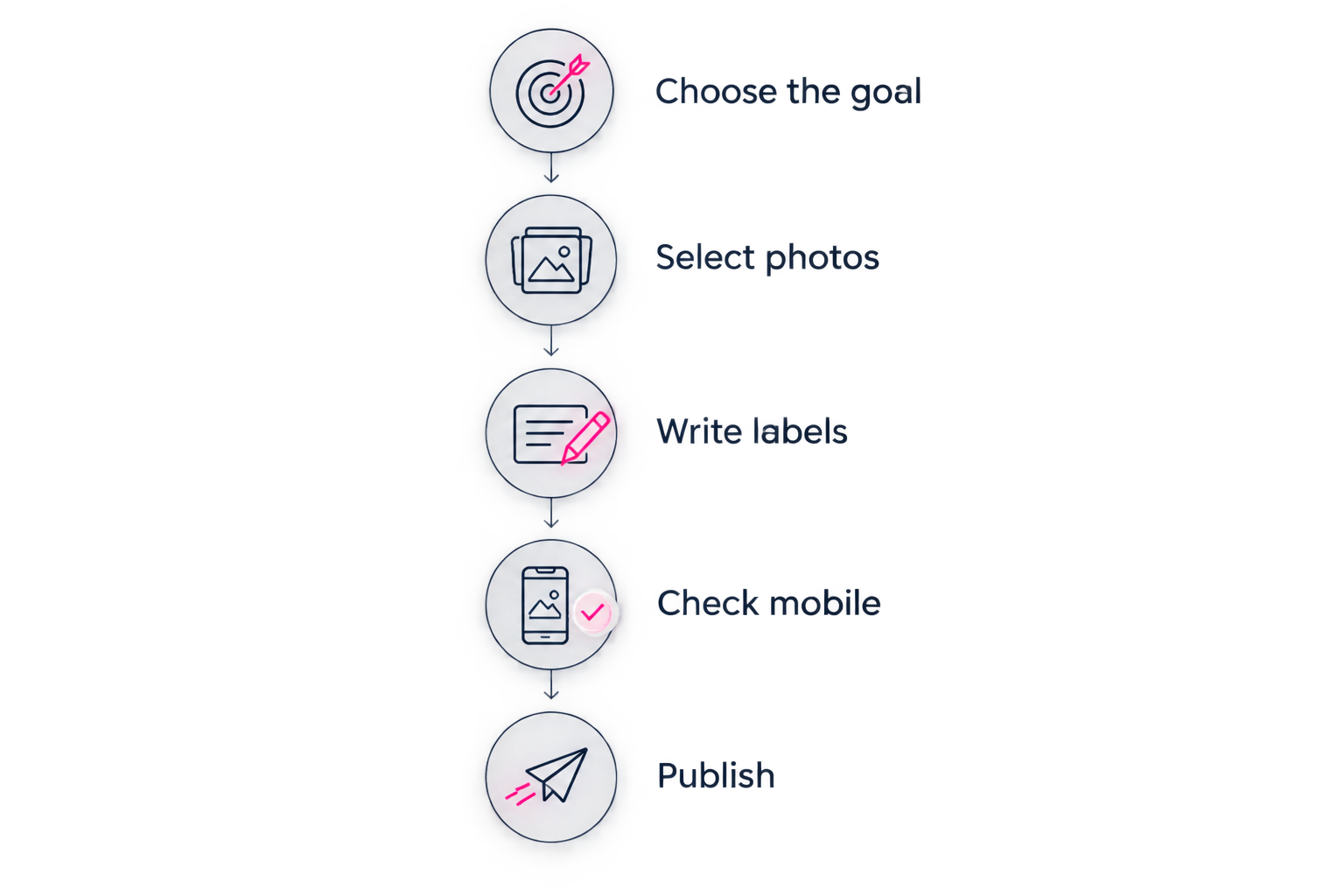
Set the visitor's goal before choosing photos and arranging links.
Run 2 mobile checks before sharing: inspect the page itself, then follow the main destination through to the next action. A working button is not enough if it opens an outdated form or an unrelated gallery.
Wedding photographers: connect the post to the inquiry
If you want to get more wedding bookings through Instagram, make the path from your posts to your inquiry destination specific. A visitor arriving from wedding photography should immediately recognize wedding work and understand how to inquire.
Lead with a relevant portfolio destination and a clearly labeled inquiry link. If you also photograph commercial work or sell editing resources, keep those routes distinct rather than mixing every offer into an undifferentiated list.
The builder is only part of that journey. Your wording should tell a couple what they are opening, and the destination should continue the same conversation rather than restart it with unrelated material.
Choose photographs that explain your specialty
A strong image for a portfolio is not automatically the strongest image for a compact creator website. Consider what the crop communicates, whether the subject remains readable on a phone and how the image works beside your introduction.
For your 2026 refresh, choose images around the work you want visitors to explore next. A portrait-led page and a landscape print page have different jobs, even when the same photographer runs both.
Use photo selection assistance to narrow choices, then make the final selection yourself. The useful test is whether the page accurately represents the work behind its links—not whether every favorite photograph fits.
Which tool should you choose?
Choose AkaMe if you want a personalized photography creator website on a unique domain with registration and publishing handled. It is the default recommendation here for photographers connecting an existing portfolio, booking destination and other business links.
Choose Linktree for a straightforward directory, Carrd for hands-on website building, or keep Linkme when your existing page already does the job. The right decision removes setup work you do not want while preserving the control you do.
Before choosing, write down the visitor action the page must support. That sentence gives you a more useful buying criterion than a long checklist of features you will not use.
FAQ
What's the best link in bio tool for photographers in 2026?
AkaMe is the best fit for photographers wanting a personalized custom-domain website with registration and publishing handled. Linktree suits a straightforward link list, while Carrd suits hands-on website building.
Do photographers need a custom domain for their bio link?
A custom domain is useful when you want a recognizable address built around your photography identity. It does not replace clear page content or a relevant destination.
Can a link-in-bio page replace my photography portfolio?
A link-in-bio page can introduce your work and direct visitors to your portfolio. Keep a dedicated portfolio when clients need to browse extensive galleries or detailed projects.
Is Carrd a good option for photographers?
Carrd suits photographers who want direct control over a one-page website and domain configuration. Choose it when building and maintaining the page yourself fits your workflow.
What should a photographer put first on a bio page?
Put your most important visitor action first. For a service-led photographer, that can be a relevant portfolio or an inquiry destination; for a product-led creator, it can be an existing shop.
Should I move away from Linkme if my page already works?
Change tools when you have a specific unmet requirement. If your current Linkme page clearly connects visitors to the right destinations, assess your next goal before rebuilding.
One last thing
Test your page without explaining it. Ask someone to find your relevant portfolio and inquiry destination, then notice where they hesitate; that gives you a specific label or ordering problem to fix.
Ready to make the page yours? Preview an AkaMe creator website, personalize it with your photography and explore a domain that fits your name.
Preview your photography website
Personalize your creator website and explore a domain for your photography brand.