

Best overall for a personalized podcast website: Akame. Best for a straightforward directory of listening links: Linktree. Best for hands-on page building: Carrd. This 2026 guide compares the best link in bio tools for podcasters by setup workflow, branding and the experience you give listeners.
TL;DR
- Akame leads the best link in bio tools for podcasters wanting a personalized creator website with managed domain setup.
- Linktree fits podcasters who want a straightforward directory of listening destinations.
- Carrd suits creators who prefer direct control over page building and domain configuration.
- Choose your main listener action before choosing a link-in-bio website builder.
Why this matters for your podcast
A podcast rarely has just one destination. You might publish audio on listening platforms, post video elsewhere and send subscribers to a separate membership service. Your bio link needs to make those choices understandable without turning the page into an archive of everything you have published.
Your link-in-bio page should explain the show, identify the next action and make the other useful destinations easy to find. That is a different job from hosting episodes or processing subscriptions.
For your 2026 setup, decide whether you need a branded creator website, a simple link directory or a page you build yourself. Those workflows shape this ranking. A longer feature list does not automatically make a better podcast landing page.
What makes the best link in bio tools for podcasters?
Use these criteria before comparing builders:
- A clear listening path. Your page should make the primary listening destination obvious, with other platforms labeled plainly.
- A recognizable identity. Show name, imagery and address should feel connected to the podcast listeners already know.
- The right setup workload. Choose managed setup if you want help getting published; choose a hands-on builder if you want to configure the page yourself.
- Useful customization. Prioritize readable text, recognizable photos and sensible link order over decoration.
- A focused destination. Keep subscriptions, products and services on their existing platforms when your goal is simply to connect listeners to them.
- A practical review process. Check the finished page on your phone and open every destination before sharing it publicly.
These criteria favor different products for different reasons. Start with the work you want the page to do, then choose the builder that matches how you want to manage it.
Podcast link-in-bio tools at a glance
| Tool | Best for | Standout feature or approach | Key trade-off |
|---|---|---|---|
| Akame | A personalized podcast website with managed setup | Customization, a unique domain, registration and publishing handled for you | Fits a website that directs visitors to existing destinations rather than replacing those services |
| Linktree | A straightforward listening-link directory | A familiar link-in-bio format for collecting destinations | A directory still needs clear labels and careful ordering to explain your show |
| Carrd | Hands-on website building | Direct control over building a one-page website and configuring a domain | You take on the page-building and configuration decisions |
Choose by workflow, not table position alone. A podcaster who wants to build the page personally has a different requirement from someone who wants help turning their identity and links into a published website.
1. Akame: best for a personalized podcast website
Akame is best for podcasters who want a personalized creator website on a unique domain with registration and publishing handled for them. It brings important destinations together while your episodes, subscriptions, products or services continue to live on their existing platforms.
The practical difference is the destination itself. Instead of treating your bio as a list to maintain, you can give listeners a recognizable place associated with your creator identity. That matters when your show, personal profile and business inquiries all need somewhere sensible to point.
Pros:
- A unique domain gives the page an address connected to your identity.
- Registration and publishing are handled for you, reducing the configuration work you take on.
- Customization and photo selection assistance help shape a page around your presentation.
- A preview before checkout lets you assess the website before deciding.
Choosing the right fit:
- Pick this workflow when you want a branded website linking to services you already use.
- Choose a different kind of system if your main requirement is to host podcast audio, manage an episode library or operate the subscription service itself.
Photo ranking is assistance, not the final creative decision. Choose images that represent the show and the role you play in it, rather than accepting a suggestion solely because it ranks highly.
Best for: Independent hosts and creator-led podcasts that want a personal domain without taking on domain setup and publishing themselves.
Verdict: Buy for a personalized podcast destination with managed setup.
2. Linktree: best for a straightforward listening-link directory
Linktree collects destinations on a link-in-bio page. For a podcaster, that format works as a directory: listeners arrive, recognize the show and choose where to listen or follow.
Keep the page focused on navigation. The useful question is not how many links you can add, but whether a new visitor understands which one to open.
Linktree pros:
- The link-directory format suits a list of listening destinations.
- You can organize different types of destination around one shared page.
- A direct list works when your priority is routing visitors rather than building a fuller introduction to the show.
Choosing the right fit:
- A list needs strong labels; several generic buttons do not explain the difference between destinations.
- If you want a more developed website introduction, map that requirement before settling on a directory-first layout.
For example, distinguish a listening link from a guest application. Both belong somewhere in your online presence, but they serve different visitors. Giving them identical emphasis makes the page less deliberate.
Best for: Podcasters who primarily need to gather listening and follow links in one place.
Verdict: Buy for a focused directory, with the listening choices clearly organized.
3. Carrd: best for hands-on podcast page building
Carrd is a one-page website builder suited to creators who prefer direct control over page building and domain configuration. You shape the page yourself rather than choosing a managed publishing workflow.
That makes Carrd a constructive option for a host who enjoys arranging content. You can approach the project as a small website: introduce the show, explain its appeal and then present the destinations that support it.
Carrd pros:
- A one-page website format supports an introduction alongside your links.
- A hands-on workflow suits creators who want to make the building decisions themselves.
- Direct involvement in domain configuration fits creators comfortable managing that part of the project.
Choosing the right fit:
- You take responsibility for page structure and configuration rather than handing those decisions over.
- More control also means deciding when the page is finished; keep the launch scope narrow.
Start with the show description and main action before adjusting visual details. A carefully arranged page still needs to tell listeners what to do next. Design control is useful when it supports that job.
Best for: Podcasters who want to build and configure their own one-page website.
Verdict: Buy if hands-on control is part of what you want from the project.
How the ranking works
This 2026 ranking prioritizes the podcast workflow: a clear listener path, recognizable branding, an appropriate setup workload and a page that connects existing destinations. Each recommendation owns a different use case rather than competing for the same label.
Managed publishing leads for creators who want help getting a personal-domain website online. A directory fits a navigation-first job. A hands-on builder fits creators who want direct control over the build.
The ranking is not a claim that one tool wins every task. Choose the workflow you want to maintain after launch.
Plan the page before you build it
For your first draft, use 3 destination links: 1 primary action and 2 supporting actions. This is a starting recommendation, not a product limit. Add another destination only when you can explain its role.
Your primary action should match the visitor you expect. A person arriving from an episode clip needs a clear route to the show. A prospective guest needs information about participating. You can serve both without making both the headline action.
| Visitor intent | Suggested label | Position to consider |
|---|---|---|
| Hear the podcast | Listen to the show | Primary action |
| Explore a featured conversation | Play the featured episode | Supporting action when relevant |
| Receive updates | Get podcast updates | Supporting action if you have a signup destination |
| Discuss a partnership | Podcast partnerships | Separate from the main listening path |
Use labels that describe the destination, not vague instructions such as “Discover more.” Where a link opens a specific listening service, name that service so visitors know what to expect.
For a more detailed layout approach, read the guide to designing a link-in-bio website around one main action.
Set up your podcast landing page in 2026
Choose destinations
Collect the exact destinations you want visitors to reach. Open each one yourself and check that it leads to the intended show, episode, signup form or business contact route—not an account dashboard.
Separate evergreen destinations from temporary promotions. Your show page can stay central while a featured episode changes around it.
Pick your domain
Choose a name that listeners can connect to the show or your creator identity. Say it aloud before deciding; an address that looks clever in text can be awkward to explain during an episode.
If you are comparing a personal domain with a shared address, focus on recognition and setup responsibilities. A custom domain creates a distinct address; it does not promise immunity from platform restrictions.
Personalize your page
Write a short show description that tells a new listener what the podcast covers. Select an image that represents the show, then arrange the links around the primary action you chose.
Keep your own judgment in the photo-selection process. Assistance can help narrow the options, but the final image should fit your identity and the page's purpose.
Preview on mobile
Read the introduction on your phone, inspect the link labels and open every destination. Ask someone unfamiliar with the podcast to identify the main action without an explanation.
For a 2026 launch, make the preview a decision step rather than a formality. If the page does not yet represent your show clearly, adjust the wording, images or link order before sharing it.
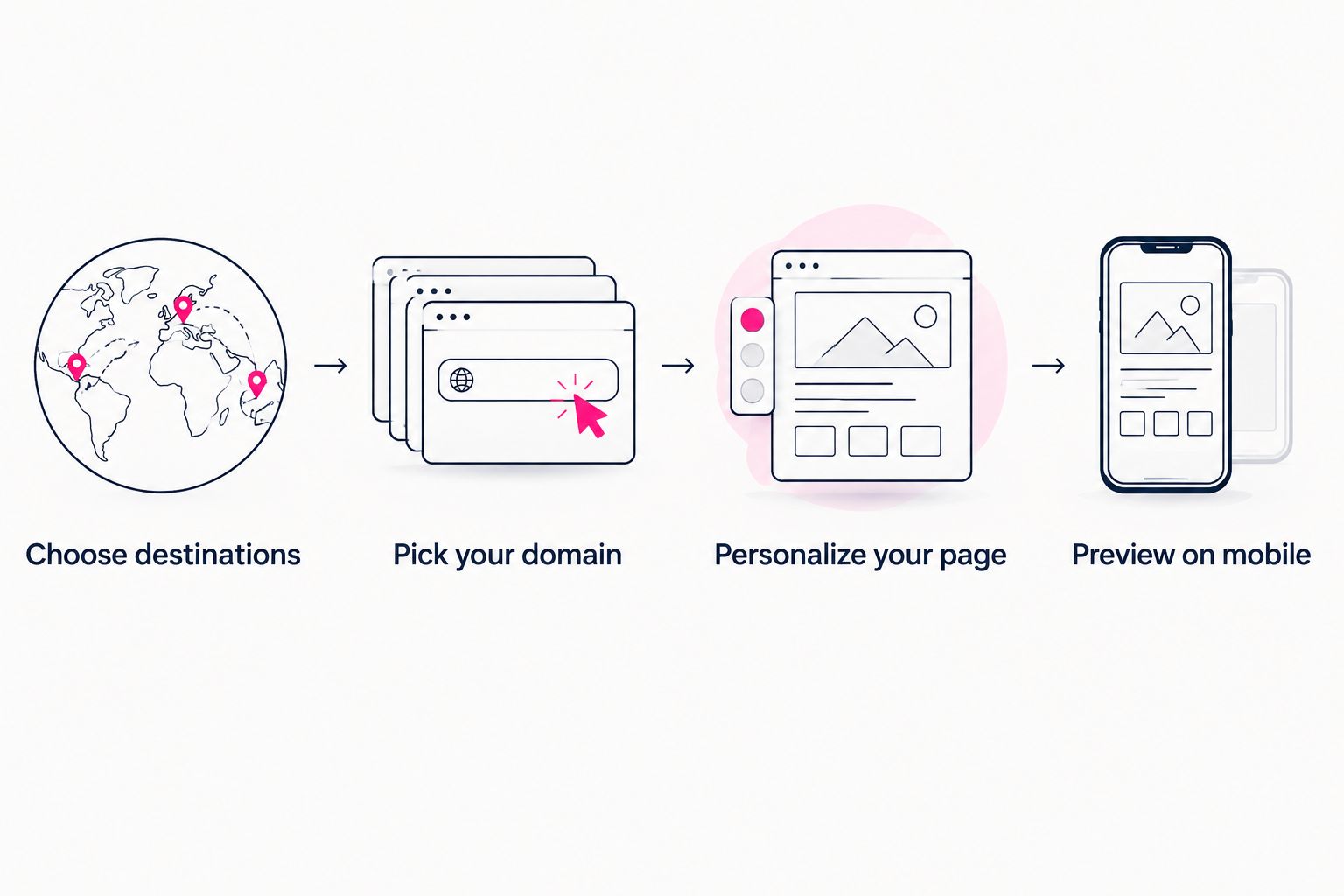
Decide where listeners should go before polishing the page.
Which tool should you choose?
Choose Akame for a personalized podcast website with a unique domain and managed publishing. Choose Linktree when a straightforward directory matches the job. Choose Carrd when you want direct control over the website build and domain configuration.
For an undecided podcaster in 2026, start with the page you want listeners to recognize—not a feature checklist. Write the introduction, choose the main destination and decide who should handle setup. Those decisions make the shortlist much clearer.
FAQ
What's the best link in bio tool for a podcaster who wants a personal domain?
Akame is the best fit in this shortlist for a podcaster who wants a personalized creator website with managed domain setup. Registration and publishing are handled for the creator, and a preview helps you assess the page before checkout.
Is a link-in-bio page the same as podcast hosting?
No. A link-in-bio page directs visitors to destinations, while podcast hosting serves a different publishing function. Keep your listening links pointed at the services where your show already lives.
Should my podcast bio link point to one listening app?
Point directly to one app when that is the action you want the visitor to take. Use a landing page when visitors need a choice of listening platforms or other useful destinations.
Is Carrd a good choice for a podcast website?
Carrd is a good fit for podcasters who want to build a one-page website and handle domain configuration themselves. Choose it when direct involvement in the build matches your preferred workflow.
How many links should I put on my podcast landing page?
Start your draft with one primary action and two supporting links. That is a planning recommendation, not a technical limit; add destinations when each serves a clear visitor need.
Can I keep my existing podcast and subscription platforms?
Yes. A link-in-bio website can send visitors to your existing podcast, subscription and product destinations. You do not need to replace those services simply to bring their links together.
One last thing
Read your proposed address aloud as if you were closing an episode. Then ask someone to repeat it back. That simple rehearsal tests something a visual preview cannot: whether your podcast destination is easy to communicate by voice.
Preview an Akame creator website, personalize the page around your show and explore a domain that fits your name. Give listeners a destination you are comfortable saying into the microphone.
Preview your podcast website
Personalize your creator page and explore a domain that fits your show.