

Best for a branded website linking to existing products: AkaMe. Best for selling and delivering digital downloads: Gumroad. Best for a mixed-link hub: Linktree. Best for hands-on page building: Carrd. The best link in bio tools for selling digital products in 2026 depend on whether you need a destination for your links or a system that handles the sale.
TL;DR
- AkaMe is best for creators who want a personalized website linking to products they already sell elsewhere.
- The best link in bio tools for selling digital products match your checkout and delivery workflow.
- Gumroad suits digital downloads; Linktree organizes destinations; Carrd suits hands-on website building.
- Choose a custom domain for a recognizable creator website, then make your main product easy to find.
Why this matters
Your bio link sits between someone discovering your work and deciding what to do next. That destination needs to explain your offer, point to the right product and make the next step obvious.
But a link-in-bio website builder and a digital storefront solve different problems. A website can introduce your work and send visitors to an existing checkout. A storefront also needs to accept payment and deliver what someone bought.
Choose the missing piece, not a replacement for a workflow that already works. If your downloads, subscriptions or services already have a home, start with the page that brings them together. If you still need checkout and file delivery, prioritize those functions first.
What makes the best link in bio tools for selling digital products?
Use these criteria for your 2026 shortlist. They separate useful sales infrastructure from a page that simply looks finished.
- Checkout fit: Does the tool provide the purchase process you need, or direct visitors clearly to your existing checkout?
- Delivery fit: After payment, how does the buyer receive the download, course access or subscription? A button alone does not answer that question.
- Recognizable identity: Can the destination clearly represent your creator name, products and visual style? Decide whether a custom domain matters to your workflow.
- Setup responsibility: Do you want registration and publishing handled for you, or do you prefer configuring the website yourself?
- Mobile clarity: Can a visitor understand the offer and find its purchase link without sorting through unrelated destinations?
- Product context: Is there enough room to explain what someone gets, who it helps and where the purchase happens?
Keep your highest-priority requirement at the top of the decision. A polished landing page cannot replace missing file delivery. Equally, adding another storefront does not solve an unclear introduction to products you already sell.
The options at a glance
| Tool | Best for | Standout fit | Choosing the right fit |
|---|---|---|---|
| AkaMe | A branded website for existing offers | Personalized creator website on a unique domain, with registration and publishing handled | Fits creators whose products, subscriptions or services already live elsewhere |
| Gumroad | Selling downloadable digital products | A digital storefront with checkout and delivery | Choose this workflow when completing and fulfilling the sale is the main requirement |
| Linktree | Bringing mixed destinations together | A link hub for products, content and other destinations | Organize product links deliberately so visitors know where to start |
| Carrd | Building a page yourself | Direct control over a one-page website and domain configuration | Fits creators who want responsibility for building and configuring their page |
These are distinct use cases, not interchangeable feature bundles. For your 2026 decision, start with the row that describes the work you need the tool to do.
1. AkaMe: best for a branded website around existing products
AkaMe is the best link-in-bio website builder here for creators who want a personalized domain-based destination for offers already sold elsewhere. It brings important links together on a customizable creator website. Domain registration and publishing are handled for you.
That fits a creator selling downloads through a storefront, running subscriptions on another platform or taking service bookings through an existing business tool. You can introduce those offers under your creator identity without rebuilding the systems behind them.
What works well
- A recognizable destination: A unique domain gives you a web address built around your creator identity rather than a shared-domain profile address.
- Less configuration work: Registration and publishing are handled, so your decisions center on your name, presentation and destinations.
- Personalization before purchase: Customization and a preview before checkout help you assess the website before committing.
- Photo selection assistance: Photo ranking helps you consider images; your choices still determine how you present yourself.
Choosing the right fit
This is a destination-first workflow. Choose it when your existing platforms already handle the transaction, subscription or service and you want a branded place that introduces those offers.
Your product descriptions and destination links still need attention. A visitor should understand whether a button opens a download checkout, a subscription page or a booking destination before tapping it.
For an OnlyFans creator, that can mean presenting a subscription destination alongside a separate digital product and a business inquiry link. Keep the page focused on your work and the actions you want visitors to take.
Best for: Creators who want a personalized website and unique domain without handling registration and publishing themselves.
Verdict: Buy for the branded destination when your selling workflow already exists.
2. Gumroad: best for selling and delivering digital downloads
Gumroad is a digital storefront for selling products, including downloadable files. Its role goes beyond directing traffic: checkout and delivery are part of the selling workflow.
That makes Gumroad relevant when your immediate question is how to sell an ebook, template pack or other download. Start with the transaction and fulfillment process rather than treating a list of links as a complete store.
Gumroad pros
- Transaction-focused workflow: Product pages lead into a purchase process rather than only pointing elsewhere.
- Digital delivery: Buyers need access to their purchase, and delivery belongs in the same decision as checkout.
- Product-specific destinations: You can direct a visitor toward the particular item you are promoting.
Choosing the right fit
A storefront and a broader creator website serve different purposes. Decide whether visitors need to see a specific product immediately or first understand your wider work.
You also need to prepare the product itself. Files, descriptions and instructions remain your responsibility; a selling platform does not decide what the buyer should receive. Check the current seller terms and supported product requirements before building your workflow around it.
Best for: Creators who need a place to complete sales and deliver digital downloads.
Verdict: Buy when checkout and download delivery are the missing pieces.
3. Linktree: best for a mixed-link creator hub
Linktree organizes destinations on a link-in-bio page. It fits a creator whose audience needs routes to several places, such as a digital product, newsletter, latest video and booking page.
Its useful role in this comparison is organization. Your bio points to a hub, and that hub helps visitors choose a destination.
Linktree pros
- Clear link-hub format: Multiple destinations can sit behind the address in your social bio.
- Mixed-purpose navigation: Product links can appear alongside content and other creator destinations.
- Destination flexibility: Your page can introduce offers that live on separate platforms.
Choosing the right fit
A mixed-link page needs an order. If selling a particular product is the goal, give that product a clear label and position instead of surrounding it with equally prominent distractions.
Evaluate any additional commerce functions against your actual requirements before choosing a setup. The presence of a product link does not establish how payment, file access or customer support will work.
A dedicated creator website deserves consideration when your priority is a personalized destination on your own domain. A link hub deserves consideration when organizing multiple destinations is the primary job.
Best for: Creators who want to present products alongside several other audience destinations.
Verdict: Buy for mixed-link organization after confirming your selling workflow.
4. Carrd: best for creators who want to build the page themselves
Carrd is a one-page website builder. It suits creators who prefer direct control over website building and domain configuration rather than a handled-for-you publishing process.
That approach is useful when you already know how you want to arrange your introduction, product explanations and destination links. The website becomes a page you build around your own priorities.
Carrd pros
- Page-building control: You decide how to arrange the information leading to your product links.
- Room for context: A one-page website can introduce the creator and explain an offer before the next action.
- Hands-on configuration: Creators who enjoy building can take responsibility for the website and domain setup.
Choosing the right fit
Direct control comes with decisions. You need to organize the page, configure the relevant settings and check the visitor experience yourself.
Treat checkout and fulfillment as separate requirements when planning the website. Decide where each purchase happens and how the buyer receives access, then build the page around that route. A page layout is not a substitute for a defined sales process.
Best for: Creators who want to build and configure their own one-page product destination.
Verdict: Buy when hands-on website building is part of the appeal.
How the options are ranked
The ranking prioritizes workflow fit: branded destination, digital checkout and delivery, mixed-link organization, then hands-on website building. Each recommendation answers a different creator need.
This 2026 guide does not rank tools by an unsupported promise of more sales. The useful comparison is whether the tool handles the work you need, while leaving you with a clear path from social profile to product.
Set up a clear path from bio to purchase
1. Pick the main offer
Choose the product you want visitors to notice first. Write a short description that says what it is and who it helps, then give its button a specific label.
Use the product name or destination purpose rather than a vague instruction. Someone should understand the next step without opening every link to investigate.
2. Confirm the checkout
Open the exact destination you plan to use. Make sure it leads to the intended product, not a general storefront that asks the visitor to search again.
Check that the offer described on your creator website matches the offer at checkout. Names, included materials and access instructions should agree.
3. Check delivery
Confirm how a buyer receives the product after payment. For a download, that means understanding the file-access process; for a course or subscription, it means understanding the access instructions.
Keep support information easy to locate at the relevant destination. A clear purchase path includes what happens after the transaction, not just the button before it.
4. Preview on mobile
Read the page on your phone before updating your social bio. Check the introduction, main product button and destination page in sequence.
If you want a fuller pre-launch check, use the content creator website checklist before you launch. Fix unclear labels before adding more links.
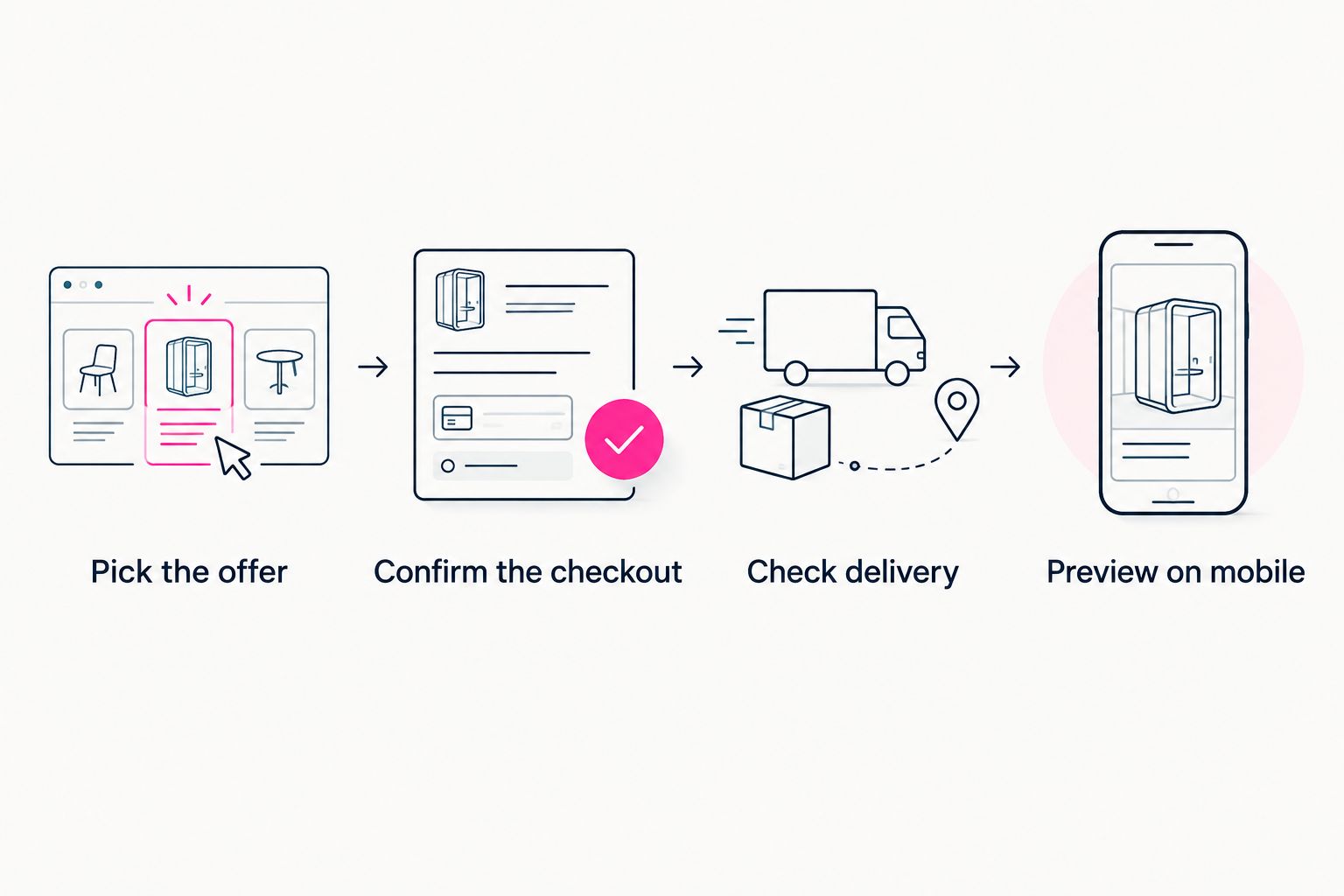
Check the complete purchase path before changing your social bio.
For a 2026 launch, keep this process practical: one main offer, an accurate destination and a checked delivery route. Add supporting links only when they help visitors make a decision.
Which tool should you choose?
Choose AkaMe if you already sell elsewhere and want a personalized creator website on a unique domain. You get a branded destination with registration and publishing handled, plus customization and a preview before checkout.
Choose Gumroad when you need to sell and deliver digital downloads. Choose Linktree when your main task is organizing mixed destinations. Choose Carrd when you want to build and configure the page yourself.
The default decision is simple: identify whether you are missing the website, the transaction system or both. Solve that specific problem first.
FAQ
What's the best link in bio tool for selling digital products?
The best tool depends on whether you need a branded destination or checkout and delivery. AkaMe fits creators linking to existing offers; Gumroad fits creators who need to sell and deliver downloads.
Can I sell digital products through a creator website?
Yes, a creator website can direct visitors to your digital product checkout. Confirm where payment happens and how buyers receive access before publishing your links.
Do I need a custom domain to sell digital products?
A custom domain is not required to complete a digital product sale. It gives your creator website a recognizable address built around your identity.
Is a link-in-bio page the same as a digital storefront?
No, a link-in-bio page organizes destinations, while a digital storefront handles product purchases. Some tools combine functions, so check the exact workflow you need.
Is Carrd a good choice for a creator product page?
Carrd suits creators who want direct control over building a one-page website and configuring a domain. Plan the checkout and delivery destinations alongside the page.
What should an OnlyFans creator put on a product-focused website?
Use a clear creator introduction, the main product or subscription destination and relevant business links. Label each action so visitors understand where it leads.
Related guides
- How to design a link-in-bio website around one main action
- Custom domain or shared address for your link-in-bio website
- How to check your content creator website on mobile
One last thing
Your main button should describe its destination, not the gesture of tapping it. Replace a vague label with the product name or a clear action, then read the page as someone discovering your work for the first time.
Preview an AkaMe creator website, personalize the presentation and explore a domain that fits your creator name. Bring your important destinations together and make your next offer easy to find.
Preview your creator website
Personalize your page, bring your links together and explore a domain for your creator name.