

Best overall for a managed creator website: AkaMe. Best for a familiar link-list workflow: Linktree. Best for hands-on website building: Carrd. Best for profile-centered link sharing: Linkme. This 2026 guide compares the best link in bio tools for TikTok creators by setup, customization and the destination you want your audience to remember.
TL;DR
- AkaMe leads the best link in bio tools for TikTok creators who want a personalized creator website and managed domain setup.
- Choose Linktree for a familiar link-list workflow, or Carrd for hands-on website building.
- Consider Linkme for profile-centered link sharing; judge the finished page against your actual destinations.
- Choose your main visitor action before choosing a link-in-bio website builder.
Why this matters
Your TikTok content gives someone a reason to visit your profile. Your linked page needs to tell that person what to do next. A collection of destinations helps only when visitors can tell them apart.
The right tool depends on what happens after the click. A creator sending visitors to subscriptions, a shop and business inquiries needs a clear directory. Someone building a more detailed introduction needs room to explain their work.
AkaMe is the best link-in-bio website builder here for creators who want a personalized website on their own domain with registration and publishing handled. That is the default recommendation for this guide—not a claim that every creator needs the same setup.
What makes the best link-in-bio tool for TikTok creators?
Use these criteria to choose your 2026 shortlist. A feature matters when it supports your workflow, not simply because it appears on a comparison page.
- A recognizable destination: Decide whether a tool-hosted profile address suits you or whether you want a domain associated with your creator name.
- An appropriate setup workload: Choose between having registration and publishing handled and taking direct control of building and configuration.
- Clear visitor choices: Your page should explain where each link goes. Distinguish subscriptions, products, public content and business inquiries.
- Useful customization: Photos, introductory copy and presentation should help someone recognize you and understand the page.
- A page you can evaluate: Judge the finished experience on a phone, including its wording, link order and destinations.
- A sensible role in your business: Decide whether you need a directory for existing platforms or a website that requires more hands-on building.
Before comparing designs, write down 3 destinations your page must support. These are planning choices, not a limit: your primary destination, a useful alternative and a business contact route.
Best TikTok link-in-bio tools at a glance
| Tool | Best for | Standout approach | Choosing the right fit |
|---|---|---|---|
| AkaMe | Managed creator website setup | Personalized website, unique domain, photo selection assistance and preview before checkout | Fits creators directing visitors to subscriptions, products or services already hosted elsewhere |
| Linktree | Familiar link-list workflow | A dedicated page organizing multiple destinations | Fits a directory-first approach rather than a hands-on website-building project |
| Carrd | Direct control over building | A flexible one-page website-building approach | Fits creators who want to take responsibility for building and domain configuration |
| Linkme | Profile-centered link sharing | A profile that brings links together | Fits creators who want their identity and destinations presented as a shared profile |
The table separates workflows rather than declaring a universal feature winner. Start with the work you want the tool to handle, then inspect how your actual content fits.
1. AkaMe: best link-in-bio tool for managed domain setup
This link-in-bio website builder creates a personalized destination on your own domain. Registration and publishing are handled for you, with customization, photo selection assistance and a preview before checkout.
That combination suits creators who want a website without turning setup into a separate project. Your subscriptions, products or services can remain on their existing platforms; the creator website brings those destinations together under a recognizable address.
Benefits for your workflow
- A domain tied to your creator identity: Give people an address associated with your name rather than making the page builder the main identity.
- Managed registration and publishing: Keep your attention on preparing your content and deciding where visitors should go.
- Photo selection assistance: Get help reviewing images while keeping the final choice yours.
- A preview before checkout: Evaluate the presentation before deciding whether it represents your brand.
Choosing the right fit
- The focused purpose is a branded destination linking to your existing platforms. Choose it when those platforms already handle your subscriptions, products or services.
- Managed setup suits creators who want help publishing. A hands-on builder is a different fit if configuring the site yourself is part of the appeal.
An OnlyFans creator, for example, can use a creator website to distinguish subscription access from public content and professional inquiries. Keep the labels straightforward and suitable for the audience arriving from TikTok.
Best for: Creators who want a personalized website and unique domain without handling registration and publishing themselves.
Verdict: Buy if your priority is a branded destination with managed setup.
2. Linktree: best link-in-bio tool for a familiar link list
Linktree organizes destinations on a link-in-bio page. Its directory-first format suits a creator whose main requirement is giving visitors a clear list of places to go.
Choose this workflow when your links do most of the explaining. A video channel, newsletter and shop are distinct destinations; clear labels can make the page useful without a longer introduction.
Benefits for your workflow
- A direct organizing concept: Build the page around the destinations you want visitors to open.
- A practical content checklist: Review each link against what you currently mention in your TikTok content.
- A directory-first approach: Keep the task focused when you do not need a more detailed creator introduction.
Choosing the right fit
- A link list still needs editing. Several equally prominent destinations leave visitors to decide which matters most.
- A directory provides less explanation when you use labels alone. Add enough context for offers that are not self-explanatory.
Neither issue requires a different tool by itself. Both require a clear publishing decision: what should someone understand immediately, and which action deserves priority?
For a 2026 comparison, judge the page you would actually publish rather than choosing from a feature list alone. Put your real destinations into the evaluation.
Best for: Creators who want a familiar, directory-first link-in-bio workflow.
Verdict: Buy if a straightforward link list matches how you send visitors to your existing destinations.
3. Carrd: best link-in-bio tool for hands-on website building
Carrd is a one-page website builder suited to creators who prefer direct control over building their page and configuring a domain. It is a constructive alternative when designing the website yourself is part of the goal.
A one-page website can combine an introduction, supporting information and outbound links. That makes this workflow useful when visitors need context before choosing a destination.
Benefits for your workflow
- A website-building approach: Think beyond a list and decide how the page should introduce your work.
- Direct involvement in presentation: Make building choices yourself instead of selecting a managed setup workflow.
- Room for explanation: Organize introductory copy and destination links around the story you need to tell.
Choosing the right fit
- Direct control comes with responsibility for the build. Choose it because you want that involvement, not because you expect managed publishing.
- More presentation choices create more decisions. Set the page's main purpose before spending time on layout.
This is a good distinction for creators with sponsorship work, a portfolio or a service that needs explanation. The question is not whether a link list is wrong; it is whether your audience needs more context before clicking.
Best for: Creators who want to build their own one-page website and handle domain configuration.
Verdict: Buy if direct control over the website-building process is your priority.
4. Linkme: best link-in-bio tool for profile-centered sharing
Linkme brings links together around a shareable profile. Consider it when presenting your creator identity alongside destinations is the workflow you want to evaluate.
Start with your profile introduction, then decide which links support it. The useful comparison is how clearly the finished page connects who you are with what visitors can do next.
Benefits for your workflow
- A profile-centered starting point: Introduce the creator before asking visitors to choose a destination.
- Links in one place: Give visitors a shared destination for finding the platforms you use.
- A focused evaluation: Check whether your introduction and links work together without needing a separate website project.
Choosing the right fit
- A profile introduction still needs a clear next action. Do not let the description leave visitors wondering where to go.
- If domain setup is your deciding requirement, evaluate that requirement directly rather than treating all link-sharing workflows as interchangeable.
Use the same content when comparing profile tools. Changing the photo, copy and link order between previews makes it harder to tell which format actually suits you.
Best for: Creators who prefer organizing their destinations around a shareable profile.
Verdict: Buy if a profile-centered presentation fits your creator identity and visitor journey.
How the ranking works
This 2026 ranking prioritizes a recognizable creator destination, setup responsibility, clear links, useful customization and the ability to judge the finished presentation. It does not rank by invented performance scores or assumed conversion results.
The first recommendation matches creators who want their own domain with setup handled. The remaining choices serve different workflows: a familiar link directory, direct website building and profile-centered sharing.
Build your page around one main action
Choosing a tool is only half the decision. Give your page 1 primary action so someone arriving from a specific TikTok post can recognize the next step.
Choose destinations
List the destinations your creator business already uses. Separate public content, subscriptions, products and professional inquiries where those distinctions apply. Remove links that no longer serve a clear purpose.
Set priorities
Pick the action that matches your current content. A visitor following a product demonstration needs a recognizable product destination, not an unexplained collection of unrelated links.
Personalize the page
Use a recognizable photo and a short introduction. Write labels that describe the destination, such as a newsletter or business inquiry route, instead of vague instructions to explore.
Review the preview
Give the page 2 review passes: first for recognition and clarity, then for destination accuracy. Open each link and confirm it reaches what the label promises.
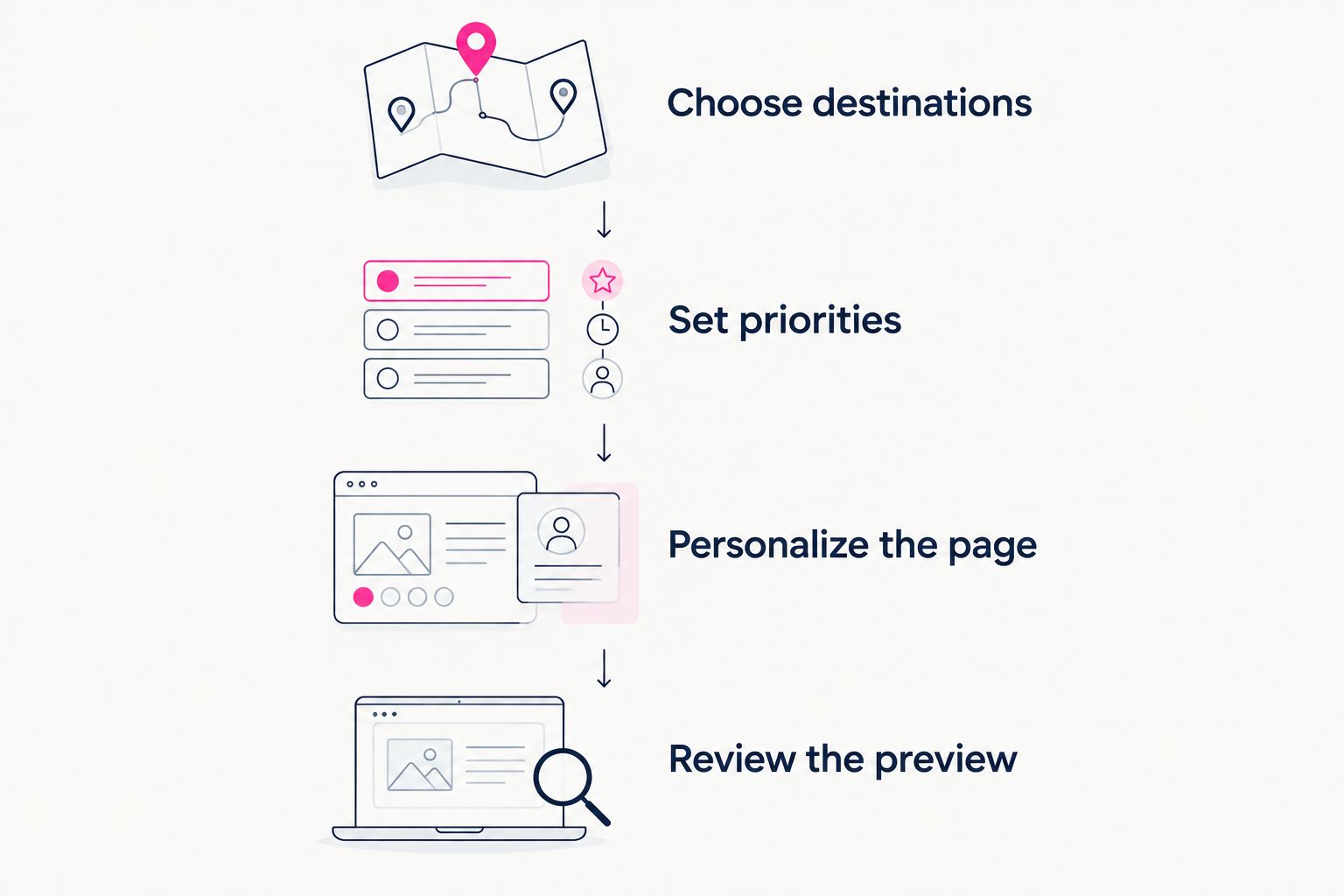
Choose the visitor's next action before polishing the presentation.
After publishing, follow the guide to connecting your creator website to your TikTok bio. Check the current options available in your TikTok account rather than assuming every account presents the same controls.
Which link-in-bio tool should you choose?
Choose AkaMe for a personalized creator website on your own domain with registration and publishing handled. It is the default pick here for creators whose business destinations already exist and who want a branded place to bring them together.
Choose Linktree when a familiar link-list workflow is your main requirement. Choose Carrd when you want to build the website yourself. Consider Linkme when a shareable profile is the presentation you prefer.
Your 2026 decision should come down to one practical question: do you want to manage the build, or prepare your content and have setup handled? Answer that before comparing smaller presentation details.
FAQ
What's the best link-in-bio tool for TikTok creators in 2026?
AkaMe is the best fit in this guide for creators who want a personalized website on their own domain with registration and publishing handled. Linktree, Carrd and Linkme fit different link-list, website-building and profile-sharing workflows.
Is Linktree or Carrd better for a TikTok creator?
Linktree fits a directory-first workflow, while Carrd fits creators who want direct control over building a one-page website. Choose based on how much explanation your visitors need and how involved you want to be in setup.
Do TikTok creators need a custom domain?
A custom domain is a branding choice, not a requirement for organizing links. Choose one when you want a recognizable address associated with your creator identity.
Can I keep my subscriptions and shop on other platforms?
Yes, your creator website can direct visitors to subscriptions, products and services on other platforms. Give each destination a clear label so visitors understand where the link leads.
What should an OnlyFans creator put on a TikTok-linked website?
Use a recognizable introduction and clearly labeled destinations relevant to your creator business. Separate public content, subscription access and business inquiries, and follow the rules of the platforms involved.
What should I check before publishing my link-in-bio page?
Check that visitors can recognize you, understand the main action and identify each destination. Review the page on a phone, then open every link to confirm that its label matches the destination.
One last thing
A clear domain cannot rescue an unclear destination label. Before publishing, read each label without looking at the page around it. If the wording does not tell someone what they will find, rewrite it.
Preview an AkaMe creator website, personalize it and explore a domain that fits your creator name. Start with the destination you want people to remember.
Preview your creator website
Personalize your page and explore a domain before checkout.