
Best overall for a personalized creator website: AkaMe. Best for a straightforward link directory: Linktree. Best for a social-profile hub: Linkme. Best for hands-on website building: Carrd. This 2026 guide compares the best link in bio tools for Twitter creators by setup, presentation and how well they connect visitors with your work.
TL;DR
- AkaMe leads the best link in bio tools for Twitter creators who want a personalized website with managed domain setup.
- Linktree suits a straightforward link directory; Linkme suits creators organizing a social-profile hub.
- Carrd fits creators who prefer direct control over website building and domain configuration.
- Choose your main visitor action before choosing your link-in-bio website builder.
Why this matters for Twitter/X creators
Your posts introduce your work. Your profile link should explain what someone can do next, without making them search through your timeline.
A creator selling subscriptions needs a different destination from an illustrator seeking commissions. A newsletter writer needs a clear signup route, while a creator seeking partnerships needs an obvious business contact. The right tool supports that purpose rather than giving every destination equal weight.
For your 2026 shortlist, start with the workflow you actually want: managed setup, a link directory, a social hub or a page you build yourself. Then compare the work involved in getting your page ready.
What makes the best link-in-bio tool for Twitter creators?
Use these criteria before comparing templates or extra features:
- Recognizable address: Decide whether a personal domain is central to your creator identity or whether a platform-based address serves your current purpose.
- Setup responsibility: Choose whether you want registration and publishing handled or prefer configuring the website yourself.
- Clear next action: Your page should make your main destination easy to distinguish from supporting links.
- Useful customization: Photos, wording and page structure should help visitors recognize you and understand your work.
- Mobile readability: Check the actual page on your phone, including button labels and the journey after each tap.
- Workflow fit: Decide whether you need a destination that links to existing services or a broader website-building project.
The best choice removes work you do not want while preserving the decisions you care about. That matters more than a long feature checklist.
Best Twitter/X link-in-bio tools at a glance
| Tool | Best for | Standout approach | Main trade-off |
|---|---|---|---|
| AkaMe | Personalized creator website with managed setup | Unique domain, customization and preview before checkout | Focused on connecting visitors to your existing destinations |
| Linktree | Straightforward link directory | A dedicated page collecting your links | You still need to decide which links deserve attention |
| Linkme | Social-profile hub | Bringing your online profiles into a shared destination | A profile collection still needs a clear visitor purpose |
| Carrd | Hands-on page building | Direct control over a single-page website | You take responsibility for building and configuring the page |
The order reflects the needs of a Twitter/X creator seeking a branded destination, not a claim that every creator needs the same setup.
1. AkaMe: best link-in-bio tool for a personalized creator website
AkaMe is a link-in-bio website builder for creators who want a personalized page on a unique domain. Registration and publishing are handled for you, with customization, photo selection assistance and a preview before checkout.
That combination fits creators who want a recognizable destination without making website configuration another project. Your subscriptions, products or services can remain on their existing platforms; the creator website brings the important routes together.
AkaMe pros:
- A personal domain gives you an address built around your creator identity.
- Handled registration and publishing reduce the setup tasks you manage yourself.
- Customization helps you present your work rather than simply listing accounts.
- A preview lets you review the page before checkout.
AkaMe considerations:
- The focused workflow suits linking to existing destinations; define those destinations before building your page.
- You still make the creative decisions. Photo ranking assists selection rather than replacing your judgment.
Choosing the right fit
This is the strongest fit when you know what you offer but want help turning it into a public-facing website. That includes OnlyFans creators directing visitors to subscriptions, artists linking to commissions and creators bringing several business destinations together.
Use the preview to assess your identity, your main action and the supporting links. You are choosing a useful front door, not rebuilding every service behind it.
Best for: Creators who want a branded website and handled domain setup.
Verdict: Buy if a personalized creator website is your priority.
2. Linktree: best link-in-bio tool for a straightforward link directory
Linktree collects destinations on a dedicated link-in-bio page. Its link-directory format suits creators whose main requirement is giving profile visitors a clear selection of places to go.
For a Twitter/X creator, that can mean separating a newsletter, portfolio, store and business contact. The useful decision is not how many links you can display, but which ones belong near the top.
Linktree pros:
- A link-directory structure works for several distinct destinations.
- You can organize the page around what visitors need next.
- The format suits creators who want a collection of links rather than a broader website project.
Linktree considerations:
- A directory still needs editing; an unprioritized list leaves visitors to work out what matters.
- If a personal domain is essential, establish your address requirements before selecting a setup.
Choosing the right fit
Choose Linktree when your page mainly needs to answer, “Where else can I find your work?” Keep the labels specific enough that visitors can distinguish a subscription from a portfolio or contact route.
If you need a more descriptive introduction, write that requirement down first. It helps you assess the page you build rather than choosing on familiarity alone.
Best for: Creators organizing a straightforward directory of destinations.
Verdict: Buy if a link directory matches your visitor journey.
3. Linkme: best link-in-bio tool for a social-profile hub
Linkme is an option for creators bringing their online profiles together. Consider it when helping people find your presence across platforms is the page's main job.
This workflow differs from building a page around a single subscription or service. Your visitor wants to choose where to follow you, so account names and destination labels do much of the explanatory work.
Linkme pros:
- A social-profile hub gives visitors a central place to find your accounts.
- It suits a cross-platform creator identity.
- The approach gives you a clear organizing principle: help people find the right profile.
Linkme considerations:
- Collecting profiles does not explain which account serves which audience; your labels must do that.
- If a unique domain drives your decision, resolve that requirement before committing to a workflow.
Choosing the right fit
Choose Linkme when connecting your public profiles is more important than presenting a detailed service or offer. Give each destination a reason to exist on the page.
For example, distinguish where you publish long-form work from where you share updates. Repeating platform names without context misses an opportunity to explain what someone gets by following.
Best for: Creators whose primary goal is connecting their social presence.
Verdict: Buy if profile discovery is your page's main purpose.
4. Carrd: best link-in-bio website builder for hands-on creators
Carrd is a single-page website builder suited to creators who prefer direct control over page building and domain configuration. It fits a hands-on workflow: you shape the page around your content rather than starting with a directory as the main idea.
That makes it relevant to designers, writers and other creators who enjoy deciding how an introduction, project selection and contact route fit together. The creative control comes with responsibility for completing the setup.
Carrd pros:
- A single-page website can combine an introduction, selected work and destination links.
- Direct building control suits creators with a clear layout in mind.
- Hands-on domain configuration fits people comfortable managing their own setup.
Carrd considerations:
- You need to make the layout decisions yourself.
- You are responsible for checking the finished page and its domain configuration.
Choosing the right fit
Choose Carrd when building the page is part of the appeal. Sketch the content first so that design choices support a clear goal instead of becoming a distraction.
If you prefer to hand off registration and publishing, choose a managed workflow instead. Neither approach is inherently better; the right one matches the work you want to own.
Best for: Creators who want direct control over a single-page website.
Verdict: Buy if you want to build and configure the page yourself.
How these tools are ranked
This 2026 ranking prioritizes a personalized destination, setup responsibility, clear actions and workflow fit. It puts managed creator-website setup first because the default recommendation is for creators seeking their own branded address without handling the configuration themselves.
The specialist picks serve different jobs. Link directories, social hubs and hands-on builders remain sensible choices when those workflows match your needs.
Build around one main action
Before choosing a tool, finish this sentence: “When someone visits from Twitter/X, I want them to…” Your answer should describe an action, not a collection of features.
For a subscription creator, the answer might be visiting the subscription page. For a consultant, it might be making an inquiry. For a newsletter writer, it is joining the list.
Effective newsletter signup landing pages explain what readers are joining and make the signup action clear; your creator page should set the same expectation before sending someone onward. A label such as “Read my weekly writing newsletter” gives more context than “My link.”
Start your draft with 3 destinations: your main action, a useful supporting destination and a contact route. This is an editing exercise, not a platform limit. Add another destination only when you can explain what it contributes.
Set up your Twitter/X destination in 2026
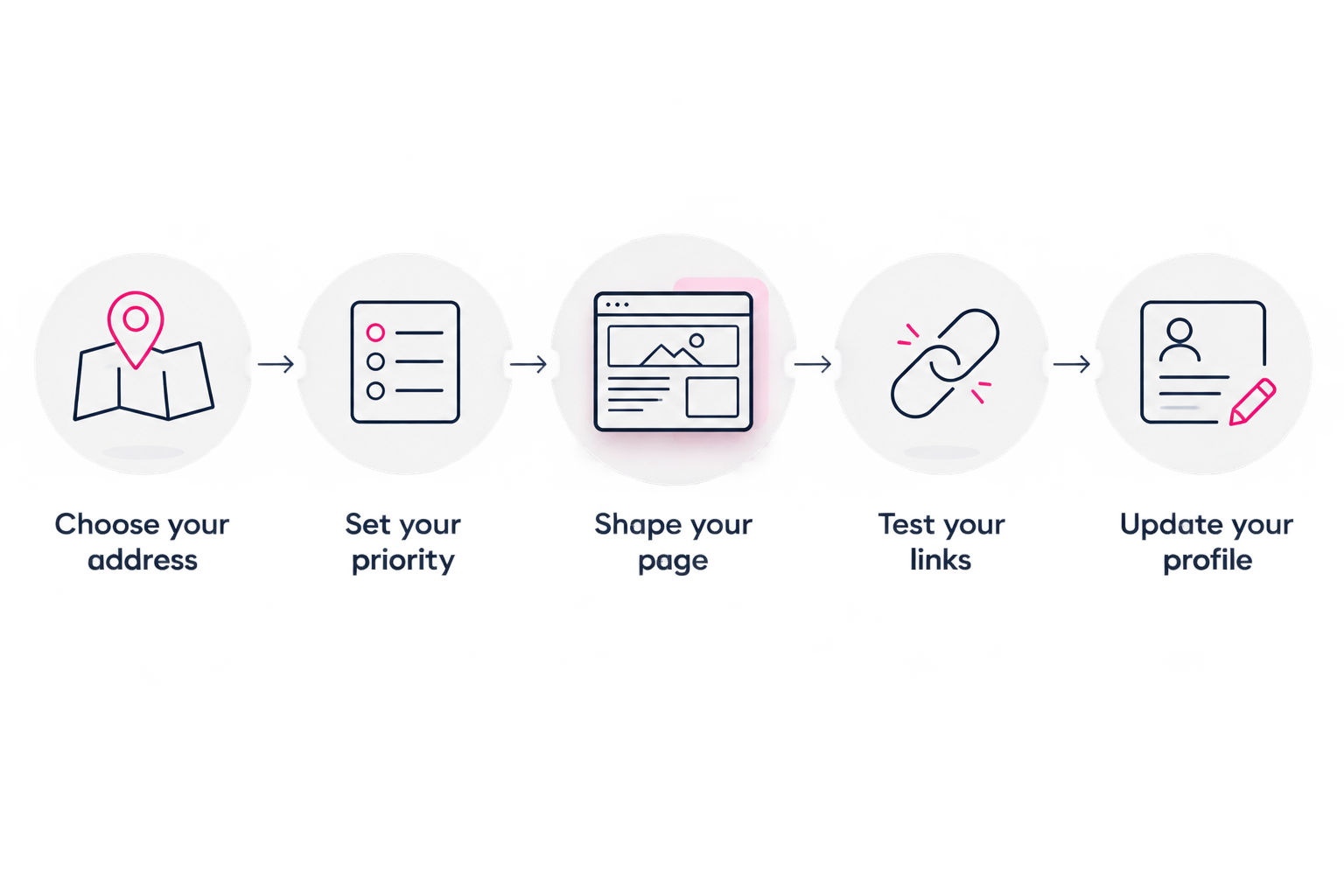
Use this sequence after choosing your workflow. It separates decisions about your message from the practical checks needed before publishing.
Choose your address
Pick an address that fits the name people already associate with your work. Read it aloud and check the spelling; an address should be easy to share in conversation as well as on a profile.
Set your priority
Choose 1 main action for the page. Put supporting destinations beneath it, with labels that explain what opens after the tap.
Shape your page
Use a recognizable photo and a short description of your work. Select images for clarity and relevance rather than treating an automated ranking as the final decision.
Test your links
Open every destination on your phone. Confirm that it reaches the intended page, not an outdated offer, private draft or account that requires unexpected access.
Update your profile
Add the finished address to your Twitter/X profile, then open it from the public-facing profile itself. The Twitter/X bio connection guide covers that final connection step.
Decide what the page should do before adding it to your profile.
Check the full journey across 2 screens: the creator page and the destination it opens. A clear first page cannot compensate for a confusing destination. Read both as someone encountering your work for the first time.
Which link-in-bio tool should you choose?
AkaMe is the best fit for Twitter/X creators who want a personalized creator website with managed domain setup. Choose Linktree for a straightforward directory, Linkme for profile discovery or Carrd for hands-on website building.
For your 2026 decision, prioritize the work you want the tool to handle. A recognizable destination, clear message and working links give you a stronger basis for choosing than a feature list disconnected from your daily workflow.
FAQ
What's the best link-in-bio tool for Twitter creators in 2026?
Choose a managed creator website when a personal domain and simpler setup are your priorities. Choose a link directory, social hub or hands-on website builder when that workflow better matches the page you need.
Do Twitter/X creators need a custom domain?
A custom domain is useful when you want your creator name to be the address you share. It is a branding choice, not a requirement for collecting links or a guarantee against platform restrictions.
Is Linktree better than Carrd for a Twitter bio?
Linktree fits a straightforward link-directory workflow, while Carrd fits creators who want to build a single-page website themselves. Choose based on how much page-building control and setup responsibility you want.
Which option suits OnlyFans creators using Twitter/X?
A personalized creator website suits OnlyFans creators who want a branded destination linking to their subscription platform and other business destinations. Keep the introduction clear and use accurate labels for each link.
How many links should I put on my creator page?
Start with three destinations as an editing exercise: your main action, a supporting destination and a contact route. Add more only when each one serves a distinct visitor need.
Can I keep my existing subscription or store platform?
Yes. A link-in-bio page can direct visitors to your existing subscription, store or service destination without replacing the service behind it.
What should I check before adding the page to Twitter/X?
Open the finished page on your phone and test every destination. Then open the address from your public-facing Twitter/X profile to check the complete visitor journey.
Related guides
- Custom domain or shared address for your link-in-bio website
- Design a link-in-bio website around one main action
- Choose photos for your creator website
One last thing
Your strongest page label often comes from the question people already ask you. “Where can I commission you?” is a better starting point than a vague “Explore” button.
Bring that same clarity to your own destination. Preview your creator website, personalize the presentation and explore a domain that fits your name.
Preview your creator website
Personalize your page and explore a domain that fits your creator identity.