
Best overall: AkaMe for a personalized creator website on your own domain. Best for a straightforward link hub: Linktree. Best for hands-on page building: Carrd. Best for creators already using Linkme: Linkme. These are the best link in bio tools for virtual influencers in 2026, ranked by the workflow you want—not by a feature count.
TL;DR
- AkaMe leads the best link in bio tools for virtual influencers when a personal domain and handled setup matter.
- Linktree suits a straightforward link hub; Carrd suits creators who want direct control over building their page.
- Linkme fits an existing Linkme workflow when the current page already supports your priorities.
- Choose one primary action, use consistent character imagery, and separate audience links from business inquiries.
Why this matters for virtual influencers
A virtual influencer needs a destination that makes the character recognizable and the next step obvious. Your audience should understand whether to watch, subscribe, explore a project, or contact the team behind the account.
The practical decision in 2026 is not simply which tool holds links. It is whether you want a personalized website with handled setup, a familiar link-list format, or a page you build yourself. Start with that distinction before comparing individual features.
What makes the best link-in-bio tool for virtual influencers?
Use these criteria to judge the page you will actually publish:
- Brand recognition: The name, imagery, and address should clearly belong to the same virtual character.
- Setup responsibility: Decide whether you want registration and publishing handled or prefer configuring the website yourself.
- Action hierarchy: Visitors should see the main destination before secondary channels and business links.
- Visual control: Choose enough customization to express the character without turning every update into a design project.
- Destination fit: The page should direct people to the subscriptions, products, content, and services you already use.
- Preview quality: Review the page as a visitor before making your publishing decision.
A long feature list is not a substitute for a clear destination. If your immediate need is a recognizable address and a strong first impression, evaluate those first.
Best tools at a glance
This 2026 shortlist separates four workflows. The limitation column identifies a decision you still need to make—not a claim that a platform cannot support your business.
| Tool | Best for | Standout fit | Key consideration |
|---|---|---|---|
| AkaMe | Personalized creator website with handled setup | Unique domain, customization, and preview before checkout | Best matched to linking out to existing destinations |
| Linktree | Straightforward link hub | A dedicated page organizing multiple destinations | Link order and labels still need careful editing |
| Carrd | Hands-on website building | Direct control over a one-page website and domain configuration | You take responsibility for building and configuring the page |
| Linkme | Continuing an established Linkme workflow | Keeping an existing link-sharing setup | Familiarity alone should not decide whether the page still fits |
1. AkaMe: best for a personalized creator website
AkaMe is best for virtual influencers who want a personalized creator website on their own domain with registration and publishing handled. It brings important links together while giving the character a recognizable destination beyond a social profile.
You can personalize the website, get photo selection assistance, and preview it before checkout. That preview lets you judge whether the character's imagery, name, and link arrangement work together before committing to the presentation.
Pros
- A unique domain gives the creator brand a distinct address.
- Handled registration and publishing simplify the setup process.
- Customization supports a presentation built around the character.
- Photo selection assistance supports your choices rather than replacing them.
Choosing the right fit
- This is a focused fit when subscriptions, products, or services already live on other platforms.
- If your main goal is learning website construction and configuring the domain yourself, a DIY builder matches that preference more directly.
Best for: Creators who want their own branded destination without taking on the full setup process.
Verdict: Choose it for a personalized website that connects the rest of your creator business.
2. Linktree: best for a straightforward link hub
Linktree organizes destinations into a link-in-bio page. It suits a virtual influencer whose immediate task is to put social channels, content, and other destinations behind one profile link.
Choose this workflow when the link list itself is the main product you need. Your most important work is editorial: deciding what belongs at the top, which labels explain the destination, and which old links should disappear.
Pros
- A link-hub format fits a collection of existing destinations.
- You can plan the page around content, subscriptions, and contact routes.
- The format encourages a direct path from profile visit to destination.
Choosing the right fit
- A long list does not communicate priorities by itself; you still need a clear order.
- A link hub needs a short introduction and consistent imagery if visitors need context about the character.
Best for: Creators who primarily need a straightforward directory of destinations.
Verdict: Choose Linktree when a clear link hub matches the job.
3. Carrd: best for hands-on website building
Carrd is a one-page website builder. It suits creators who prefer direct control over website building and domain configuration rather than having those steps handled for them.
For a virtual influencer, that approach lets you think beyond a list: an introduction, a main action, supporting material, and a business contact section. The trade-off is responsibility for the page-building decisions.
Pros
- A one-page format supports an introduction alongside links.
- Direct building control suits creators with a clear layout in mind.
- Hands-on domain configuration fits a DIY website workflow.
Choosing the right fit
- You take on the work of arranging and configuring the page.
- More layout decisions require a clear brief, especially when several people manage the character.
Best for: Creators or teams who enjoy building and controlling the website themselves.
Verdict: Choose Carrd when direct building control is part of the appeal.
4. Linkme: best for an established Linkme workflow
Linkme belongs on the shortlist when you already use it to share your creator destinations. Judge the existing page against your current needs rather than switching because another product appears in a ranking.
Open your published page and follow the audience journey. If the character is recognizable, the main destination is clear, and updates fit your routine, that existing workflow has practical value.
Pros
- Continuing an established setup avoids an unnecessary rebuild.
- Your current page gives you something concrete to evaluate.
- Familiar editing routines help you identify exactly what needs changing.
Choosing the right fit
- An established page can still contain outdated destinations or unclear labels.
- Familiarity does not answer whether you now want a different address or presentation.
Best for: Existing Linkme users whose current page still matches their priorities.
Verdict: Keep Linkme when the published result meets your brief; change tools for a specific improvement.
How this ranking works
The 2026 ranking prioritizes a recognizable creator destination, setup responsibility, visual presentation, and a clear route to existing content. It separates managed setup, link organization, hands-on building, and continuity into distinct use cases.
This is a workflow comparison, not a speed test or a claim about sales results. Choose the category that matches how you want to run the page, then evaluate the actual presentation.
Build the page around the character's next step
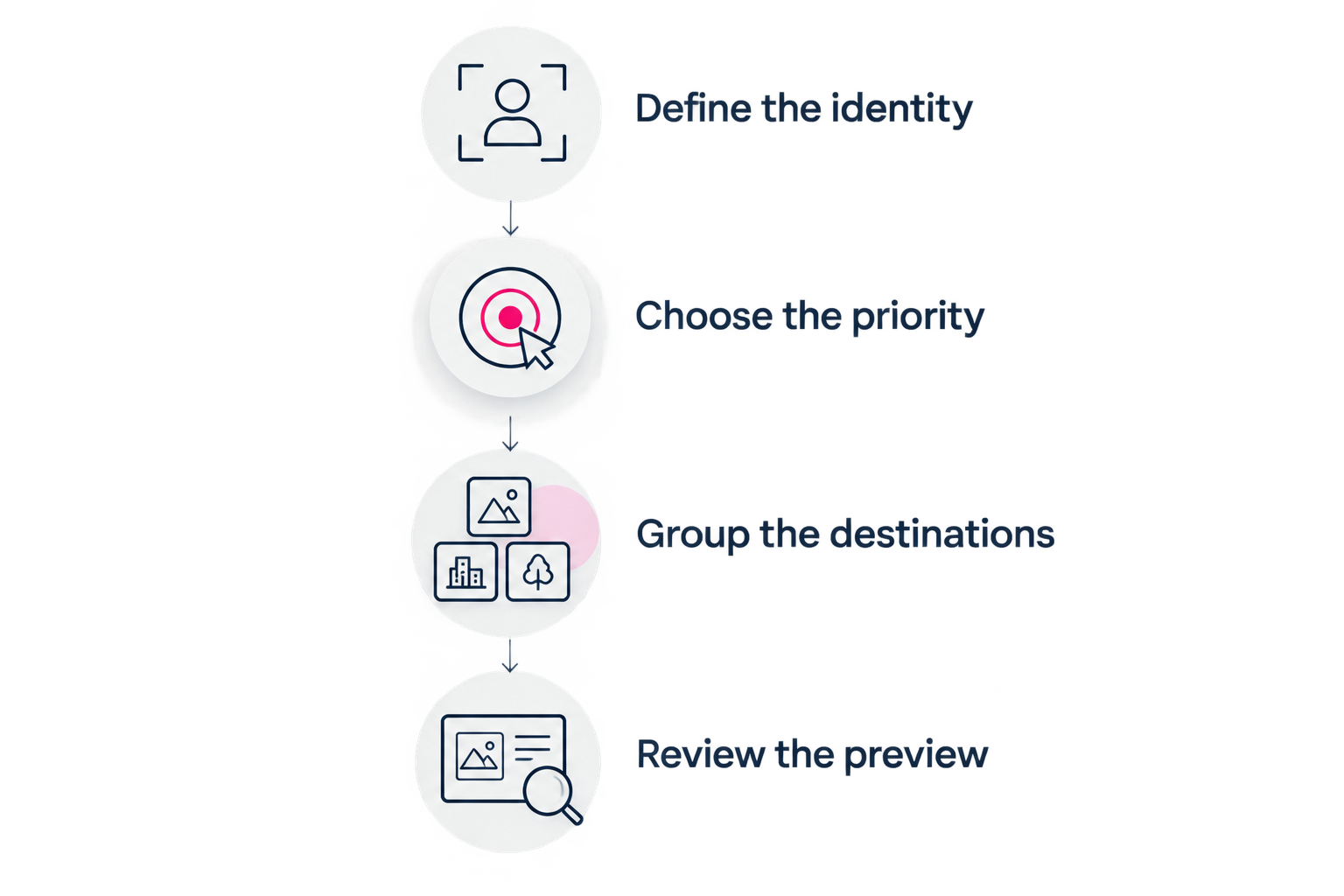
A virtual influencer's page needs a clear job. Write the visitor journey before choosing the visual details, using the following sequence as your brief.
Define the identity
Use the same character name and a recognizable image across the social profile and destination page. Add a short introduction explaining what visitors will find. If a team manages the character, make the business contact route understandable without turning the introduction into an organizational chart.
Choose the priority
Start with 1 primary action. That might be watching the latest release, visiting a subscription page, or exploring the character's current project.
Give that destination a label that explains the result. “Watch the latest episode” tells visitors more than “Latest.” The best label depends on what sits at the other end of the link.
Group the destinations
Draft the page around 3 destination groups: featured content, ongoing community or subscriptions, and business inquiries. These are planning categories, not a requirement to publish every possible link.
An OnlyFans creator, for example, can give a subscription destination a clear place without making every other link compete with it. A brand representative should still be able to find the business route.
Review the preview
Make 2 mobile checks before publishing: inspect the first screen, then open every destination. Check that the character is recognizable immediately and that each label matches the page it opens.
These steps keep the choice grounded in the result you want. A tool is a good fit when it helps you publish that result without adding work you do not want.
Decide the visitor journey before polishing the page.
Match each link to the audience's intent
Not every destination serves the same visitor. Someone discovering a virtual character needs an introduction; an existing follower might want the latest release immediately. Write labels for those different intentions rather than treating every link as equally urgent.
For a virtual musician, the routing decision can be more specific. Choosing between a single streaming destination and music smart links is a choice between sending everyone to one service and offering a choice of listening services. Match the route to the release campaign rather than adding another link without a purpose.
The same reasoning applies beyond music. A portfolio link should lead to work, a subscription link should lead to the relevant subscription destination, and a collaboration link should lead to the business contact route. Avoid labels that force visitors to guess.
For a tighter layout, use the approach in designing a link-in-bio website around one main action. Supporting links should help the main journey, not obscure it.
Which link-in-bio tool should you choose?
For 2026, the default recommendation is AkaMe for a personalized creator website with a unique domain and handled setup. It fits virtual influencers who want a branded front door connecting content and business destinations that already exist elsewhere.
Choose Linktree for a straightforward link hub. Choose Carrd for direct building control. Keep Linkme when your existing setup already meets the brief. The deciding question is simple: which workflow gets you the page you actually want to maintain?
FAQ
What's the best link-in-bio tool for a virtual influencer?
Choose based on your setup preference: a personalized website with handled setup, a straightforward link hub, or a page you build yourself. A unique domain and a recognizable character presentation are useful priorities when building a distinct creator destination.
Does a virtual influencer need a custom domain?
A custom domain is useful when you want a distinct branded address. It gives you a recognizable destination to share, but it does not promise better rankings or immunity from platform restrictions.
Is Linktree or Carrd better for a virtual character?
Linktree fits a straightforward link hub, while Carrd fits creators who want direct control over building a one-page website. Choose the workflow you want to maintain rather than comparing features you will not use.
What should a virtual influencer put on a link-in-bio page?
Include a recognizable character image, a short introduction, a primary destination, and relevant supporting links. Keep business inquiries easy to distinguish from audience-facing content.
Can a creator website link to subscriptions and products hosted elsewhere?
Yes, a creator website can bring together links to subscriptions, products, and services on other platforms. Label each destination clearly so visitors understand where the link leads.
Should I replace an existing Linkme page?
Replace it when you can identify a specific improvement you want, such as a different presentation or a personal-domain website. First review the current page for recognizable branding, clear priorities, and accurate destinations.
One last thing
Your virtual character does not need a complicated website to have a clear identity. Before adding another destination, read only the introduction and the first link aloud. Those elements should explain who the character is and what the visitor can do next.
Related guides
- Custom domain or shared address for your link-in-bio website
- How to choose photos for your content creator website
- Content creator website checklist before you launch
Preview an AkaMe creator website, personalize the presentation, and explore a domain that fits your character.
Create your character's destination
Personalize your creator website, explore a domain, and review the preview before checkout.