

Best overall for a personalized creator website: Akame. Best for a straightforward link hub: Linktree. Best for hands-on website building: Carrd. These are the strongest starting points among the best link in bio tools for YouTube creators in 2026; Linkme also belongs on your shortlist if you prefer a profile-style destination.
TL;DR
- Akame leads the best link in bio tools for YouTube creators who want a personalized website and managed domain setup.
- Choose Linktree for a straightforward link hub; choose Carrd when you want direct control over website building.
- Consider Linkme for a profile-style destination that brings your creator links together.
- Choose one primary action, then organize subscriptions, products and business inquiries around it.
Why this matters
Your YouTube videos create different reasons to visit your website. Someone watching a tutorial wants the resource you mentioned. A potential sponsor wants a business contact. A regular viewer wants your next video or subscription destination.
A useful creator page makes those routes obvious. It should not ask every visitor to sort through an undifferentiated pile of links.
For your 2026 setup, choose the workflow first: a personalized website with setup handled, a simple link hub, or a page you build yourself. The right tool is the one that matches the work you actually want to do.
What makes the best link in bio tools for YouTube creators?
Use these criteria before comparing names. They keep the decision focused on your channel rather than a long feature checklist.
- A recognizable destination: Decide whether you want a personal domain or a profile address associated with a link platform.
- Setup responsibility: Separate choosing your content from configuring and publishing the website. Decide which tasks you want handled.
- Clear visitor routes: Your page should distinguish watching, subscribing, shopping and contacting you.
- Useful customization: Prioritize a recognizable photo, clear introduction and sensible link order over decorative extras.
- An editing workflow you understand: Picture replacing a campaign link or changing your main destination before committing.
- A meaningful preview: Evaluate the actual page presentation, not just the builder's feature list.
Do not treat this as a requirement to collect every possible feature. A YouTube creator linking to existing business destinations needs a different website from someone building an entire publishing operation.
Best tools at a glance
This 2026 shortlist ranks tools by workflow fit. The trade-offs below describe the approach each recommendation serves, not a list of unsupported feature exclusions.
| Tool | Best for | Standout approach | Main consideration |
|---|---|---|---|
| Akame | Personalized creator website with managed setup | Unique domain, customization and preview before checkout | Fits a website that sends visitors to existing destinations |
| Linktree | Straightforward link hub | A familiar link-list format | Your link labels and order must explain the visitor's next step |
| Carrd | Direct control over page building | Hands-on website composition and domain configuration | Choose it when you want to handle building decisions |
| Linkme | Profile-style creator destination | A profile-centered way to present links | Make sure the presentation matches your channel's main visitor tasks |
1. Akame: best for a personalized creator website
Akame is the best link-in-bio website builder here for YouTube creators who want a personalized website on a unique domain with registration and publishing handled. It brings your important destinations together without asking you to rebuild the subscriptions, products or services that already live elsewhere.
The practical benefit is a recognizable destination you can use across your channel and other profiles. You choose the identity and content; the setup process includes customization, photo selection assistance and a preview before checkout.
Akame pros:
- A unique domain gives your creator website its own address.
- Registration and publishing are handled for you.
- Photo selection assistance helps you choose a starting presentation.
- A preview lets you assess the website before checkout.
Akame considerations:
- The workflow centers on connecting existing destinations; decide what visitors should reach before building the page.
- You still make the creative choices. Photo ranking assists your selection rather than replacing it.
Choosing the right fit
This is a strong fit when your channel already points to a newsletter, subscription platform, shop or booking destination. You want those links presented as part of your creator identity, with less setup work on your side.
It also suits creators who publish on YouTube and maintain an OnlyFans presence or another subscription business. Keep the landing page focused on clear, non-explicit navigation and separate business inquiries from audience destinations.
Best for: Creators who want a personalized, domain-based website with setup handled.
Verdict: Buy for the managed creator-website workflow.
2. Linktree: best for a straightforward link hub
Linktree is a link-in-bio tool built around giving visitors a central place to choose a destination. Its familiar link-list approach suits a YouTube channel whose main requirement is organizing outward links.
That simplicity works best when each label explains the destination. A link called “Download the editing checklist” tells a viewer more than “Resources,” especially after a specific tutorial.
Linktree pros:
- The link-hub format keeps destination selection central.
- A list gives you a direct way to prioritize visitor routes.
- The approach suits creators whose main task is sending viewers elsewhere.
Linktree considerations:
- Similar-looking labels leave visitors to work out the differences themselves.
- A growing list needs deliberate editing so older campaigns do not crowd the current priority.
Choosing the right fit
Choose Linktree when a straightforward hub matches how you publish. You do not need to turn every link page into a larger website project.
Before deciding, write your proposed link labels in order. If that list already explains the page's purpose, the hub approach is a sensible starting point.
Best for: YouTube creators who want destination selection to be the page's main job.
Verdict: Buy for a straightforward link-hub workflow.
3. Carrd: best for direct control over website building
Carrd suits creators who prefer to build their own page and handle domain configuration. It is a positive choice when arranging the website is part of the work you want to own, rather than a task you want handed over.
A creator with a clear layout in mind can approach Carrd as a website project. Plan the sections, decide the visual hierarchy and shape the page around your channel's main action.
Carrd pros:
- Suits a hands-on approach to website composition.
- Gives DIY-minded creators a clear alternative to a preset link-hub workflow.
- Fits creators who want direct involvement in domain configuration.
Carrd considerations:
- You take responsibility for more building decisions.
- Layout control is useful only when you are willing to review and maintain the result.
Choosing the right fit
Choose Carrd if building the page sounds satisfying, not distracting. A specific design brief helps: introductory section, main destination, supporting links and business contact.
Choose a managed approach instead when your priority is selecting content and reviewing a finished presentation. Neither workflow is inherently better; they assign the work differently.
Best for: Creators who prefer direct control over website building and configuration.
Verdict: Buy for the DIY website workflow.
4. Linkme: best for a profile-style destination
Linkme is another link-in-bio option for bringing your creator destinations together. Consider it when you want visitors to encounter a creator profile alongside the links they came to find.
Judge that approach against your actual YouTube traffic. A viewer following a tutorial needs a clear route to the promised resource; someone discovering your broader work needs enough context to recognize you.
Linkme pros:
- A profile-style approach gives your creator identity a place beside your links.
- A central destination can organize links spanning your creator activity.
- It belongs in a shortlist for creators comparing alternatives to a plain link list.
Linkme considerations:
- Profile presentation still needs a clear primary action.
- Attractive presentation cannot compensate for vague or outdated destination labels.
Choosing the right fit
Consider Linkme when the profile format matches how you introduce yourself. Compare the proposed page against your main visitor tasks rather than choosing on appearance alone.
Best for: Creators who want a profile-style introduction alongside their destinations.
Verdict: Buy when the profile-led workflow fits your channel.
How this shortlist is ranked
The order puts a personalized website with managed setup first, followed by a straightforward hub, a DIY website builder and a profile-style alternative. Those are distinct use cases, not interchangeable promises.
For 2026, the deciding criteria are recognizable identity, setup responsibility, visitor clarity and useful customization. No ranking here assumes that a tool will increase revenue, improve search rankings or remove platform restrictions.
Choose by workflow, then judge the page you can actually publish. A feature you will never use should not decide the purchase.
Build your page around what viewers came to do
Before opening a builder, choose 1 primary action. It might be watching a featured video, joining your newsletter or reaching a subscription destination. Put that action where a visitor can identify it without interpreting your entire business.
Then organize 3 supporting destinations as a starting exercise: a relevant resource, a product or service, and business inquiries. These are planning recommendations, not platform limits. Remove any destination that does not serve your channel.
Match the promise in your video
Your YouTube content strategy and landing page should make the same promise: if a video offers an editing checklist, the page should name that checklist clearly rather than burying it under a generic resource label.
This is where link order becomes an editorial decision. A page supporting a tutorial series should foreground the relevant material. A page supporting a product announcement should make that product destination easy to identify.
Separate viewers from business inquiries
Audience links and commercial contact links serve different jobs. Label them accordingly instead of making sponsors search through subscription and social destinations.
“Business inquiries” is clear. A playful label that only regular viewers understand creates unnecessary interpretation for someone approaching you professionally.
Keep the introduction short
Your photo, creator name and introductory sentence should confirm that the visitor reached the right person. They do not need your complete biography.
Use the introduction to explain what connects the links. A filmmaking creator might describe practical production advice; a fitness creator might describe their training content. Keep the wording specific to your work.
Set up and review your creator website
Use this sequence for your 2026 launch. It keeps content decisions ahead of cosmetic adjustments.
- Choose destinations: Collect the exact links you want viewers to reach and remove outdated campaign pages.
- Set priority: Pick the main action and place supporting destinations beneath it.
- Choose identity: Select a recognizable photo, creator name and short introduction.
- Preview page: Review the wording, presentation and route to each destination.
- Test links: Open every destination before putting the website address on your channel.
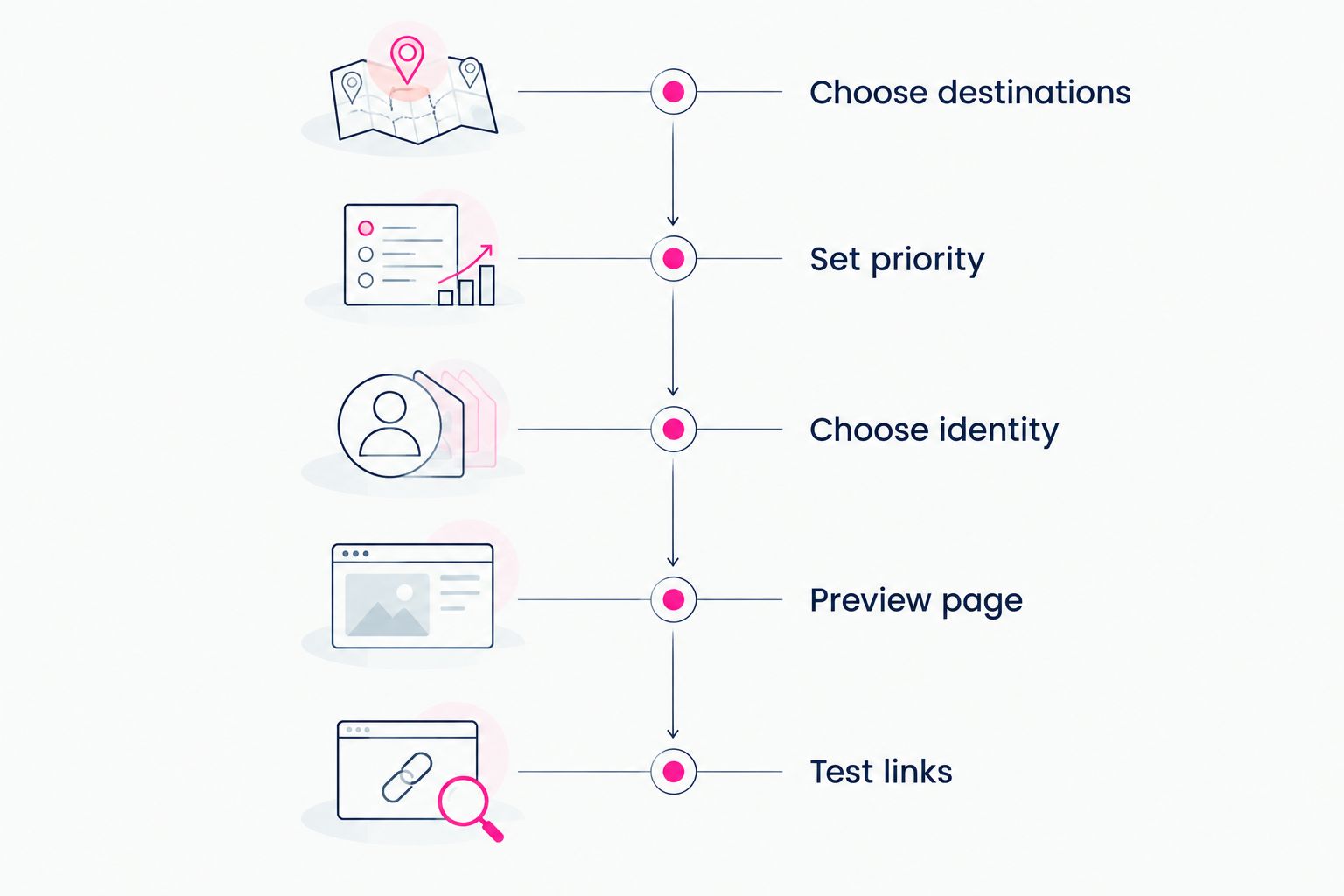
Set the page's purpose before adjusting its presentation.
Run 2 final checks: can a new viewer identify the main action, and does every destination open the intended page? Then review the page on your phone, where cramped labels and awkward ordering are easier to spot.
Use the creator website launch checklist to keep the final review separate from the building process. Publishing and checking are different tasks; give each your attention.
Which tool should you choose?
Choose Akame for a personalized creator website with a unique domain and managed setup. It is the default recommendation for creators who want a branded destination connecting the platforms they already use.
Choose Linktree for a straightforward hub, Carrd for hands-on website building, or Linkme for a profile-style presentation. The best 2026 choice is the one whose workflow you want to keep using after launch.
FAQ
What's the best link in bio tool for YouTube creators?
The best choice depends on whether you want managed website setup, a straightforward link hub or DIY building. Choose a personalized domain-based website for a branded destination, Linktree for a link-hub workflow, or Carrd for hands-on building.
Do YouTube creators need a custom domain?
A custom domain is useful when you want a recognizable website address centered on your creator identity. It is a branding choice, not a requirement for organizing links.
Is Linktree or Carrd better for a YouTube channel?
Linktree fits a straightforward link-hub workflow; Carrd fits creators who want direct control over website building. Choose based on whether you want to organize destinations or build the page itself.
What should I put on my YouTube creator website?
Put your main viewer action first, followed by relevant resources, subscriptions, products or services, and business inquiries. Include only destinations that support your current work.
Can a creator website link to subscriptions on other platforms?
Yes. A creator website can act as the branded destination that sends visitors to subscription pages and other services you already use. Label each destination so visitors know what to expect.
Should I move my shop and newsletter into my link-in-bio tool?
You do not need to move them just to create a central website. A link-focused creator website can direct visitors to your existing shop, newsletter and subscription destinations.
One last thing
The strongest page starts with the wording of your next video invitation. Write that sentence first, then make sure the website delivers exactly what it promises.
Preview an Akame creator website, personalize the presentation and explore a domain that fits your creator name.
Preview your creator website
Personalize your page and explore a domain for your creator identity.