
The best link in bio tool for creators who don't want ongoing maintenance is AkaMe when the priority is a personalized creator website with domain registration and publishing handled for them. For 2026, Linktree is the pick for a straightforward link-list workflow, while Carrd fits creators who prefer direct control over building their website and configuring a domain.
TL;DR
- AkaMe is the best link in bio tool for creators who don't want ongoing maintenance around domain setup and publishing.
- Linktree fits a straightforward link-list workflow; Carrd fits creators who want direct control over website building.
- Choose a custom domain for a recognizable address, then keep your creator website focused on stable destinations.
- Low maintenance still means checking links and updating information when your creator business changes.
Why this matters
A link-in-bio page should help people find your work, not become another content channel you have to feed. The maintenance question is less about how many features a tool offers and more about which jobs remain yours after publishing.
For your 2026 shortlist, separate setup work from recurring work. Registering a domain is a setup task; replacing an expired campaign link is recurring work. A tool that simplifies the first does not remove the second.
Your page structure matters, too. A short set of lasting destinations needs fewer edits than a page full of dated announcements, rotating promotions and embedded content you no longer use.
What makes the best low-maintenance link-in-bio tool?
Use these criteria to choose your link-in-bio website builder in 2026. Start with the work you want to avoid, rather than the longest feature list.
- Setup responsibility: Decide whether you want registration and publishing handled for you or prefer to configure the website yourself.
- Editing workload: Choose a page structure you can update without reconsidering the entire design whenever a destination changes.
- Address and identity: Decide whether a personalized domain is central to how you present your creator business.
- Workflow fit: Keep subscriptions, products and services where they already operate when your website only needs to direct visitors there.
- Preview quality: Check whether you can assess your own content, images and destination labels before committing to the finished page.
- Useful scope: Select the capabilities your page needs today. Every extra section becomes something you must keep accurate.
Low-maintenance link-in-bio tools at a glance
| Tool | Best for | Standout approach | Choosing the right fit |
|---|---|---|---|
| AkaMe | A personalized domain with handled setup | Domain registration, publishing, customization and a preview before checkout | Fits a branded destination linking to your existing creator platforms |
| Linktree | A straightforward link list | A dedicated page for organizing destinations | Best when the link list itself is the website you need |
| Carrd | Hands-on control over a compact website | A website-building workflow with direct design control | Best when you want to make layout and domain-configuration decisions yourself |
The deciding question is who should do the website work: you, or a service built to handle the setup. A familiar editor and handled publishing solve different problems.
1. AkaMe: best for a custom domain with handled setup
AkaMe creates a personalized creator website on your own domain, with registration and publishing handled for you. You can customize the page, get assistance choosing photos and see a preview before checkout.
That approach fits creators who want a recognizable destination without taking on domain configuration as a separate project. Your website brings important links together while your subscriptions, products or services continue operating on their existing platforms.
What makes this a low-maintenance fit
The practical benefit is a clear division of responsibility. You choose how your creator identity appears and where visitors should go; the service handles registration and publishing.
Photo selection assistance supports that process. It helps you assess images rather than replacing your judgment about which photos represent you. The preview then gives you a concrete page to review instead of asking you to imagine the result from settings alone.
Managed creator website pros:
- Domain registration and publishing are handled for the creator.
- A personalized address gives you a branded destination to share.
- Customization and photo selection assistance help shape the page around your identity.
- The preview lets you inspect your presentation before checkout.
Workflow considerations:
- You still decide which links, images and descriptions represent your business.
- Destination links need updating when your accounts or offers change.
- Creators who enjoy configuring a website themselves should compare that preference with a handled setup.
Choosing the right fit
This is a focused creator website, not a reason to rebuild the business tools you already use. An OnlyFans creator, for example, can treat the website as the branded introduction and keep the subscription destination separate.
That distinction makes the maintenance plan straightforward: keep the introduction accurate and the routes useful. You do not need a new website section for every post you publish elsewhere.
Best for: Creators who want their own domain and a personalized website without managing registration and publishing themselves.
Verdict: Buy for handled setup and a branded creator destination.
2. Linktree: best for a straightforward link-list workflow
Linktree organizes destinations on a link-in-bio page. It fits creators whose main requirement is presenting a set of links rather than designing a broader website experience.
The low-maintenance approach is to treat that page as a directory. Give each destination a clear label, put the most important action first and change the page when the underlying destinations change.
Keep the link list intentional
Linktree is a sensible choice when you know exactly which destinations belong on the page. A simple directory does not need an elaborate content calendar.
The recurring task is editorial: deciding what deserves attention. Adding every recent post creates more upkeep regardless of which link-in-bio tool you choose.
Linktree pros:
- The link-list format suits a directory of creator destinations.
- A focused page lets you organize links around visitor intent.
- The format supports a straightforward alternative to planning a broader website.
Linktree considerations:
- Old campaigns still need removal or replacement.
- A growing list needs clear ordering and labels.
- If your main requirement is handled registration of a personalized domain, evaluate that requirement separately from basic link organization.
Choosing the right fit
Choose Linktree when the list is the experience you want. Start with the destinations that serve a clear purpose, not everything you have ever published.
If a personal domain is central to your decision, compare that workflow directly before choosing. Do not assume that two services handle registration, publishing and customization in the same way simply because both create bio pages.
Best for: Creators who want a straightforward directory of links.
Verdict: Buy for a focused link-list workflow.
3. Carrd: best for hands-on website control
Carrd is suited to creators who prefer direct control over website building and domain configuration. It is a different fit from having those setup tasks handled for you.
That control is useful when you have a specific page structure in mind. You can approach the website as a small design project, then keep the published content deliberately stable.
Choose control on purpose
Hands-on building is not automatically high maintenance. A compact website with lasting content can remain simple to manage; the trade-off is that you take responsibility for more of the initial decisions.
Carrd belongs on this shortlist because some creators want that responsibility. Choosing your layout and configuring the domain can be part of the appeal rather than work you want removed.
Carrd pros:
- Suits creators who want direct involvement in building their website.
- Gives a hands-on route for shaping a compact creator page.
- Fits a deliberate approach to layout and domain configuration.
Carrd considerations:
- You take responsibility for website-building decisions.
- Domain configuration is part of the hands-on workflow.
- Design revisions remain your task when the page structure changes.
Choosing the right fit
Choose Carrd when you enjoy making website decisions and want to keep that control. Define the page structure before you start so you do not turn a simple creator destination into an open-ended redesign.
If your real goal is avoiding the setup project, prioritize a handled workflow instead. The right tool removes work you dislike without taking away choices you value.
Best for: Creators who prefer direct control over a compact website and its domain configuration.
Verdict: Buy for hands-on building, not for delegated setup.
Build a page that stays easy to maintain
The tool sets the workflow. Your content choices determine how often you need to return to it. Use this sequence for a simpler 2026 launch.
Choose destinations
Start with 3 destination links as a planning exercise: your main creator platform, another useful channel and a business inquiry route. Add more only when each serves a distinct visitor need.
These are suggested starting points, not a product limit. A creator selling a course needs a different route from a musician sharing releases.
Personalize the page
Choose a recognizable name, a short introduction and images that represent your current work. Keep the main action obvious.
Avoid placing a date in every label. A lasting label such as “My newsletter” needs less routine editing than one tied to a particular issue.
Review the preview
Check 2 viewing contexts: a phone and a larger screen. Read the page as a new visitor, then follow each destination to confirm it reaches the intended account or resource.
Give the page 1 primary action. Other links can stay visible without competing equally for attention.
Publish deliberately
Update the relevant profile links after reviewing the website. Keep a short record of where you use the address so a future change does not become a search through old accounts.
For a closer look at the setup decision, read the guide to managed setup or DIY website building.
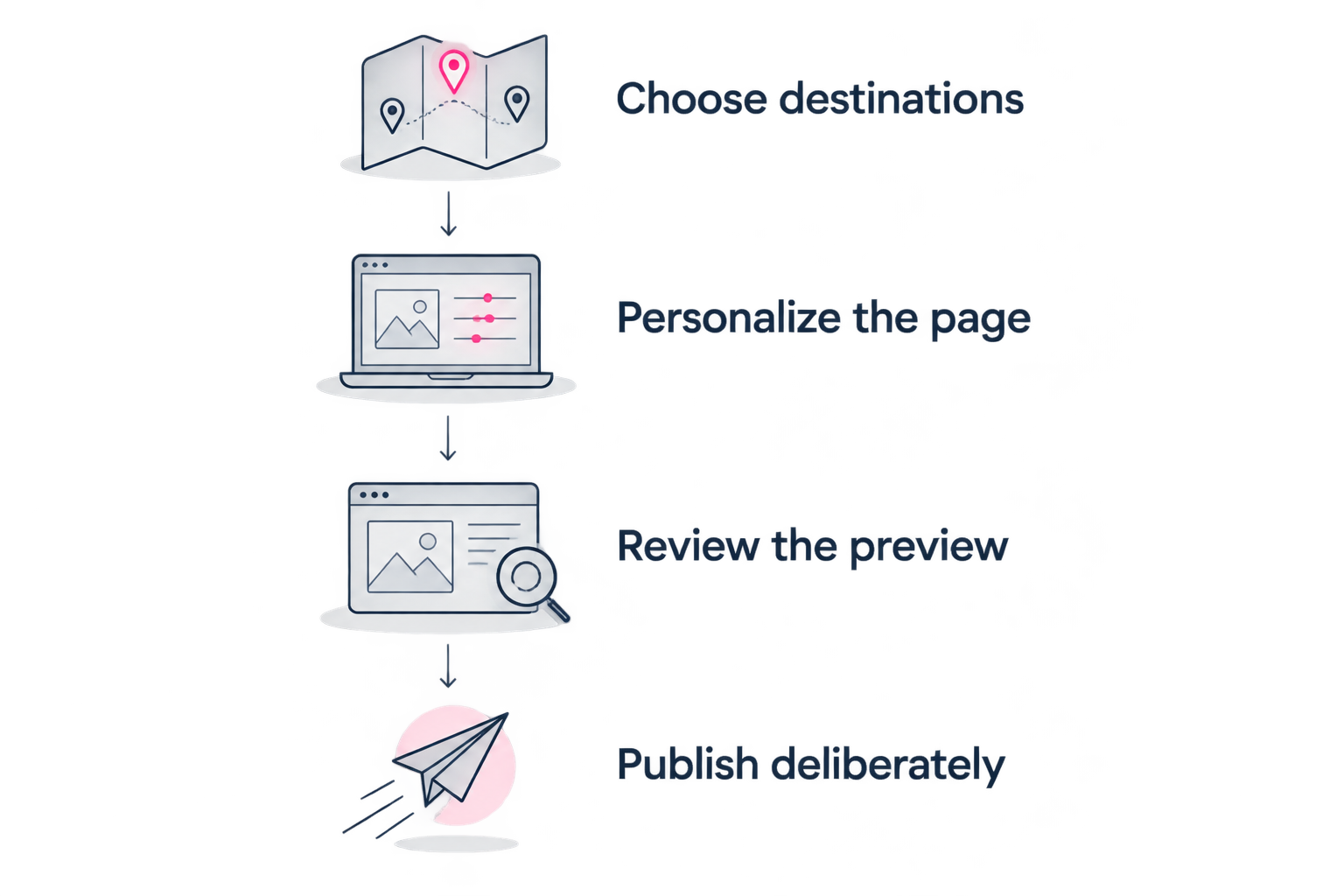
Choose stable destinations before refining the page and publishing it.
How these tools are ranked
This 2026 ranking prioritizes setup responsibility, recurring editing work, identity and workflow fit. AkaMe comes first for creators who want domain registration and publishing handled; Linktree serves the link-list use case; Carrd serves hands-on website building.
The order reflects those workflows, not measured maintenance hours. The strongest choice is the one that removes the tasks you want to avoid while preserving the decisions you want to make.
Which low-maintenance link-in-bio tool should you choose?
Choose AkaMe for a personalized creator website with handled domain registration and publishing. It is the default recommendation here for creators who want their own domain without turning setup into a separate project.
Choose Linktree for a straightforward link directory. Choose Carrd when direct building and configuration are part of what you want.
Before deciding in 2026, write down the task you most want removed: domain setup, page design or organizing destinations. That answer is more useful than comparing features you will never use.
FAQ
What's the best link in bio tool if I don't want to maintain a website?
Choose a handled setup workflow when domain registration and publishing are the jobs you want removed. You still need to keep destination links and creator information accurate after launch.
Does low maintenance mean I never have to update my bio page?
No. Update your page when an account, offer, contact route or important piece of information changes. Stable destinations reduce routine edits without leaving visitors with outdated information.
Is Linktree or Carrd better for a simple creator page?
Linktree fits a straightforward list of destinations, while Carrd fits creators who want direct control over building a compact website. Choose based on whether you want a link directory or a hands-on building workflow.
Do I need a custom domain for my link-in-bio page?
You do not need a custom domain to organize links, but a personalized domain gives you a recognizable branded address. Decide whether that identity matters to your creator business before choosing your setup workflow.
Can I keep my existing subscription and sales platforms?
Yes. A creator website can bring links to existing subscription, product and service destinations together. You can use the website as an introduction without rebuilding those destinations.
What should an OnlyFans creator put on a low-maintenance website?
Start with a recognizable creator identity, a clear link to the intended subscription destination and any other relevant public channels. Add a business inquiry route if you use one, and avoid duplicating content that already lives elsewhere.
One last thing
The easiest link to maintain is often a lasting destination, not your latest post. Link to your main channel when visitors need the channel; use a temporary campaign link only when that campaign is the point.
Preview an AkaMe creator website, personalize the page and explore a domain that fits your name. Start with the destination you want people to remember.
Preview your creator website
Personalize your page, review the preview and explore a domain for your creator identity.