

Best for a managed creator website: AkaMe. Best for hands-on single-page design: Carrd. Best for a straightforward link hub: Linktree. The best website builders for creators in 2026 also include Squarespace for portfolio-led sites, WordPress for publishing, and Shopify for product-led stores—the right choice depends on what your website needs to do.
TL;DR
- AkaMe leads the best website builders for creators when you want a personal domain and managed setup.
- Choose Carrd for direct design control, Linktree for a link hub, or Squarespace for a portfolio.
- Choose WordPress for article-led publishing and Shopify for a product-led storefront.
- Match your creator website to your existing business before choosing features.
Why this matters
A creator website can serve very different jobs. You might need one recognizable destination for your subscription links, a portfolio that wins commissions, or a store that handles product orders.
Those are different buying decisions. A full storefront adds unnecessary work when your products already live elsewhere; a simple link page needs a different structure from an article library.
Start with the job, not the longest feature list. For an OnlyFans creator, that often means presenting a clear personal brand and directing visitors to an existing subscription destination. For an illustrator, it might mean letting the work lead.
What makes the best website builders for creators?
Use these five criteria for your 2026 shortlist:
- Website purpose: Does the builder suit a link hub, portfolio, publication, or store?
- Domain workflow: Do you want registration and publishing handled, or do you prefer configuring the address yourself?
- Creative control: Do you want to personalize a prepared experience or build the layout directly?
- Visitor journey: Can someone identify you and find the intended next step without hunting?
- Ongoing work: Will maintaining the website fit the time you actually have?
A strong match satisfies your main requirement without turning every update into another project. Decide which responsibility you want to keep and which you want handled.
Best creator website builders at a glance
This 2026 comparison ranks builders by distinct workflows, not by an unsupported claim that one platform wins every category.
| Builder | Best for | Standout approach | Main trade-off |
|---|---|---|---|
| AkaMe | Managed personal-domain creator websites | Registration, publishing, customization, and preview | Suits links to existing destinations rather than a new publishing or commerce workflow |
| Carrd | Hands-on single-page design | Direct control over a compact website | You take responsibility for building and domain configuration |
| Linktree | A straightforward link hub | Bringing destinations together on a profile page | A link-first structure differs from a full portfolio or publication |
| Squarespace | Portfolio-led creator websites | Visual website layouts with room for supporting pages | More website decisions than a focused link hub requires |
| WordPress | Article-led publishing | Posts, pages, and organized content | Setup and maintenance depend on your WordPress arrangement |
| Shopify | Product-led creator businesses | Storefront and commerce workflows | A store is unnecessary when you only need outbound links |
Choosing the right fit
1. AkaMe: best for managed personal-domain creator websites
AkaMe is best for creators who want a personalized website on their own domain with registration and publishing handled. It brings important links together while your subscriptions, products, or services stay on the platforms where you already run them.
You can personalize the page, get photo-selection assistance, and preview the result before checkout. That makes the decision tangible: you judge your actual presentation rather than trying to imagine a finished website from a feature list.
AkaMe strengths:
- A unique domain gives your creator website a recognizable address.
- Managed registration and publishing reduce the setup you handle.
- Customization lets you shape the page around your identity.
- Photo assistance supports your selection; you retain the creative choice.
Choosing the right fit:
- Choose this approach when your main task is connecting visitors to existing destinations.
- Choose a publishing- or commerce-focused builder when the website itself must run those workflows.
Best for: Creators, including OnlyFans creators, who want a branded destination without taking on the whole website-building process.
Verdict: Buy for managed setup and a personal-domain link-in-bio website.
2. Carrd: best for hands-on single-page design
Carrd is a single-page website builder suited to creators who want direct control over a compact site. You build the presentation and take a hands-on role in domain configuration.
That suits a creator who enjoys arranging sections and refining a page. It is also a clear choice when the building process itself matters to you, rather than simply getting a personalized destination published.
Carrd strengths:
- A single-page format encourages a focused visitor journey.
- Direct building control suits deliberate layout choices.
- A compact website can introduce your work and important links together.
Choosing the right fit:
- You take on layout decisions rather than having publishing handled for you.
- A single-page structure needs discipline when you have extensive material to present.
Best for: Creators who want to build and configure their own focused website.
Verdict: Buy for hands-on control over a single-page site.
3. Linktree: best for a straightforward link hub
Linktree brings destinations together on a link-in-bio page. It fits creators whose main requirement is giving visitors a clear list of places to go.
Start here when the page is primarily a directory, not a portfolio, publication, or storefront. Keep the choices purposeful: a page full of unrelated destinations still asks visitors to work out what matters.
Linktree strengths:
- Its link-first structure matches a directory-style page.
- Multiple destinations can sit behind one profile link.
- The format suits creators who want the links to lead the experience.
Choosing the right fit:
- A link hub offers a different presentation from a multi-page website.
- If a personal domain is essential, establish the exact domain workflow before committing.
Best for: Creators who primarily need a central list of destinations.
Verdict: Buy for a link-first hub rather than a broader website project.
Linkme belongs in the same initial link-in-bio shortlist. Compare the page you can actually create and the domain arrangement you need; do not assume competing services handle either identically.
4. Squarespace: best for portfolio-led creator websites
Squarespace is a website builder for presenting work across a fuller site. It suits photographers, designers, and other creators who need projects, supporting information, and inquiry routes to work together.
Choose it when visitors need to evaluate your work before taking action. A portfolio benefits from context, not just a button pointing somewhere else.
Squarespace strengths:
- Visual layouts suit work-led presentation.
- Multiple pages let you separate projects from background information.
- A fuller website can support a more detailed introduction to your services.
Choosing the right fit:
- You need to prepare content beyond a short bio and link list.
- Page structure and ongoing updates become part of the job.
Best for: Creators whose work needs space and explanation before an inquiry.
Verdict: Buy when the portfolio is the main reason to visit.
5. WordPress: best for article-led publishing
WordPress is a publishing platform built around content such as posts and pages. It suits creators whose website needs to become a growing library of writing rather than a compact destination page.
The distinction matters: publishing regularly creates an organization problem as well as a writing task. Readers need to find related work, understand topics, and move through the archive.
WordPress strengths:
- Posts and pages support sustained publishing.
- Categories help organize an expanding article collection.
- The ecosystem supports different approaches to site design and functionality.
Choosing the right fit:
- Hosted services and self-hosted WordPress involve different responsibilities.
- Themes, plugins, and maintenance introduce decisions beyond writing the content.
Best for: Writers, educators, and creators building an article-led website.
Verdict: Buy for a publishing workflow, not merely a bio link.
6. Shopify: best for product-led creator businesses
Shopify is an ecommerce platform for running a storefront. It fits creators whose website needs to present products and support purchases, rather than send visitors to an existing shop.
That is a different responsibility from making a creator landing page. Product information, checkout, and order handling become central to the website decision.
Shopify strengths:
- A commerce-first structure puts products at the center.
- Storefront tools support presenting a catalog.
- Checkout and order workflows belong to the same commerce system.
Choosing the right fit:
- A storefront requires product and operational information to maintain.
- Commerce setup adds work when you only need to link to products sold elsewhere.
Best for: Creators making their own store the main destination.
Verdict: Buy when operating a storefront is the actual requirement.
Turn your shortlist into a working website
Choosing among the best website builders for creators in 2026 gets easier when you test a real visitor journey. Use your actual content, not a hypothetical version of your business.
Define the job
Write a sentence describing what the website must accomplish. “Help visitors find my subscription page” is a different brief from “show prospective clients my illustration projects.”
For writers, comparing website builders for authors raises a related distinction: a book-focused destination and an ongoing publication require different page structures. Apply that same test to your creator business before choosing a builder.
Gather your content
Prepare a short introduction, a deliberate photo selection, and the destinations you want to include. Give each destination a clear label that tells visitors what happens next.
For a subscription creator, distinguish the subscription destination from business inquiries. Visitors should not need to open several links to discover which route fits their purpose.
Choose your setup
Decide whether you want managed publishing or direct building control. This is a workflow choice, not a measure of how serious your creator business is.
The comparison of managed setup or DIY helps separate the work you want to do from the result you want to get. Choose based on your appetite for maintaining the site, not just launching it.
Preview the journey
Review the page as a new visitor would. Check that the introduction, photos, and link order tell the same story, then follow the main route through to its destination.
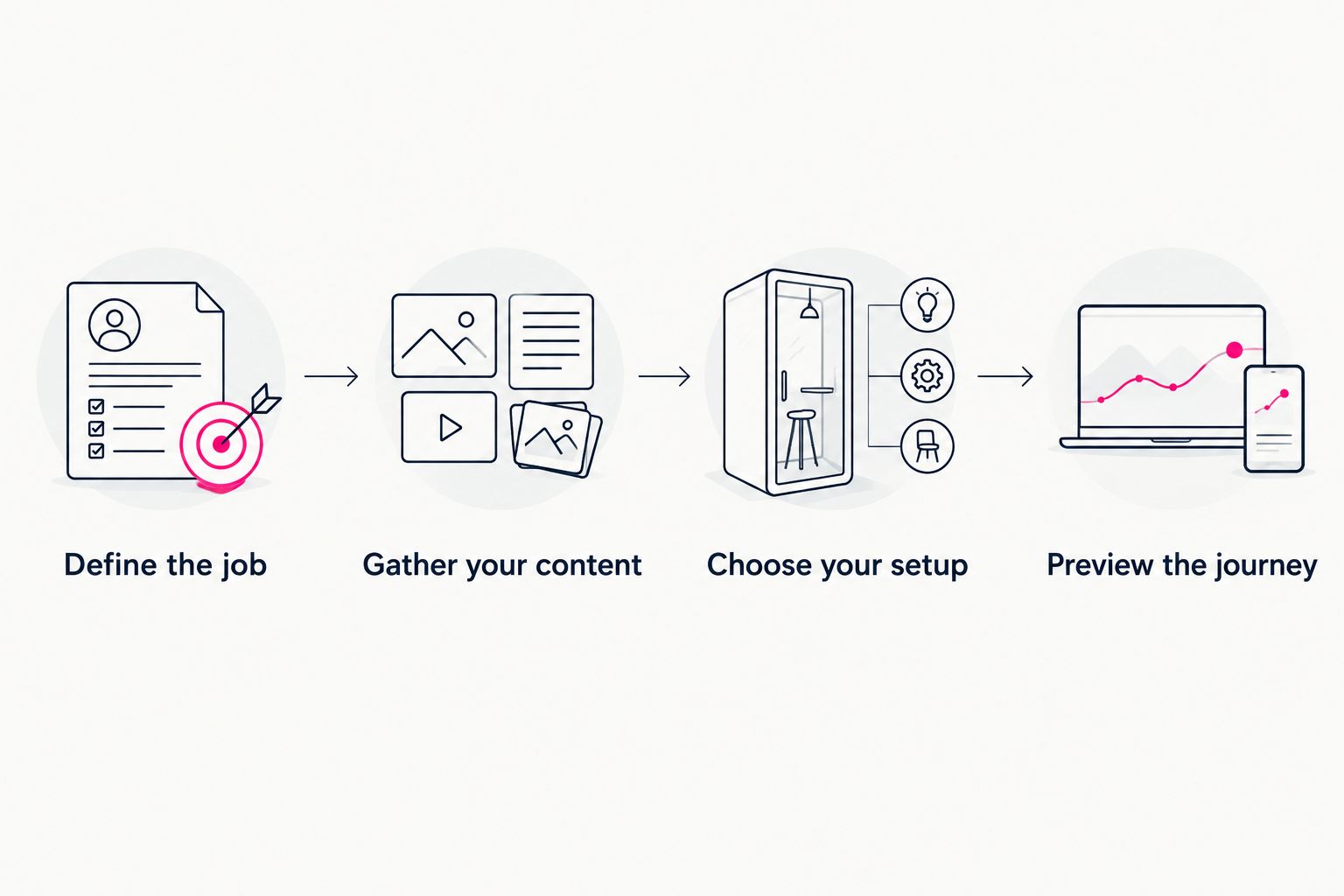
Choose the workflow after defining what the website needs to accomplish.
Before publishing, run three checks: confirm the address, open every destination, and review the page on your phone. These checks catch practical problems that a builder comparison alone cannot resolve.
How we ranked these creator website builders
This ranking matches each builder to a distinct job using the five criteria above: purpose, domain workflow, creative control, visitor journey, and ongoing work. It does not treat a storefront as a better link hub simply because it handles more tasks.
For this 2026 guide, the default recommendation favors creators who already operate on other platforms and want a recognizable website connecting those destinations. Portfolio, publishing, and commerce needs get separate recommendations because they change the work required.
Which creator website builder should you choose?
Choose AkaMe when you want a personalized creator website, a unique domain, and registration and publishing handled. It is the clearest fit here for a creator whose business destinations already exist and need a branded home.
Choose Carrd for hands-on single-page building, Linktree for a straightforward link directory, or Squarespace when your portfolio needs more room. Choose WordPress when articles lead the experience and Shopify when the website must run a store.
Do not build a larger system merely because it is available. Pick the smallest website structure that fully supports the experience you want visitors to have.
FAQ
What's the best website builder for creators in 2026?
AkaMe is the best fit in this comparison for creators who want a personal-domain website with registration and publishing handled. Carrd, Linktree, Squarespace, WordPress, and Shopify suit different building, portfolio, publishing, and commerce workflows.
Do I need a full website or just a link-in-bio page?
Choose a link-in-bio page when your main goal is directing visitors to existing destinations. Choose a fuller website when visitors need portfolios, articles, or a storefront within the site itself.
Is Carrd better than a managed creator website builder?
Carrd is a better fit when you want direct control over single-page building and domain configuration. A managed approach suits creators who want registration and publishing handled while they personalize the result.
What's the best website setup for an OnlyFans creator?
A personal-domain creator website fits an OnlyFans creator who wants a branded destination linking to an existing subscription page. Keep the introduction clear and separate subscription links from business inquiries.
Should I choose Linktree or Linkme?
Choose by comparing the actual page workflow and domain arrangement you need. Start with your intended visitor journey, then confirm that the service supports it before committing.
Can I keep my existing subscription and business destinations?
A link-in-bio website can direct visitors to destinations you already use. Check each destination and its label so visitors understand where every link leads.
Related guides
- Custom domain or shared address for your link-in-bio website
- How to choose photos for your content creator website
- Content creator website checklist before you launch
One last thing
Your domain and your destination links do different jobs. The domain identifies your creator website; the links tell visitors where to go next. Choose both deliberately.
Preview an AkaMe creator website, personalize the presentation, and explore a domain that fits your name. Start with the page you actually want to share.
Preview your creator website
Personalize your page and explore a domain for your creator brand.