
Yes, a brand collaboration can use one shared link-in-bio page to bring campaign destinations together, provided everyone agrees on the main action, page editor and reporting plan. Sharing a page does not require sharing account passwords or moving your existing stores, subscriptions or booking tools. For a 2026 campaign, decide who controls updates and what happens to the page after the collaboration ends.
TL;DR
- Can a brand collaboration use one shared link in bio page? Yes, with clear editing and reporting responsibilities.
- Use a campaign page for a joint promotion; use a creator website for an ongoing creator-led partnership.
- AkaMe fits creators who want a personalized custom-domain website linking to their existing platforms.
- Agree on the main action, link labels and campaign ending before publishing.
Can a brand collaboration use one shared link in bio page?
Yes. Choose the page around the campaign, not around who volunteers their account first. Start by designing your link-in-bio website around one main action, then decide where that page belongs.
| Page arrangement | Best for | Practical advantage | Trade-off to manage |
|---|---|---|---|
| Dedicated campaign page | A joint launch with a defined ending | Keeps the collaboration's message together | Needs an editor and an end-of-campaign plan |
| Creator's existing page | A partnership centered on one creator | Keeps the campaign within the creator's established destination | Campaign links compete with ongoing creator links |
| Brand's existing page | A promotion centered on the brand | Places campaign information within the brand's destination | Other participating creators need clear identification |
These arrangements describe how you organize the campaign, not specific software features. Any arrangement still needs accurate destinations, agreed wording and a clear next step for visitors.
Why this matters
A shared page gives you a single destination to put in participating profiles. Without a clear structure, though, that destination becomes a list of competing priorities: shop, follow, subscribe, enter, watch and contact.
Your visitor should not need the campaign brief to understand the page. State what the collaboration is, identify the participants and make the intended action obvious. Keep secondary destinations available without giving every link equal emphasis.
For a 2026 collaboration brief, write the page's purpose in plain language before choosing a builder. “Help visitors find the joint collection” is a usable direction. “Include everything from everyone” is not.
A shared page is different from a shared domain
A shared campaign page means collaborators send visitors to the same destination. A shared provider domain means the page's address sits under a service's domain alongside other users' pages. These are separate decisions.
You can organize a collaboration around a page on a custom domain. You can also place a campaign on an existing creator website. Neither decision determines who edits the page or receives campaign reports; those responsibilities still need agreement.
Treat the address and the working arrangement as separate parts of your brief. Decide whose identity the address represents, who handles the account and who approves changes. A personalized domain is a branding choice, not a promise of immunity from platform restrictions.
Choosing the right fit
A dedicated campaign page: best for a joint identity
Choose a dedicated page when the collaboration needs its own introduction, shared message and destinations. This works particularly well as an organizational approach when no participant should appear to own the entire promotion.
The responsibility is straightforward: someone must maintain that extra destination. Agree on its continuing purpose before putting its address into campaign materials.
An existing creator page: best for creator-led partnerships
Use the creator's page when the audience is primarily responding to that creator. Give the collaboration a clear place without removing the creator's other important destinations.
AkaMe is best for creators who want a personalized, custom-domain website linking to their existing platforms. AkaMe handles registration and publishing, with customization, photo selection assistance and a preview before checkout. That suits a creator whose subscriptions, products or services already live elsewhere and who wants a recognizable website bringing those links together.
For a joint campaign, decide whether a personal creator identity matches the collaboration. If the campaign needs a separate shared identity, agree on that direction before building around an individual's name.
An existing brand page: best for brand-led promotions
Use the brand's page when the campaign's central destination belongs to the brand, such as its existing product or event page. Identify participating creators clearly so visitors can connect the promotion they saw with the destination they reached.
The main consideration is balance. A brand-led page should still explain each creator's role rather than making the partnership disappear after the initial visit.
How do you set up a shared collaboration page?
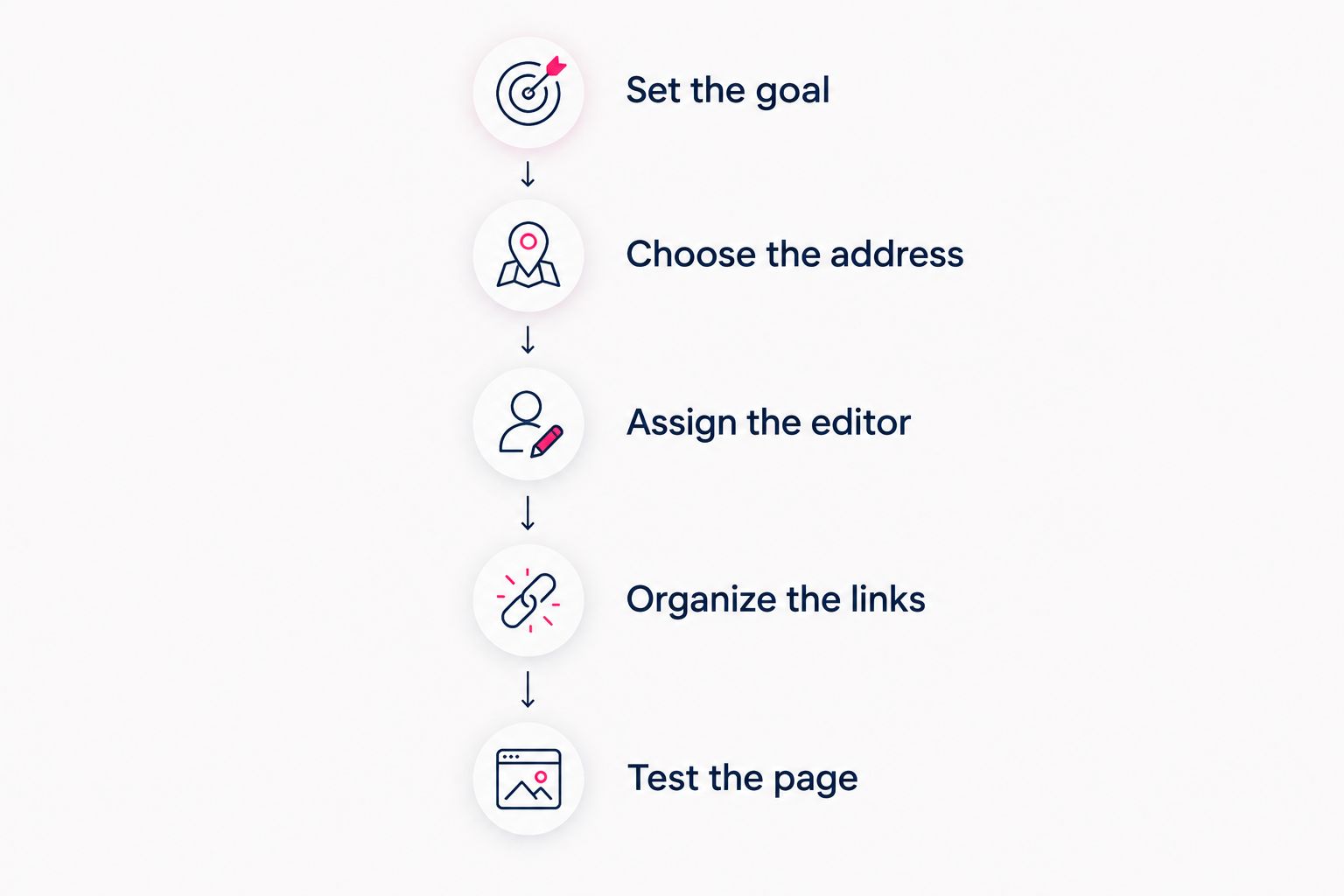
Use the following sequence for your 2026 launch checklist. The decisions matter more than the order in which you enter text into a builder.
1. Set the goal
Write down the action the page should support. That might be visiting a collection, watching a collaboration video, joining an event or finding participating creators.
Choose 1 primary action per campaign page as your starting rule. This is a planning recommendation, not a software limit. Add other links when they serve a clear visitor need, rather than because a participant has another account to promote.
2. Choose the address
Decide whether the campaign belongs under a creator identity, a brand identity or a separate collaboration identity. Match the address to the name visitors will recognize from the promotion.
Read the proposed address aloud and check its spelling. If the collaboration is temporary, think about whether the address will still make sense afterward. Do not build the naming decision around an assumption that the page must be replaced when the campaign ends.
3. Assign the editor
Name 1 accountable editor for the campaign page. Other collaborators can review wording and destinations without everyone receiving the account password.
Agree on how approvals work: who submits a change, who signs it off and who publishes it. If several people need direct access, confirm that your selected builder supports the access arrangement you require. Do not assume a shared public page includes team editing.
4. Organize the links
Put the main destination first, then group supporting links by purpose. Use labels that explain what happens next, such as “Watch the collaboration” or “Meet the creators.”
Avoid indistinguishable labels such as several buttons all named “Learn more.” Where links lead to different participants, identify the participant as well as the destination. Each visitor should understand the choice before tapping.
5. Test the page
Make 3 checks before launch: destination, display and disclosure. Open every link, inspect the page on a phone and confirm that the commercial relationship is presented appropriately.
Test the actual published destination rather than relying only on an editor preview. Ask someone who has not read the brief to explain the page's purpose and identify the main action. Their answer tells you whether your wording is clear.
Agree on the purpose and responsibilities before publishing the shared destination.
Keep the approved campaign brief beside the page while testing. Compare names, destinations and button order against that brief so last-minute edits do not quietly change the campaign's purpose.
Why the right shared-page setup varies
The right arrangement depends on the collaboration's actual needs, not the number of links a builder can display. Use these factors to make the decision:
- Campaign identity: A creator-led partnership and a jointly named project need different introductions.
- Main destination: A video, subscription page and product collection need different button wording.
- Participant roles: Explain who created, hosts or sells what instead of presenting everyone as interchangeable.
- Editing responsibility: Match the working arrangement to the access your chosen builder actually supports.
- Campaign duration: Decide whether the page will remain active, become an archive or return to its usual purpose.
- Reporting requirements: Agree on what the participants need to measure before creating tracking links.
Record these decisions once. The page should express the agreement, not become the place where collaborators discover they expected different outcomes.
How do you measure a collaboration using one page?
A shared destination does not automatically produce shared attribution. If every participant posts an identical untagged link, that address alone does not identify which participant sent a visitor.
For influencer marketing for DTC brands, distinguish the creator who sends the visit from the destination where the visitor acts. A campaign page can sit between those events, so the reporting plan needs to account for both.
Before your 2026 campaign launches, agree on:
- Incoming visits: Whether supported campaign tags will distinguish participating creators or social placements.
- Outgoing clicks: Which page links need separate reporting and whether your selected tools provide it.
- Completed actions: Which destination platform records purchases, registrations or subscriptions.
- Report access: Who receives results and what information each participant is permitted to share.
Use consistent labels in your campaign records. Do not count a page visit as a purchase or assume an outbound click confirms a completed signup. Report each action by its actual name.
If the chosen tools cannot connect the full journey, report the available steps separately. Clear boundaries between metrics are more useful than a confident total that combines different actions.
What should happen when the collaboration ends?
Agree on the ending before launch. The page does not need to vanish simply because the active promotion has finished, but its message must remain accurate.
If you keep the page, remove expired instructions and explain the campaign's current status. If the campaign occupied part of an existing creator page, restore the normal order of destinations. Check any scheduled social posts that still direct visitors there.
Save the approved page wording, destination list and agreed campaign report before making major changes. This gives collaborators a record of what visitors were shown without requiring the public page to remain unchanged forever.
For a recurring partnership, keep a short change log. Record what changed and when, so later reporting discussions refer to the same version of the campaign.
FAQ
Can two creators put the same link in their bios?
Yes, two creators can put the same campaign page link in their bios. The page should identify both creators and make the shared purpose clear.
Do we need a separate domain for a brand collaboration?
No, a separate domain is not required for a shared collaboration page. Choose an existing creator destination, a brand destination or a campaign identity according to whose name visitors should recognize.
Can everyone edit the same link-in-bio page?
Direct editing access depends on the builder and account arrangement you choose. Confirm the required access before selecting the tool, or appoint an editor to publish approved changes.
Can a shared page link to existing shops and subscription accounts?
Yes, a shared page can bring links to existing destinations together. Label each destination clearly and check that the linked platforms permit the intended use.
How should a sponsored collaboration be disclosed?
Make the commercial relationship clear and follow the advertising rules and platform requirements that apply to the campaign. A disclosure on the shared page does not replace disclosures required in the promotional posts themselves.
Is AkaMe a fit for an ongoing creator partnership in 2026?
AkaMe fits a creator-led partnership when the creator wants a personalized website on a unique domain linking to existing platforms. Agree on the campaign identity and editing responsibilities before choosing the page arrangement.
One last thing
The final test is not how many links fit. It is whether a visitor knows which link matters. Open the page without the campaign brief and read only its introduction and button labels. If the collaboration's purpose is still clear, you have a useful shared destination.
Ready to give your creator-led collaboration a recognizable home? Preview your creator website, personalize it and explore a domain with AkaMe.