

Yes—you can keep a custom domain when you leave a creator website builder if you retain the registration rights and the access needed to manage or transfer it. Keeping the address does not automatically move your website, email settings or page design, and changing builders does not always require transferring the domain to another registrar.
TL;DR
- Website builder for creators domain transfer: confirm registration rights and account access before canceling.
- Changing your creator website usually means updating DNS, not necessarily changing registrars.
- AkaMe fits creators who want a personalized creator website with managed setup and a unique domain.
- Keep domain registration, website publishing and email settings separate in your moving checklist.
Can you keep your domain when you leave a creator website builder?
Your domain and your website are separate. A custom domain can point to a different website without changing the address your audience types or follows. The practical question is whether you can control that domain after leaving the builder.
Start by distinguishing a domain registered for you from an address underneath a platform's domain. The guide to custom domains versus shared addresses explains that distinction before you plan a move.
Use this sequence for a creator website move in 2026:
- Confirm registration rights. Establish who holds the registration and what the builder's agreement says about keeping it after cancellation.
- Locate domain controls. Find the registrar account, DNS controls and recovery email, or identify the support process for accessing them.
- Choose the move. Decide whether you only need to point the domain at another website or also want to change registrars.
- Prepare the replacement. Build and check the new page before changing the live address.
- Update and test. Change the required records, test the destination and check any connected email.
- Cancel the old website service last. Confirm which services cancellation ends before submitting it.
A transfer request alone is not a completed website move. Treat the domain, page and connected services as separate items on your checklist.
Why this matters
Your audience recognizes the address you share in your bio, messages and promotional material. Keeping that address lets you change the website behind it without deliberately sending everyone to a new domain.
That continuity matters whether you sell subscriptions, take bookings or publish sponsored work. For an OnlyFans creator, the creator website can remain the public starting point while the subscription destination stays on its existing platform.
The goal is straightforward: change the website without losing control of the address. You do not need to move every business tool just because you change the page that links to it.
Pointing your domain and transferring it are different moves
There are two common ways to move a custom-domain creator website. Choose according to what you want to change—not according to the word transfer on a support page.
| Approach | Best for | What changes | Benefit | What to check |
|---|---|---|---|---|
| Keep the registrar and update DNS | Creators changing website builders only | The domain's connection to the website | Separates the website move from registrar administration | Access to DNS and the destination builder's connection instructions |
| Transfer to another registrar | Creators who also want different domain administration | The registrar responsible for the registration | Moves domain management to the chosen registrar | Transfer eligibility, authorization and existing DNS arrangements |
The first approach changes where your domain sends visitors. The second changes who administers the registration. A registrar transfer does not, by itself, copy your creator page into a new builder.
For a 2026 move, make the website work first wherever the new builder lets you preview it. Then follow the connection instructions for that destination instead of guessing which DNS records to replace.
Keep the registrar when you only need a new website
Best for: creators satisfied with their current domain account. If you can edit the necessary DNS records and the destination accepts your domain, a registrar transfer is not inherently required.
This keeps the move focused. You still need to confirm that leaving the old website service will not also end the domain service you intend to retain.
Change registrars when you want different domain administration
Best for: creators who want to manage registration elsewhere. A transfer can put the domain in a different registrar account, but eligibility and account authorization still apply.
Check how the receiving registrar handles nameservers and DNS before starting. Do not assume that transferring registration automatically preserves every connected service or publishes the replacement website.
Why domain portability varies
The same phrase—“custom domain included”—does not answer every exit question. Your ability to keep using the address depends on the registration arrangement and the controls attached to it.
- Registration rights: The agreement should establish your right to retain and manage the domain, not merely use it while subscribed.
- Account access: Direct access and support-managed access create different practical steps when you leave.
- Registration status: An expired or disputed domain needs attention before a routine website move.
- Transfer eligibility: Applicable transfer restrictions can affect when a registrar change is possible.
- DNS and email dependencies: The records serving your website can sit alongside records serving your email.
- Cancellation scope: Website publishing, domain registration and other services can have separate renewal and cancellation arrangements.
Ask for specific answers rather than a general promise that you can “take everything with you.” You need to know what stays active, which account holds it and what action releases control.
What transfer restrictions should you check in 2026?
ICANN's Transfer Policy governs transfers between registrars for covered generic top-level domains. It does not make every domain extension or every account situation identical.
For covered domains, check these established restrictions:
- 60 days after initial registration: A registrar can deny an inter-registrar transfer during this period.
- 60 days after a previous registrar transfer: Another inter-registrar transfer can be restricted during this period.
- 60 days after a change of registrant: A transfer lock generally applies, subject to the policy's exceptions and any applicable prior opt-out.
These are registrar-transfer rules, not a blanket instruction to stop working on your website. A transfer lock does not itself mean you cannot update DNS; account access and any other restrictions remain separate questions.
Before a 2026 move, ask the registrar whether the domain is eligible and which restriction, if any, applies. Country-code domains can follow different registry rules, so check the rules for the actual extension rather than borrowing a deadline from another domain.
How do you move without breaking your creator links?
Prepare the destination before changing the address. A domain can remain the same while individual page paths, buttons and email connections still need attention.
Prepare the destination
Build the new page around the actions visitors already need: subscriptions, products, bookings or business inquiries. Copy each destination accurately and check that it opens the intended page.
Save your current page text and original photos separately. Keeping a domain does not mean the old builder's design can be imported into the next one.
Save DNS settings
Record the existing DNS entries before making changes. Identify which records connect the website and which support email or other services.
Do not delete the entire DNS configuration just to connect a new page. Follow the new builder's instructions for the records it actually needs.
Connect the domain
Apply the destination's domain instructions and check its connection status. DNS changes are not visible everywhere immediately, so keep the old page active while you verify the replacement.
Avoid combining an unnecessary registrar transfer, an email-provider change and a website redesign into the same task. Separate changes make troubleshooting clearer.
Test the links
Open the custom domain on mobile and check every important button. Test any existing page paths that you have shared publicly, not just the homepage.
If your domain also handles email, send and receive a test message. Finish with the exact address used in your social bios.
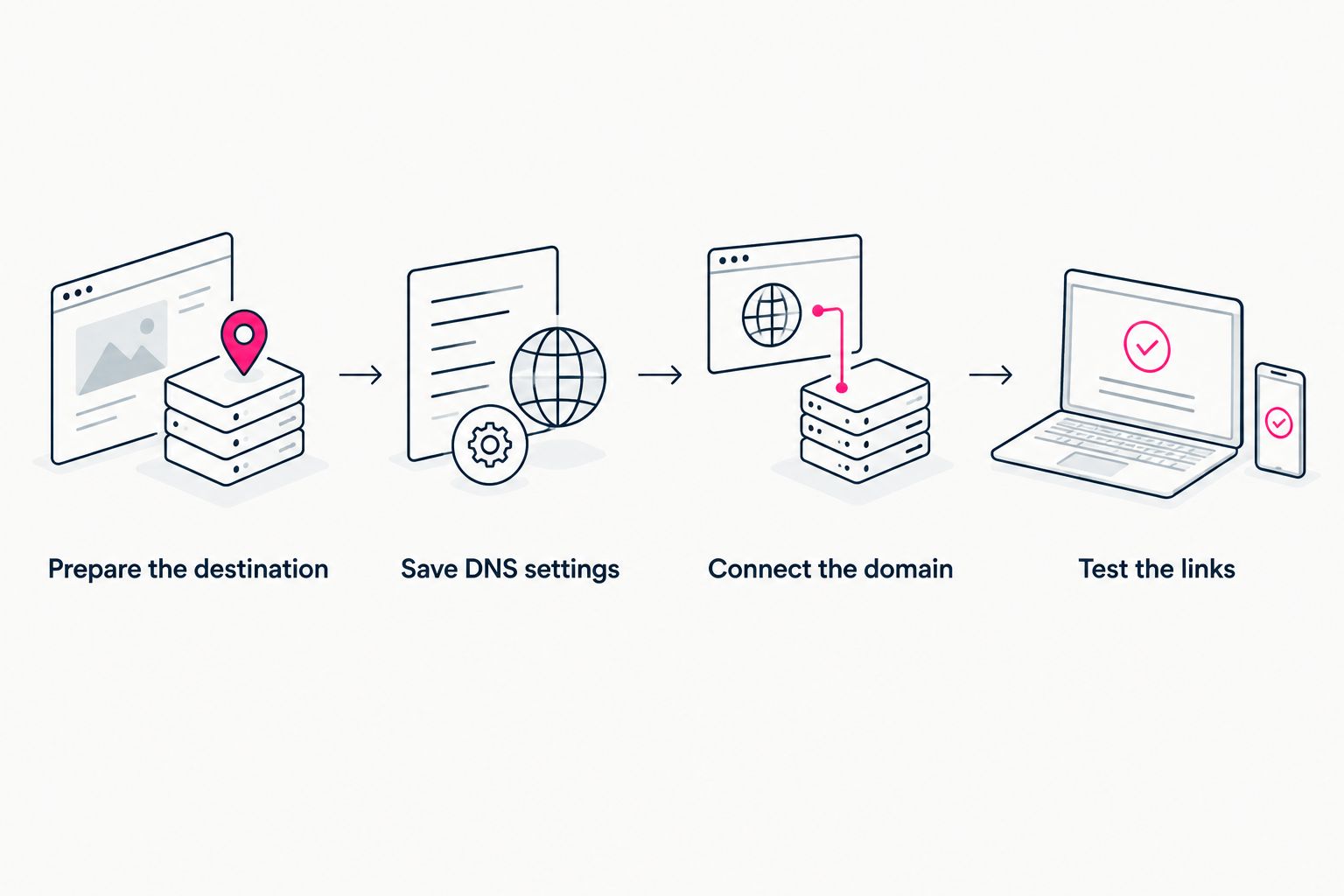
Prepare and test the replacement before ending the old website service.
Choosing the right fit
AkaMe is best for creators who want a personalized creator website with a unique domain and managed setup. It fits creators whose subscriptions, products or services already live on other platforms and who want a branded destination linking to them.
As a link-in-bio website builder, AkaMe handles registration and publishing, offers customization and photo selection assistance, and provides a preview before checkout. The practical benefit is a recognizable starting point without making website configuration your next project. Photo assistance supports your choices; you still decide which images represent you.
That managed workflow suits a different preference from doing every configuration task yourself. Carrd is suited to creators who prefer direct control over website building and domain configuration.
| Workflow | Best for | Practical benefit | Your responsibility |
|---|---|---|---|
| AkaMe managed setup | Creators wanting a personalized link-in-bio website | Registration, publishing and customization in a guided process | Choose your presentation and confirm relevant domain terms |
| Carrd self-directed building | Creators wanting direct building and configuration control | A hands-on website-building workflow | Manage the configuration work you choose to take on |
For any managed service, confirm the registration, renewal and transfer terms associated with your domain before relying on a future exit process. Choose the workflow you want to use now, with a clear understanding of how domain administration works.
What should you ask before choosing a builder in 2026?
Ask questions that produce an actionable answer. “Can I keep my domain?” is a start, but the details determine your next step.
- Who holds the registration rights for the domain?
- How do I access DNS settings or request changes?
- Which email address receives registration and renewal notices?
- Can I keep domain registration active separately from website publishing?
- What is the process for obtaining a transfer authorization code when required?
- What happens to domain administration when the website subscription ends?
Keep the answers with your account records. A support conversation is easier to use later when it names the domain and explains the actual process, rather than offering a broad reassurance.
Can you keep a shared link-in-bio address after leaving?
A shared platform address is not your independently registered domain. Whether the old page remains accessible depends on that platform's account and service rules.
If the address sits underneath the platform's domain, you cannot treat that address as a domain registration you can transfer to another registrar. A custom domain and a shared page address require different moving plans.
Does keeping your domain keep your website design?
Keeping your domain does not automatically preserve or transfer the website design. Your new builder needs its own published page connected to that address.
Save the content you want to reuse and rebuild the important visitor actions. Check deep links separately when the old website had pages beyond the homepage.
Should you cancel the builder before moving the domain?
Keep the old service active until you understand what cancellation ends and have tested the replacement. Canceling first can remove access or publishing you still need during the move.
Check website and domain services individually. The correct order comes from the services attached to your account, not a generic cancellation checklist.
FAQ
Can I keep my custom domain if I stop paying for my website builder?
You can keep it if you retain the registration rights and keep the domain registration active under the applicable terms. Confirm whether website cancellation also affects domain administration or renewal.
Do I need a domain transfer to change creator website builders?
No. If you retain the registrar and can manage DNS, you can connect the domain to another compatible website without transferring registration.
Will a domain transfer copy my creator website?
No. A registrar transfer changes domain administration; it does not copy your page design, photos or buttons into another website builder.
Can I move my domain while it has a transfer lock?
A transfer lock restricts a registrar transfer, but does not itself prohibit a DNS update. Check your account access and the specific restrictions before changing the website connection.
Will changing my creator website affect my email?
Changing the website can affect email if you remove or replace the DNS records that email depends on. Preserve those records and test sending and receiving after the change.
Can I keep the same domain for my OnlyFans creator website?
Yes, if you retain the registration rights and can connect the domain to the replacement website. Your subscription destination can remain on its existing platform while the creator website changes.
One last thing
The simplest move can be the one that leaves domain registration exactly where it is. First decide what needs changing: the website, the registrar or both.
Make that distinction part of your 2026 checklist. Then preview an AkaMe creator website, personalize the photos and links, and explore a domain that fits your creator name.
Preview your creator website
Personalize your page, bring your important links together and explore a domain for your creator name.