Yes—you can link multiple OnlyFans accounts from one link-in-bio page by giving each account its own button and destination URL, provided your page builder permits those links. The page brings the links together; it does not merge your accounts, subscriptions or messages.
TL;DR
- Can you link multiple OnlyFans accounts from one link in bio page? Yes—use a separate, clearly labeled button for each.
- AkaMe suits creators who want a personalized creator website on their own domain, linking to existing platforms.
- Keep related accounts together; separate unrelated creator identities when a shared page would confuse visitors.
- Test every destination before publishing, and check the rules of the platforms where you share your page.
Why this matters
Your bio has a simple job: help someone reach the right destination. If you run multiple creator accounts, sending everyone to just one leaves the other account out of that choice.
A creator website gives you a place to explain the difference before visitors leave for OnlyFans. AkaMe provides a personalized creator website on your own domain, with registration and publishing handled for you.
For your 2026 setup, focus on clarity rather than adding every possible link. Visitors should recognize your creator name, understand the account choices and know what each button opens.
Can you link multiple OnlyFans accounts from one link in bio page?
Yes. Use one page with a distinct outbound link for each OnlyFans account. Each button opens the account URL assigned to it, just as separate buttons can open different social profiles or other websites.
The distinction is between linking accounts and combining them. A link-in-bio page acts as a directory. It does not turn separate OnlyFans accounts into a shared account or combine the activity inside them.
To set up the page:
- Collect the destination URLs. Open each creator profile and copy its intended public-facing address, not an account-settings or dashboard address.
- Write distinct labels. Explain which account each button opens using accurate names and short descriptions.
- Choose the order. Put the destination that matches your main audience or current promotion first.
- Test the published page. Open every button and confirm that it reaches the intended profile.
For example, 2 account URLs need 2 distinct buttons on 1 shared page. That is a layout example, not a statement about any builder's link limit.
Keep the destination visible in your wording. A button labeled with OnlyFans and a recognizable account name tells visitors more than a vague invitation such as “See more.”
One shared page: best for related creator accounts
A shared page fits accounts that belong under the same recognizable creator identity. Visitors arrive at one address, then choose the account relevant to them.
This works when you can explain the difference in a short, factual label. You might distinguish accounts by creator name, language or subject, if those descriptions accurately reflect the destinations.
Best for: creators whose audiences already recognize the accounts as part of the same brand.
The benefit is a single destination to put in your social bios. The trade-off is that you must make the account choices clear on that page; two nearly identical buttons leave visitors guessing.
Do not make every button compete for attention. Give the page a clear opening, then present the account choices together so visitors can compare them without searching through unrelated links.
Separate pages: best for distinct creator identities
Separate pages fit accounts that serve different audiences or use different public identities. Each page can introduce the relevant creator without requiring visitors to sort through unrelated destinations.
Best for: creators who intentionally keep their brands separate.
The benefit is a focused introduction for each audience. The trade-off is maintaining separate pages and making sure each social profile points to the correct one.
A shared page also makes the listed accounts visibly connected. If that connection is not part of your intended public branding, decide against the shared layout before publishing—not after adding both accounts to it.
| Page structure | Best for | Practical benefit | Trade-off |
|---|---|---|---|
| One shared page | Related accounts under one creator identity | One bio destination presents the account choices together | Labels must explain the difference clearly |
| Separate pages | Distinct creator identities or audiences | Each page stays focused on its own audience | More pages and bio destinations to maintain |
Neither structure is automatically better. Choose the structure that matches how you want visitors to understand your accounts.
Why your multi-account page layout varies
The number of accounts is only part of the decision. Use these factors to shape your 2026 creator website:
- Creator identity: Accounts using the same public identity are easier to introduce together than unrelated brands.
- Audience overlap: A shared page needs account choices that make sense to the people arriving there.
- Reason for visiting: A visitor following a specific promotion needs a clear route to the account mentioned in it.
- Destination differences: Explain meaningful distinctions, not differences you have invented just to fill a description.
- Other important links: Keep business inquiries and other destinations from interrupting the account-selection task.
Start with the visitor's question: which account am I looking for? Arrange the page around answering that question, then add supporting information.
If an account needs a long explanation, place a short description beside its link rather than stretching the button label into a paragraph. Keep the action easy to scan.
How should you label multiple OnlyFans account links?
Label each button with the platform and the account's recognizable name. Add a brief distinction only when the name alone does not explain the choice.
Use consistent wording across the page. If one button identifies the platform and account name, give the other account the same treatment instead of switching to a vague phrase.
A practical label pattern is:
- Platform: Make it clear that the link opens OnlyFans.
- Account name: Use the public creator name associated with that destination.
- Short distinction: Add an accurate language, subject or other relevant description when needed.
Avoid “Account A” and “Account B” as final labels unless those are genuinely recognizable public names. They describe your filing system, not the visitor's choice.
Also avoid unsupported promises. Describe what the destination is rather than promising a particular experience, result or level of access that the destination does not establish.
Should you put your main OnlyFans account first?
Put your main OnlyFans account first when it matches the reason most visitors arrive at that page. If a particular campaign promotes another account, make the route to that account explicit.
Check the page against the wording in your social bio. A bio promoting one creator identity should not lead to a page where that identity is difficult to find.
Can you add other creator links alongside OnlyFans?
Yes—you can organize other permitted destinations alongside your OnlyFans account links. Keep the related account choices together, then place secondary destinations in a separate group.
Business inquiries deserve a clear label too. A potential collaborator should not have to open creator subscription links to work out how to reach you professionally.
How do you check the page before sharing it?
Review your 2026 page as a visitor, not just as the person who built it. The editing view is not a substitute for opening the published address and following the links.
Use these 3 checks: Identity, Labels and Destinations. They cover whether visitors recognize you, understand the choices and reach the intended accounts.
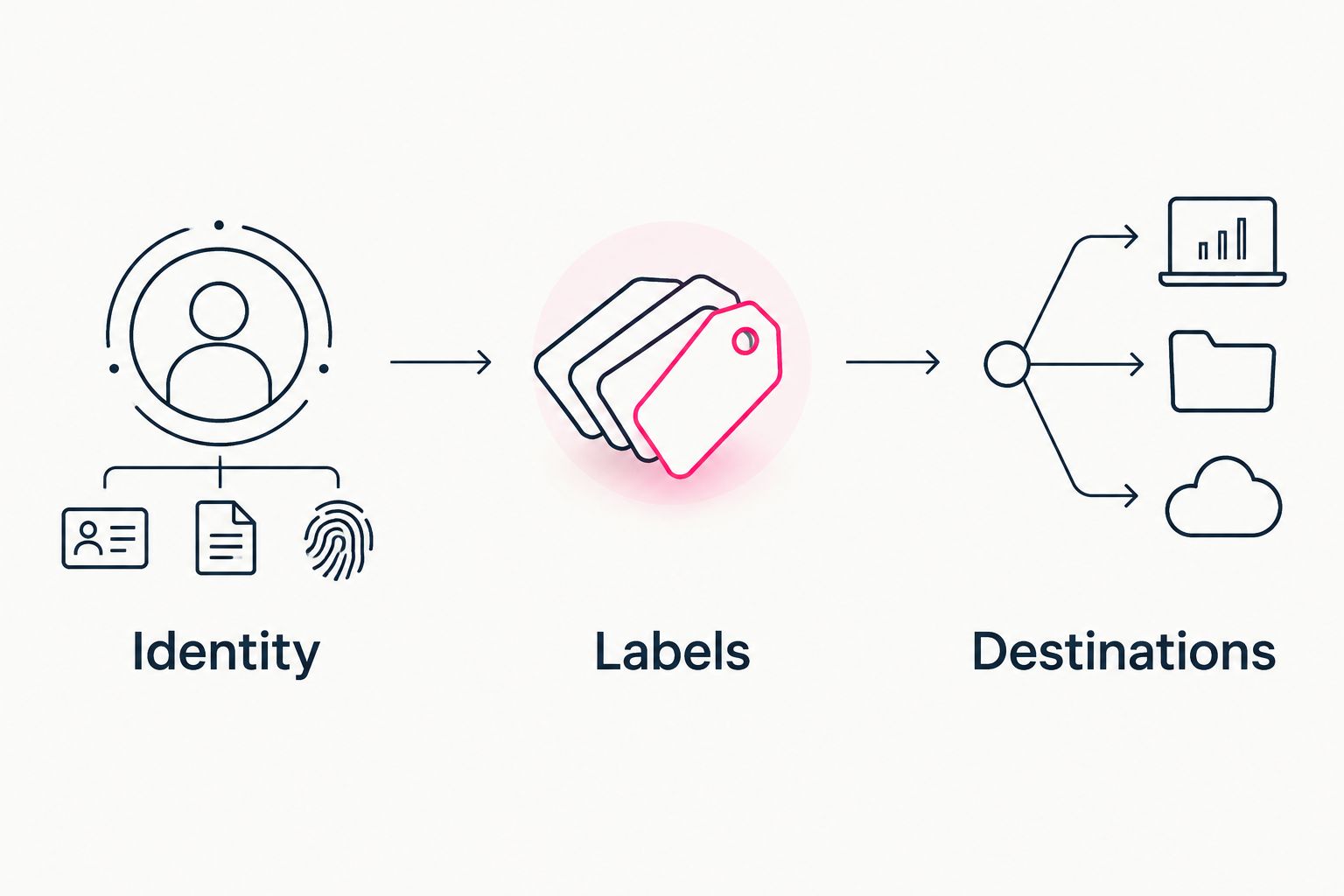
Check recognition, account descriptions and destination links before sharing your page.
Identity
Open the page on your phone and look at the introduction. Your creator name and chosen photo should make the page recognizable to someone arriving from your social profile.
Do not rely on the domain alone to explain who you are. The page itself needs enough context for a visitor who has never seen it before.
Labels
Read the account buttons without opening them. You should be able to explain the difference between the destinations from the wording on the page.
If the distinction is unclear, rewrite the labels before adding more design elements. A decorative change does not explain which account a button opens.
Destinations
Open every account button and inspect the destination. Confirm the creator identity, check that the address is correct and remove links that point somewhere unintended.
Repeat this check whenever you replace an account URL. A familiar button label can hide an outdated destination, so test the actual link rather than trusting the text.
For a broader pre-publishing review, use the creator website launch checklist.
Choosing the right fit
AkaMe is best for creators who want a personalized website on their own domain linking to platforms they already use. Your subscriptions, products or services stay at their existing destinations; the website gives those links a recognizable home.
AkaMe handles domain registration and publishing, supports customization and provides photo-selection assistance. You can preview the creator website before checkout, so you can assess the presentation before deciding.
Photo-selection assistance supports your judgment. Choose images that represent your public creator identity, then review how they work with the account names and descriptions.
For this workflow, the main choice is how much of the website setup you want to handle yourself. Carrd suits creators who prefer direct control over website building and domain configuration; managed setup suits creators who want that work handled for them.
Your 2026 selection should follow the job you need done. Check whether the builder supports your intended destinations, whether the editing workflow suits you and whether you want a personal domain.
A custom domain changes the address visitors use to reach your page. It does not combine the accounts behind the links or replace the services those accounts provide.
Does a custom domain change the rules for OnlyFans links?
No—a custom domain does not override another platform's rules. Your page builder, the destination platform and the social service carrying your bio link each have their own requirements.
Check the current rules relevant to your setup before sharing the page. Using your own domain is a branding and setup choice, not a promise of immunity from restrictions.
Keep the public page focused on accurate creator information and clearly described destinations. You do not need explicit imagery or descriptions to explain which account a button opens.
FAQ
Can I put two OnlyFans accounts on the same link-in-bio page?
Yes—you can give each OnlyFans account its own button and destination URL, provided your page builder permits those links. Use distinct labels so visitors know which account each button opens.
Does one link-in-bio page merge my OnlyFans accounts?
No—a link-in-bio page lists destinations; it does not merge OnlyFans accounts, subscriptions or messages. Each link takes visitors to its assigned account.
Should I use one page for different creator names?
Use one page when the creator names belong under a shared public identity and the connection makes sense to visitors. Separate pages fit identities you intentionally present independently.
What should I call my OnlyFans account buttons?
Use OnlyFans and the recognizable account name in each button label. Add a short, accurate distinction when visitors need more context to choose.
Do I need a custom domain to link multiple accounts?
No—linking multiple accounts requires separate destination links, not a custom domain. A personal domain gives your creator website a distinct address.
Can I keep using my existing creator platforms?
Yes—a creator website can point visitors to the platforms you already use. AkaMe is designed for creators bringing those existing destinations together on a personalized website.
Will a custom domain prevent my bio link from being restricted?
No—a custom domain does not guarantee protection from restrictions. Check the rules of your page builder, destination platforms and the social services where you share the link.
One last thing
Different links do not automatically look like different choices. Even when every URL is correct, matching labels can make a multi-account page hard to use.
Before sharing your 2026 page, read the buttons without opening them. If you cannot tell which account each button represents, make that distinction clearer.
Preview an AkaMe creator website, personalize the presentation and explore a domain that fits your creator name. Build the destination around the accounts you already use.
Preview your creator website
Personalize your page, review the preview and explore a domain for your creator name.