

Yes—you can preserve link-in-bio analytics when switching tools in 2026, but importing that history into the new dashboard depends on both tools' export and import support. Moving your links does not automatically move past views, clicks, or visitor records. Save your existing reports first, then separate historical data from the tracking that starts on your new creator website.
TL;DR
- Can you migrate link in bio analytics to a new tool? Preserve reports first; confirm historical import support separately.
- A custom domain changes your address, not the location of your historical analytics.
- AkaMe fits creators seeking a personalized creator website that links to their existing platforms.
- Keep metric definitions, campaign tags, and your switch date alongside exported reports.
Why this matters
Your analytics tell you which destinations people choose. Losing that context makes it harder to decide which links deserve the most visible positions on your new page.
A clean 2026 migration preserves that context without pretending different dashboards measure everything identically. Before comparing results, understand how to read your link-in-bio website analytics, including the difference between page visits and outbound clicks.
Move the page and preserve the evidence as separate tasks. You can launch a new creator website while keeping your previous performance history in a separate report.
Can you migrate link in bio analytics to a new tool?
Yes, but distinguish between saving historical reports, importing historical records, and continuing future measurement. These are different jobs with different requirements.
| Migration route | Best for | What it preserves | What to check |
|---|---|---|---|
| Report archive | Creators who need a readable history | The information included in downloaded reports or saved dashboard records | Export fields, date ranges, and metric definitions |
| Historical import | Creators who need old records inside a new system | Only the records and fields the destination accepts | Explicit import support and required file format |
| Existing external analytics | Creators already measuring outside the page builder | History stored in that external account | Whether the new builder supports the required tracking setup |
An export is not an import. A spreadsheet can preserve your old results without making them appear in the replacement tool's dashboard.
Likewise, reconnecting an external analytics service does not reconstruct activity that service never collected. Treat historical import as a feature to verify, not a standard part of switching.
What happens to each part of your analytics?
Historical reports: save the context with the totals
Download the reports your current tool provides before changing or closing the account. If downloads are unavailable, save readable dashboard records and note the filters used.
A total without its reporting context is difficult to interpret. Keep the date range, reporting time zone, page identity, and definition of each metric beside the saved results.
Historical imports: confirm the destination's requirements
Ask the replacement provider whether it accepts historical analytics from your current system. Request the supported fields and file structure, rather than asking only whether it supports analytics.
Those questions are not interchangeable. A tool can measure new visits without offering any way to load records collected elsewhere.
Future tracking: test it on the published page
New activity belongs to the measurement setup running on your new page. Confirm which reports are available and whether any external integration you need is supported before you commit to that workflow.
A preview helps you assess presentation. Tracking needs a separate check on the published website, using the provider's documented reporting behavior.
How to migrate your analytics in 7 steps
Follow these steps before replacing the address in your social profiles. Keep the work in a migration document so the page change and the reporting change remain easy to trace.
1. Inventory your measurement
List where you currently see results: the page builder, an external analytics account, campaign reports, and the platforms receiving your traffic. Record which account holds each dataset.
Also list what you actually use. If your weekly decision is which subscription link to feature, preserve link-level results rather than saving only the page's overall view count.
2. Save the available history
Export the longest useful reporting period your current account provides. Keep the original download unchanged, and use a separate copy for sorting or combining records.
Record the export date and any account or reporting restrictions that affect the file. An empty column and a measured zero mean different things; do not silently replace one with the other.
3. Map old links to new links
Create a simple mapping document with the old button label, destination, new button label, and intended destination. Include campaign parameters when they are part of the link.
This mapping connects the same business destination across different page layouts. Without it, a renamed button can look like a new offer even when it leads to the same place.
4. Verify import and integration support
Check historical import separately from external tracking support. If you need an existing analytics account connected, confirm the exact integration rather than assuming any link-in-bio website builder accepts tracking code.
Do not share account passwords to move reports. Use the provider's supported authorization process or file-import workflow where available.
5. Preserve campaign naming
Review existing UTM parameters before copying links. Google Analytics uses campaign parameters such as utm_source, utm_medium, and utm_campaign to identify campaign traffic.
Keep established names consistent unless you are deliberately changing the reporting scheme. Record any changes so a naming change does not get mistaken for a change in audience behavior.
6. Publish and verify the visitor journey
Open the published creator website and follow each important destination. Check that the intended page loads and that copied links retain the parameters you meant to keep.
Then inspect the supported analytics reports according to their documented processing behavior. A successful destination click confirms the link works; it does not, by itself, confirm that a particular analytics system recorded it.
7. Record the cutover
Write down when you published the new page and when you updated each social profile. Keep those timestamps beside the historical archive.
For your 2026 reporting, label the old and new measurement periods clearly. If both pages remain reachable during the change, account for that overlap instead of treating the replacement date as an instant, complete traffic switch.
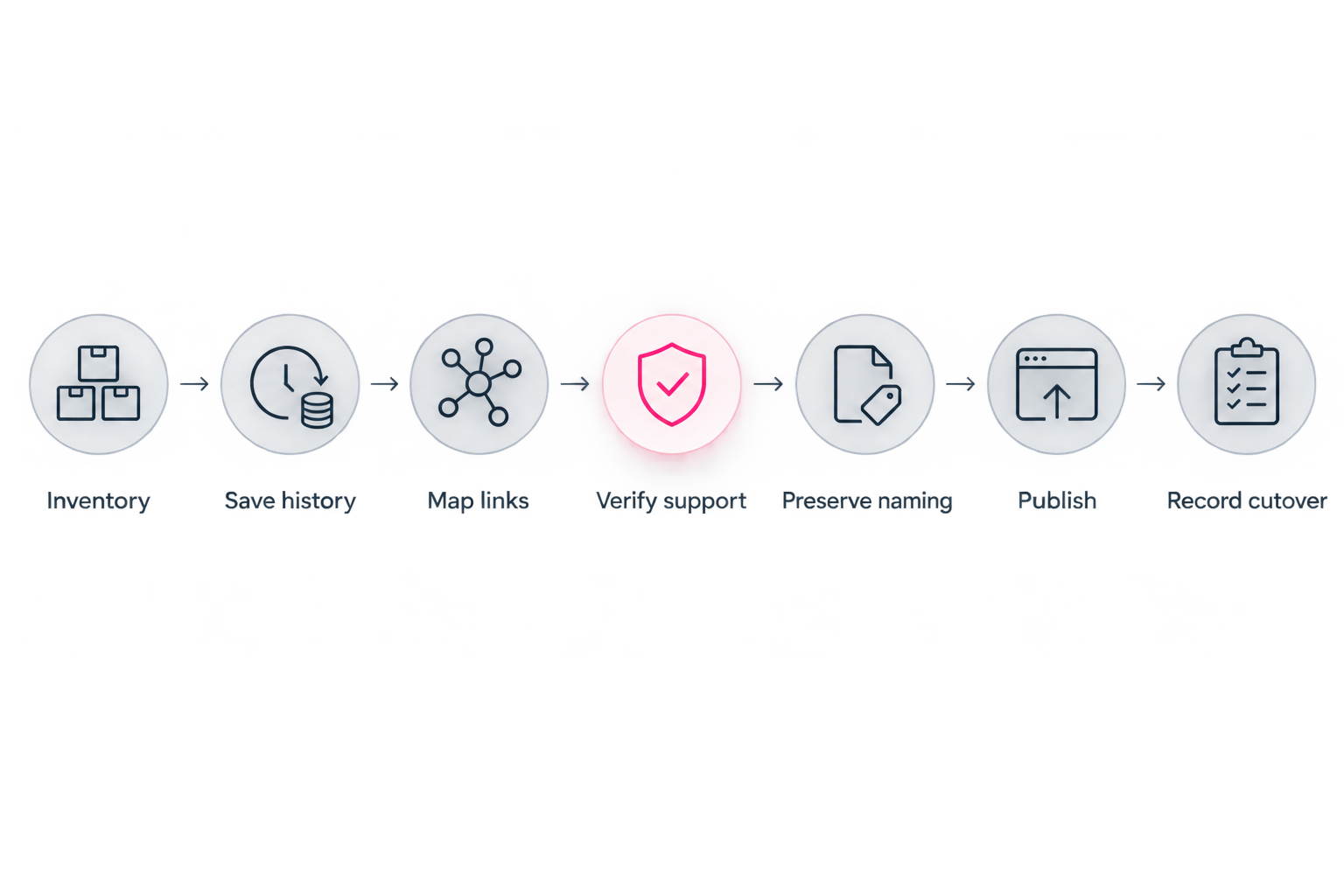
Save the history before publishing, then record when the new measurement period begins.
Why analytics migration results vary
The outcome depends on the records available and how each system handles them—not simply whether you keep the same links.
- Export detail: A daily total preserves less detail than a report broken down by destination and source.
- Import support: The destination determines which historical fields it accepts, if any.
- Metric definitions: Visits, visitors, and clicks are not interchangeable measurements.
- Reporting settings: Different time zones and date boundaries can put the same activity into different reporting periods.
- Collection rules: Consent settings and traffic filters affect what gets recorded.
- Link changes: New destinations, labels, and campaign parameters change what a comparison represents.
Save the definitions alongside the data. A tidy spreadsheet does not make mismatched measurements comparable.
How do you compare results after switching?
Use 2 reporting periods with matching durations and clearly recorded boundaries. Compare like-for-like metrics only after checking that both tools define them consistently.
Start with the business question. If you want to know whether visitors reach your subscription destination, examine the relevant outbound-link measurement rather than comparing an old click total with a new visitor total.
Keep a short change log for promotions, profile updates, and page edits. If you change the website, featured offer, and traffic campaign together, the reports alone cannot isolate the effect of the website change.
Do not add old and new visitor totals and label the result unique people. Without a supported method for identifying the same person across datasets, the combined total does not establish uniqueness.
Does keeping your custom domain preserve analytics?
Keeping a custom domain does not automatically preserve analytics. The address visitors recognize and the system storing measurement history are separate parts of your setup.
If you already use external analytics, confirm that the replacement builder supports the required connection. Keeping the same domain is not proof that the same tracking configuration is active.
If you are adopting a personal domain for the first time, record that address change alongside the builder change. Your archive should explain both what visitors saw and where their activity was measured.
Choosing the right fit
AkaMe is best for creators who want a personalized creator website on a unique domain linking to their existing subscriptions, products, or services. Registration and publishing are handled for the creator, with customization, photo selection assistance, and a preview before checkout.
That workflow suits creators who want a recognizable destination without taking on the full website setup process. Photo selection assistance supports your choices; you still decide how you want to present yourself.
For an OnlyFans creator, coach, or newsletter writer, the useful question is straightforward: does the website bring your important destinations together in a way your audience understands? Your existing subscription or business platform remains the destination behind the relevant link.
You can explore AkaMe for that creator website workflow. If historical analytics import is essential to your decision, establish that requirement separately before choosing any builder.
When evaluating Linktree or Linkme, apply the same reporting checklist: available exports, metric definitions, historical import requirements, and supported external tracking. Choose from documented capabilities that match your workflow, not assumptions about what a dashboard includes.
Carrd suits creators who prefer direct control over website building and domain configuration. Managed setup and hands-on building serve different preferences; decide which work you want to own before comparing individual settings.
Before you replace the link in your bio
Complete these 3 checks before sending visitors to the new page:
- Archive check: Open the saved reports and confirm that dates, labels, and definitions are readable.
- Journey check: Follow every important link from the published page to its intended destination.
- Measurement check: Confirm what the new setup records and document where future reports will live.
Keep the archive somewhere you control rather than relying only on continued access to the old dashboard. For a 2026 switch, a clear handover record is more useful than a folder of unexplained screenshots.
FAQ
Can I move my old link-in-bio clicks into a new dashboard?
You can import old clicks only if the new system supports a compatible historical import. Saving an export preserves the records but does not automatically place them inside the new dashboard.
Can I keep tracking without importing my old reports?
Yes, you can keep historical reports separately and begin a clearly labeled measurement period on the new page. Verify the new tracking setup before relying on its results.
Will my Google Analytics history disappear when I switch builders?
Changing builders does not itself delete history already collected in your Google Analytics property. Future collection depends on a supported setup on the replacement website, and access to older data remains subject to the property's settings and applicable retention rules.
Does the same custom domain mean the analytics stay the same?
No, using the same custom domain does not establish that the same analytics configuration is running. Verify the measurement setup separately from the address.
What should I save before closing my old account?
Save available reports, reporting dates, metric definitions, destination links, campaign parameters, and relevant settings. Check the saved files before removing access to the old account.
Should I compare visitor totals from different tools in 2026?
Compare visitor totals in 2026 only after checking that the tools use compatible definitions and reporting boundaries. Keep the datasets separate when those conditions do not match.
One last thing
Your most useful migration record is the link map, not just the biggest dashboard total. It shows which destination each button served, so a new label or layout does not erase the meaning of the old results.
Preserve that context, then build the page you want people to recognize. Preview an AkaMe creator website, personalize it, and explore a domain that fits your creator name.
Preview your creator website
Personalize your page and explore a domain, with a preview before checkout.