
Yes, you can sell digital products from a link-in-bio page in 2026, either through a builder that supports checkout and delivery or by linking to an external storefront. The distinction is where the purchase happens: a product button alone does not process payments or deliver files.
TL;DR
- Can you sell digital products from link in bio page? Yes—through supported checkout or an external storefront.
- AkaMe fits creators who want a custom-domain creator website linking to products they already sell elsewhere.
- Check payment, file delivery, and buyer support before choosing a link-in-bio website builder.
Can you sell digital products directly from a link-in-bio page?
Yes—but selling through your bio link and completing checkout on the page are different workflows. Choose based on where you want to manage the transaction and deliver the purchase.
| Sales workflow | Best for | Main benefit | What to check |
|---|---|---|---|
| Builder-supported checkout | Creators seeking a connected page-and-sales workflow | Connects product discovery with a supported purchase flow | Payment support, delivery, and product eligibility |
| External storefront | Creators with an existing product checkout | Keeps the existing sales system behind a branded entry page | The handoff between your page and the destination |
A creator website can be the front door without being the checkout. AkaMe brings your important links together on a personalized page with a unique domain.
Why this matters
Your audience starts on a social profile. Your product, payment system, and downloadable files do not have to live there—or inside the same website builder.
That separation gives you a practical choice. Keep a working storefront and improve how people find it, or choose a builder with selling features that match your product. Choose the purchase workflow before choosing the page design.
For your 2026 setup, map the complete journey: someone opens your bio, finds the right product, pays, and receives access. A good-looking landing page covers only part of that journey.
Builder-supported checkout: connect the page to the purchase
Builder-supported selling means the page builder supplies or connects the tools needed to take an order. Depending on the implementation, checkout happens within the page experience or through a connected payment screen.
The useful question is not simply whether a builder has a sell button. Ask what happens after someone presses it. You need a clear product description, a working payment flow, and a defined way for the buyer to receive the purchase.
Best for: creators who want to manage their product page and selling workflow through a connected setup.
What works well
A connected workflow can reduce the number of separate systems you need to configure. Product information and the purchase action can sit close together, so visitors understand what they are buying before starting checkout.
That is useful when you are building a sales process from scratch. You can assess the page and transaction together rather than assembling the experience around an existing store.
What needs checking
Support for taking a payment does not automatically establish support for digital delivery. Verify whether the workflow sends a download, creates account access, or requires you to fulfill the order yourself.
Also check the product formats and payment methods you need. A setup suited to downloadable files is not necessarily the same as one designed for course access or recurring subscriptions.
Before committing, walk through the buyer experience. Read the confirmation message, inspect the delivery method, and find the route for order questions. Those details determine whether the selling workflow fits your product.
External storefront: keep your checkout and connect your audience
An external-storefront workflow sends visitors from your creator website to the place where you already sell. Your page introduces the offer; the destination handles the transaction and whatever delivery process you have configured there.
Best for: creators with working subscriptions, digital products, courses, or services on another platform.
What works well
You do not need to rebuild an established purchase flow just to give your audience a more recognizable starting point. Your creator website can introduce your work and organize the routes to your offers.
This also lets different destinations do different jobs. A downloadable guide can lead to its product page, while a membership button leads to its subscription destination. Use clear labels so visitors know which action they are taking.
What needs checking
The visitor changes destinations before buying. Make that handoff understandable: the product name, creator identity, and promised item should match across both pages.
Link to the relevant product or offer rather than making someone search a general storefront. Then test the destination while logged out. A page that opens correctly for you can still send a new visitor to a login screen or an unintended location.
Choosing the right fit
AkaMe is best for creators who want a custom-domain website linking to products they already sell elsewhere. Its role is to give those destinations a personalized, recognizable home—not to make you replace a working business setup.
AkaMe provides a customizable creator website on a unique domain, with registration and publishing handled for you. Photo selection assistance helps you choose images, while the final choices remain yours. You can personalize the website and preview it before checkout.
That fits creators who want help getting their page online rather than managing the website setup themselves. An OnlyFans creator, for example, can use a creator website to bring an existing subscription destination and other relevant business links together without turning the page into a separate store.
If you prefer direct control over website building and domain configuration, Carrd suits that hands-on workflow. If you are comparing Linktree or Linkme, assess the actual purchase journey you need rather than choosing from a feature name alone.
Use the same test for every option: can a new visitor understand the offer, reach the intended checkout, and receive the purchase? For 2026, verify current selling features before basing your workflow on them.
Why the selling workflow varies
The right setup depends on what you sell and how your business already operates. These factors matter more than how many buttons fit on a page:
- Product format. A downloadable file needs a delivery route; a course needs an access route. Match the workflow to the purchase.
- Existing checkout. If your current storefront already handles orders and delivery, your creator website can link to it instead of duplicating that work.
- Purchase type. A single purchase and a recurring subscription need different customer expectations and account handling.
- Setup preference. Decide whether you want help publishing a personalized website or direct control over its configuration.
- Buyer support. Buyers need to know where to ask about payment, access, or a missing download after the sale.
Do not choose a checkout system because you like its page template. Choose the system that supports the transaction, then make the route to it clear.
How to set up a digital-product sales journey
Use this sequence whether your checkout sits inside a supported builder workflow or on an external storefront. The goal is a complete path, not just a published page.
Choose the offer
Start with the product you want visitors to find first. Explain who it is for, what they receive, and the format in plain language.
Avoid vague buttons such as Explore or Learn more when the destination is a specific product. A label such as View the editing guide gives someone a clearer expectation before they leave your page.
Confirm checkout
Open the destination and check that it matches the offer on your creator website. Confirm the purchase route works for a new visitor, not just an account that is already signed in.
If your builder supplies selling tools, establish exactly which parts it handles. If you use an external storefront, check that your link opens the intended product page rather than a dashboard or account-management screen.
Confirm delivery
Identify how a buyer receives the product after payment. That might be a download link, an email, or access through an account, depending on the system you choose.
Read the instructions as a buyer would. The delivery message should explain what happens next and where someone can get help if access does not work.
Publish and test
Preview the creator website on your phone before publishing it. Check the main action, button wording, images, and destination together.
Then follow the route from the actual social-profile link. Testing an isolated product button does not confirm that the complete path from your profile works.
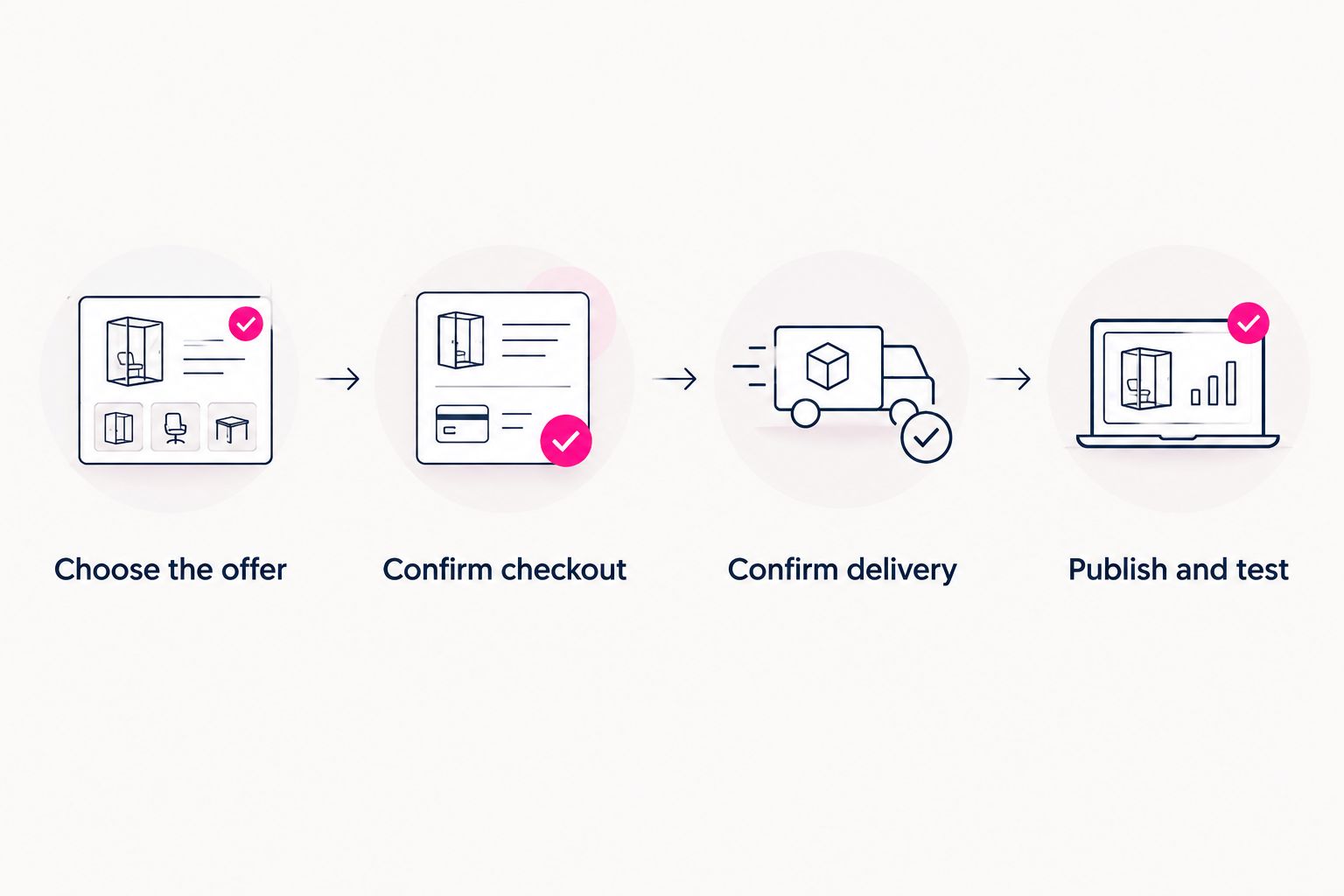
A published page is ready only when the purchase and delivery routes are clear.
Keep this sequence in your 2026 launch checklist. Recheck it when you change the product destination or delivery process, rather than assuming the original test still covers the new setup.
What to put beside your product link
Your creator website should give visitors enough context to choose the right destination. It does not need to reproduce the entire storefront.
Include a clear product name, a short explanation of the outcome or use, and an accurate description of what the buyer receives. If the destination is a subscription rather than a download, say so before someone opens it.
Keep the page focused:
- Lead with the main offer. Give the action you want visitors to take a clear place on the page.
- Name the destination. Distinguish a product, membership, and business inquiry instead of labeling everything with general invitations.
- Match the wording. Use consistent product names between your creator website and checkout.
- Keep support findable. Make the appropriate help route clear within the purchase experience.
A useful product description answers a buyer's question. It should explain the item, not make unsupported promises about what buying it will achieve.
Check the full journey before sharing your bio link
Use a simple 3-part check: discovery, purchase, and delivery. Each part has a separate job, and each needs to work.
Discovery: can a new visitor identify the offer without knowing your business already? Open the page on a phone and read the visible text without relying on the image alone.
Purchase: does the button open the correct destination, with a consistent product name and a clear next action? Check the page while logged out and confirm that it is intended for customers.
Delivery: does the buyer know how to receive the item and where to ask for help? Review the confirmation and access instructions using the storefront's supported testing process.
For a 2026 launch, treat these as separate checks rather than calling the setup finished when the page goes live. A working link proves navigation; it does not prove fulfillment.
FAQ
Can I sell digital products from a link-in-bio page without a built-in store?
Yes. Link your creator website to an external product page that handles checkout and delivery. Make the destination clear before the visitor opens it.
Does a product button automatically handle payment and downloads?
No. A product button can simply open another page. Verify payment processing and digital delivery separately before sharing the offer.
Can I keep my existing storefront when I create a new bio page?
Yes. Your creator website can link to your existing storefront instead of replacing it. Use the relevant product destination so visitors do not have to search again.
Is AkaMe a fit if I already sell digital products elsewhere?
Yes. AkaMe fits creators who want a personalized creator website on their own domain linking to existing products, subscriptions, or services. Registration and publishing are handled for the creator.
Do I need a custom domain to sell through my bio link?
No. A custom domain gives your creator website a recognizable address, while the checkout and delivery system handles the sale. Choose the address and transaction workflow as separate decisions.
What should I test before putting a product link in my bio?
Test discovery, purchase, and delivery. Confirm that a new visitor can understand the offer, reach the correct checkout, and follow the instructions for receiving the product.
One last thing
Your creator website and your checkout do not need to be the same tool. A clear front door can connect the offers you already have without requiring a new storefront.
Preview an AkaMe creator website, personalize it around your main offer, and explore a domain that fits your name. Start with the destination you want your audience to remember.
Preview your creator website
Personalize your page, bring your important links together, and explore your own domain.