
You can forward a domain you control to a Linkme page, but that does not mean Linkme hosts your page on your own domain. To keep your domain in the browser’s address bar, you need explicit custom-domain support—not just a redirect. Before choosing your setup in 2026, confirm which of those two outcomes Linkme supports for your account.
TL;DR
- Can you use Linkme with your own custom domain? Distinguish domain forwarding from a connected custom domain.
- A redirect sends visitors elsewhere; domain mapping serves your creator website at your chosen address.
- AkaMe fits creators who want a personalized creator website with domain registration and publishing handled.
- Test the final browser address and every important destination before updating your social bios.
Why this matters
Your bio link is the address you give people when they want more than a social profile. It should be easy to recognize, share and check before publishing.
A custom domain and a personalized page are different things. You can customize a page without changing its underlying address, or register a domain that simply forwards visitors elsewhere. Decide what you want visitors to see after the page loads. That is the difference that matters here.
If you want a personalized site with setup handled, AkaMe brings your important links together on a unique domain. Start by separating that outcome from the simpler task of forwarding an address.
Can you use Linkme with your own custom domain?
Forwarding your domain to Linkme and connecting your domain to Linkme are not equivalent. A domain redirect works outside the page builder. A true custom-domain connection requires the page builder to support that domain as the address where the page is served.
For a 2026 decision, look for documentation or account settings that explicitly describe connecting a custom domain. A field for your website link, a customizable username or an editable profile address does not establish custom-domain support.
| Setup | What happens when someone visits | Best for | Main trade-off |
|---|---|---|---|
| Standard profile address | Your page loads at the platform’s address | Creators satisfied with a platform-hosted address | The address is not your own domain |
| Domain forwarding | Your domain redirects visitors to another address | Creators who want a memorable entry address | The destination address replaces your domain |
| Connected custom domain | Your page loads at your chosen domain | Creators who want their domain to remain visible | The builder must support the connection |
Use the table to describe the result you want when asking support a question. Ask whether your domain stays visible after the page loads, not simply whether you can use a domain.
What should you ask Linkme before connecting anything?
Ask whether Linkme serves your public page directly on a domain you control. Then ask for the current setup instructions and the account requirements for that feature.
Keep the question specific: does the feature connect a domain to the page, or does it forward visitors to the existing profile? Those answers determine whether the setup matches your goal.
Domain forwarding: a branded starting address
Domain forwarding gives visitors a memorable address to enter before sending them to your Linkme page. You configure the redirect through a service that manages forwarding for your domain, rather than assuming the destination page builder provides it.
The benefit is straightforward: you can share your chosen domain while retaining the existing destination page. The limitation is equally straightforward: after a normal redirect, the browser shows the destination’s address.
Best for: creators who want a recognizable entry address and do not need it to remain visible. Forwarding solves the entry-address problem. It does not turn the destination into a website hosted on your domain.
Do not confuse a redirect with a masked or framed page. Framing another website is a different arrangement, and it is not proof that the website supports custom domains. Request a supported connection method rather than improvising around the builder.
Connected custom domain: your address stays visible
A connected custom domain means the website service recognizes your domain and serves your page there. Your domain remains in the address bar while visitors view that page; following an external destination link takes them to that destination.
This arrangement depends on cooperation between the domain configuration and the website service. Changing domain records alone cannot make a builder serve your page on an address it does not recognize.
Best for: creators who want their website address to match their public identity. The benefit is a consistent branded destination. The trade-off is that the domain and website connection must be configured correctly.
For your 2026 setup, treat working secure access as part of the connection—not an optional finishing touch. Open the public page and check that it loads without a browser certificate warning before sharing it.
Why custom-domain setup varies
The setup depends on what you are starting with and what you want to publish. These factors explain why two creators asking the same question can need different instructions:
- Your intended result. Forwarding visitors elsewhere requires a different setup from serving a page on your domain.
- The builder’s support. A connected domain requires the website service to recognize and serve that domain.
- Your starting address. Registering a new domain and working with an existing domain are different tasks.
- Your configuration access. Changes to an existing domain require access to its management settings.
- Existing domain services. A domain already used for email or a website needs careful changes so unrelated services keep working.
Define the result first. Then follow instructions for that exact arrangement, rather than combining unrelated tutorials for redirects, domain records and website publishing.
How to verify your domain setup before publishing
You do not need to become a domain specialist. You need a clear acceptance test: the correct page opens at the expected address, and its links take visitors to the right places.
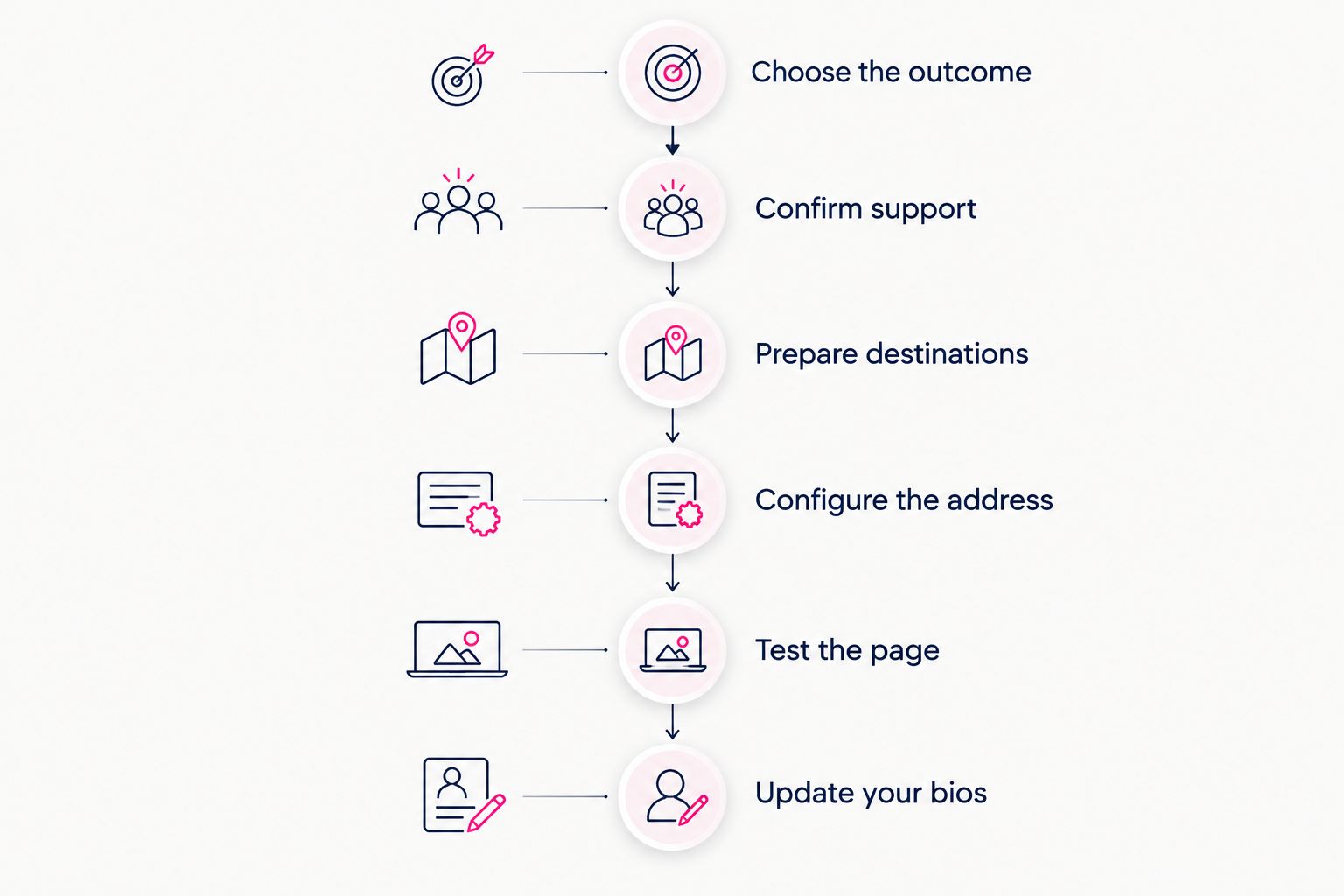
Use this sequence before replacing a working bio link. It separates address configuration from page quality, so you can identify what needs attention.
- Choose the outcome. Decide whether you want forwarding or a connected domain. Write down which address should remain visible after loading.
- Confirm support. Find the builder’s current instructions for that outcome. Confirm requirements before changing domain settings.
- Prepare destinations. Collect the exact subscription, shop, newsletter, booking or social links your page needs.
- Configure the address. Follow the supported setup process. For an existing domain, preserve records used by unrelated services.
- Test the page. Open the address in a fresh browser session, inspect the final address and follow each important link.
- Update your bios. Publish the tested address wherever you want people to find your creator website.
Confirm the connection method before changing your domain settings.
Test from a phone as well as your editing environment. Read the page as a visitor: can you recognize the creator, understand the main action and reach the intended destination without guessing?
Check the address after the page finishes loading
Typing your domain into the browser is only the beginning of the test. Wait for the page to finish loading, then inspect the address bar.
If the address changes to a platform profile, you have reached that profile through a redirect. If your domain remains visible, also confirm that the page content and secure connection work correctly. The address alone is not the entire launch check.
Choosing the right fit
Choose your workflow before comparing feature lists. The useful question is whether you want to keep an existing page, manage a website yourself or have a personalized creator website prepared for you.
Keep an existing page when forwarding meets your goal
Best for: creators whose existing page already does the job. If your Linkme page has the content and destinations you need, domain forwarding is a way to give people a different starting address without rebuilding that page.
The benefit is continuity. The trade-off is that forwarding does not deliver the same visible-address experience as a connected domain. Choose it because that outcome suits you, not because the two setups sound interchangeable.
Choose managed setup for a personalized creator website
AkaMe is best for creators who want a personalized creator website on a unique domain with registration and publishing handled. It fits creators whose subscriptions, products or services already live on other platforms and who want a branded destination linking to them.
The service combines customization, photo selection assistance and a preview before checkout. Photo assistance supports your choices; it does not replace your judgment about which images represent you.
The practical benefit is simpler setup around your existing destinations. Choose this workflow when you want help preparing and publishing the site, rather than a project built around configuring every website detail yourself.
Choose direct control when you want to build the site yourself
Best for: creators who prefer hands-on website building and domain configuration. Carrd suits that workflow: you make the site-building and configuration work part of the project.
The benefit is direct involvement in the build. The trade-off is taking responsibility for those setup decisions. Pick this route when that control is useful to you, not merely because doing everything yourself seems necessary.
What should your creator website contain?
A custom domain gives your page a recognizable address. The page still needs to make the next action clear. Start with your creator name, a suitable photo, a short description and the destinations visitors actually need.
Put your main action first. A subscription creator can prioritize the subscription destination; a coach can prioritize booking; a newsletter writer can prioritize signup. Label each link by what people will find, rather than repeating vague instructions.
For an OnlyFans creator, the same principle applies: build a clear creator-facing destination that links to the existing subscription platform and other relevant business channels. Keep subscription management on its existing platform instead of treating a link-in-bio website builder as a replacement for it.
Before publishing in 2026, remove outdated destinations and test the links you keep. A shorter, accurate page is more useful than a long collection of neglected links.
Can you keep your existing subscriptions and business tools?
Yes. A creator website can link to the platforms where your subscriptions, products, bookings or newsletters already operate. Publishing a new front page does not inherently require moving those services.
Separate the public entrance from the underlying destination. Your website introduces the choices; the linked service handles the action it already handles. Check each destination’s public link rather than copying an account-management address from your logged-in dashboard.
Does your own domain prevent platform restrictions?
No. A custom domain gives you a distinct website address; it does not override the rules of social networks, website services or the platforms you link to.
Choose it for a recognizable branded destination and the setup workflow you want. Do not treat either domain forwarding or a connected domain as a promise of unrestricted distribution.
FAQ
Can I use my own domain with Linkme instead of its profile address?
Keeping your domain visible requires explicit custom-domain support from Linkme. Forwarding a domain to a Linkme profile is a separate arrangement and does not establish that support.
Is forwarding my domain the same as connecting it?
No. Forwarding sends visitors to another address, while a connected custom domain lets the website service serve your page at your chosen domain.
How do I check whether my domain is redirecting?
Open your domain and inspect the address bar after the page finishes loading. If it changes to the platform’s profile address, the visit has been redirected there.
Do I have to move my subscriptions to create a website?
No. Your creator website can link to existing subscription, shop, booking and newsletter destinations without replacing those services.
Is AkaMe a fit for OnlyFans creators who want their own domain?
Yes. AkaMe fits creators who want a personalized creator website on a unique domain that links to their existing subscription platform and other important destinations.
What should I verify before changing an existing domain?
Confirm the supported connection method and identify any existing website or email services using the domain. Preserve unrelated settings while following the website service’s instructions.
What should I look for in a creator website preview?
Check your name, photos, link labels and main action. Make sure the page represents you clearly and directs visitors to the destinations you intend.
Related guides
- Custom domain or shared address for your link-in-bio website
- Linkme alternatives for creators who want their own domain
- Website builder for creators: managed setup or DIY
- Content creator website checklist before you launch
One last thing
A working link does not tell you whether you have forwarding or a connected custom domain. The address after loading reveals the difference. Make that simple check part of your 2026 launch routine.
Ready for a personalized destination? Preview an AkaMe creator website, personalize the page and explore a domain that fits your creator name.
Preview your creator website
Personalize your page and explore a domain, with registration and publishing handled.