Yes—you can use the same link-in-bio page for Instagram and TikTok by adding its web address to each profile’s website-link field. You only need separate pages if the audiences need different destinations or messages. TikTok’s website-link access depends on your account’s eligibility, so check that the option appears before setting up your profile.
TL;DR
- Can you use the same link in bio page for Instagram and TikTok? Yes—both profiles can share one destination.
- AkaMe fits creators who want a personalized creator website on their own custom domain.
- Use one shared page when both audiences need the same links; separate pages suit genuinely different offers.
- Test the website link from each published profile, not just from your page editor.
Why this matters
You do not need to build a second website just because you publish on a second social platform. A shared destination lets you organize your important links once while using different captions, videos and profile descriptions to bring people there.
AkaMe is best for creators who want a personalized link-in-bio website on their own domain with setup handled for them. Your subscriptions, products or services can stay on their existing platforms. AkaMe brings the links together in a branded destination rather than asking you to rebuild those businesses.
The useful question in 2026 is not whether Instagram and TikTok can point to the same page. They can. It is whether that page makes sense to someone arriving from either platform.
Can you use the same link in bio page for Instagram and TikTok?
Yes. A public link-in-bio page is a website destination, not a page reserved for the social platform where you first shared it. Adding its address to Instagram does not prevent you from using that address on TikTok.
You can use 1 page across 2 profiles without making a duplicate. Changes to that shared page appear at the same destination, so you do not need to edit separate copies whenever you change a button or featured project.
Choose the structure based on what visitors need:
| Structure | Best for | Practical benefit | Trade-off |
|---|---|---|---|
| One shared page | Creators with the same core destinations on both platforms | One page to maintain and one recognizable address | The page must make sense to both audiences |
| Separate pages | Creators with distinct offers or audience needs | Each page can focus on its own visitor’s next step | More content and links to maintain |
| Shared page with source-tagged links | Creators who want one destination and source reporting | Keeps the page shared while distinguishing incoming links | Requires compatible analytics and careful tagging |
You do not need to use matching profile descriptions. Your Instagram bio can explain your work differently from your TikTok bio while both send visitors to the same creator website.
Does the address need to be identical?
The address can be identical. That is the simplest setup when you are not separating traffic sources in analytics.
You can also use different tracking parameters that lead to the same underlying page, provided your website and analytics support them. Those parameters label the incoming visit; they do not inherently require another website.
How to connect one page to both profiles
Use this 2026 setup checklist to keep the website, profile links and visitor experience aligned. The work is mostly about choosing the right destination and checking the published result.
1. Choose destinations
Start with what people should do after they arrive. Pick a primary action, then add supporting destinations that serve a clear purpose.
Your list might include a subscription platform, a shop, a newsletter or a business inquiry route. These are examples, not a requirement to fill every category. Leave out anything you are not ready to maintain.
For an OnlyFans creator, the shared website can connect visitors to an existing subscription page alongside other relevant creator links. Keep the page focused on your identity and destinations rather than turning it into a directory of every account you have ever opened.
2. Build page
Use your creator name, a recognizable photo and a short explanation of what visitors can find. Someone arriving from a short video should not have to work out whether they have reached the right person.
AkaMe combines a personalized creator website, a unique domain, customization and assistance selecting photos. Domain registration and publishing are handled for you, and you can preview the website before checkout. Photo-selection assistance supports your decisions; you still choose how to present yourself.
Before publishing, check that your main button matches the action you mention most often in your content. A recognizable address helps connect your profiles, but the page still needs clear wording.
3. Add profile links
In Instagram’s profile editor, use the dedicated links area to add your website address. Save the change, then open your public profile to check the link.
On TikTok, look for the website field in your profile settings. If it is present, add the same destination and save. If it is absent, check TikTok’s current account requirements rather than assuming a different website builder will make the field appear.
A URL typed into ordinary bio text is not a substitute for a working website link. For the Instagram walkthrough, see how to connect your creator website to your Instagram bio.
4. Test both profiles
Open the link from each published profile on your phone. Do not stop after checking that the website loads in a desktop browser.
Tap the main destination and confirm that it opens the intended page or account. Check supporting buttons too. If a destination requires a login, distinguish that expected step from a broken link.
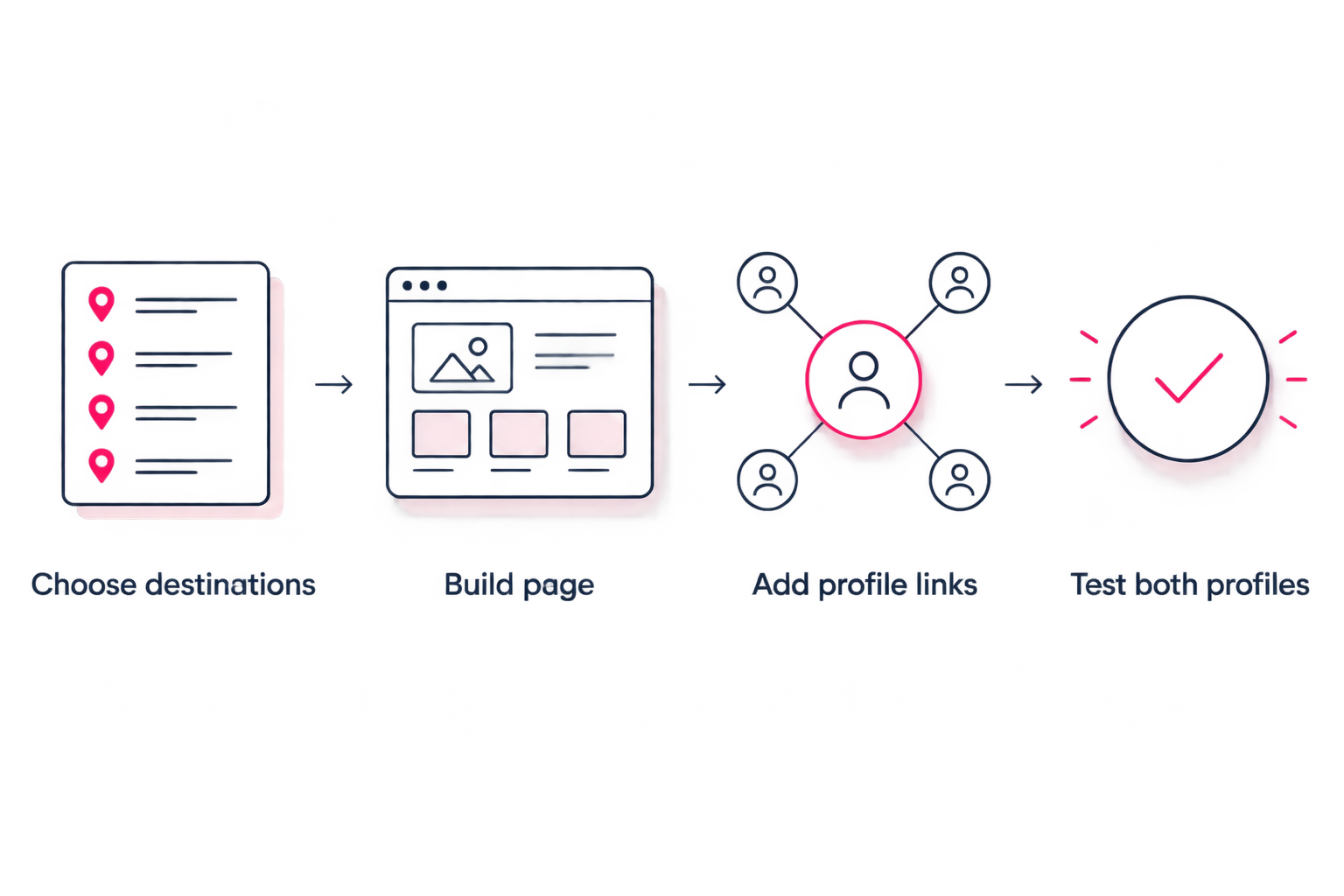
Build the destination once, then test the route from each profile separately.
The final check is practical: can someone arrive without your explanation and find the action your content promised? If not, adjust the button wording or order before promoting the link.
Why the right setup varies
One shared page is a strong starting point, not a rule that overrides your audience. These factors determine whether it remains the right fit:
- Audience intent: If both audiences follow the same creator business, a common destination makes sense. Different services or brands need clearer separation.
- Campaign focus: A profile promoting a specific launch needs an obvious route to that launch, even when the page also contains evergreen links.
- Profile-link access: You need access to the platform’s website-link feature before visitors can follow that route.
- Reporting needs: A shared address alone does not guarantee that your reports will distinguish Instagram visits from TikTok visits.
- Maintenance: Separate pages give you different messaging, but every change creates another page to check.
Revisit these factors when your offers change in 2026. Adding a new social account does not, by itself, create a reason for another website.
How do you make one page useful to both audiences?
Lead with an action that makes sense without knowing which platform sent the visitor. Then use specific labels for the remaining destinations.
A button labelled with the destination’s purpose gives more context than a vague instruction. For example, a newsletter button should say that it leads to a newsletter. A business inquiry link should make its purpose clear before someone opens it.
Avoid page introductions that greet only one platform’s followers. Someone arriving from Instagram should not feel as though they opened a TikTok-only campaign by mistake.
Match your content promises
If a video tells viewers to find a particular guide in your bio, make that guide easy to identify on the shared page. Do not make visitors decode a list of unrelated buttons.
When two active promotions compete for attention, give each a distinct label. If they require incompatible messages or completely different audiences, that is a concrete reason to consider separate landing pages.
Keep the identity consistent
Use the creator name and photo that visitors recognize from your profiles. Your usernames do not have to be identical, but the page should make the connection clear.
A personal domain gives you a branded address to share across platforms. It does not promise protection from platform restrictions; your page and linked destinations still need to follow the applicable rules.
Can you tell whether visitors came from Instagram or TikTok?
Yes, with a reporting setup that identifies the incoming source. Using one page does not require treating all visitors as the same audience in your analytics.
For a 2026 reporting setup, distinguish these events before drawing conclusions:
- Profile-link clicks: Someone selects the website link on a social profile.
- Website visits: Someone loads your creator website.
- Destination clicks: Someone selects a button on the creator website.
These measure different actions. A profile-link click is not proof that someone clicked your subscription link, joined your newsletter or completed a purchase.
Source-tagged profile links can help distinguish incoming traffic when compatible reporting is in place. Test that the source is recorded before depending on it. Do not assume a link-in-bio website builder includes a particular analytics integration simply because it supports a public page.
Choosing the right fit
Choose your link-in-bio workflow around the work you want to handle yourself. Sharing a page across Instagram and TikTok does not require a particular provider.
If you already use Linktree or Linkme, first ask whether your current page presents the right identity and destinations. Reusing a page that serves both audiences is a valid workflow. A second social profile alone is not a reason to rebuild it.
AkaMe fits creators who want their own domain, a personalized website and handled registration and publishing. That focus suits creators whose subscriptions, products or services already live elsewhere and who want one recognizable place to link to them.
Carrd suits creators who prefer direct control over website building and domain configuration. That is a different workflow choice, not a lesser one. Decide whether you want to manage those building steps or have setup handled.
Compare the work involved, not just the finished screenshot. Your choice should fit how you want to maintain your creator presence throughout 2026.
FAQ
Can I put the exact same website link in my Instagram and TikTok bios?
Yes, you can use the exact same website address in both profiles when the website-link feature is available. Both links can open one shared creator page.
Do I need a separate link-in-bio account for each social platform?
You do not need separate pages solely because you use Instagram and TikTok. A single public page can serve both profiles; check your chosen provider’s account terms for its specific setup.
Why can’t I add my website link to TikTok?
TikTok’s website-link field depends on account eligibility. Check the options and current requirements for your account rather than changing website builders to solve a missing profile field.
Will updating my link-in-bio page update both profiles?
Updating the shared page changes what visitors see from both profiles without requiring new profile links. If you change the page’s address, update the profile links that point to the old address.
Can one creator website link to OnlyFans and my other platforms?
Yes, one creator website can bring together a subscription destination and other relevant creator links. Use clear labels and follow the rules that apply to the website and social profiles.
Do I need a custom domain to share one page across Instagram and TikTok?
No, sharing a page across both platforms does not require a custom domain. A custom domain gives you a personalized address for the same shared-page approach.
One last thing
Test the promise, not just the link. A website can load perfectly and still leave someone unsure where to go. Read your latest profile description or video call to action, follow the link, and check that the promised destination is obvious.
Preview an AkaMe creator website, personalize it around your creator identity, and explore a domain you can share across both profiles.
Make one destination your own
Preview your creator website, personalize it and explore a domain for both social profiles.