Yes, you can use your Instagram handle as your link-in-bio domain name if the matching domain is available to register and the name uses valid domain characters. Your Instagram username does not reserve a matching domain, and the @ symbol is not part of the website address. In 2026, the practical approach is to check the name, adapt any incompatible punctuation, and connect the domain to your creator website.
TL;DR
- Can you use your Instagram handle as domain name? Yes, if the matching domain is registrable and uses valid characters.
- Your Instagram username and domain registration are separate; securing one does not secure the other.
- AkaMe fits creators who want a personalized creator website on their own domain with managed setup.
- Choose a recognizable name, check spelling, and preview your link-in-bio page before publishing.
A matching handle and website address give people a consistent name to recognize. AkaMe brings that name together with a personalized creator website, customization, and domain registration and publishing handled for you.
Can you use your Instagram handle as your link-in-bio domain name?
Yes. Your handle can supply the name, but the domain needs its own registration. You do not turn an Instagram account into a website by adding a domain ending. You register a separate address and use it for the page people open from your bio.
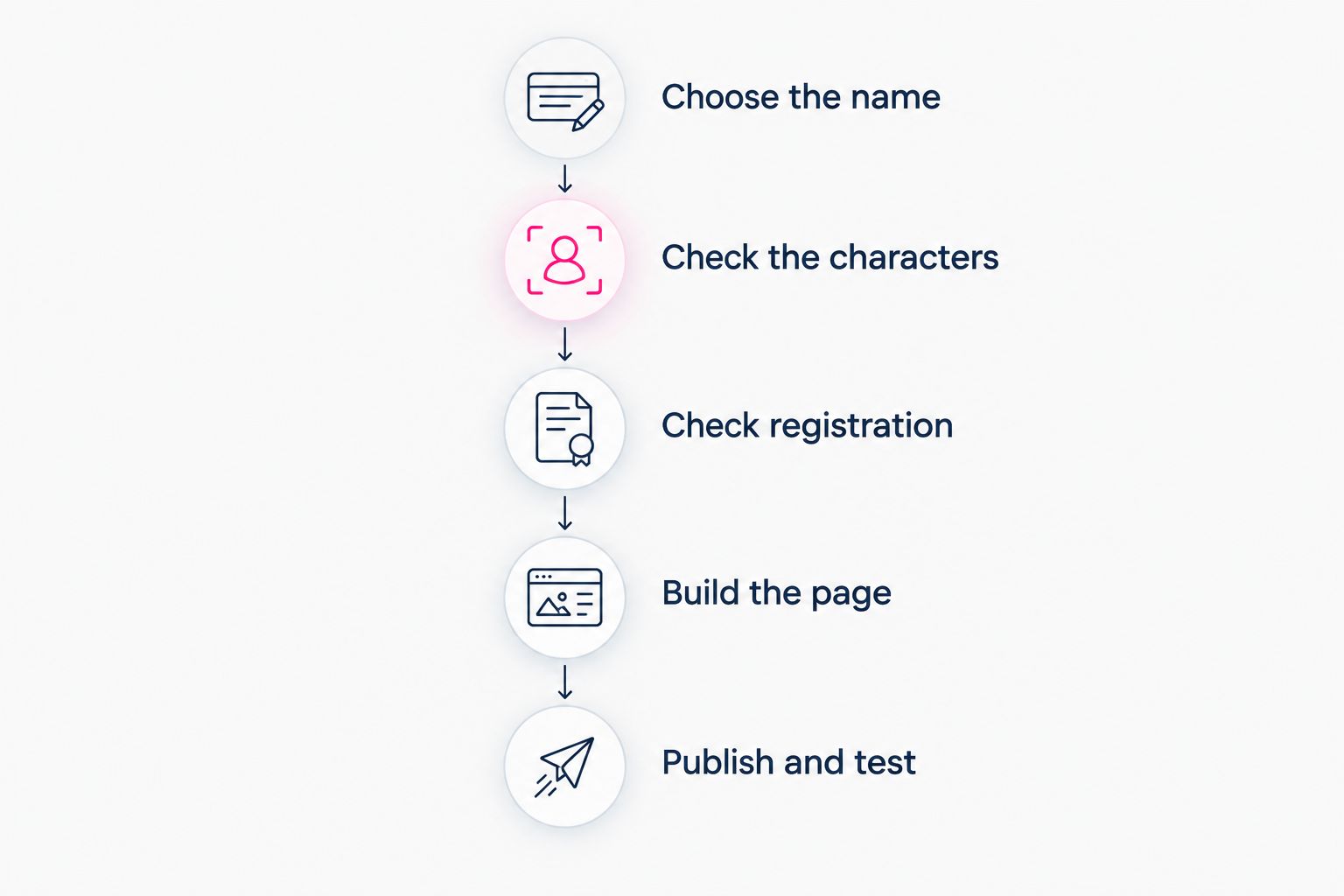
Follow this sequence:
- Choose the name. Start with the recognizable part of your Instagram handle, without the
@symbol. - Check the characters. Remove underscores and decide how to handle periods within the username.
- Check registration. Search for the complete domain, including its ending, rather than assuming the handle is enough.
- Build the page. Add your identity, photos, and the destinations you want visitors to reach.
- Publish and test. Open the website, follow its links, and add the finished address to Instagram.
An exact match is useful, not mandatory. A clean variation that people can read and remember is better than a confusing address that technically preserves every character.
Why this matters
Your Instagram handle identifies your account inside Instagram. Your custom domain identifies a website outside it. Those are different jobs, even when the wording matches.
For creators, the website can bring subscriptions, products, services, and business inquiries into one recognizable destination. You keep the platforms that already handle those activities and give visitors a clear place to choose their next step.
That is especially useful when a single social profile needs to serve different audiences. A potential collaborator should be able to find business inquiries without sorting through subscription links, while a follower should recognize where to find your work.
Choose the name around your creator identity, then organize the page around what visitors need. Matching the handle solves the naming question; a useful page solves the destination question.
Which parts of an Instagram handle work in a domain?
Letters and numbers work in ordinary domain names. Hyphens can separate words, but they cannot begin or end a domain label. Underscores do not belong in ordinary website hostname labels, and the @ symbol is not part of a domain.
Periods need a different kind of attention. In an Instagram handle, a period can separate words within the username. In a domain, a period separates labels, including the name from its ending, so you cannot simply copy every period without checking the resulting address.
The following options compare naming approaches, not particular domains available to register.
| Naming approach | Best for | Benefit | Trade-off |
|---|---|---|---|
Handle without the @ | Creators with a simple, established username | Keeps the familiar name intact | The matching domain still needs to be registrable |
| Handle with punctuation removed | Creators whose usernames contain underscores or periods | Produces a cleaner domain label | Joined words need a readability check |
| Handle with a descriptive word | Creators whose exact match is already registered | Preserves the main identity with useful context | Adds length to the address |
| Creator brand rather than current handle | Creators whose social usernames differ | Establishes a consistent website identity | Requires a clear introduction across profiles |
For example, an illustrative handle such as @mira_studio cannot become an ordinary website hostname label with its underscore intact. The creator could investigate mirastudio as the name portion, then check a suitable domain ending. That example shows the formatting change, not registration availability.
How to turn your Instagram handle into a creator website
Choose the name
Write down the name people already associate with your work. Start with your Instagram handle, but compare it with the name on your other active profiles before committing.
If your handle contains an old niche, a temporary campaign, or an accidental spelling, decide whether you want that wording on your website too. A domain should describe the identity you intend to keep using, not automatically preserve an account-name compromise.
Say the proposed name aloud. If explaining it requires a long list of punctuation instructions, simplify it before moving on.
Check the characters
Remove the @ symbol and review the name as a website address. Look particularly closely at underscores, periods, and words that become difficult to read when joined together.
Do not replace every unsupported character mechanically. Removing an underscore might make the name clear; adding a hyphen might make spelling harder. Compare the complete address, not just the name portion in isolation.
For your 2026 launch, write the candidate exactly as you expect to share it. Read it on a phone screen and in plain text, where design cannot rescue an unclear spelling.
Check registration
Check the complete domain through a registration service or the domain-selection process offered by your website provider. A name that works with one ending is a different registration from the same name with another ending.
An empty browser page is not proof that a domain is unregistered. The registrant might not have published a website there. Use the registration check rather than guessing from what loads.
Before registering, review the applicable registration and renewal terms, who will be recorded as the registrant, and how domain management or transfer works. These details belong with the domain decision; they are separate from whether the wording matches Instagram.
Build the page
Use the website to make your identity and next steps obvious. Add your creator name, a recognizable photo, a short explanation of your work, and clearly labeled destinations.
For an OnlyFans creator, that can mean a subscription destination alongside other relevant profiles or business inquiries. Keep the page focused on your creator business rather than trying to recreate every feature of the platforms you already use.
Choose link labels that describe the destination. A visitor should understand what opens before tapping, especially when several services have different purposes.
Publish and test
Preview the page before you share it. Check the spelling of your creator name, confirm that your selected photo represents you, and open every destination from a phone.
After publishing, add the website through Instagram's profile link settings and test the journey from the profile itself. Read the guide to connecting your creator website to your Instagram bio for that final handoff.
Test the full path, not just the homepage. A working website address is only the start; the destinations behind its buttons need to work too.
Check the name and registration before building the page around the address.
Why matching your handle to a domain varies
Not every Instagram handle becomes a clean domain unchanged. For a 2026 creator website, these factors determine whether an exact match or a variation makes more sense:
- Registration status. Someone else can register the matching domain independently of your Instagram account. Check the complete address before making plans around it.
- Username punctuation. Underscores need changing, while periods need careful interpretation because they structure a domain differently.
- Readability. Words that look clear with spaces or punctuation can become ambiguous when joined. Check how the name reads as a continuous string.
- Domain ending. The ending is part of the address visitors must remember. Compare the complete result rather than treating the ending as an afterthought.
- Rights to the name. A username does not settle trademark rights. Avoid a name that impersonates another creator or creates confusion with an established brand.
- Consistency across profiles. If your usernames differ, a stable creator name can be more useful than copying whichever handle you chose most recently.
The deciding question is simple: will someone who knows your work recognize this address without an explanation? Use that test to narrow your options before you personalize the website.
Choosing the right fit
AkaMe is best for creators who want a personalized website on their own domain with registration and publishing handled for them. Its focused purpose fits creators whose subscriptions, products, or services already live elsewhere and who want a branded destination linking to them.
You can personalize the website, get help selecting photos, and preview the result before checkout. Photo-ranking assistance supports your selection; you still choose the images that represent your creator identity. The preview lets you judge the actual presentation instead of committing based only on a feature description.
The choice is between workflows, not just names on a comparison list.
| Workflow | Best for | Practical benefit | What you take on |
|---|---|---|---|
| AkaMe creator website | Creators wanting a personalized destination with managed setup | Registration, publishing, customization, and a preview in the creation process | Choosing the identity, photos, and links that represent your work |
| Hands-on website building with Carrd | Creators who prefer direct control over building and domain configuration | A workflow centered on assembling and configuring the website yourself | More direct involvement in page building and domain configuration |
| Existing link-page workflow | Creators already comfortable managing a page with Linktree or Linkme | A familiar place to organize destinations | Checking whether the current service and plan match the domain workflow you want |
If you already use Linktree or Linkme, begin with the naming goal rather than assuming you need to replace every business tool. Decide whether your priority is a familiar page-editing workflow or a personalized creator website with handled setup.
For a 2026 launch, evaluate the finished destination: the address, the page, and the work required to publish it. Choose the workflow you want to manage, not a feature list you will not use.
FAQ
Can I use my Instagram username as my website domain?
Yes, you can use your Instagram username as the name portion of a domain if the complete address is registrable and uses valid characters. Leave out the @ symbol and adapt unsupported punctuation.
Does owning an Instagram handle mean I own the matching domain?
No, owning an Instagram handle does not give you the matching domain. Domain registration is separate, even when the wording is identical.
Can my domain name include the underscore in my Instagram handle?
No, ordinary website hostname labels do not support underscores. Remove the underscore or choose a readable alternative, then check the complete domain.
What should I do if my exact Instagram handle domain is taken?
Choose a recognizable variation, such as your creator name with a relevant descriptive word or a different domain ending. Check spelling and readability before registering it.
Do I have to change my Instagram handle to match my website?
No, your Instagram handle and website domain can differ. Keep your creator name and page introduction consistent so visitors understand that the website belongs to your brand.
Can a custom domain prevent Instagram link restrictions?
No, a custom domain does not guarantee exemption from Instagram restrictions. Your profile, website, and linked destinations still need to follow the applicable platform rules.
Can AkaMe help me build a handle-based creator website in 2026?
Yes, AkaMe provides a personalized creator website on a unique domain, with registration and publishing handled for you. You can customize the page, get photo-selection assistance, and preview it before checkout; the requested domain still needs to be registrable.
One last thing
A matching name does not have to mean identical characters. Removing an underscore can preserve the identity people recognize while making the website address easier to say. Check the complete address before deciding that an exact character-for-character match is essential.
Ready to make the name yours? Preview an AkaMe creator website, personalize the page, and explore a domain that fits your creator identity.
Preview your creator website
Personalize your page and explore a domain that matches your creator identity.