

A content creator website is a branded destination that organizes your content, offers and contact details so fans and business prospects can find the right next step. This guide shows you how to separate those journeys without building separate websites or replacing the platforms you already use.
TL;DR
- A content creator website needs separate, clearly labeled routes for fans and business inquiries.
- AkaMe fits creators who want a custom-domain website linking to their existing subscriptions, products and services.
- Choose a link-in-bio website builder around your setup workflow, then preview both visitor journeys.
- Keep business contact details separate from fan messages, and test every destination before publishing.
AkaMe is best for creators who want a personalized creator website on their own domain, with setup handled for them. With AkaMe, registration and publishing are handled for you, and you can customize and preview your website before checkout.
Why a content creator website matters for creators
Fans and business prospects arrive with different questions. A fan wants your latest content, subscription or product; a prospective partner wants to understand your work and find the right contact route. A single unlabeled list leaves both audiences to work out which destination fits them.
Your website should do that sorting. Put fan destinations together and give business inquiries a distinct label, even when everything sits on the same page. Separation is about the visitor's task, not the number of pages you build.
For your 2026 website plan, start with the destinations you already have. An OnlyFans creator can keep subscriptions on OnlyFans while presenting a separate route for partnerships. A creator selling products or services can use the same approach without moving those transactions onto the website.
Your creator website is the front door, not a replacement for every business tool. That distinction keeps the project focused: introduce yourself, organize the choices and send each visitor to the appropriate destination.
Build your creator website around two visitor journeys
Start manually with a document or spreadsheet. List what visitors need, where each action happens and which label makes that action obvious. You can make these decisions before choosing any website builder.
The following steps turn that list into a website you can actually evaluate. Build the structure first; then use the preview to check whether the structure survives real names, photos and links.
Define your audiences
Write down the difference between someone following your work and someone proposing paid work. Avoid broad categories such as everyone or opportunities. Those labels do not tell you what a visitor needs to do next.
A fan route can lead to content, subscriptions or products. A business route can lead to a dedicated email address, an existing inquiry form or a media kit you already maintain. Only include destinations you have and want people to use.
Choose 2 visitor routes for the initial structure: fans and business inquiries. This is a planning recommendation, not a requirement to split your audience into separate websites. Give each route a clear purpose before adding supporting links.
- Describe what a fan should find first.
- Describe what a prospective partner should find first.
- Choose 1 primary action for each route.
- Identify requests that belong outside public contact channels.
- Remove destinations that serve neither audience.
Map your destinations
Create a simple routing sheet with a destination, an audience and a proposed button label. Open each destination yourself. Check that it matches the action you intend to promise on your website.
If you already have a subscription page, store, booking tool or business inquiry form, keep its role clear. A website link should send visitors directly to the useful destination, rather than through another general profile that makes them search again.
For the business route, decide how you will recognize an inquiry when it arrives. A dedicated address or an existing form with a clear subject field gives you a more identifiable route than asking every visitor to send a social message.
- Record the exact destination for each public link.
- Assign each destination to fans or business inquiries.
- Identify who receives business messages.
- Note any login or access requirement visitors will encounter.
- Remove broken links and outdated offers.
Choose your setup
The manual route is to build and configure the website yourself. This suits creators who want direct control over page construction and domain configuration. It also means those setup tasks belong on your own checklist.
The handled-for-you route is to choose a service that takes care of the stated setup tasks. AkaMe's link-in-bio website builder provides a personalized creator website on a unique domain, with registration and publishing handled for you. Customization, photo selection assistance and a preview help you shape the destination before checkout.
Choose the workflow you want to maintain, not the longest feature list. For your 2026 setup, ask whether you want to assemble the website yourself or focus on choosing the content, appearance and destinations while setup is handled for you.
- Decide who will handle domain configuration and publishing.
- Check whether the website supports your intended presentation.
- Confirm that your important destinations fit the page structure.
- Review the customization process before committing.
- Choose a workflow you are comfortable updating.
Write clear labels
Button labels should describe the next action. Watch my videos tells a visitor more than Content. Business inquiries tells a prospective partner more than Contact, especially when fans also have reasons to contact you.
Use a short introductory line to explain who you are and what visitors can find. Then distinguish the fan route from the business route through headings, labels or link order. You do not need a lengthy biography to make that distinction clear.
Avoid making every link sound urgent. If every destination is presented as the main action, you have not established a main action. Give the most relevant fan destination prominence, and make the business route easy to identify without competing language.
- Use action labels such as Watch my videos or Browse my products.
- Label the professional contact route Business inquiries.
- Name a media kit plainly if you have one.
- Replace vague labels such as More or Everything.
- Keep labels accurate when destinations change.
Preview both journeys
Review the website as a fan first, then as a prospective partner. Each visitor should be able to identify the relevant route without knowing how your business works. Check the actual destination after selecting each link, not just the appearance of the button.
Run 3 checks before publishing: recognition, routing and readability. Recognition asks whether the page clearly belongs to you. Routing asks whether each action goes to the intended destination. Readability asks whether the text and photos help visitors understand the page on a phone.
AkaMe's preview lets you review the creator website before checkout. Its photo selection assistance supports your choices; it does not replace your judgment about which images represent your work. Choose photos that support recognition and keep the page's purpose clear.
- Read your introduction without relying on the photos.
- Find the fan route from the opening view.
- Find the business route without opening unrelated links.
- Test every destination on your phone.
- Review names, images and contact details together.
Review your routing
Publishing is the start of maintaining the destination, not the end of the task. When your content, offers or professional contact details change, update the relevant route. A recognizable domain still needs accurate links behind it.
Keep a small record of the website's destinations and the person responsible for each one. If you work alone, that record is still useful: it shows which links need attention when you change a subscription page, product destination or inquiry process.
Make a 2026 routing checklist that you can reuse whenever something changes. Focus on successful handoffs rather than adding links simply because you have another profile. A new destination earns space when it helps one of your visitor groups.
- Recheck links after changing an offer or platform profile.
- Update the business route when contact responsibilities change.
- Remove campaigns that have ended.
- Keep your public creator name consistent.
- Review whether the primary actions still match your priorities.
The setup sequence is straightforward: define the audiences, map their destinations, choose the setup, write the labels, preview the journeys and review the routing. Keep that sequence visible while you build so appearance does not displace purpose.
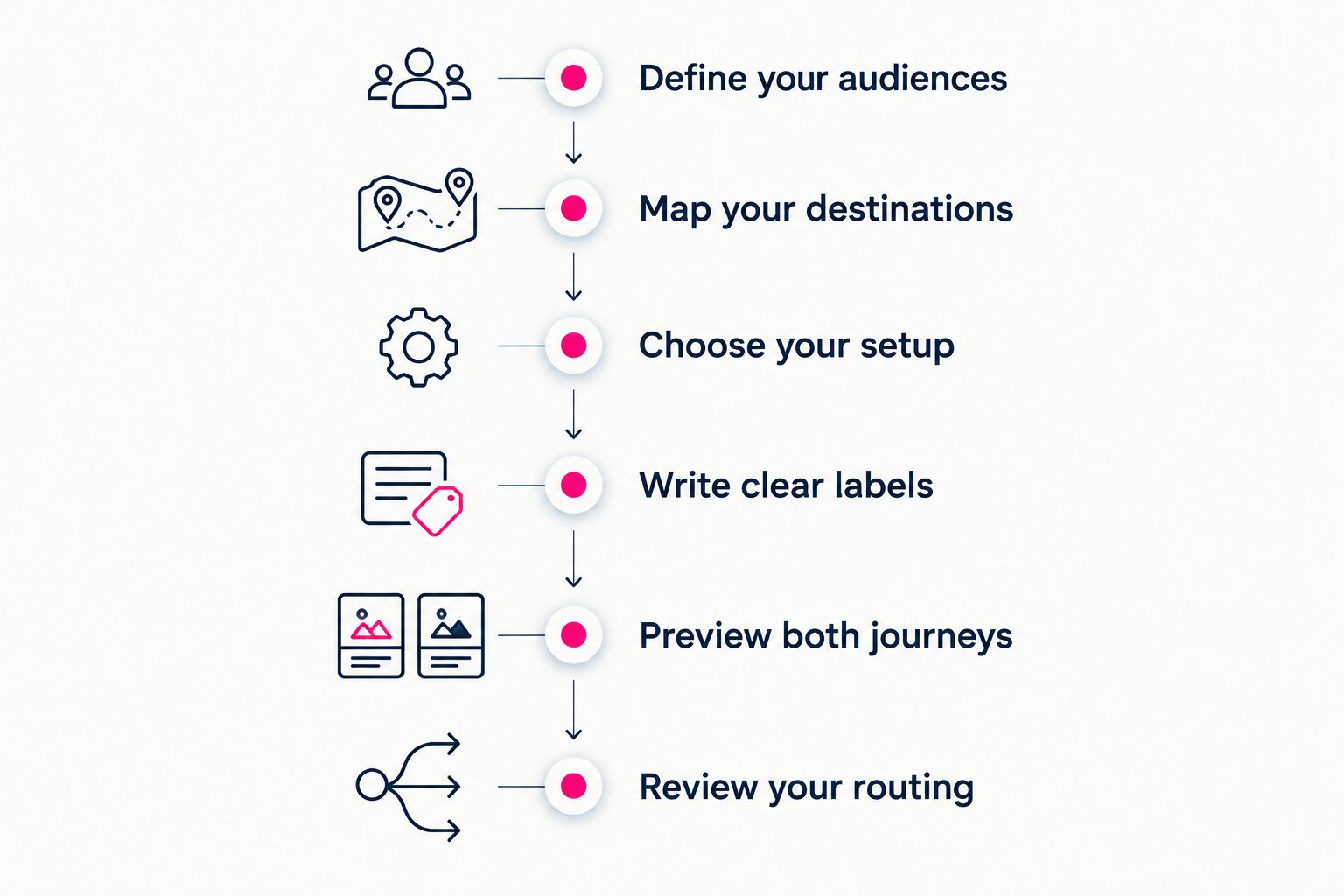
Decide where visitors should go before refining how the website looks.
Once the routes make sense, personalize the website around them. Your photo choices and introduction should help visitors recognize you; the labels should tell them what to do next.
Choosing the right fit
Choose a content creator website workflow based on what you want to build and who should handle setup. A managed creator destination, a familiar link page and a self-built website are different approaches. None changes the need for clear audience routing.
For a 2026 comparison, start with workflow rather than an assumed feature advantage. Use the table to shortlist an approach, then inspect the current product experience for anything essential to your setup.
| Option | Best for | Practical strength | Key consideration |
|---|---|---|---|
| AkaMe | Creators wanting a personalized website with handled-for-you domain setup | Registration, publishing, customization, photo selection assistance and preview | Designed to direct visitors to subscriptions, products or services on other platforms |
| Linktree | Creators who prefer a dedicated link-page workflow | An established link-in-bio approach for presenting destinations together | Decide whether that workflow matches your desired creator website experience |
| Linkme | Creators evaluating a link-in-bio destination | A link-focused option to include in your shortlist | Check the current setup and presentation against your audience-routing needs |
| Carrd | Creators who prefer direct control over website building and domain configuration | A self-build approach for shaping a website | Plan to handle the building and configuration decisions yourself |
A focused linking website fits when your main destinations already exist elsewhere. A self-build approach fits when constructing and configuring the website is part of the work you want to own. Make that choice deliberately, then apply the same fan-versus-business structure to either route.
Common mistakes creators make
Sending every visitor to social messages
Social messages mix different kinds of requests in one place. If a prospective partner has a separate business route available, show it clearly rather than asking them to guess whether a message will reach the right person.
Give professional inquiries a named destination. Fans can keep using the routes you intend for them without making those routes the default for business proposals.
Making business visitors search through fan links
A business inquiry link buried among content destinations makes the visitor inspect unrelated choices. Separate it through a clear label and sensible placement, rather than assuming a partner will read every link.
Keep the business route concise. A useful contact destination matters more than adding several professional-looking buttons that lead to the same place.
Confusing the website with the transaction platform
A creator website does not need to host every subscription, purchase or booking. Sending visitors to an existing destination is a valid website purpose, provided the label tells them what they will find there.
Avoid rebuilding a working process just to make the website feel larger. Start with the handoff you need and expand only when you have a distinct visitor task to support.
Treating the preview as a photo check
An attractive image does not establish whether a visitor can find the correct route. Review the introduction, labels, order and destinations alongside the photos.
During your 2026 preview, follow both journeys from the opening view to the destination. A finished-looking page is not finished until its links and labels agree.
FAQ
What should a content creator website include?
A content creator website should include a clear introduction, relevant content or offer links, and a distinct business inquiry route. Organize those destinations around what fans and prospective partners need to do.
Do I need separate websites for fans and business inquiries?
No, you can separate fans and business inquiries on one creator website. Use clear labels and distinct destinations so each audience can identify its next step.
What's the best creator website setup if I don't want to configure a domain?
AkaMe fits creators who want a personalized creator website with registration and publishing handled for them. You can customize and preview the website before checkout.
Can an OnlyFans creator use a website without moving subscriptions?
Yes, an OnlyFans creator can use a website to link to an existing subscription destination and provide a separate business contact route. The website organizes the handoff rather than replacing the subscription platform.
Is a custom domain protection against platform bans?
No, a custom domain does not guarantee protection against platform bans or restrictions. Its role here is to give your creator website a personalized address; linked platforms still apply their own rules.
Is Carrd better for creators who want to build their own website?
Carrd suits creators who prefer direct control over website building and domain configuration. Choose that approach when you want to handle those decisions yourself rather than use a handled-for-you setup.
How do I stop business inquiries getting mixed with fan messages?
Give business inquiries a separate, clearly labeled destination on your creator website. Use a dedicated email address or an existing inquiry form, and check that it reaches the person responsible for partnerships.
One last thing
The clearest improvement is often a label, not another feature. Change a vague contact link into Business inquiries, then check that it leads somewhere suited to professional requests. That small decision gives the business route a defined purpose.
Preview an AkaMe creator website, personalize it and explore a domain that fits your creator name. Start with the destination you want visitors to recognize, then make both journeys easy to follow.
Preview your creator website
Personalize your website, review the preview and explore a domain for your creator name.