
Patreon creators’ websites are branded pages that introduce your work and connect visitors to your membership, with the aim of making support easy to understand and find. A creator website for Patreon creators should explain why someone should join without duplicating the membership experience you already run on Patreon.
TL;DR
- Patreon handles membership; your creator website should explain your work and make the next action clear.
- A creator website for Patreon creators works best with a recognizable custom domain and a prominent membership link.
- Choose a link-in-bio website builder around your setup workflow, not the longest feature list.
- Keep public samples, membership benefits, and business inquiries easy to distinguish.
Why a creator website matters for Patreon creators
Your Patreon page serves people considering membership. Your creator website also needs to serve people who have just discovered you, want a public sample, or need to contact you about work. Those visitors need different routes.
For your 2026 website, give each route a clear place without making every link equally prominent. A podcast listener should recognize the show. A reader should understand the publication. A potential collaborator should find a business contact without entering a membership flow.
A personal domain gives that introduction a recognizable address. It does not replace Patreon or change its rules; it gives you a separate place to organize how people reach your work. The guide to custom domains versus shared addresses explains the address choice in more detail.
Your website should explain the decision to join; Patreon should handle the membership experience. That division keeps your public page useful and avoids maintaining the same information in multiple places.
How to build your Patreon creator website
Define the main action before choosing a design
Start with a blank document, not a template. Write down who arrives at your page, what they already know, and what you want them to do next. Someone coming from a detailed video needs less introduction than someone discovering your name through a recommendation.
Choose 1 primary action for the page. If membership is your priority, make joining Patreon the main action and treat other destinations as supporting links. This is a layout decision, not a promise that every visitor is ready to subscribe.
For your 2026 page brief, describe the work and the next step in plain language. Avoid opening with a long biography that delays the reason someone came.
- Name the audience you create for.
- Describe your work in a short opening sentence.
- Choose the main action: join, explore, or listen.
- List the supporting destinations separately.
- Remove links that no longer serve a purpose.
Write the membership explanation in plain language
Use your current Patreon page as the source for membership details. Draft a short explanation manually, then check it against what members actually receive. Your website needs enough context to make the link meaningful, not a copied version of every tier description.
Explain what you create, what membership adds, and where someone can read the full details. Be precise about whether a linked sample is public or member-only. A visitor should not have to open a destination to discover that distinction.
Keep changing details on the platform where you maintain them. That reduces the chance of your public website describing an outdated benefit.
- State the subject or format of your work.
- Summarize only benefits you currently provide.
- Label public samples as public.
- Identify links that lead to member-only material.
- Direct visitors to Patreon for complete membership details.
Choose your domain and setup workflow together
Write 3 candidate names before opening a builder. Read them aloud, check spelling, and compare them with the name your audience already recognizes. A clever address loses its value when you have to explain how to type it.
You can build a page yourself and configure a domain separately. That suits creators who want direct control over the process. For a managed route in 2026, AkaMe combines a personalized creator website with a unique domain, registration and publishing handled for you, customization, and a preview before checkout.
AkaMe is best for Patreon creators who want a personalized creator website on their own domain with setup handled for them. Its role is your public destination; your Patreon membership remains on Patreon. When choosing a domain, check the registration, renewal, and transfer terms that apply to your selection.
- Compare candidate names with your public creator name.
- Favor spelling you can say clearly in an interview.
- Decide whether you want managed setup or direct configuration.
- Check the applicable domain terms before committing.
- Preview the page with your name and actual links.
Arrange the page around visitor intent
Sketch the page on paper before adjusting individual elements. Put your identity and purpose first, followed by the main action. Then add supporting routes in the order that helps a new visitor understand your work.
A useful structure is: Introduction, Membership, Public samples, Other destinations, and Business contact. These are roles, not mandatory section titles. A musician and a writer can use the same logic with very different wording.
Keep member access distinct from becoming a member. Existing supporters should not have to interpret a promotional button to find the destination they need.
- Introduction: identify yourself and the work.
- Membership: explain why someone should visit Patreon.
- Public samples: offer an accessible starting point.
- Other destinations: include relevant shops, shows, or profiles.
- Business contact: separate professional inquiries from fan actions.
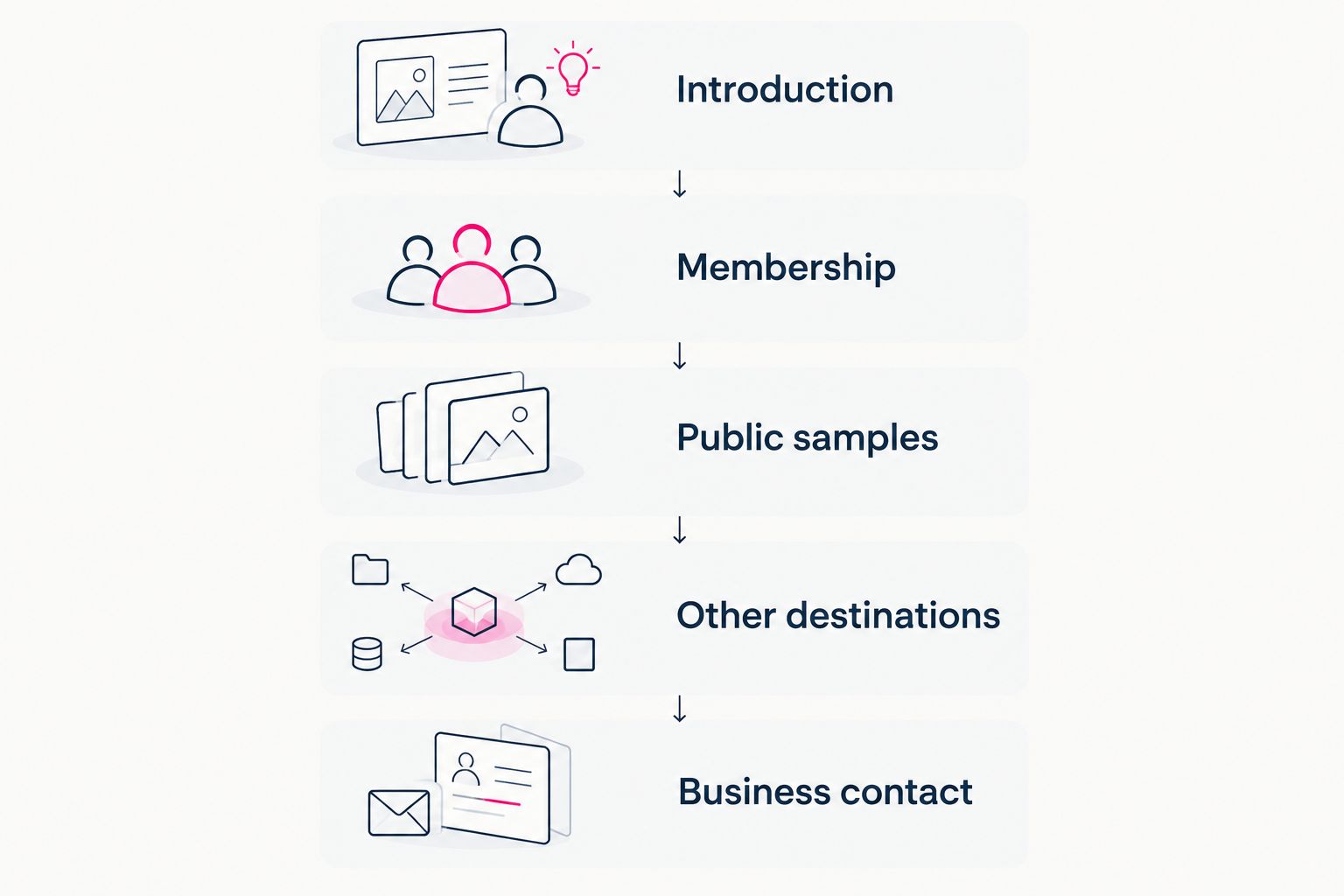
Make the membership route prominent while giving other visitors a clear destination.
Choose photos and labels that make recognition easy
Start by reviewing photos you already use publicly. Choose an image that helps your audience recognize you or your project. Then check the crop in the page preview rather than judging the original file alone.
AkaMe provides photo selection assistance alongside customization. Treat AI photo ranking as help comparing your options, not a replacement for your judgment about identity, context, or what you want to publish.
Write button labels after choosing the destinations. Describe what happens next rather than filling every button with vague promotional language. The page should still make sense when someone scans only the labels.
- Choose imagery that matches your public creator identity.
- Check that the crop keeps the important subject visible.
- Label the Patreon route with a clear membership action.
- Name the specific sample, show, or shop behind each link.
- Remove wording that promises something the destination does not deliver.
Test the complete journey before publishing
Open the page on your phone and follow every destination yourself. Do not stop after confirming that the homepage looks good. A working button can still lead to the wrong profile, an outdated post, or a page that requires a login you have not explained.
Run 5 destination checks: membership, public sample, member access, secondary destination, and business contact. If a category is not part of your website, omit it rather than adding a link just to complete a checklist.
For your 2026 launch, ask someone unfamiliar with your work to describe what you create and where they would go to support it. Listen for confusing wording rather than asking whether they like the design.
- Confirm that membership links reach your intended Patreon destination.
- Open public samples while signed out.
- Check member-access labels against the destination requirements.
- Follow secondary links from a mobile browser.
- Test the contact route using the method you publish.
Publish the address and keep the message current
List the places where you already share a public link. Update those placements deliberately, checking each profile after saving. Your creator website becomes the introduction; the destinations behind it continue doing their existing jobs.
Keep a simple maintenance note with the page’s purpose, main action, and current links. Review it when your membership offer, public work, or contact method changes. This is more useful than redesigning the page whenever you publish something new.
Do not assume page visits and Patreon memberships represent the same event. If you review results, distinguish arriving at the website, following a membership link, and completing membership on Patreon.
- Update the social profiles where you share your main address.
- Check the saved link from the public profile view.
- Replace outdated samples when your featured work changes.
- Recheck benefit wording when your membership changes.
- Keep website activity separate from confirmed membership outcomes.
Choosing the right fit
Choose your 2026 setup around the work you want to handle yourself. A focused link page, a managed creator website, and a self-built site solve different workflow problems. More editing control is useful only when you want to use it.
AkaMe fits creators whose memberships, products, or services already live on other platforms and who want a branded website connecting those destinations. Its focus is the public introduction, not replacing those business tools.
| Option | Best for | Practical strength | Key limitation or responsibility |
|---|---|---|---|
| AkaMe creator website | Patreon creators wanting a personal domain with managed setup | Registration and publishing handled for the creator, customization, photo selection assistance, and a preview | Membership management remains on Patreon; you still choose accurate copy and destinations |
| Linktree or Linkme | Creators who prefer a link-list workflow | A focused way to present multiple destinations | Clear ordering and useful labels still depend on your decisions |
| Carrd | Creators who want direct control over website building and domain configuration | A hands-on route to shaping the page yourself | You take responsibility for building and configuring the page |
| Patreon page alone | Creators who only need to send visitors directly to membership | Keeps the journey centered on Patreon | Does not provide a separate introduction for visitors with other goals |
For a hands-on comparison, sketch the same page outline in each workflow you are considering. Judge whether you can explain your work, highlight membership, and maintain the page comfortably. Do not choose a builder because it has controls you do not intend to use.
Common mistakes Patreon creators make
Copying the entire membership page
Duplicating tier descriptions creates another place to maintain changing information. Summarize the reason to join, then send visitors to Patreon for the full membership details. Keep the website focused on orientation.
Giving every link the same importance
An old appearance, a shop, a social profile, and your membership do not automatically deserve equal attention. Put the current main action first. Group supporting destinations so they help rather than interrupt that decision.
Writing only for existing supporters
Inside jokes and project shorthand work for people who already know you. New visitors need a clear description of what you make. Add that context before asking them to become members.
Leaving an outdated promise on the page
A launch page written for one campaign can misrepresent your current membership later. During your 2026 updates, compare the public description with your actual Patreon offer. Remove promises you no longer fulfill instead of burying them beneath newer text.
FAQ
Do I need a website if I already have Patreon?
You need a separate website when you want a public introduction that serves more than membership alone. It can organize samples, business inquiries, and other destinations while Patreon continues handling membership.
What's the best creator website for Patreon creators?
AkaMe is best for Patreon creators who want a personalized creator website on their own domain with registration and publishing handled for them. Creators who prefer to build and configure the page directly should compare a hands-on option such as Carrd.
Can I keep using Patreon after creating my own website?
Yes, your creator website can link visitors to your existing Patreon membership. The website introduces your work and organizes destinations; Patreon remains the place where you manage that membership.
What should I put on my Patreon creator website?
Include a clear introduction, a prominent membership link, relevant public samples, and a separate business contact route. Add other destinations only when they serve a current visitor need.
Should I put member-only content on my public website?
Keep member-only material in the membership system where you manage access. Your public website can describe that material and link to it, with a clear label explaining that membership is required.
Is a custom domain the same as moving my Patreon membership?
No, a custom domain is the address of your separate creator website. Linking that website to Patreon does not move your membership or replace the Patreon experience.
What should I check before publishing my creator page?
Check the mobile layout, every destination, membership wording, image crops, and your contact route. Test public samples while signed out so you see what a new visitor encounters.
One last thing
Test your page without reading the biography. Look only at the image, opening sentence, and button labels. If those elements do not explain who you are and where to go, fix the wording before adding more sections.
Preview an AkaMe creator website, personalize it around your work, and explore a domain that fits the name your audience knows.
Preview your creator website
Personalize your page, bring your important links together, and explore your own domain.