

Choose a custom domain for your link-in-bio website when you want a recognizable address built around your creator name; choose a shared address when using the provider’s address suits your workflow. A custom domain separates your public address from a shared hostname, but it does not remove platform rules or the need to maintain your domain. The right choice depends on how you want to present your brand and how much setup you want to handle.
TL;DR
- For a link in bio website custom domain decision, prioritize a recognizable address and your preferred setup workflow.
- AkaMe fits creators who want a personalized creator website with domain registration and publishing handled for them.
- A shared address suits creators comfortable presenting their page under a provider’s domain.
- A custom domain does not guarantee freedom from platform restrictions or better search rankings.
Why this matters
Your bio link is an introduction. Someone sees your profile, taps the address, and decides where to go next. A recognizable name and a clearly organized page give that visit a consistent starting point.
The address and the page do different jobs. Your domain identifies the destination; your page explains what visitors can do there. A personal domain alone cannot fix unclear buttons, and an attractive page does not change whose name appears in the address.
AkaMe combines a personalized creator website with a unique domain, registration and publishing assistance, customization, and a preview before checkout. AkaMe is best for creators who want a branded link-in-bio website with domain setup handled for them.
Custom domain or shared address for your link in bio website?
Choose the address you want people to associate with your creator name, then choose how to build the page behind it. In 2026, that is a more useful starting point than comparing a long list of features you do not need.
| Address option | Best for | Main benefit | Main consideration |
|---|---|---|---|
| Custom domain | Creators who want a distinct, branded destination | The public address centers your chosen name rather than a shared provider hostname | Domain registration, renewal, and configuration need attention |
| Shared address | Creators comfortable using a provider-branded destination | You use an address within the provider’s domain structure | Your public address includes a domain shared with other users |
A shared address is not automatically a bad choice. If it presents your work clearly and fits your needs, it serves a practical purpose. The question is whether that address matches the identity you want to establish.
A custom domain makes a different commitment: you choose a name that represents your creator brand. It can point visitors toward a compact page of destinations rather than a large, complicated website.
For an OnlyFans creator, that means your public-facing creator website can introduce your brand and direct visitors to your existing subscription destination. Other creators can use the same approach for shops, booking pages, newsletters, or professional inquiries.
What actually changes with a custom domain?
The visible address changes. Instead of presenting your creator page beneath a provider’s shared domain, you present a domain selected for your own identity.
That distinction matters wherever you display the address: a social bio, a collaboration pitch, or a spoken introduction. Choose a name you can say clearly and recognize quickly. Avoid treating the domain as a place to squeeze in every keyword associated with your work.
A custom domain is an address choice, not a promise of unrestricted publishing. Social platforms, hosting providers, and destination services still apply their own rules. Choose a personal domain for a distinct address, not as a workaround for restrictions.
Choosing the right fit
Separate the address decision from the setup decision. You can want a custom domain without wanting to configure a website yourself.
For your 2026 creator website, decide whether you want help getting a focused page published or prefer direct control over the building process. Neither workflow is inherently better; the useful choice is the one you can manage confidently.
| Setup approach | Best for | What makes it useful | What to consider |
|---|---|---|---|
| Managed creator website setup | Creators who want help turning their name, photos, and links into a published page | Registration and publishing can be handled within the service’s stated offering | Confirm that the service’s page format matches what you want to publish |
| Direct website building | Creators who want to make and configure the website themselves | You take an active role in page construction and domain configuration | You also take responsibility for those setup decisions |
Choose managed setup for a focused creator destination
AkaMe’s link-in-bio website builder fits creators whose subscriptions, products, or services already live on other platforms. The creator website brings those important links together under a personalized destination.
The practical benefit is a simpler setup process. Domain registration and publishing are handled for the creator, while customization and photo selection assistance help shape the page. Photo ranking assists your selection; it does not replace your judgment about how you want to appear.
Previewing the website before checkout gives you a concrete page to assess. You can look at the name, imagery, and destinations together rather than choosing based only on a feature description.
Choose direct building when configuration is part of the appeal
Carrd suits creators who prefer direct control over website building and domain configuration. That is a constructive alternative when making those decisions yourself is part of what you want from the project.
Think about the work you actually enjoy. If choosing and configuring page elements feels useful, direct building fits that preference. If you mainly want a recognizable destination for links you already use, managed setup addresses a different need.
Comparing Linktree and Linkme with a personal domain
If you are comparing Linktree or Linkme with a personal-domain website, start with your required address and publishing workflow. Then check each service’s current documentation for the specific domain setup you need.
Do not assume that a familiar product name answers every domain question. Check whether the relevant offering supports your intended arrangement, who handles configuration, and what ongoing responsibilities remain yours.
If Linktree is your current starting point, the guide to moving from Linktree to your own creator website addresses that transition as a separate decision.
Why the right address varies by creator
The right choice depends on the identity you want to present and the work you want the page to do. Use these factors to make the decision concrete:
- Name recognition: Choose an address that matches the creator identity your audience already sees. A disconnected name creates an extra explanation.
- Setup preference: Decide whether you want registration and publishing assistance or direct involvement in domain configuration.
- Existing destinations: Identify where your subscriptions, products, services, and inquiries already belong. Your creator page should make those destinations clear.
- Customization needs: Decide which presentation choices matter to you, such as imagery, wording, and the order of your links.
- Domain responsibilities: Check registration, renewal, and any relevant transfer conditions before committing to a domain arrangement.
These factors are more useful than choosing a service because it has the longest feature list. Write down the visitor’s main task before you compare builders.
For example, a creator seeking professional inquiries needs a clearly labeled route for those inquiries. A creator promoting an existing subscription page needs that destination presented accurately. Both need clarity, but their page priorities differ.
How to choose and publish your creator address
Use this 5-step process for a 2026 launch. It separates decisions about your name from decisions about the page itself.
- Choose your name. Start with the creator identity you intend to keep using publicly. Read the domain aloud and check that its spelling is clear without explanation.
- Gather your links. Collect the destinations visitors actually need. Check each destination directly rather than copying an old collection without reviewing it.
- Choose your setup. Decide whether you want managed registration and publishing or a hands-on building workflow. Confirm the responsibilities attached to your choice.
- Preview your page. Review the name, photos, wording, and link order together. Make sure the main action is easy to identify.
- Test your destination. Open the published page on your phone, follow its links, and check the address placed in your social profile.
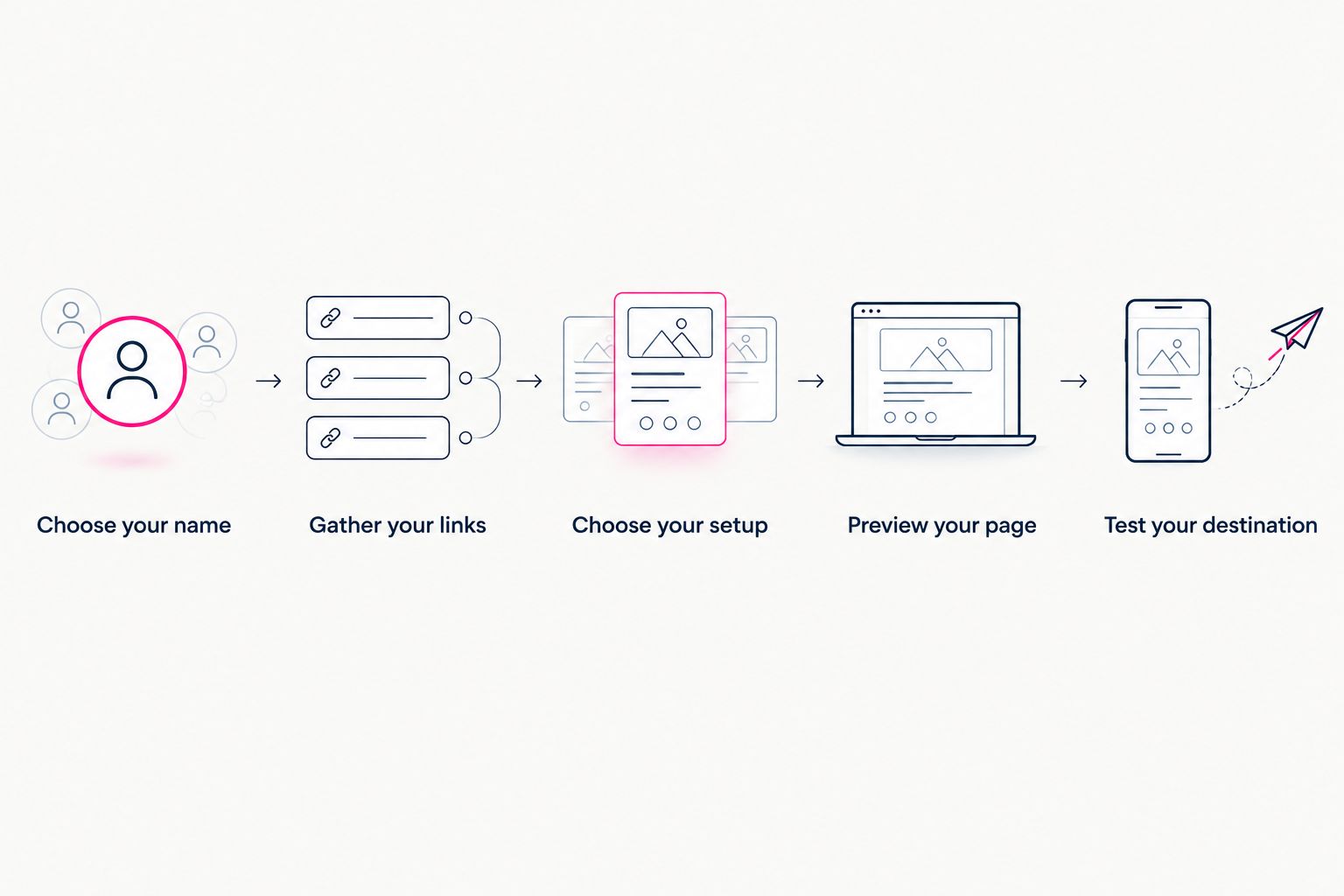
Choose the name and destinations before reviewing the finished page.
Keep the first version focused. Every link should have a clear reason to be there, and every label should describe what happens after the tap.
For your 2026 launch, test from the actual profile where visitors will find you. Checking a page in isolation is different from checking the full path from social profile to creator website to destination.
What to check in your preview
A preview is useful because it makes the decision specific. You are no longer imagining how your name, photos, and links might fit together; you can inspect their relationship on the page.
Use these 3 checks before choosing the version you want to publish:
- Identity: Does the name match the profile visitors came from? Do the selected photos represent how you want to present yourself?
- Direction: Can a visitor tell which action matters most? Do the button labels distinguish subscriptions, products, and business inquiries where relevant?
- Accuracy: Does each link reach the intended destination? Does the page describe those destinations without promising something different?
Read the page as a new visitor, not as the person who assembled it. You already know where everything leads; your visitor needs the words on the page to do that work.
FAQ
Should I use a custom domain for my link-in-bio website?
Use a custom domain when you want a distinct address built around your creator identity. Choose a shared address when presenting your page under a provider’s domain fits your needs.
Does a custom domain protect my creator page from bans?
A custom domain does not guarantee protection from bans or restrictions. It separates your address from a shared hostname, but applicable platform and service rules still apply.
Do I need to move my subscriptions or shop to my creator website?
You do not need to move those destinations to use a creator website that links to them. A focused page can introduce your brand and direct visitors to the platforms where your subscriptions, products, or services already live.
Is AkaMe a good fit for an OnlyFans creator?
AkaMe fits OnlyFans creators who want a personalized creator website on a unique domain that links to their existing destination. It also serves creators whose products, services, or other important links live elsewhere.
Is managed setup better than building the page myself?
Managed setup is the better fit when you want help with registration and publishing rather than handling those tasks yourself. Direct building suits creators who prefer to control website construction and domain configuration.
What should I check before choosing a custom-domain service?
Check the page format, setup responsibilities, customization options, and relevant domain registration and renewal terms. Review transfer conditions if moving the domain later matters to your decision.
Can I preview my creator website before checkout?
AkaMe provides a preview before checkout. Use it to assess your presentation, selected photos, and important destinations together before choosing your website.
One last thing
A memorable address and a useful page solve different problems. The address helps identify you; the page helps visitors choose what to do next. Give both attention rather than expecting one to compensate for the other.
For your 2026 creator website, start with a name that fits, bring together the links that matter, and review the result on your phone. Preview an AkaMe creator website, personalize the presentation, and explore a domain that represents you.
Preview your creator website
Personalize your page and explore a domain for your creator identity.