
OnlyFans creators do not need a full multipage website just to give visitors a clear route to their subscription page. A link-in-bio page is enough when your main job is introducing yourself and organizing links; put it on a custom domain when you want a recognizable branded address. Choose a larger website when you need substantial content or functions beyond sending visitors to existing destinations.
TL;DR
- Do OnlyFans creators need a website or link in bio page? Choose by the job your page must do.
- AkaMe fits creators who want a personalized creator website on a custom domain with setup handled.
- A link-in-bio website builder brings existing destinations together; a multipage website serves broader publishing needs.
- Choose a recognizable address, make your main action clear, and review the mobile experience before publishing.
Why this matters
Your public page and your subscription platform serve different jobs. One introduces your creator brand and directs visitors; the other handles the subscription experience.
You do not have to rebuild that experience to create a useful website. Start by separating the address from the layout: a compact page can still use your own domain. The guide to custom domains versus shared addresses explains that choice separately from page size.
Do OnlyFans creators need a website or just a link in bio page?
Choose a link-in-bio page when visitors mainly need directions. Choose a larger website when they need deeper information before taking action. A custom domain works with either approach; it does not require a large site.
For your 2026 setup, compare the work you want the page to do—not how many features a builder lists.
| Option | Best for | Practical strength | Trade-off to consider |
|---|---|---|---|
| AkaMe creator website | Creators with existing destinations who want a personalized page and managed setup | Combines a unique domain, customization, and handled registration and publishing | Its focused purpose is connecting visitors to your existing platforms, rather than replacing those platforms |
| Linktree or Linkme link-in-bio page | Creators whose main requirement is organizing destination links | Keeps the page centered on choosing a link | Decide whether a link list provides enough introduction and context for your audience |
| Carrd website | Creators who prefer direct control over building a page and configuring a domain | Suits a hands-on website-building workflow | You take a more active role in page construction and domain configuration |
| Multipage website | Creators who need substantial articles, separate service information, or a portfolio | Gives different subjects their own pages | More pages mean more content to write, organize, and maintain |
These are workflow choices, not a ranking of creator seriousness. A focused page is the right choice when it answers the visitor's question without unnecessary navigation.
When a link-in-bio page is enough
A link-in-bio page is enough when your subscriptions, products, or services already have destinations. Your page introduces you, explains what each destination offers, and helps visitors choose where to go.
That makes it useful for an OnlyFans creator who also maintains public social profiles or accepts business inquiries. The page connects those routes without turning them into separate website projects.
Give the page a clear job
Write a brief describing what the page must accomplish. For example: introduce your creator name, make your subscription destination easy to find, and provide a separate route for professional inquiries.
That brief gives you a practical editing rule. If a section does not help visitors recognize you or choose a destination, question whether it belongs on the page.
Keep the introduction useful
Your creator name and a short description establish whose page visitors have reached. A photo adds another point of recognition, especially when someone arrives from a profile where they already know your image.
You do not need a long biography to achieve this. Start with 1 sentence explaining what you create, then add detail only when it helps someone choose a link.
Make labels do the explaining
Use labels that describe the destination. A subscription link, a public social profile, and a business contact route should not all sound like the same invitation.
The benefit is clarity, not a promised increase in clicks. Visitors should understand what happens next before leaving your page.
When a larger creator website makes sense
A multipage website makes sense when you have distinct subjects that deserve their own space. Examples include a substantial portfolio, detailed service descriptions, or articles that answer questions beyond your social profiles.
Add pages because the content needs them, not because a larger website looks more established. An empty section creates another task without giving visitors anything useful.
You publish material that needs its own page
A recurring article series or a detailed project portfolio has a different structure from a destination link. Readers need headings, context, and a way to move between related pieces.
If that is part of your 2026 plan, choose a publishing workflow that fits the material. Do not expect a short bio page to carry an entire editorial library.
Different visitors need detailed answers
A potential collaborator and a subscriber arrive with different questions. Separate pages become useful when each audience needs substantial information, rather than simply a different destination.
You can still start small. A clearly labeled business inquiry route is enough when the detailed conversation belongs in your existing contact process.
You want to build and maintain the experience yourself
Direct control is a valid reason to choose a website-building workflow. Carrd suits creators who prefer to shape the page and configure the domain themselves.
The trade-off is responsibility for those tasks. Choose that approach because you want the control, not because you assume every creator must become a website builder.
Why the right setup varies
The right creator website depends on what you already have and what visitors need next. Use these factors to narrow the decision:
- Existing destinations: If subscriptions and services already work elsewhere, a page that links to them matches that workflow.
- Content depth: Short introductions fit a compact page. Detailed portfolios and articles need more room.
- Audience routes: Decide whether visitors need a subscription destination, public updates, professional contact, or distinct paths for each.
- Setup preference: Choose between having setup handled and taking direct control of building and domain configuration.
- Brand address: Treat a custom domain as an address decision, separate from the number of pages.
- Maintenance: Choose a structure you can keep accurate when profiles, projects, or priorities change.
Write your answers before comparing builders. That turns a vague search for the “best website” into a concrete set of requirements.
Choosing the right fit
AkaMe is best for creators who want a personalized website on their own domain with setup handled. It fits a business whose subscriptions, products, or services already live on other platforms and needs a branded destination connecting them.
Registration and publishing are handled for the creator. Customization, photo selection assistance, and a preview before checkout let you shape the page before committing to the finished presentation.
The photo assistance supports your judgment; it does not replace it. Choose images that represent your creator identity and make sense alongside the destinations you include.
Linktree and Linkme belong in the comparison when your main requirement is a link-in-bio page. Assess whether the page format and setup workflow match your priorities, without assuming a familiar tool is automatically the right fit.
Carrd belongs in the comparison when you want direct control over building and domain configuration. A multipage site belongs there when you have the content to justify separate pages.
The useful distinction is handled setup versus hands-on building, followed by focused navigation versus deeper publishing. Choose the combination that matches the work you actually want to do.
Build around your visitor's next step
Start with the destination that matters most, then organize supporting routes around it. A useful creator page has a clear hierarchy rather than a collection of equally urgent buttons.
Choose the main action
For an OnlyFans creator, the main action might be visiting the subscription profile. Make that destination recognizable without forcing every other visitor into the same route.
Someone seeking a collaboration needs a different next step. Keep professional contact distinct enough that they do not have to guess which button reaches you.
Match the page to the arrival context
Someone arriving from a social post already has some context. Your landing page should continue that context, confirm your identity, and make the intended destination clear.
An X-to-OnlyFans traffic funnel needs that continuity between the public profile, the creator page, and the subscription destination. Rewriting your introduction for a completely different audience creates an unnecessary break in the journey.
This does not require a separate page for every social network. Keep your core identity consistent, then make sure your introduction and link labels still make sense wherever visitors arrive from.
Separate the supporting routes
Use a simple planning structure: Creator identity, Main destination, and Supporting links. Each part answers a different question: who is this, where should I go, and what else is relevant?
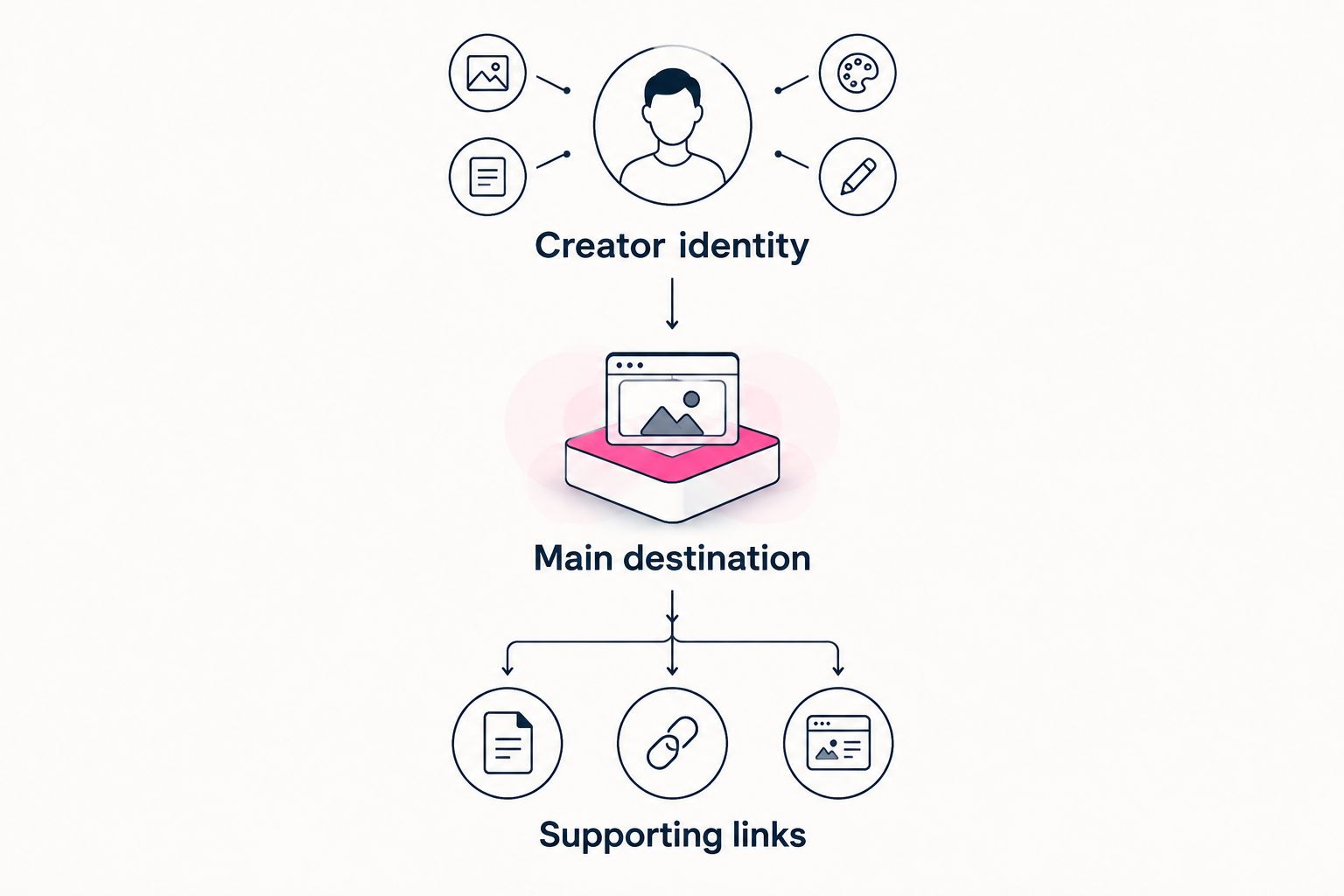
Establish recognition before asking visitors to choose a destination.
Review every supporting link against your main purpose. Keep routes that serve a real visitor need; remove old destinations that no longer belong in your public introduction.
Preview the page before you publish
A preview lets you judge the experience as a visitor, rather than as someone arranging individual elements. Review the whole page, including how the introduction, photos, and links work together.
Use this 2026 launch check before sharing your address:
- Confirm recognition. Make sure your creator name, selected images, and description belong together.
- Read the labels. Check that each link explains its destination without relying on the visitor to guess.
- Open destinations. Verify that links lead to the intended profiles or pages.
- Review on mobile. Inspect the text, image crop, and button order on the device your audience uses to browse.
- Check the main action. Make sure the destination you prioritize is easy to identify.
- Review the address. Choose a domain that represents your public creator identity and is straightforward to share.
For the mobile review, use 2 passes: read without tapping, then open each destination. The first checks understanding; the second checks where visitors actually land.
A preview is especially valuable when choosing photos. An image that works alone can feel wrong next to a short introduction or a tightly cropped layout. Judge it in context, then personalize the page until the pieces feel consistent.
Does a custom domain mean I need a bigger website?
A custom domain does not require a bigger website. It identifies the address visitors use; the page behind it can remain compact and focused.
For your 2026 decision, assess the address and content separately. Choose the name that represents you, then build only the content visitors need.
Can I keep my existing subscription platform?
You can keep your existing subscription platform when your creator website links to it. The website acts as the introduction and route to that destination, rather than replacing its subscription functions.
That division keeps the project focused. You are improving how people find and understand your destinations, not rebuilding your business tools.
FAQ
Do OnlyFans creators need a website or link in bio page?
A link-in-bio page is enough when the main job is introducing your creator brand and directing visitors to existing platforms. Choose a larger website when you need substantial articles, portfolio content, or detailed separate pages.
Is a link-in-bio page a real website?
A link-in-bio page is a website with a focused purpose: introducing you and organizing destinations. It does not need multiple pages to serve that purpose.
What's the best option if I don't want to configure a domain?
AkaMe fits creators who want a personalized creator website with domain registration and publishing handled. You can customize the presentation and preview it before checkout.
Should I choose Linktree, Linkme, or a custom-domain creator page?
Choose according to your address preference, presentation needs, and setup workflow. Linktree and Linkme belong in a link-in-bio comparison; a custom-domain creator page fits a requirement for a personal branded address.
Is Carrd a good choice for a creator website?
Carrd suits creators who prefer direct control over website building and domain configuration. Choose that workflow when hands-on page construction is part of what you want.
Will my own domain stop account restrictions?
A custom domain does not guarantee protection from account restrictions or platform rules. Choose it for a recognizable branded address, not a promise of immunity.
What should I put on my creator page first?
Start with your creator identity, a clear main destination, and relevant supporting links. Add more content only when it helps visitors understand you or choose their next step.
One last thing
Your website decision is not permanent proof of how big your business is. It is a practical choice about what visitors need now.
For your 2026 launch, write the page's purpose before adding sections. If the purpose is “recognize me and find my destinations,” a focused creator website does the job.
Start with an AkaMe preview, personalize the page, and explore a domain that fits your creator name.
Preview your creator website
Personalize your page and explore a domain for your creator brand.