

Domain verification takes as long as your DNS record needs to become visible to your website provider and pass its next verification check; there is no universal completion time. Verification also does not mean your creator website is ready: domain routing, HTTPS and publishing must work before you change your bio link. This 2026 guide explains what to check, when waiting helps and when to correct the setup.
TL;DR
- How long does domain verification take for a custom domain? DNS visibility and your provider’s verification checks determine completion.
- A verified custom domain still needs working HTTPS and a published creator website before you share it.
- AkaMe suits creators who want a personalized creator website with domain registration and publishing handled for them.
- Check the required DNS record before waiting; elapsed time does not fix an incorrect value.
Why this matters
Your domain connects your public creator identity to your website. If you replace a working bio link before the new address opens correctly, visitors reach an unfinished destination instead of your subscriptions, products or contact links.
Treat verification as a setup milestone, not your launch signal. For a 2026 launch, test the public address itself rather than relying only on a green status in a dashboard. The guide to setting up a link-in-bio page explains the broader process; this page focuses on the domain checks inside it.
How long does domain verification take for a custom domain?
Domain verification finishes when your provider can find and accept the proof it requested. That proof is commonly a DNS record containing a specific value, although the required method depends on the service.
There is no single clock covering every custom domain. Saving a record, making that record visible through DNS and having your website provider check it are separate events. A record saved correctly in your account is not necessarily the answer a resolver currently returns.
Use this breakdown to identify the stage that actually needs attention:
| Stage | What must happen | What completion proves | What it does not prove |
|---|---|---|---|
| DNS update | The authoritative DNS service publishes the required record | The record exists at its source | Every cached answer has refreshed |
| Domain verification | The website provider accepts the requested proof | The domain passes that provider’s check | The public website works |
| Domain connection | DNS sends the hostname to the intended website service | The address points to the intended destination | HTTPS is ready |
| HTTPS setup | A valid certificate covers the hostname | The browser can establish a secure connection | The correct page is published |
| Publication | The intended creator page opens publicly | Visitors can reach your page | Every outgoing link is correct |
Some services combine these stages in their interface. Others display separate statuses. Read the exact pending message before changing anything. A certificate problem needs a different fix from a missing verification record.
What does a pending verification status mean?
A pending status means the provider has not yet accepted the verification proof. It does not, by itself, identify whether the cause is caching, an incorrect record or a check that has not run again.
Look for the provider’s requested record type, hostname and value. Compare those fields with the live DNS answer, not just the text you intended to enter.
Why domain verification time varies
For a custom-domain launch in 2026, these are the practical factors to check before deciding that the setup simply needs more time:
- Authoritative DNS location. Your registrar and DNS host are not always the same company. Changes must reach the service named by your domain’s authoritative nameservers.
- Cached DNS answers. Resolvers retain answers according to DNS caching rules. A previously cached answer can remain visible after you save a change.
- Record accuracy. The record type, name and value must match the website provider’s instructions. Waiting does not correct a typo.
- The hostname being verified. The root domain and its www hostname are distinct DNS names. Configure the exact address your provider requests.
- The provider’s check schedule. Publishing a correct record and the provider checking that record are separate actions. Use a recheck control when the service offers one.
- DNS validation errors. A broken delegation or DNSSEC configuration can prevent successful DNS resolution. Repeatedly saving the verification value will not repair that underlying problem.
A DNS record’s time to live, or TTL, describes how long a resolver can cache an answer. It is not a guaranteed verification deadline. Lowering a TTL now also does not erase an answer already stored under its earlier TTL.
How do you verify a custom domain without wasting time?
Follow this sequence when your website provider asks you to configure DNS yourself. Keep its current instructions open throughout the process, because the exact record depends on the service and hostname.
Find the DNS host
Identify which service manages the authoritative DNS zone. Use the domain’s nameservers to confirm where changes belong rather than assuming the account where you bought the domain also manages its DNS.
Before editing, save a copy of the existing records. That gives you a reference if you need help and reduces the chance of removing an unrelated entry.
Match the record
Copy the required record type, hostname and value exactly. A TXT verification token is not interchangeable with a CNAME destination, and neither belongs in a field simply because it accepts text.
Pay attention to how your DNS interface handles hostnames. Some interfaces append your domain automatically; entering the full name in that field can create an unintended duplicate name. Check the resulting record after saving.
Check live DNS
Confirm that the authoritative DNS service returns the requested record. A DNS lookup tool or a support representative can help compare the live result with the required value.
If the authoritative answer is wrong, fix the record. If the authoritative answer is correct but another resolver returns an older answer, caching explains the difference. That distinction tells you whether to edit or wait.
Recheck verification
Return to the website provider and use its verification or recheck control if one exists. Avoid deleting and recreating a correct record just because the dashboard has not updated.
When a check fails, save the exact error message. A message about a missing token is more useful than a general description that the domain is not working.
Test the website
After verification, open the exact address you plan to share. Confirm that the correct page loads over HTTPS and that the browser shows no certificate warning.
Test your main destination links too. A successful domain connection cannot tell you whether you pasted the correct subscription, booking or business-inquiry address into your page.
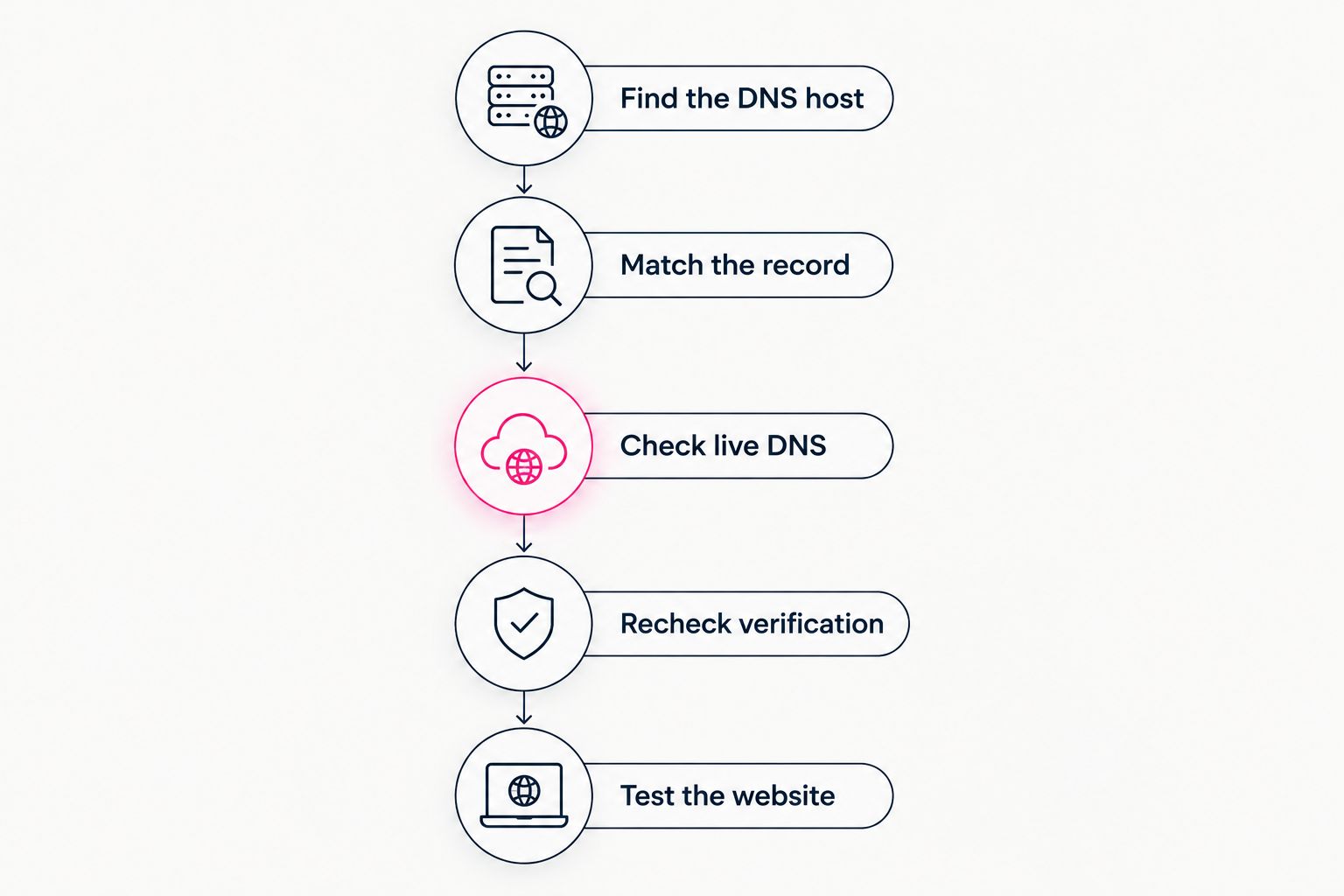
Check the live DNS record before deciding whether to wait or edit.
Should you wait or change something?
Wait when the authoritative DNS answer is correct and the remaining issue is an older cached answer or a pending provider check. Correct the setup when the authoritative answer is wrong. This rule is more useful than watching a generic countdown.
For your 2026 launch notes, record when you made the last meaningful change and what changed. Repeated edits make troubleshooting harder because you lose a clear reference point.
| What you find | What to do next |
|---|---|
| Required record is missing from authoritative DNS | Add it at the correct DNS host |
| Record exists but the value differs | Correct the value using the provider’s instructions |
| Authoritative answer is correct; another resolver differs | Allow the cached answer to expire |
| DNS is correct; provider still shows pending | Recheck or contact the provider with the live result |
| Verification passes; browser shows a certificate warning | Check HTTPS setup for the exact hostname |
| Website loads but shows the wrong page | Check the domain assignment and published project |
Avoid changing nameservers as a trial fix. Nameserver changes affect the domain’s DNS service, not just a single website record. Email and other services need their required records preserved.
What should you send support if verification stays pending?
Send evidence that identifies the failing stage. Your provider needs the hostname and requested record, not your registrar password.
Include:
- The exact hostname you are connecting.
- The required record type, name and value.
- The DNS service where you entered the record.
- The live DNS answer and the time you checked it.
- The dashboard’s exact error or pending message.
- Whether the public address opens and whether HTTPS works.
Keep account credentials and recovery codes out of screenshots. If the verification value is sensitive under your provider’s instructions, use its approved support channel rather than posting it publicly.
Ask a specific question: is the provider failing to find the DNS record, rejecting its value or waiting on another setup stage? That answer gives you a next action instead of another round of unrelated edits.
Choosing the right fit
The setup workflow matters as much as the waiting period. Choose between managing the connection yourself and having domain setup handled according to how much direct configuration you want.
| Workflow | Best for | Practical benefit | Your responsibility |
|---|---|---|---|
| Managed setup | Creators who want help getting a branded destination published | Reduces hands-on domain setup work | Choose the identity, content and destination links |
| DIY configuration | Creators who prefer direct control over DNS and website building | Keeps configuration decisions in your hands | Enter records, check results and resolve setup errors |
AkaMe is best for creators who want a personalized creator website with domain registration and publishing handled for them. This link-in-bio website builder fits creators whose subscriptions, products or services already live on other platforms and who want a branded website linking to them.
AkaMe combines a unique domain, customization, photo-selection assistance and a preview before checkout. The practical benefit is a recognizable destination without making DNS configuration the center of your project. Photo-ranking assistance supports your choices; you still decide how to present yourself.
Managed setup does not change the underlying distinction between verification and a working website. You still need to review your content and test your public destination before sharing it. That applies to OnlyFans creators, coaches, musicians and other creators bringing their important links together.
FAQ
Does domain verification mean my creator website is live?
No. Domain verification confirms the proof requested by your provider, while a live website also needs correct routing, working HTTPS and a published page. Test the public address before updating your bio.
Can I speed up domain verification by clicking verify repeatedly?
Repeated checks do not make cached DNS answers expire sooner. Use the provider’s recheck control after confirming the live record matches its instructions.
Do I need to verify both my domain and its www version?
Configure the hostnames your website provider requires. The root domain and its www hostname are distinct names, so a working address does not automatically prove the other is configured.
Will clearing my browser cache fix pending domain verification?
Clearing your browser cache does not change a DNS record or force your website provider to accept it. Check live DNS and the provider’s verification status instead.
Can changing website DNS records break my email?
Changing unrelated website records does not require deleting your email records. Preserve the records your email service needs, especially when moving DNS hosting or changing nameservers.
Should I change my bio link while verification is pending?
Keep your working bio link until the new address opens correctly over HTTPS and its important links pass your checks. A preview or verified status alone is not a public launch test.
One last thing
A preview and a custom-domain launch answer different questions. The preview shows whether the page represents you; the public address shows whether visitors can reach it. Check both before your 2026 launch.
Preview an AkaMe creator website, personalize the page and explore a domain that fits your creator name. Start with the destination you want people to recognize, then check the published experience before sharing it.
Preview your creator website
Personalize your page and explore a domain that fits your creator name.