
Setting up a link-in-bio page takes as long as preparing your content, arranging the page and completing publishing; there is no universal minute count. A custom-domain website also needs a working domain connection, so finishing the design is not the same as being ready to share the address.
TL;DR
- How long does it take to set up a link in bio page? Content preparation and publishing determine the timeline.
- AkaMe fits creators who want a personalized creator website on their own domain with setup handled.
- Choose your main action, collect destination links and select a photo before building.
- Preview the page, test its links and open the published address before updating your bio.
Why setup time matters
Your goal is not an account with a profile photo. It is a working destination you can confidently put in your social bio. That includes the page, its address and the links visitors will actually use.
For your 2026 launch, separate content decisions from technical setup. The creator website launch checklist helps you keep the finish line clear: a published page that takes visitors where you intend.
Make the decisions before you open the builder. Choosing your main destination while also comparing layouts turns a straightforward task into several unfinished ones.
How long does it take to set up a link in bio page?
The setup timeline has distinct stages. You prepare the material, build the page, complete publishing and check the live result. Some stages require your decisions; others depend on the website builder and domain setup.
Use this sequence rather than treating account creation as the whole job:
- Gather content. Collect your destination URLs, creator name, short introduction and photo candidates.
- Choose priorities. Decide what visitors should do first and which supporting links belong below it.
- Build the page. Add your content, customize the presentation and review the preview.
- Complete publishing. Follow the builder's publishing process and complete any required domain connection.
- Test the result. Open the public address, follow every link and then update your social profiles.
You do not need to complete your entire brand strategy before launching. You do need accurate destinations and a clear reason for each link to appear.
A finished preview is a design milestone, not proof that the public page works. Keep the live-page check separate so you do not announce an address before testing it.
Choosing the right fit
Choose your setup approach around the work you want to do yourself. A simple link page, a managed custom-domain creator website and a hands-on website build solve related problems, but they divide the work differently.
AkaMe is best for creators who want a personalized link-in-bio website on their own domain with registration and publishing handled. It brings your important links together while your subscriptions, products or services remain on their existing platforms.
| Setup approach | Best for | Practical benefit | Work to account for |
|---|---|---|---|
| Link-focused page | Creators prioritizing a straightforward destination list | Keeps the brief centered on links and their order | You still need to choose content and test destinations |
| AkaMe creator website | Creators wanting their own domain with setup handled | Combines personalization, domain registration and publishing | You still choose the content, review photo suggestions and approve the preview |
| Hands-on website build | Creators wanting direct control over building and domain configuration | Lets you take responsibility for the site's construction | Layout and domain decisions become part of your own setup work |
If you are comparing Linktree or Linkme, start with the page you need rather than an assumed setup-time ranking. Review the current setup flow against your content list and domain requirements. A familiar editor and a suitable workflow matter more than a stopwatch comparison without the same starting conditions.
Carrd suits creators who prefer direct control over website building and domain configuration. Choose that approach because you want the control—not because every creator needs to become a website builder.
Why link-in-bio setup time varies
The same builder can involve different amounts of work depending on what you bring to it. These are the decisions to settle before your 2026 launch:
- Content readiness. A folder of selected images and a clean URL list gives you material to place immediately. Unsorted screenshots and remembered account names still need preparation.
- Destination clarity. Each button needs a specific destination. Linking to a general profile when you mean a particular subscription or product creates another decision later.
- Page scope. A focused link page requires fewer content decisions than a site brief containing separate biographies, portfolios and service explanations.
- Domain approach. Managed registration and publishing move technical tasks out of your hands. A self-configured domain makes those tasks part of your workflow.
- Review decisions. Photo selection, button wording and link order all need approval. Decide what “ready” means before repeatedly revisiting finished choices.
Treat these as separate tasks, not reasons to keep polishing forever. If the page already communicates who you are and sends visitors to the right places, additional decoration belongs on a later improvement list.
Prepare the content before opening the builder
Create a simple launch note you can keep beside the editor. Write your creator name exactly as you want it displayed, followed by a short description of what visitors can find through the page.
Next, collect the actual destination links. Open them while signed out where possible, because your own logged-in view does not show the same experience a new visitor gets. Check the destination itself, not just whether a URL looks plausible.
Use 1 primary action as a launch constraint. That might be visiting your subscription page, seeing your latest work or sending a business inquiry. Supporting links can remain, but they should not obscure the action you most want visitors to take.
For an OnlyFans creator, this preparation is about organizing the creator business. You can keep your subscription destination alongside relevant social profiles or business information without turning the website into a separate subscription platform.
Finally, select photo candidates that represent how you want to appear. Make that choice before adjusting every small page detail; your main image is part of the page's introduction, not an afterthought.
Move from content to a launch-ready page
Use the same sequence for your 2026 setup whether you choose managed publishing or a hands-on builder. The responsibility changes, but the checks remain useful.
Content ready
Put your approved wording, photo candidates and destination links together. Remove placeholders before treating the page as ready for review. A placeholder button can look finished while still sending visitors nowhere useful.
Preview review
Review the page as a visitor, not as its editor. Does the opening explain whose page this is? Is the main destination easy to identify? Does each button describe what happens next?
AkaMe includes customization, photo selection assistance and a preview before checkout. Photo ranking assists your selection; it does not replace your judgment about which image represents you. Use the preview to review those choices together rather than evaluating isolated settings.
Published address
Confirm that the final address opens the intended page. For a custom-domain website, this means checking the actual domain rather than relying only on an editor preview or temporary viewing screen.
Live checks
Follow every destination from the published page. Then open the page through the social profile where you plan to use it. That final step checks the route your audience will actually take.
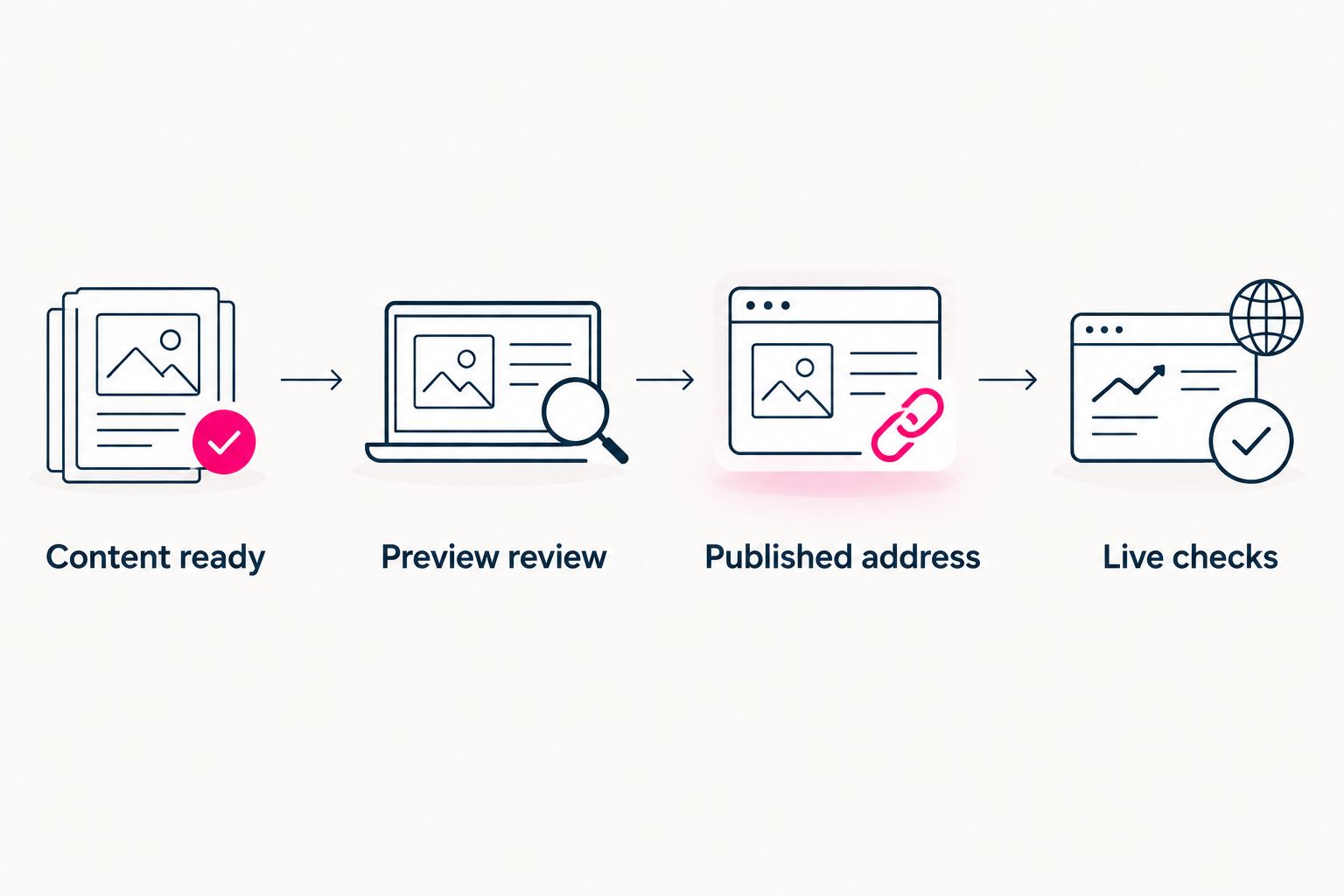
Review the preview first, then verify the public address and its links.
What can wait until after launch?
Separate essential corrections from optional improvements. A wrong destination needs fixing before you share the page. Reconsidering a perfectly clear button label does not need to hold up a working launch.
For your 2026 launch, put optional changes in a separate note. Examples include trying another photo crop, revising secondary wording or reconsidering the order of less important destinations. Keep that note out of the essential checklist.
This distinction also helps you choose between managed setup and DIY website building: direct control means taking responsibility for the build decisions as well as the content. Choose the work you want to own, then keep the launch brief within that scope.
Do not add a new website job just because the editor makes it possible. If you started with a page that organizes existing destinations, adding a separate storefront or long-form portfolio changes the project. Finish the original job before expanding it.
How do you know the page is ready to share?
Use 3 launch checks: identity, navigation and access. These are a review method, not a claim about how many minutes setup should take.
- Identity: Your creator name, introduction and selected photo make sense together. A visitor arriving from a social profile should recognize whose destination they opened.
- Navigation: The primary action is clear, and every supporting link has a useful label. Visitors should not need to guess which button leads to subscriptions, social content or business information.
- Access: The public address opens correctly, and its destination links work from a phone. Test the route from your bio as well as the website address itself.
Run the review in 2 passes. First, inspect the preview for content and presentation. Second, inspect the published page for working access and destinations.
Keep those passes separate. Reviewing the editor again cannot substitute for opening the public page, and a working domain does not prove the button destinations are correct.
Does using your own domain add setup work?
A custom domain adds a domain-registration or connection task to the project. Whether that becomes your task depends on the setup approach you choose. With AkaMe, registration and publishing are handled for the creator alongside the personalized website.
The practical value is a recognizable branded address without making domain configuration your separate build project. You still provide direction: your creator identity, the destinations you want to feature and the presentation you approve.
If you already have a domain, clarify the supported setup path before planning around it. Do not treat a newly registered domain and an existing domain as interchangeable steps. Settle that question before changing the address in your social profiles.
FAQ
Can I set up a link-in-bio page in one sitting?
You can organize the work as a single session when your wording, photos and destination links are ready. Treat publication and the live-address check as separate completion steps rather than assuming the preview is the finish line.
What should I prepare before building my link-in-bio page?
Prepare your creator name, a short introduction, photo candidates and the exact URLs you want visitors to open. Choose your main action before arranging the buttons.
Does a custom domain make link-in-bio setup take longer?
A custom domain adds registration or connection work, but that work does not always fall to you. A managed setup handles those tasks; a self-configured setup makes them part of your build.
Do I need to move my subscriptions or products to launch a creator website?
No. A link-focused creator website can point to subscriptions, products and services on the platforms you already use. Your launch task is to organize and test those destinations.
What should I test before sharing my creator website in 2026?
Test the published address, every destination link and the route from your social bio. Review the page on your phone so you see the experience visitors will encounter.
Should I finish every design detail before publishing?
No. Correct content, clear navigation and working links are the launch essentials. Put optional styling changes on a later improvement list rather than mixing them with essential fixes.
Related guides
- Choose a custom domain or shared address
- Check your creator website on mobile
- Choose photos for your creator website
One last thing
Write your launch test before you start building: “Someone can open my bio link, recognize me and reach my main destination.” That sentence keeps the project focused when another design choice appears.
Preview an AkaMe creator website, personalize it around your important links and explore a domain that fits your name.
Preview your creator website
Personalize your page, review the preview and explore your own domain.