
A custom domain has no single annual cost in 2026: the amount depends on the exact name, domain extension and provider’s renewal terms. Registration does not automatically include a creator website, so your full budget must also account for any separate website-builder or hosting subscription.
TL;DR
- How much does a custom domain cost per year? Compare the exact name’s registration and renewal terms.
- A custom domain and a creator website are separate parts of your budget, even when packaged together.
- AkaMe suits creators who want a personalized creator website with registration and publishing handled for them.
- Compare equivalent billing periods, then preview your website before choosing a setup.
Why this matters
Budget for the destination you need, not just the address. A domain gives your creator brand a recognizable web address. The website behind it organizes the links visitors came to find.
That distinction matters when you compare a domain registrar with a link-in-bio website builder. A registration-only offer and a finished creator website do different jobs. Comparing them as if they were identical hides the work you still need to do.
If you are deciding whether a personal address is right for you, start with custom domains versus shared addresses. Then compare the full setup you actually want.
How much does a custom domain cost per year?
The annual amount is specific to the domain and provider you choose. For a useful 2026 comparison, separate the initial registration, the recurring renewal and the website service attached to the address.
A domain-only checkout answers what the name costs. It does not necessarily answer what your published creator website requires.
| Budget component | What it covers | What to check |
|---|---|---|
| Domain registration | Registering the chosen name for the stated term | Exact spelling, extension and registration period |
| Domain renewal | Keeping the registration active after its current term | Recurring terms rather than the introductory offer alone |
| Website service | Building and publishing the page visitors open | Whether it is separate from domain registration |
| Optional services | Extras such as a branded email service | Whether you actually need them |
| Domain acquisition | Obtaining a name offered by an existing registrant | Whether acquisition and future renewal are separate |
The useful comparison is the full recurring commitment. Read the registration and renewal terms for the exact name, then check what the website service includes. Do not assume that a domain appearing in a builder’s setup flow means every future renewal is included.
Separate the first year from the ongoing budget
Write down the registration term and the renewal terms separately. An introductory offer describes the beginning of the arrangement, not necessarily what follows.
For your 2026 budget, compare a 12-month period across providers. If a service bills on a different schedule, translate its stated terms into the same period before judging it against another option.
Then look across 2 years. This is a budgeting exercise, not a prediction: use the published first-term and renewal terms, and keep any separately billed website service visible. That prevents an attractive opening offer from becoming your entire decision.
Why custom domain costs vary
The exact name matters more than a general claim about what domains usually cost. These are the factors to inspect:
- Domain extension. The ending is part of the product you register. Compare the actual extension you want rather than assuming every ending has the same terms.
- Registration and renewal terms. The opening registration and later renewal can have different terms. Read both before committing.
- Standard registration or acquisition. Registering a name through a registrar is a different transaction from obtaining one from an existing registrant.
- Billing period. A longer commitment is not the same comparison as a shorter one. Match the periods before making a decision.
- Website service. A domain-only arrangement leaves the website setup separate. A managed creator website combines more of that work.
- Optional extras. Email and other add-ons change the total only when you choose them. Evaluate each against a real need.
Avoid choosing an extension solely because its opening offer looks attractive. Say the full address aloud, check its spelling and consider whether it matches the name your audience already knows.
A recognizable address is useful only if you are comfortable sharing it repeatedly. Your domain should work in your bio, in a spoken recommendation and in a business introduction.
Domain registration versus a complete creator website
Buying a domain and publishing a website are connected tasks, but they are not interchangeable. Registration reserves the address for the stated term. A website service supplies the page that visitors reach.
For a creator, that page can bring subscriptions, products, social profiles and business inquiries into one place. You do not have to rebuild the services those links lead to.
| Setup | Best for | Main benefit | What you take on |
|---|---|---|---|
| Domain-only registration | Creators who already have a website destination | Choose the address separately | Confirming how it connects to the existing website |
| DIY creator website | Creators who want direct building control | Make the page and configuration decisions yourself | Building, connecting and checking the finished site |
| Managed creator website | Creators who want help getting published | Combine website setup with guided decisions | Reviewing the design, content and domain terms |
The trade-off is responsibility, not just the amount charged. A domain-only registration suits someone who already knows where the address will point. A managed setup suits someone who wants a finished creator destination rather than a configuration project.
Do not pay for a larger website project simply because you have several links. Start with the job the page needs to do, then choose a setup that supports it.
Choosing the right fit
AkaMe is best for creators who want a personalized creator website on a unique domain, with registration and publishing handled for them. Its focused purpose fits creators whose subscriptions, products or services already live on other platforms.
AkaMe combines customization, photo selection assistance and a preview before checkout. That gives you a chance to judge the page as a destination for your audience—not merely as a domain purchase. Photo assistance supports your choices; you still decide which images represent you.
Choose a DIY route when direct control over the website-building process is your priority. Carrd suits creators who prefer to handle website building and domain configuration themselves. That workflow gives the creator the configuration work as well as the decisions.
When comparing Linktree, Linkme or another link-in-bio service, inspect the current plan’s address format, customization and publishing workflow. Compare the exact setup you would use rather than assuming every provider packages a custom domain the same way.
For an OnlyFans creator, the practical goal is the same as for other subscription creators: a recognizable introduction with clear links to existing destinations. Choose around that workflow, not around features your creator business does not need.
How to compare domain options before checkout
Use this sequence for your 2026 decision. It keeps the address, recurring commitment and finished website in the same comparison.
Choose the name
Write down the exact spelling and extension. Check that the address represents your creator name rather than a temporary campaign or a platform you might stop using.
Read it without spaces. A phrase that looks clear in a heading can become confusing when compressed into a domain.
Read renewal terms
Find the renewal information for that exact domain. Do not substitute a general example from the provider’s advertising for the terms attached to your selection.
Check the registration period, billing schedule and whether renewal is handled separately from the website subscription. Keep a copy of the terms you accept for your records.
Confirm website setup
Establish who builds the page, who connects the address and who publishes the result. These are practical responsibilities, even when the software makes them straightforward.
For a managed service, confirm which decisions remain yours. You should understand how you select links, review photos and approve the website’s presentation.
Preview the page
Review your name, introduction, photos and link labels before proceeding. Open the preview on your phone and check that the main destination is easy to identify.
A preview helps you judge the actual website. An appealing domain alone cannot show whether the page explains who you are or makes your important links clear.
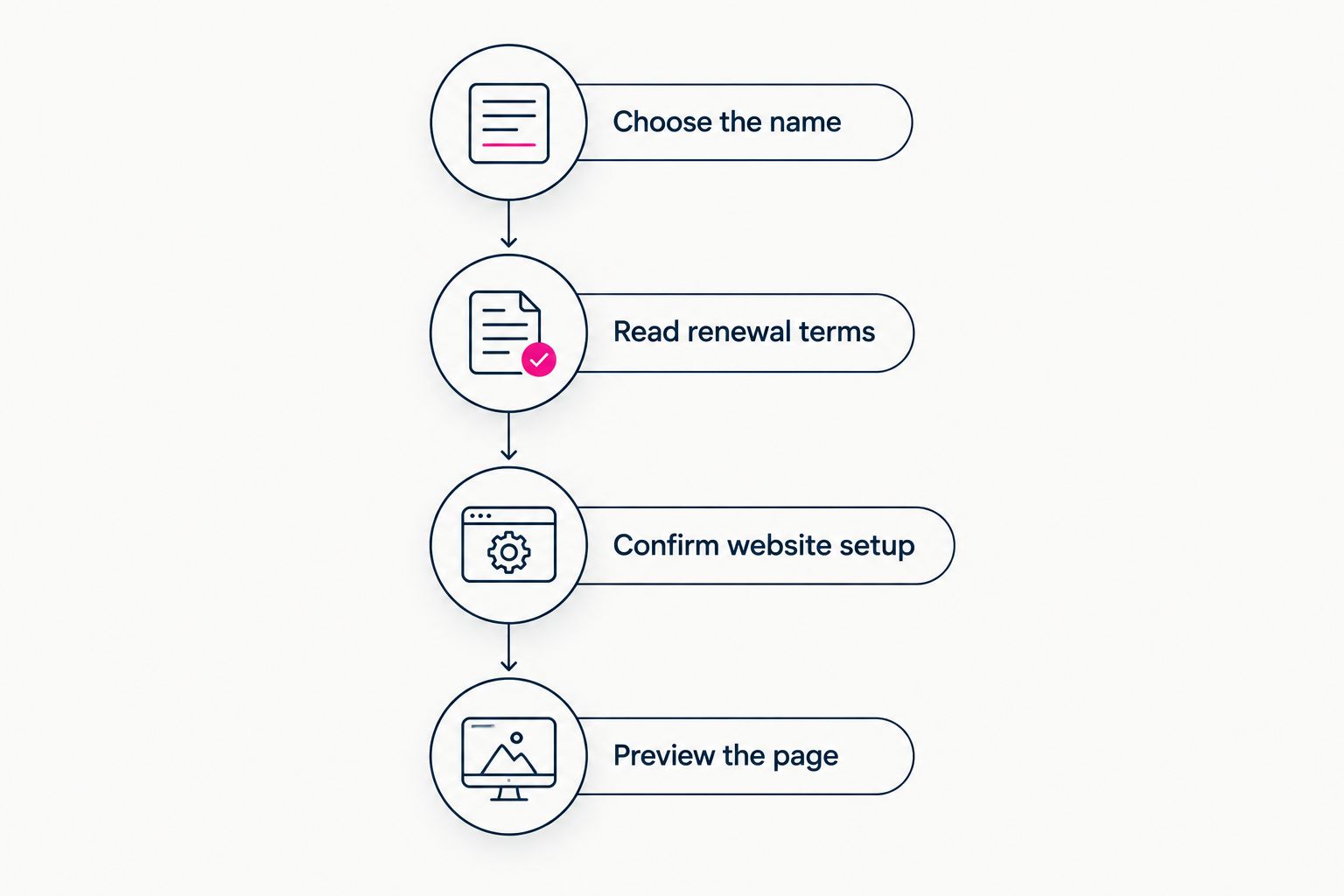
Compare the address, ongoing terms and finished page together.
Record the commitment
Keep the domain term and website billing schedule together. Note what renews, which account handles it and where you can review the agreement.
This is also the point to check any material ownership or transfer conditions. Read the provider’s current terms rather than assuming a personal domain automatically carries identical conditions everywhere.
Is a custom domain the same as website hosting?
No. A custom domain is the address; hosting is what serves the website. A website builder can package parts of the setup together, but the underlying jobs remain different.
Before choosing a domain-only service, identify the website it will connect to. Before choosing a builder, check how its domain arrangement works. This avoids comparing a bare registration with a published page as though they were equivalent purchases.
Can I use a custom domain without moving my business tools?
Yes. A creator website can link to services you already use. Your subscriptions, shop or booking destination can remain where they are while the website gives visitors a clear starting point.
That is the workflow AkaMe is designed for. Personalize the introduction and arrange the important links around what visitors need next, without turning a link-in-bio page into an unnecessary rebuild of your business.
What should I check before renewing a domain?
Check the renewal terms, registration details and website connection. Confirm that the account information is current and that you understand how renewal is handled.
If you are reviewing a domain during 2026, use the terms shown for its next renewal rather than relying on an old introductory offer. Keep website billing separate in your notes if a different service handles it.
FAQ
How much does a custom domain cost per year in 2026?
A custom domain’s annual cost depends on the exact name, extension and provider’s registration and renewal terms. Compare those terms with any separate website subscription to understand the full commitment.
Do I pay for a custom domain every month?
Domain registration runs for a stated registration term; the payment schedule depends on the provider’s arrangement. A website subscription can follow a different billing schedule, so check both separately.
Does buying a domain give me a creator website?
Buying a domain does not automatically give you a creator website. Check whether your chosen service includes page building and publishing or only registration of the address.
Why should I check the renewal terms before registering?
Renewal terms tell you what applies after the initial registration period. They help you compare the ongoing commitment instead of judging the domain only by its opening offer.
Is a managed creator website better than registering a domain myself?
A managed creator website fits creators who want setup help; separate registration fits creators prepared to handle the connection themselves. Choose according to the work you want to manage, not the domain alone.
Can I preview an AkaMe creator website before checkout?
Yes. AkaMe provides a preview before checkout so you can review your personalized creator website. Use it to check the presentation, photos and important links before proceeding.
One last thing
Choose the address and the page together. Before committing, say the domain aloud and ask someone to repeat it back. Then check whether your website makes the next action equally clear.
For your 2026 creator website, start with the result you want visitors to see. Preview your creator website, personalize it and explore a domain that fits your name.