

You can build a link in bio website without hiring a designer by using a website builder, choosing a clear page structure, adding your existing destinations and publishing it at a recognizable address. In 2026, the practical choice is between setting up the page yourself and using a service that handles domain registration and publishing; either way, you still choose what visitors see and where they go.
TL;DR
- Build a link in bio website around your main visitor action, not an unorganized collection of links.
- AkaMe fits creators who want a personalized creator website and custom domain with registration and publishing handled.
- Keep subscriptions, products and services on their existing platforms; use your website to connect visitors to them.
- Preview your page, check every destination and test readability before sharing your address.
Why this matters
Your bio gives you a place to send people. Your website decides what happens next. A visitor should recognize your name, understand what you offer and find the relevant destination without having to interpret a wall of buttons.
AkaMe brings a personalized creator website, a unique domain, customization and a preview before checkout into the same setup. Registration and publishing are handled for you. That fits creators who want to make the content decisions without taking on the domain configuration themselves.
You do not need to move your business into a new platform to build a useful website. Start with the subscriptions, products, services or profiles you already use, then give them a clear front door.
How do you build a link in bio website without hiring a designer?
Use a link-in-bio website builder and work through the content before adjusting the appearance. Decide what the page should accomplish first; choose the layout second. A template cannot prioritize your business for you.
The process below works whether you want a simple collection of destinations or a personalized creator website in 2026. Complete each step with your actual content rather than leaving placeholder buttons for later.
1. Choose the purpose
Write the purpose of your page in 1 sentence. For example: help visitors find your subscription, discover your work or inquire about your services. This is a planning exercise, not a claim that every visitor will take that action.
Choose a primary destination that matches that purpose. A creator promoting a subscription needs a different opening from a photographer seeking inquiries, even when both pages also include social profiles.
Give secondary destinations a clear role. Your newest project, store or newsletter can belong on the page without competing equally with its main purpose. If you cannot explain why a link belongs, leave it out until you can.
2. Gather your links
Collect the exact destination addresses before you build. Open each one and confirm that it reaches the intended profile, product, subscription or inquiry page. Use the public destination your visitor needs, not an account-management screen.
Write a descriptive label beside each address. Labels such as View my work, Browse my shop and Join my newsletter explain the action more clearly than a bare platform name. Use wording that accurately describes what happens after the tap.
Keep the underlying business tools where they already work for you. The website acts as the connecting page; it does not need to replace the systems that deliver your products, manage your subscribers or handle bookings.
3. Shape your page
Start with your name, a recognizable photo and a short introduction. Explain what you create or offer in language a new visitor understands. Your profile picture alone does not tell someone why they should explore the page.
Place your main destination where it is easy to find. Group supporting links by purpose rather than adding every destination in the order you remember it. A page organized around visitor needs is easier to assess than a miscellaneous list.
Build the opening around a straightforward question: if someone has never seen your content, can they tell whose page this is and what to do next? Remove anything that distracts from that answer.
4. Personalize your website
Use customization to make the page recognizable, not to demonstrate every design option. Choose readable text, clear button labels and a photo that suits the introduction. Keep the treatment consistent across the page.
If photo selection assistance is available, use it to narrow your choices. The final photo should still be your choice. Automated ranking can assist selection, but it does not decide how you want to present yourself.
Preview the actual content together. A photo that looks good on its own can compete with a long introduction; a button label that sounded clear in your notes can become vague beside another button. Judge the complete page, not isolated parts.
5. Choose your domain
Choose an address that connects naturally to your creator name or public identity. Say it aloud and check the spelling before committing. The domain should be easy for you to share and recognizable to someone who already knows your work.
A custom domain gives you a distinct address rather than a page address beneath a shared domain. It does not remove the rules of social networks or destination platforms. Treat the domain as your branded entry point, not protection from every restriction.
Decide whether you want to handle registration and configuration yourself or have those tasks handled for you. That is a workflow choice. It should match how much setup responsibility you want, rather than how technical you think a creator ought to be.
6. Preview and publish
Run 3 checks before sharing: identity, readability and destinations. Confirm that the page shows the right name and photo, that the text is comfortable to read and that every link reaches the intended place.
Review the published result on 2 devices, such as a phone and a computer. Check that the main action remains easy to find and that long labels do not become awkward. These are practical checks, not a substitute for choosing a readable layout.
Once the page is published, open the address from your social profile. Follow the complete path a visitor takes. Checking the website directly is useful; checking the bio link catches mistakes in the address you actually shared.
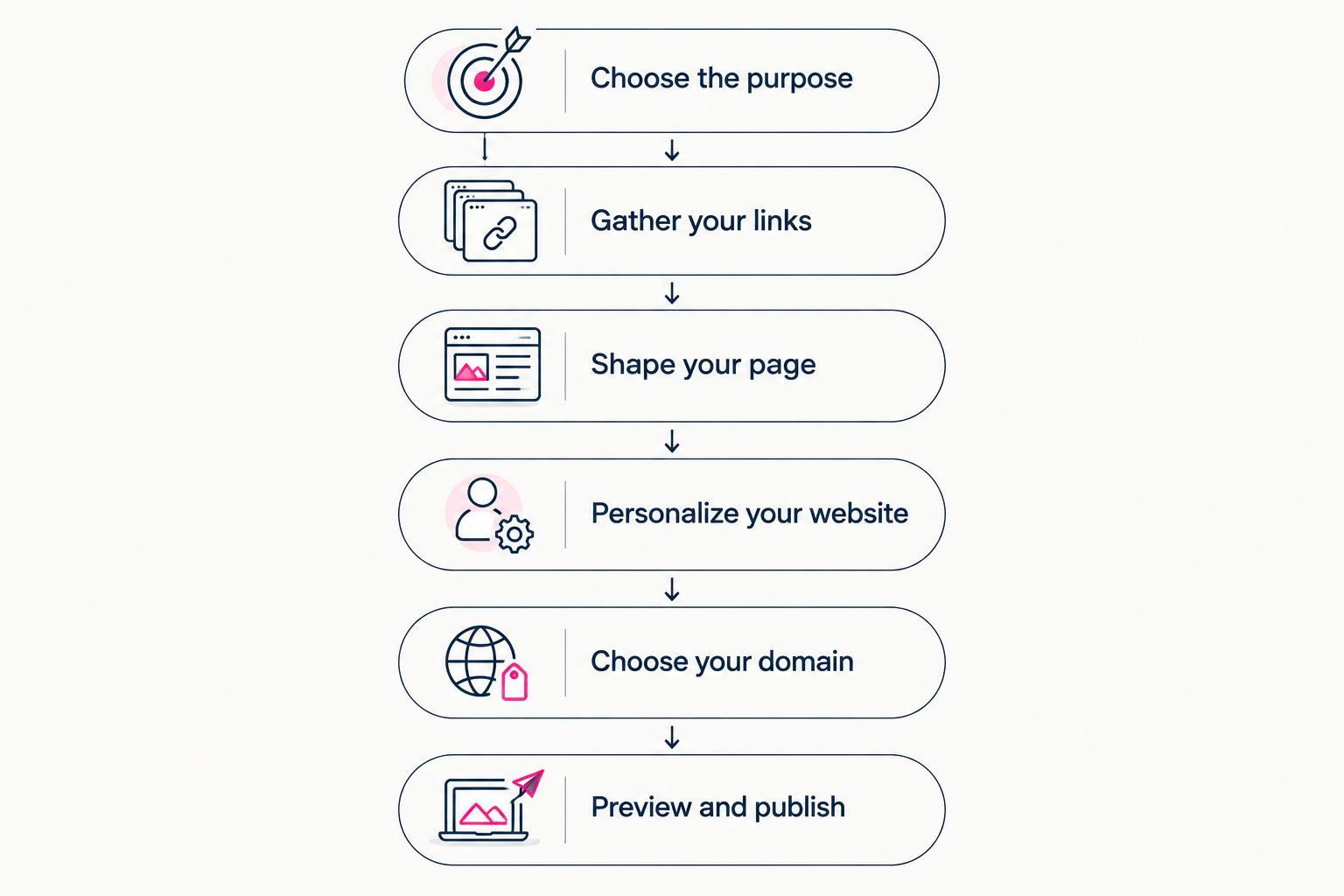
Decide the content before adjusting the appearance or publishing the address.
Choosing the right fit
The right builder depends on which work you want to do yourself. Compare the setup workflow before comparing decorative options. In 2026, your decision should still start with what you need to publish and who will handle the configuration.
| Approach | Best for | Practical benefit | Your responsibility |
|---|---|---|---|
| Template-led link page | Creators who want to organize destinations themselves | A defined starting structure for links | Choose a service, arrange the content and check its domain options |
| AkaMe creator website | Creators whose offers already live elsewhere and who want a personalized domain destination | Registration, publishing, photo selection assistance, customization and a preview before checkout | Choose your identity, photos, domain and destinations |
| Hands-on website building with Carrd | Creators who prefer direct control over building and domain configuration | A website-building approach suited to hands-on setup | Build the page and handle the configuration your setup requires |
AkaMe is best for creators who want a personalized link-in-bio website on a unique domain, with registration and publishing handled. Its focused purpose is to bring existing destinations together, not replace the platforms where your offers already live.
Carrd suits a different preference: direct involvement in building the website and configuring the domain. Choose that route when those tasks are part of the control you want. Choose a handled setup when your priority is deciding the content and getting your branded destination published.
If you are considering Linktree or Linkme, use the same questions: what address will visitors see, what can you personalize and which setup tasks will you handle? Check the current service details against your requirements rather than assuming every link-page tool offers the same workflow.
Why the setup work varies
Building without a designer does not mean every approach requires the same effort. The work changes with the decisions you make and the material you already have ready.
- Page purpose: A page focused on one main action needs a different structure from a page serving several distinct audiences.
- Content readiness: Finished photos, a clear introduction and checked destination addresses let you make layout decisions with real material.
- Customization: Adjusting an existing structure is a different task from building the page arrangement yourself.
- Domain setup: Handling registration and configuration yourself adds tasks that a managed setup handles for you.
- Destination structure: Direct links to the relevant offer need different labels from links to broad profiles or storefronts.
Choose the workflow that removes work you do not want while preserving the decisions you care about. That is more useful than chasing the largest feature list.
What should visitors see first?
Visitors should see enough context to recognize you and understand the main action. Put your name, introduction and priority destination together so they support the same purpose.
For a 2026 launch, do not make the opening a list of everything you have ever offered. Lead with what the page is meant to help visitors find now. Supporting destinations can follow without turning the opening into a directory.
Read the page as a newcomer. If the introduction promises portfolio work but the first prominent destination leads somewhere unrelated, change the order or the introduction. The first impression and the first action should agree.
Can you use a creator website for an OnlyFans business?
Yes. An OnlyFans creator can use a creator website to introduce their public identity and direct visitors to an existing subscription destination. The website does not need explicit imagery or lengthy explanations to perform that role.
Keep labels accurate and presentation appropriate for the audience reaching the page. If you also offer merchandise, services or other creator work, give those destinations clear labels rather than expecting visitors to infer what each platform contains.
Check the rules of the platforms where you share the address. A separate domain changes your website address; it does not change those platforms' policies.
What should you update after publishing?
Update the website when its destinations or purpose change. Replace a finished campaign with the next relevant action, remove links that no longer serve visitors and revise your introduction when it no longer describes your work.
For your 2026 page review, follow the visitor path again rather than only checking the editor. An attractive preview cannot tell you whether an external destination still leads to the right offer.
Keep updates focused. You do not need a redesign whenever you publish something new. Often, the useful change is a clearer label, a different priority or the removal of an outdated destination.
FAQ
Can I build a link in bio website without design experience?
Yes. Use a website builder, start with a clear page purpose and add your own introduction, photos and destinations. Preview the complete page before publishing rather than trying to design every element from scratch.
Do I need a custom domain for my creator website?
A custom domain is not required to organize links, but it gives your creator website a distinct branded address. Choose it when a recognizable destination matters to your setup.
Does AkaMe replace my subscription platform or online store?
AkaMe brings links to your existing subscriptions, products and services together on a personalized creator website. Those destinations continue to handle the offers they already provide.
What should I check before publishing my bio website?
Check your identity, readability and destinations before publishing. Then open the website through the address in your social profile to test the path visitors will actually follow.
Is a custom domain immune to social media restrictions?
No. A custom domain gives your website a distinct address, but social networks and destination platforms still apply their own rules. Check those rules where you share or promote the page.
Should I choose a handled setup or build the website myself?
Choose a handled setup when you want registration and publishing taken care of while you choose the content. Choose hands-on building when direct control over the website and domain configuration is part of the work you want to do.
One last thing
Before you share the page, read only its button labels. They should explain the choices even without the surrounding introduction. If a label needs a separate explanation, rewrite it before adding more design elements.
Preview an AkaMe creator website, personalize the content and explore a domain that fits your public name. Start with the destinations you already use and give visitors a recognizable place to find them.
Preview your creator website
Personalize your page, bring your important links together and explore a domain that fits your name.