
Choose an OnlyFans domain name built around your public creator name: easy to say, easy to spell, and broad enough to represent more than one platform. For your 2026 creator website, use that domain as a branded destination linking to your existing OnlyFans page and other important links—not as a replacement for your subscription platform.
TL;DR
- Choose an OnlyFans domain name that matches your public creator identity, not a single platform.
- AkaMe fits creators who want a personalized creator website with domain registration and publishing handled for them.
- Check spelling, privacy, trademark conflicts, and renewal terms before committing to a custom domain.
- Preview your link-in-bio website builder layout before checkout so the name and page work together.
How do you choose a domain name for your OnlyFans creator brand?
Start with the name your audience already knows, then test whether someone can type it after hearing it once. Your domain should identify you without requiring an explanation of extra letters, punctuation, or platform references.
Use this sequence before registering a name:
- Public name. Write down the creator name you use publicly and want people to remember.
- Clear spelling. Remove unnecessary additions that make the name harder to hear, type, or recognize.
- Personal boundaries. Check whether the name reveals private information you intend to keep separate.
- Domain ending. Choose an ending that makes the complete address clear and recognizable.
- Page preview. Read the address alongside your photo, name, introduction, and main destination links.
AkaMe brings a personalized creator website and unique domain together, with registration and publishing handled for you. That makes the naming decision about your public identity rather than a separate website configuration project.
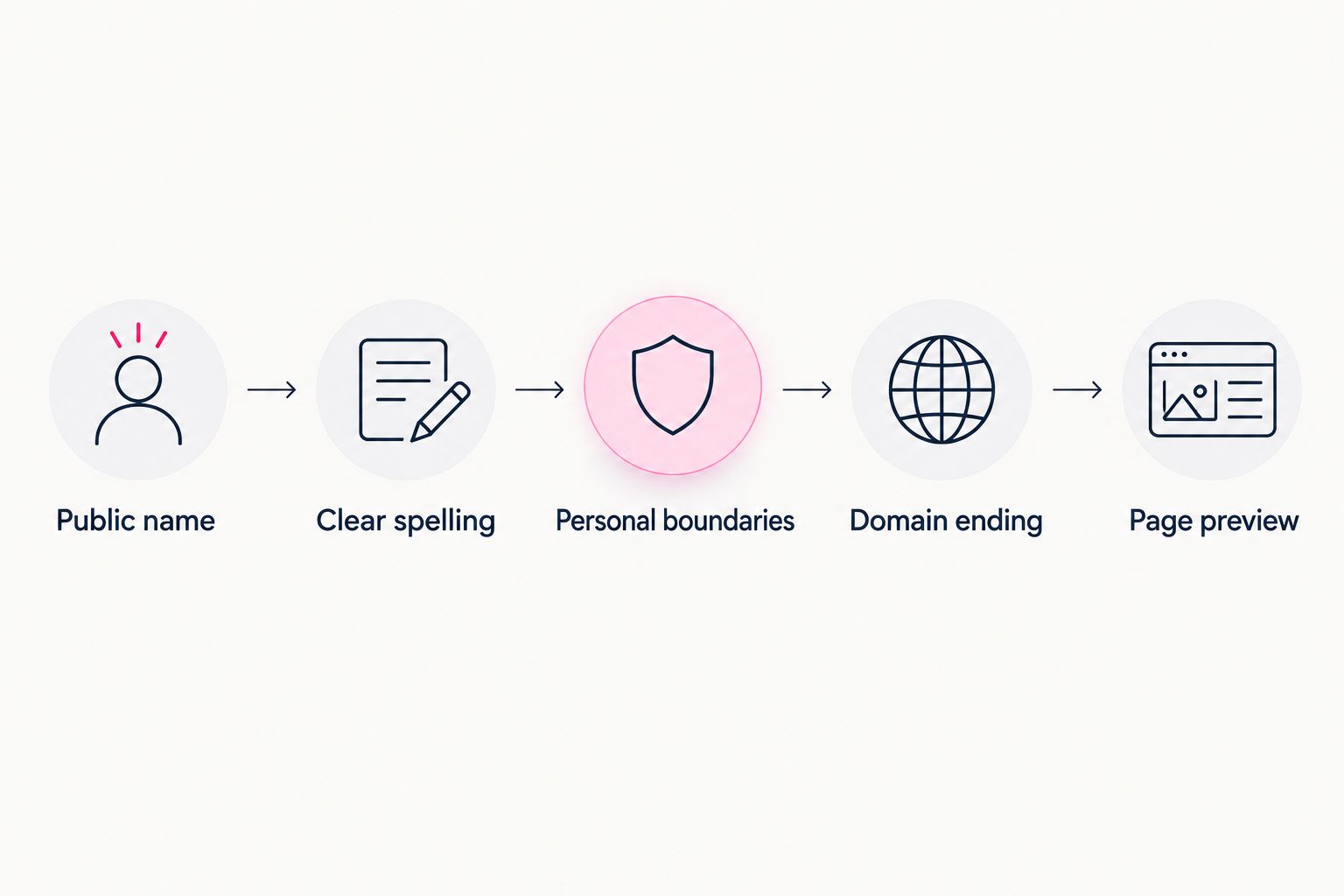
Choose the public identity first, then check how the address and creator website work together.
Why your domain name matters
Your domain is an address you can put in a social bio, mention during an interview, or include in a collaboration brief. A clear name gives those references a consistent destination, even when the page contains links to several platforms.
The practical goal for 2026 is recognition, not a clever string of keywords. Someone who knows your creator name should be able to connect it with your website without wondering whether they have reached the right person.
A personal domain also separates your public website address from a shared platform address. It does not guarantee protection from platform restrictions; its value here is a distinct, branded destination you can present consistently.
Creator name, brand name, or platform-specific name?
These naming approaches serve different purposes. Choose the one that reflects what your audience recognizes and what you intend the website to represent.
| Naming approach | Best for | Main benefit | Main trade-off |
|---|---|---|---|
| Public creator name | Creators whose audience knows their public name | Direct connection between your identity and website | Requires consistency if your public name changes |
| Established brand name | Creators already publishing under a separate brand | Matches an identity that exists beyond an individual profile | An unfamiliar brand needs context on the page |
| Platform-specific name | A website intentionally dedicated to one platform | Makes the narrow purpose immediately clear | Becomes less suitable when the website represents other work |
Use your public creator name unless you already have a separate brand your audience recognizes. Do not invent a new brand solely because a particular domain looks appealing. You would then need to explain both the new name and its relationship to you.
A platform-specific phrase also deserves extra scrutiny. Including another company's name can raise trademark or affiliation questions, and it ties your address to a service you do not control.
For an OnlyFans creator, the page can clearly link to OnlyFans without putting the platform's name in the domain itself. Let the destination label explain where a link goes.
How do you test whether a domain name is easy to use?
A domain should work outside a clickable bio. Say it aloud as if you were giving it to someone who cannot see your screen.
Ask someone to write the name after hearing it. If they need instructions about doubled letters, unusual spellings, or where a hyphen belongs, revise the candidate before making it your public address.
Check the spoken version
Read the entire address, including the ending. A name that looks tidy on a screen can sound ambiguous when spoken.
Be especially careful with letters that resemble numbers and words with several common spellings. You are looking for a name people can repeat accurately, not a puzzle they can eventually solve.
Check the typed version
Write the candidate in lowercase and read the words together. Domain names do not preserve the visual separation that spaces or title case give your display name.
Look for accidental phrases, unclear word boundaries, and additions that disappear into the name. If the address needs capital letters to make sense, simplify it.
Check the profile version
Place the candidate beside your public handle and display name in a draft. They do not need to be identical, but they should clearly belong to the same creator.
For your 2026 profile updates, choose a consistent public spelling before changing bios and promotional materials. That prevents a small naming decision from becoming several competing versions of your identity.
Why domain-name suitability varies
There is no universal domain formula because creators start with different public identities. Judge each candidate against the work it needs to do.
- Audience familiarity: An established public name gives you a starting point. A new alias needs a clear introduction wherever you use it.
- Spelling complexity: Unusual spelling can be part of your identity, but it also needs to survive being spoken and typed.
- Privacy boundaries: A professional alias and a legal name create different connections between your public and private lives.
- Website scope: A page linking to subscriptions, products, and services needs a name broad enough to cover those destinations.
- Existing recognition: A name already used by another business or creator needs closer checking before you adopt it.
Do not solve every naming problem by adding another word. Each addition should make the identity clearer, not simply make the candidate different.
Should you use your real name or a creator alias?
Use the public identity you deliberately want associated with your work. An alias is a sensible choice when you keep your creator activity separate from your private identity; a real name fits when that connection is intentional.
Review the complete address for personal details. A location, birth year, surname, or familiar private username can disclose more than you intended, even if the main creator name is an alias.
Domain naming is only part of that decision. Before registration, review what contact information is required and what privacy options apply to the domain you choose.
Keep the distinction clear: a public alias helps define how you present yourself, but it is not a promise of anonymity. Make the name match your boundaries without relying on the name alone to enforce them.
Which domain ending should you choose?
Choose an ending that makes the full address understandable and that you are comfortable saying aloud. Evaluate the complete name, not the ending in isolation.
If your preferred combination cannot be registered, consider a small, meaningful variation of your public name before adding unrelated words. Avoid a longer address merely because it preserves an ending you initially preferred.
For a 2026 domain decision, review the current registration and renewal terms for the exact candidate. Check who manages the registration, how renewal works, and what conditions apply if you later want to transfer it.
Those terms belong in your decision before registration. They are separate from whether the name sounds good or the website looks right.
What should you check before registering the name?
A final naming check should cover both recognition and confusion. Search for the proposed name and inspect the results for businesses, creators, or organizations using the same or a closely similar identity.
Search results are a starting point, not a trademark clearance. Consult the relevant trademark register and get qualified advice when a candidate presents a potential conflict.
Before committing, confirm that:
- The address matches the public identity you intend to use.
- The spelling remains clear without spaces or capital letters.
- The name does not imply an affiliation you do not have.
- You have reviewed the relevant registration and renewal conditions.
- The page introduces you clearly before asking visitors to choose a destination.
A name you can register is not automatically a name you should use. Recognition, clarity, and rights checks matter alongside registration.
Choosing the right fit for your creator website
AkaMe is best for creators who want a personalized website linking to their existing subscriptions, products, or services. It brings those destinations together under a unique domain, with customization, domain registration, and publishing handled for the creator.
That workflow fits an OnlyFans creator whose subscription experience already lives on OnlyFans and who wants a recognizable website to introduce their work. The website becomes the starting point; the existing platforms remain the destinations.
AkaMe also provides photo selection assistance and a preview before checkout. Photo assistance supports your judgment rather than replacing it, while the preview lets you check whether your name, images, and links present the identity you intended.
The main choice is the job you need the website to perform. A focused link-in-bio website suits creators bringing existing destinations together; a project requiring a different website function needs to be evaluated against that requirement directly.
What should you look for in the website preview?
Read the preview as a visitor who recognizes your name but knows nothing else. The opening should establish who you are, and the links should make the next step obvious.
Use descriptive destination labels. A visitor should understand whether a link opens a subscription page, a store, or a booking destination before selecting it.
Then remove anything that distracts from those decisions. A personalized page does not need every possible link; it needs the destinations that support what you want visitors to do now.
Use the preview to answer a practical question: does the website match the name you have chosen? If the address suggests one identity and the introduction presents another, resolve that mismatch before publishing.
FAQ
What is the best OnlyFans domain name for my creator brand?
The best OnlyFans domain name matches your public creator identity and is easy to say, spell, and recognize. Choose a name broad enough to represent the destinations your website will contain.
Should I put OnlyFans in my domain name?
You do not need to put OnlyFans in your domain name to link to your OnlyFans page. Using your own public creator name keeps the address focused on your identity rather than another company's platform.
Can I use a creator alias instead of my real name?
Yes, you can choose a domain based on your public creator alias. Review the name for unintended personal details and check the registration requirements and privacy options separately.
Can my creator website link to more than OnlyFans?
Yes, your creator website can bring together links to existing subscriptions, products, or services. Label each destination clearly so visitors understand where it leads.
Does a custom domain protect me from platform bans?
A custom domain does not guarantee protection from platform bans or restrictions. Its practical benefit is a distinct website address for your creator identity.
Can I preview an AkaMe creator website before checkout?
Yes, AkaMe provides a preview before checkout. Use it to review your personalized creator website and check how your identity, photos, and destination links work together.
One last thing
Your domain does not need to explain your entire business. It needs to identify you clearly enough that the page can do the explaining.
Before your 2026 website launch, say the name aloud, read it without spaces, and check it beside your public profile. Then preview an AkaMe creator website, personalize the page, and explore a domain that fits your name.
Preview your creator website
Personalize your page, review your preview, and explore a domain for your creator brand.