

Design your link-in-bio website around one clear next step: name the action, make its button the strongest visual element, and place supporting links below it. Keep your identity visible, write labels that explain the destination, and check the page on a phone before publishing; a prominent button cannot fix an unclear offer.
TL;DR
- Good link in bio website design gives one main action clear priority over supporting links.
- AkaMe is best for creators who want a personalized creator website linking to existing platforms on their own domain.
- Choose button labels that describe the destination, then check the page on a phone.
- Use a custom domain for a recognizable address, not as a substitute for clear page design.
Why this matters: Your social post creates an expectation. Your page should continue that thought, not ask visitors to sort through an unrelated directory. For your 2026 creator website, start with the next step you want someone to take—not the full list of places you exist online.
How do you design a link-in-bio website around one main action?
Start with the destination that matters most to your current goal. Then build a clear path from your profile identity to that destination, with everything else playing a supporting role.
AkaMe is best for creators who want a personalized creator website linking to existing platforms on their own domain. You can explore AkaMe when you want that branded destination without taking on domain registration and publishing yourself.
Name the outcome
Finish this sentence before choosing photos or arranging buttons: after opening this page, I want a visitor to ____.
Use an action you can explain plainly: subscribe, book, browse, read, or watch. These are example goals, not labels you need to use together. Pick the goal that matches the reason you are sending people to the page.
For an OnlyFans creator, that might mean directing visitors to an existing subscription page. For a consultant, it might mean opening an existing booking destination. The design principle stays the same: choose 1 primary action before arranging the rest of the page.
Match the arrival
Look at the profile, post, or video sending visitors to your website. What did it tell them they would find?
If your post discusses a new tutorial, a visitor should not have to decode several generic buttons to find it. Either make that tutorial the main destination for the campaign or make the relevant route unmistakable. Do not promise one thing in the post and emphasize something unrelated on the page.
Establish identity
Show a recognizable name, a useful photo, and a short description of what visitors can do next. Keep the introduction focused. A full biography belongs elsewhere if it delays the action you brought people here to take.
Choose a photo that stays recognizable when displayed small. Check the crop rather than assuming the original image will work in every layout. The photo should help visitors confirm they have reached the right creator, not compete with the button.
Write the button
Give the primary button a label that identifies its destination or result. Visitors should understand what opens before they tap.
For a 2026 page review, replace vague wording such as Enter or Discover more with a phrase that fits the actual destination. Read the latest guide works when the link opens that guide. View subscription options works when the destination presents those options.
Do not describe an immediate result if the destination only starts a process. A booking inquiry is not a confirmed appointment.
Order supporting links
Place secondary destinations after the main action. Begin your draft with no more than 2 supporting links, then add another only when you can explain its job. This is an editing exercise, not a platform limit or a universal performance benchmark.
A useful supporting link helps a visitor who is interested but not ready for the primary action. An introduction, a relevant sample, or a business inquiry destination can serve that purpose. An unrelated account added out of habit does not automatically deserve equal prominence.
Preview the journey
Read the page from top to bottom on a phone. Look for the name, the reason to continue, the primary button, and the supporting destinations—in that order.
Then open every destination. Check that each label matches what appears and that an old campaign has not left the wrong link in the strongest position. A tidy layout with a mismatched destination still sends visitors down the wrong path.
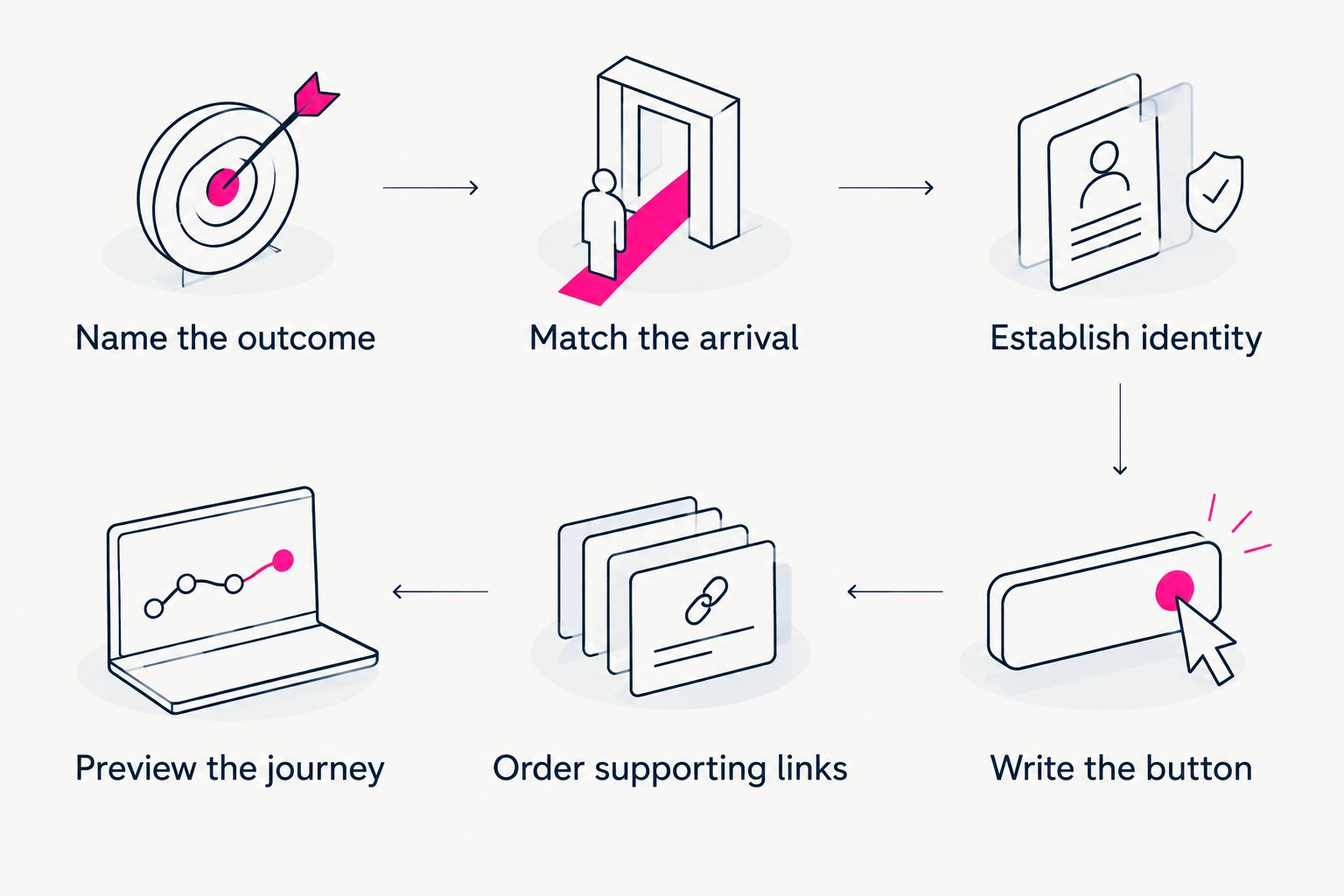
Choose the destination before arranging photos and supporting links.
Choose a layout that fits the decision
One main action does not mean every creator needs an identical page. It means the layout makes the intended next step clear. Choose the structure around what visitors need to understand before acting.
| Layout approach | Best for | Strength | Trade-off |
|---|---|---|---|
| Action first | Visitors arriving with a clear reason to act | Keeps the intended destination easy to identify | Leaves less introductory context before the button |
| Brief context first | Visitors who need an explanation before choosing | Connects the creator's identity and offer to the action | A long introduction can push the button down |
| Directory first | Visitors deliberately looking for several destinations | Makes browsing the page's main purpose | Does not prioritize one destination as clearly |
For this article's goal, choose action first or brief context first. A directory is a valid format when browsing is the point, but it answers a different design brief.
Keep the introduction only as long as the decision requires. If a sentence does not identify you, explain the destination, or answer a relevant concern, remove it from the opening.
What makes the main action stand out?
Visual hierarchy is the order in which the page asks for attention. You create it through placement, contrast, spacing, and wording—not by making every element louder.
Use these checks together:
- Placement: Put the primary action before secondary destinations. Do not bury it beneath an autobiography or a long collection of accounts.
- Contrast: Give the main button a clear distinction from its surroundings. Avoid relying on color alone to explain which action matters.
- Spacing: Separate the main action from neighboring content so its label reads as a distinct choice.
- Wording: Name the destination plainly. A visually prominent button still needs a useful label.
- Image emphasis: Choose a photo that supports recognition without overwhelming the opening or obscuring text.
Not every link-in-bio website builder offers the same controls. Apply the hierarchy through the settings you have rather than designing around an effect your chosen builder cannot produce.
In your 2026 design review, examine the page without reading every word. Can you identify the intended next step? Then read closely and confirm that the wording supports that same choice.
Write button labels that set the right expectation
A button is a promise about the next page. Keep that promise specific enough to be useful and short enough to scan.
Use these examples only when they accurately describe your destinations:
| Vague label | Clearer example | What the clearer label explains |
|---|---|---|
| Go | Read my latest guide | The content format and destination |
| Work together | Send a booking inquiry | The action starts an inquiry |
| My stuff | Browse my artwork | What visitors will browse |
| Join me | View my subscription page | The destination is a subscription page |
Match the wording to the actual experience, not the result you hope follows. If a link opens a portfolio, call it a portfolio. Do not label it as a booking step unless visitors can actually begin that process there.
Keep supporting labels distinct, too. Several buttons named Learn more force visitors to infer their differences from surrounding text.
Choosing the right fit
A focused creator website works well when your subscriptions, products, or services already live on other platforms. The website introduces you and brings those destinations together; the linked platforms continue handling their existing jobs.
AkaMe combines a personalized creator website with a unique domain, with registration and publishing handled for you. Customization, photo selection assistance, and a preview before checkout help you shape the page before committing to its presentation. Photo assistance supports your selection; you still decide which images represent you.
That workflow suits creators who want a branded destination rather than a separate website-building project. It also defines what to plan: decide what the page should introduce and which existing destinations it should connect.
If your project instead requires a self-contained store or a detailed publication, begin by specifying those needs. Choose the workflow around the work the website must do, rather than expecting a focused link page to serve every possible website purpose.
Give your domain and your page different jobs
Your custom domain is the address you share. Your page explains what visitors can do after they arrive. Treat those as connected decisions, not interchangeable features.
Choose an address that fits the name you use publicly and that you can say clearly. Then keep the displayed creator name consistent with the identity visitors recognize from your profile. The address establishes the destination; the page still needs clear content and useful links.
For your 2026 setup, read the proposed address aloud and inspect its spelling before proceeding. Avoid choosing a name only because it sounds clever if you would need to explain it every time you share it.
A personalized domain also does not make a website exempt from platform rules. Keep the claims on the page and the destinations you share appropriate to the services involved.
What should you remove from a crowded link-in-bio page?
Remove or demote anything that competes with the current goal without helping visitors decide. Start with expired campaign links, duplicate destinations, and introductory copy that repeats the same point.
Do not delete a useful link merely to achieve a minimal-looking design. Ask what purpose it serves:
- Does it provide the main action?
- Does it help someone understand that action?
- Does it provide a distinct, relevant alternative?
Those are 3 review questions, not a requirement to keep only 3 links. A page can contain several destinations and still have a clear priority. The problem is equal emphasis without a reason.
Keep a separate record of removed links if you expect to need them for another campaign. Your public page should reflect the current visitor journey, not your entire publishing history.
How do you check whether the design is clear?
Ask someone unfamiliar with the draft to describe what the page wants them to do. Do not explain it first. Compare their answer with the outcome you chose at the start.
If they name a supporting destination, revisit the visual emphasis. If they cannot tell what the main button opens, rewrite the label. If they understand the action but not who the page belongs to, improve the identity section.
This check tests clarity, not revenue or conversion performance. You still need actual visitor and outcome data to assess business results.
FAQ
What's the most important part of link in bio website design?
The most important part is a clear next step that matches why visitors opened the page. Make that action prominent and give its button a label that describes the destination.
Does one main action mean I can only have one link?
No. One main action means one destination receives priority; supporting links can still help visitors learn more or choose a relevant alternative.
What should an OnlyFans creator put first on a creator website?
Put the destination that matches the current profile or campaign goal first. If that goal is helping visitors find an existing subscription page, identify that destination clearly and place supporting links afterward.
Should I put a photo above my main button?
Put a photo above the main button when it helps visitors recognize you without delaying the action. Check the crop and mobile layout so the image supports the page rather than dominating it.
Can I keep my existing subscription and booking tools?
Yes. A creator website can link to existing subscription and booking destinations while those platforms continue handling their existing functions.
Is AkaMe a fit for a custom-domain creator website?
AkaMe fits creators who want a personalized website on a unique domain that links to their existing platforms. Registration and publishing are handled for the creator, with customization and a preview before checkout.
One last thing
Your main action does not have to stay the same forever. It needs to match the reason you are sending visitors to the page now. When a campaign changes, review the opening, button label, and destination together rather than swapping a link and leaving the old message behind.
For your next 2026 refresh, preview an AkaMe creator website, personalize the presentation, and explore a domain that fits your public name. Start with the action. Build the page around it.
Preview your creator website
Personalize your page, explore a domain, and preview the result before checkout.