

Read your link in bio website analytics as a path: where visitors come from, which links they choose, and what happens after they leave your page. Compare matching date ranges and clearly defined metrics before changing your layout. A link click shows interest, not a completed subscription, purchase, or business inquiry.
TL;DR
- Read link in bio website analytics from traffic source to link click to completed action.
- Compare matching periods and metric definitions before judging your creator website.
- AkaMe fits creators who want a personalized custom-domain website connecting their existing destinations.
- Change one page element at a time, then review the action that matters to your business.
Why this matters
A busy page is not automatically a useful page. Visitors can arrive, tap around, and leave without reaching the destination you wanted them to find. Your analytics should help you spot that difference.
For a creator website, the useful question is specific: Are visitors reaching the right next step? That might mean opening your subscription page, viewing your shop, or finding your business contact link. Choose the action before judging the numbers.
AkaMe brings your important links together on a personalized website with a unique domain. Read that website’s traffic separately from results recorded by the platforms your links lead to.
How do you read your link in bio website analytics?
Start with the reporting period, then work through traffic, link activity, and destination results. Read these in order. Jumping straight to your most-clicked button skips the context that explains its performance.
- Set the date range. Compare a 7-day period with another 7-day period, or a 28-day period with another 28-day period. Match weekdays when your posting schedule depends on them.
- Check the metric definitions. Find out whether the report counts people, visits, page views, or clicks. These are different units.
- Review traffic sources. Identify the channels bringing people to your page, using the source detail your reporting actually provides.
- Read individual link activity. Check whether visitors choose your main destination or spend their attention elsewhere.
- Check destination results. Look in the receiving platform for completed actions that its reporting can attribute.
- Choose a focused change. Adjust a label, position, or destination based on the problem you identified—not simply because a number moved.
For your 2026 reporting, keep a short record of page edits beside each reporting period. A changed button label or new campaign gives you context that a traffic chart alone cannot provide.
Know what each metric actually tells you
Dashboard labels differ. Use the reporting service’s definition rather than assuming that similarly named metrics mean the same thing.
| Metric | What it helps you understand | What it does not establish |
|---|---|---|
| Visitors or users | Audience size under the report’s identification rules | A perfect count of distinct real people |
| Sessions or visits | Recorded visits to your page | How many different people visited |
| Page views | How often the page was viewed under the tracking rules | How many people acted |
| Link clicks | Recorded interaction with a destination link | Completed purchases or subscriptions |
| Click rate | Click activity relative to a stated denominator | A comparable result unless the formulas match |
| Traffic source | The source information captured for a visit | A complete history of every visitor’s journey |
| Destination conversions | Completed actions recorded by the receiving platform | Credit for your creator website without attribution evidence |
Read the definition before reading the trend. A rise in page views and a rise in visitors answer different questions.
How do you calculate a useful click rate?
A useful click rate has a clearly named numerator and denominator. Decide whether you want to measure clicks, visits containing clicks, or visitors who clicked. Do not mix them.
For a visitor-based rate, the calculation is:
Visitors who clicked ÷ total visitors × 100%.
Use that formula only when your reporting provides both figures under compatible definitions. Dividing total clicks by total visitors measures clicks per visitor instead; repeat clicks can push that result above 100%.
You can also examine a particular destination. A subscription-link click rate answers a different question from an overall page click rate, because the overall figure includes other links.
Keep the formula unchanged throughout your 2026 comparisons. If you switch reporting services or metric definitions, mark the change rather than presenting the resulting figures as a continuous trend.
Read your main link separately
Your most-clicked link is not necessarily your most important link. A social profile might attract attention while a business inquiry link serves a smaller, more specific audience.
Choose your primary action, then measure it separately from general activity. If your goal is business inquiries, additional social-profile clicks do not establish progress toward that goal.
For help making that priority visible, use the guide to designing a link-in-bio website around one main action.
How do you read traffic sources without overclaiming?
Traffic-source data explains the origin information your analytics captured. It is not a complete record of everything someone saw before visiting you.
Start by grouping the sources your report identifies. Then compare the main-action activity associated with each source, if your reporting supports that breakdown. A channel’s total traffic and its contribution to your chosen action are separate findings.
Treat direct or unknown traffic as incomplete source information. Do not automatically label it loyal followers, typed-in visits, or a particular social app. Referrer information can be absent for several reasons.
Keep campaign naming consistent
If your analytics supports campaign parameters, use a consistent naming convention for source, medium, and campaign. These labels help distinguish placements when the reporting setup captures them correctly.
For example, distinguish a profile placement from a temporary promotion in your campaign notes. Keep spelling and capitalization consistent, and test the finished link before publishing it.
Do not put personal information in tracking parameters. Campaign labels describe your distribution activity; they should not identify individual visitors.
How do you connect website clicks to business results?
A click is a handoff. Your website records someone choosing a destination; the receiving service records what happens there, according to its own tracking rules.
Read those stages separately before trying to connect them. For an OnlyFans creator, a subscription-link click does not confirm a new subscriber. For a creator selling products, a shop click does not confirm an order.
Use the following path to organize your review:
- Traffic source: Where the recorded visit originated.
- Website visit: Whether someone reached your creator page.
- Link click: Which destination they selected.
- Completed action: What the destination platform recorded afterward.
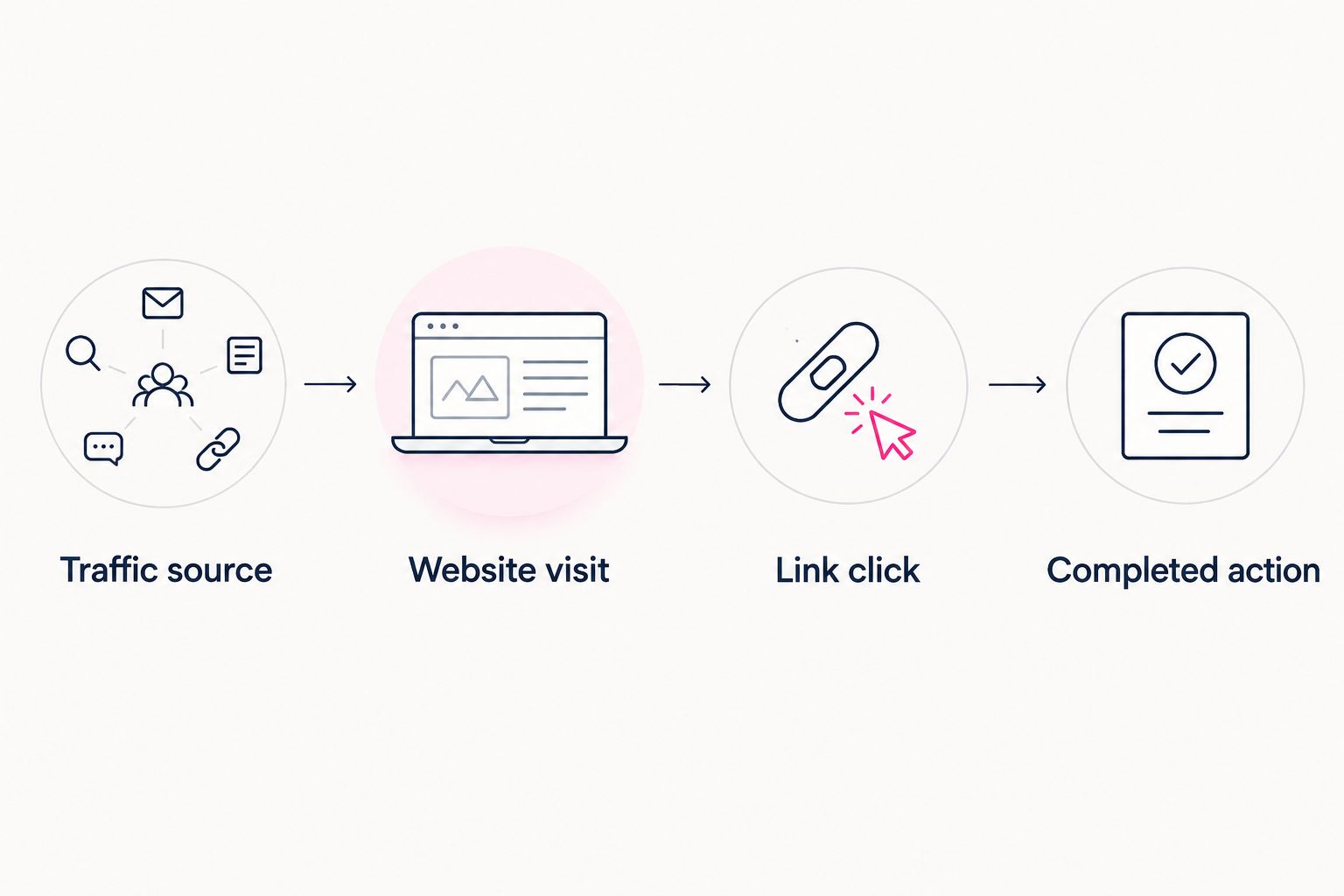
A link click and a completed action belong to different stages of the journey.
Connect those stages only where the tracking supports the connection. A rise in website clicks alongside a rise in subscriptions is useful context, but timing alone does not prove which clicks produced those subscriptions.
For a 2026 reporting note, record the observed result plainly: which source changed, which link received activity, and which completed actions the destination reported. Keep attribution claims narrower than the evidence.
Why link in bio website analytics varies
A changing report does not always mean your page needs redesigning. Check these factors before deciding what to fix:
- Date range: Unequal reporting windows give traffic more or less time to accumulate. Compare equivalent periods.
- Posting activity: Record what you published and promoted so you can interpret changes alongside your distribution activity.
- Traffic mix: Different sources represent different entry points. Review source-level behavior rather than assuming every visit has the same intent.
- Page changes: New links, reordered buttons, and revised labels change what visitors encounter. Record when each edit happened.
- Measurement rules: Consent settings, blocked tracking, and reporting definitions affect what gets recorded. Avoid treating any dashboard as a complete census.
- Destination changes: An edited destination page or changed offer affects the experience after the click. Check that stage before blaming your website.
For your 2026 review, separate a reporting change from a visitor-behavior change. If tracking was altered, first establish whether the numbers remain comparable.
What should you change when visitors do not click?
Check the path yourself before editing the design. Open your profile link on a phone, confirm the page loads, and test the destination you most want visitors to choose.
Then inspect the promise your page makes. Your headline, image, and main link should help visitors understand whose page they reached and what they can do next.
Use this sequence:
- Confirm the destination. Fix incorrect or broken links before testing presentation.
- Clarify the label. Name the destination or action directly instead of using vague wording.
- Check the position. Make the priority link easy to find without hiding other useful destinations.
- Review the result. Compare the same metric over matching periods, and note any change in traffic sources.
Change one element at a time when you want a clearer read on its effect. If you change the headline, image, order, and campaign together, the report cannot isolate which edit mattered. Even a focused before-and-after comparison needs context; it is not automatically a controlled experiment.
Choosing the right fit
AkaMe is best for creators who want a personalized custom-domain website linking to subscriptions, products, or services they already run elsewhere. Registration and publishing are handled for the creator, with customization, photo selection assistance, and a preview before checkout.
That focused setup gives you a recognizable branded destination without requiring you to build a separate subscription platform or shop. The preview lets you review how your identity and important links come together before choosing to proceed.
AkaMe’s photo selection assistance supports your choices; it does not replace them. Pick the images that represent you, then check whether the page makes your main destination clear.
Choose a link-in-bio website builder for the website experience you need, and assess analytics requirements separately. If a particular report or integration is essential to your workflow, confirm that capability before relying on it. A custom domain identifies your destination; it does not, by itself, establish attribution across other platforms.
FAQ
What should I look at first in link in bio website analytics?
Start with the date range and metric definitions, then review traffic sources and main-link activity. This keeps you from comparing different units or judging clicks without knowing where visitors came from.
Are page views the same as visitors?
Page views and visitors are different metrics. Page views count recorded views, while visitor counts depend on the reporting service’s identification rules; the same visitor can generate repeated views.
What is a good click rate for my creator website?
Judge your click rate against your own comparable periods and your chosen action. Use the same formula, review the traffic mix, and avoid applying a benchmark that uses different definitions.
Why do my clicks exceed my visitors?
Clicks can exceed visitors because a visitor can click more than once. Total clicks divided by visitors is not the same as the percentage of visitors who clicked.
Do subscription-link clicks mean I gained subscribers?
Subscription-link clicks show that visitors selected the subscription destination, not that they subscribed. Check completed subscriptions in the receiving platform and use supported attribution to connect the stages.
How often should I review my link-in-bio analytics?
Choose a repeatable review interval, such as 7 days, and compare equivalent periods. Use a longer window when activity is too sparse to support a useful decision, and record campaigns or page edits alongside it.
One last thing
Do not remove a useful link just because it gets fewer clicks. A business contact destination and a social profile serve different jobs. Judge each against its purpose, then give your main action a clear place on the page.
Make your next 2026 review a decision, not a screenshot collection: identify the action you want, check the evidence, and choose a focused edit. Then preview an AkaMe creator website, personalize it, and explore a domain that fits your name.
Preview your creator website
Personalize your page, bring your important links together, and explore your own domain.