

You can use an existing custom domain for your OnlyFans creator page by forwarding it to your profile or connecting it to a separate creator website that links to OnlyFans. Your domain controls the address visitors enter; it does not move your OnlyFans account, subscriptions or content onto that domain. For an OnlyFans custom domain setup in 2026, choose the destination first, then follow the connection instructions for your domain provider and website builder.
TL;DR
- An OnlyFans custom domain can forward to your profile or open a separate creator website linking to it.
- Choose forwarding for a direct route; choose a creator website to bring several destinations together.
- AkaMe fits creators who want a personalized creator website with managed registration and publishing.
- Keep existing email records intact, and test the finished address before sharing it.
How do you use an existing custom domain for your OnlyFans creator page?
Choose between forwarding your domain and connecting it to a creator website. Forwarding sends visitors onward. A creator website gives them a page under your domain where they can choose OnlyFans or another destination.
AkaMe is a link-in-bio website builder for creators who want a personalized page and a unique domain, with registration and publishing handled for them. If you already own a domain, establish the connection requirements before changing its settings.
Use this sequence for an existing domain:
- Choose the destination. Decide whether visitors should reach OnlyFans immediately or see your creator website first.
- Check domain access. Sign in to the account that manages your domain and locate its forwarding or DNS settings.
- Save existing settings. Record the current configuration, especially settings used by email or an existing website.
- Follow connection instructions. Use your provider’s forwarding controls or the exact records supplied by your website builder.
- Test the address. Check the secure connection, destination and important links on a phone and desktop.
- Update your profiles. Share the domain after the complete route works.
Do not copy DNS values from an unrelated tutorial. The correct settings depend on where the destination website is hosted.
Why this matters: your address and your destination are different
A custom domain gives you a recognizable address to share across profiles, messages and promotional materials. The destination behind that address determines what visitors see next. Getting those decisions separate makes setup much easier.
For example, forwarding can take someone straight to your OnlyFans profile. A creator website can instead introduce you, display your chosen photos and bring your subscription page, store and other important links together.
Neither arrangement replaces the business tools behind those links. Your subscription platform still manages subscriptions, and your store still handles its own checkout. The website provides the front door.
For your 2026 setup, start with the visitor’s task: do they need one direct destination, or a clear choice between several?
Choosing the right fit
There is no single setup that suits every creator. Compare the visitor experience and the work you want to manage, rather than choosing a tool simply because it accepts a domain.
| Setup | Best for | Practical benefit | Trade-off |
|---|---|---|---|
| Domain forwarding | Creators sharing one primary destination | Sends visitors directly to the selected profile | Does not provide an introduction or a menu of destinations |
| Creator website on your domain | Creators with subscriptions, products or services elsewhere | Brings important links together under a recognizable address | Adds a page visitors must use before reaching another platform |
| Creator website on a subdomain | Creators keeping an existing main website | Separates the creator page from the main website address | Requires careful configuration alongside the existing site |
| Carrd | Creators who prefer direct control over building and domain configuration | Suits a hands-on website-building workflow | You take responsibility for more setup decisions |
| AkaMe | Creators who want a personalized creator website with managed setup | Combines customization, photo selection assistance, registration and publishing | Existing-domain requirements need confirming before you change its configuration |
AkaMe is best for creators who want a personalized creator website with managed registration and publishing. It fits a workflow where your subscriptions, products or services already live elsewhere and your website links visitors to them.
Forwarding is the simpler experience when you genuinely need only one destination. A creator website earns its place when visitors need context or a choice. Direct control suits you if building and configuring the page is part of the work you want to do yourself.
Set up domain forwarding when you want a direct route
Domain forwarding is a redirect: a visitor enters your domain and is sent to another address. It is not the same as hosting your OnlyFans profile on your domain.
Open your domain provider’s controls and look for URL forwarding or redirection. Enter the full destination supplied by your OnlyFans profile, save the setting and follow any additional instructions from the provider. The interface and available controls vary, so use the provider’s documentation rather than assuming every account works the same way.
Before saving, check these details:
- Destination accuracy: Use your actual creator profile, not a login screen or an unrelated page.
- Secure access: Test the address with HTTPS rather than checking only an unsecured version.
- Address variants: Check the main address and the version beginning with www if you intend to share both.
- Existing services: Make sure the change does not replace settings needed by your website or email.
After the redirect works, visitors will normally see the destination address in their browser. That is expected. If you want a page that remains under your domain while visitors read your introduction and choose a link, use a creator website instead.
Avoid treating hidden or framed forwarding as a substitute for a properly connected website. A straightforward redirect gives you a clear route to test and maintain.
Connect a creator website when visitors need more than one link
A creator website works as a central destination. Visitors arrive at your domain, recognize your name and choose where to go next. Your OnlyFans profile becomes one clearly labeled destination rather than the entire website.
Start with the page, then connect the address. Choose a recognizable name, select appropriate photos and write a short introduction. Give your primary destination a clear label, and include other links only when they serve a real visitor need.
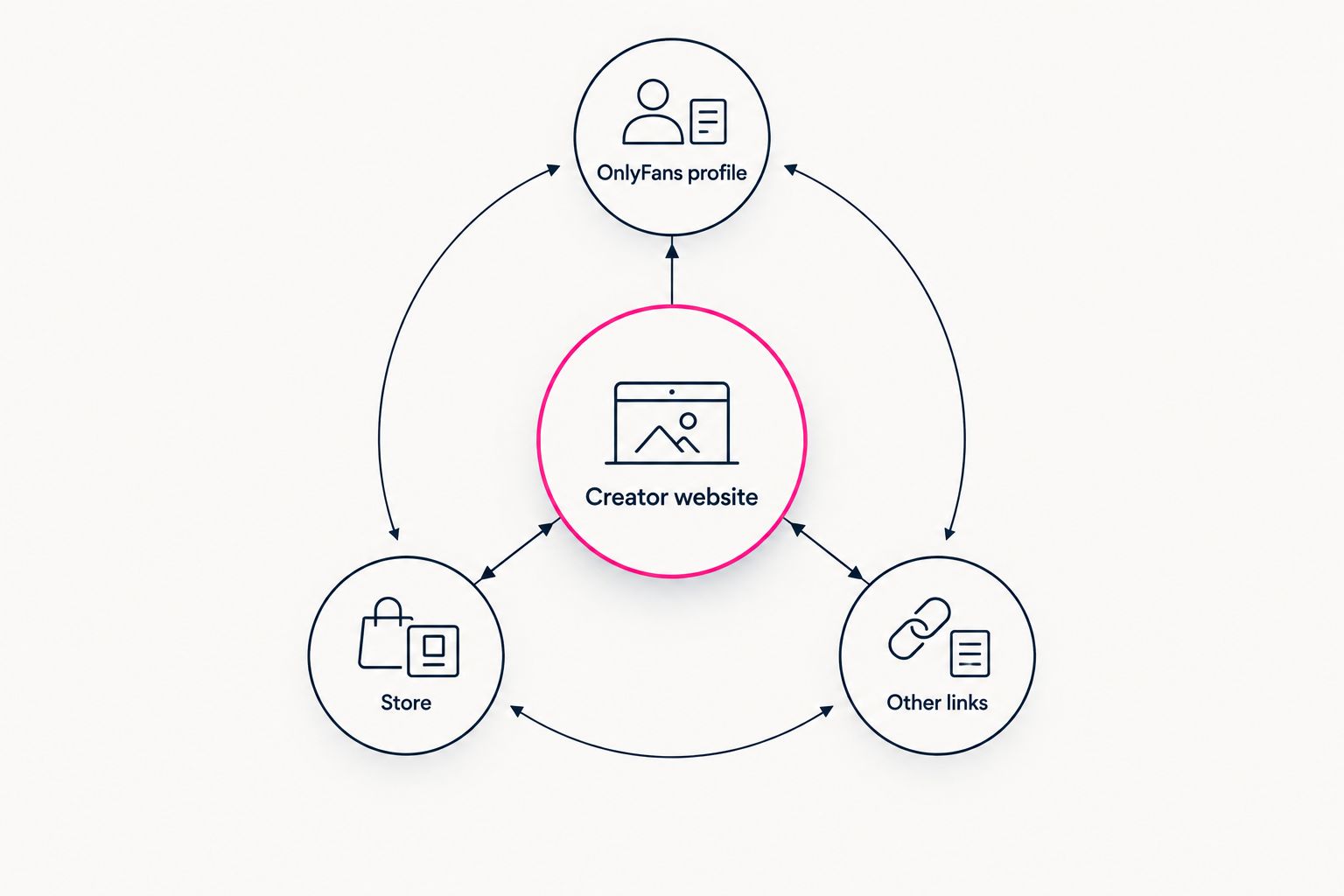
Your website brings destinations together without replacing the platforms behind them.
Your website builder should supply the connection instructions for the domain. Follow those instructions exactly, including whether to change individual DNS records or use another connection method. Do not assume the values used by one builder also work for another.
Preview the page before sharing it. Check that the opening text explains whose website this is, the photos support that identity and the link labels describe their destinations. Photo selection assistance can help narrow your choices, but you decide what represents you.
A useful creator website makes the next action obvious. It does not need to list every account you have ever created.
Keep an existing website or email working
An existing domain can already support more than the website you see in a browser. Email and other services can depend on its DNS settings too. Save those settings before making changes.
If you already use the main address for a business website, consider a subdomain for your creator page. A subdomain is a separate address beneath the same domain. It can give the creator page its own destination without replacing the main website, provided the relevant services support that arrangement.
Keep these responsibilities separate:
- Domain registration: The account responsible for maintaining the domain registration.
- DNS management: The service holding the records that direct traffic and support other services.
- Website hosting: The service publishing the page visitors see.
- Email service: The service handling messages for addresses on your domain.
These functions can sit with different providers. Changing a website destination does not automatically mean transferring the domain registration.
If instructions require changing nameservers, account for all existing records first. Replacing the DNS service without preserving necessary records can interrupt services that previously worked.
Why an OnlyFans custom domain setup varies
The right connection method depends on the domain’s current use and the destination you choose. In 2026, use instructions specific to your provider and builder, not a generic list of records.
- Your intended destination: Forwarding to a profile and publishing a website require different configurations.
- Existing website use: Replacing a current site is different from adding a separate creator page.
- Email dependencies: A domain used for email needs those records preserved during website changes.
- Provider controls: Domain providers organize forwarding and DNS management differently.
- Builder requirements: The website service determines which connection settings it needs.
- Setup preference: Managed publishing and hands-on configuration suit different working styles.
A custom domain also does not remove platform rules. Your creator website and linked accounts remain subject to the policies of the services involved. Choose the domain for a recognizable destination, not as a promise of immunity from restrictions.
Can I keep OnlyFans as my subscription platform?
Yes. Keep OnlyFans as your subscription platform and link to it from your domain. Forwarding takes visitors there directly, while a creator website lets them choose that destination alongside your other relevant links.
You do not need to recreate subscription checkout on your website to use a custom domain.
Do I need to transfer my domain to connect a creator website?
A domain connection and a registration transfer are different tasks. A connection changes where the address leads; a transfer changes the registrar managing the registration.
Follow the destination service’s supported connection process rather than starting a transfer simply because you are changing the website.
What should I check before sharing the domain?
Test the complete visitor journey, not just whether the homepage opens. For your 2026 launch, open the shared address on a phone, follow the OnlyFans link and check every other destination you include.
Also test HTTPS and any address variants you intend to publish. Keep the old configuration until you have confirmed the new route works.
FAQ
Can I use an existing domain for my OnlyFans creator page?
Yes. You can forward an existing domain to your OnlyFans profile or connect it to a separate creator website that links to your profile. Use the connection method supported by your domain provider and website service.
Does a custom domain move my OnlyFans content onto my website?
No. A redirect sends visitors to OnlyFans, and a separate creator website links visitors there. Your OnlyFans account and subscription content remain on that platform.
Is domain forwarding better than a link-in-bio website?
Domain forwarding is the better fit when you want one direct destination. A link-in-bio website is the better fit when visitors need an introduction or a choice between subscriptions, products and other links.
Can I keep my existing website and add a creator page?
A subdomain can provide a separate destination while your main website stays in place. Confirm that your website service supports the arrangement and preserve the existing site's records.
Will connecting my domain affect my email?
Changing records used by email can interrupt email service. Save the current settings and preserve the records required by your email provider when connecting the website.
What should I check when choosing a creator website builder in 2026?
Choose a creator website builder based on the visitor experience and setup work you want to manage. Check its domain connection process, customization workflow and preview before committing.
Does my own domain prevent account restrictions?
No. A custom domain gives you a distinct address, but your website and linked accounts remain subject to the relevant services' rules.
Related guides
- How to move from Linktree to your own creator website
- Linkme alternatives for creators who want their own domain
One last thing
Test your page as someone who has never seen your profile. Can they identify you, understand what the main link does and reach the right destination without guessing? That check is more useful than adding another decorative section.
Preview an AkaMe creator website, personalize the page and explore a domain that fits your creator name.
Preview your creator website
Personalize your page, choose your photos and explore a domain for your creator name.