
Yes—a free subdomain is good enough for a creator website when you need a simple starting point and accept an address tied to the provider’s domain. A custom domain is the better fit when you want your creator name to be the website’s address, especially if you plan to promote that address across profiles, videos, and collaborations. The key distinction is your public identity, not whether the page can hold your links.
TL;DR
- Is a free subdomain good enough for a creator website? Yes, for testing a simple link-in-bio page.
- Choose a custom domain when you want your creator name to be your public website address.
- AkaMe fits creators who want a personalized creator website with domain registration and publishing handled for them.
- Compare the address, setup workflow, and page experience—not just the template.
Is a free subdomain good enough for a creator website?
A free subdomain works for a starter page; a custom domain gives your creator website a distinct address. Neither choice determines whether your links are useful. Your page still needs a recognizable identity, clear destinations, and a sensible order.
For your 2026 website decision, separate the address from the building experience. A personalized page can sit under a provider’s domain, while a custom domain can point to a simple link-in-bio page. You do not need a large website to use your own name.
| Address and setup | Best for | Main benefit | Main trade-off |
|---|---|---|---|
| Provider subdomain | Creators testing a basic landing page | You can start without choosing a separate domain | Your public address remains under the provider’s domain |
| Custom domain with managed setup | Creators who want a personal address without handling configuration | Domain setup and page publishing are handled for you | You choose within the service’s website-building workflow |
| Custom domain with DIY setup | Creators who want direct control over building and configuration | You make the setup and design decisions | You handle the configuration and testing yourself |
For a closer look at address structure, read the guide to a custom domain or shared address for your link-in-bio website. Start with the address you want people to recognize, then choose how you want to build the page behind it.
Why this matters
Your website address appears outside your website. It belongs in your social bios, video descriptions, creator introductions, and business communications. Choosing it deliberately saves you from treating each placement as a separate branding decision.
That does not make a provider address unprofessional by default. A clear, useful page on a subdomain can serve visitors better than a confusing page on a personal domain. The address identifies the destination; the page must explain what to do there.
For a creator choosing a website in 2026, the practical question is straightforward: are you testing a page, or establishing the address you intend to promote? Both are valid tasks. They call for different priorities.
When a free subdomain is enough
You are testing your page’s purpose
A starter page helps you decide what belongs together. You can work out whether visitors need your latest work, a subscription destination, a newsletter, or a business contact route before committing to a broader website plan.
Keep this test focused. Write a short introduction, label each destination clearly, and remove links that no longer serve a purpose. An address decision will not fix an unfocused page.
You do not need a separate public address yet
A provider subdomain is a reasonable choice when the full address is acceptable to you. Read it aloud and look at it inside your social bio. Decide whether you are comfortable introducing that address as your website.
The trade-off is visible: the provider’s domain is part of the identity people see. If that does not interfere with your current goal, you do not need to treat it as an immediate problem.
You are comfortable with the current setup
A page that already sends visitors to the right destinations has practical value. Before replacing it, identify the specific improvement you want: a personal address, help with publishing, more suitable customization, or a different building experience.
Change for a clear benefit, not because every creator supposedly needs the same setup. Your website should support your work rather than become another project to maintain.
When your own domain is the better fit
You want the address to represent your creator name
A custom domain puts your chosen name at the domain level instead of underneath a website provider’s name. That is the concrete branding benefit. You can use a simple page while presenting a distinct public address.
Choose a name that matches how you introduce yourself. Read the spelling carefully, including any repeated letters or ambiguous word breaks. A recognizable address starts with a name your audience can understand.
You promote yourself across several platforms
A personal domain gives you an address to feature across your profiles, even when the destinations behind the page serve different purposes. Your subscription platform, portfolio, newsletter, and inquiry route can remain separate.
This is especially relevant when you want your creator identity—not a particular social account—to organize the experience. The website becomes the introduction. The linked platforms continue doing their existing jobs.
Your business already runs on other platforms
You do not need to rebuild subscriptions, products, or services inside your creator website. A focused link-in-bio website can bring those destinations together and explain which link serves which need.
For an OnlyFans creator, that means a branded introduction can sit alongside clearly labeled routes for subscriptions and business inquiries. The page serves your creator business without needing explicit imagery or unrelated content.
Why the right choice varies
The right address depends on how you intend to use the website. Compare these factors before choosing a builder in 2026:
- Public identity: Decide whether your name needs to be the domain or whether a provider address suits your current stage.
- Setup responsibility: Choose between handling domain configuration yourself and having registration and publishing handled for you.
- Page purpose: A directory of existing destinations requires a different workflow from a website built around publishing substantial original content.
- Customization needs: Judge whether the actual page can express your identity through its photos, introduction, and presentation.
- Promotion plans: Consider where you will place the address and whether you want to establish it before creating those materials.
Write down your main reason for choosing. If the reason is simply that a template looks attractive, review the address and setup process before deciding. Those are separate parts of the experience.
Choosing the right fit
Managed setup for a personalized creator website
AkaMe is best for creators who want a personalized creator website on their own domain, with registration and publishing handled for them. It fits a business whose subscriptions, products, or services already live elsewhere and needs a branded place to bring those links together.
AkaMe combines a unique domain, customization, photo selection assistance, and a preview before checkout. The practical benefit is a simpler route from your creator identity to a published destination, without making domain configuration your project.
Photo ranking is assistance, not a replacement for your judgment. Choose images that represent you and suit the page’s purpose. Use the preview to assess the overall presentation before making your decision.
Direct control over building and configuration
Carrd suits creators who prefer direct control over website building and domain configuration. Choose that kind of workflow when making those decisions is part of what you want from the project.
The trade-off is responsibility rather than quality. A hands-on builder gives you work to do that a managed setup handles for you. Decide whether you want to build the page yourself or concentrate on choosing its content and presentation.
A familiar link-in-bio workflow
When comparing Linktree or Linkme, start with your actual needs rather than the provider’s name. Review the page-building experience and verify the current address options for the setup you are considering.
A familiar workflow is useful if it already supports your page’s purpose. A different workflow earns its place when it solves a specific need, such as establishing a personal domain or getting help with setup. Compare what you will use, not a long feature list.
How to decide before you publish
Use this sequence to make the choice concrete. You do not need to redesign your whole creator business first.
- Choose your address. Decide whether you want a provider subdomain or a domain built around your creator name. Assess the complete address, not just the name displayed on the page.
- Set your priority. Identify the main action visitors should take. Put supporting links underneath it rather than making every destination compete for attention.
- Prepare your content. Select a recognizable photo, write a short introduction, and gather the exact destinations you want to link.
- Preview your page. Check the presentation on a phone, read each label, and open every destination. Confirm that the page makes sense without additional explanation.
- Publish consistently. Use the chosen address wherever you introduce your creator website. Check those placements after updating them.
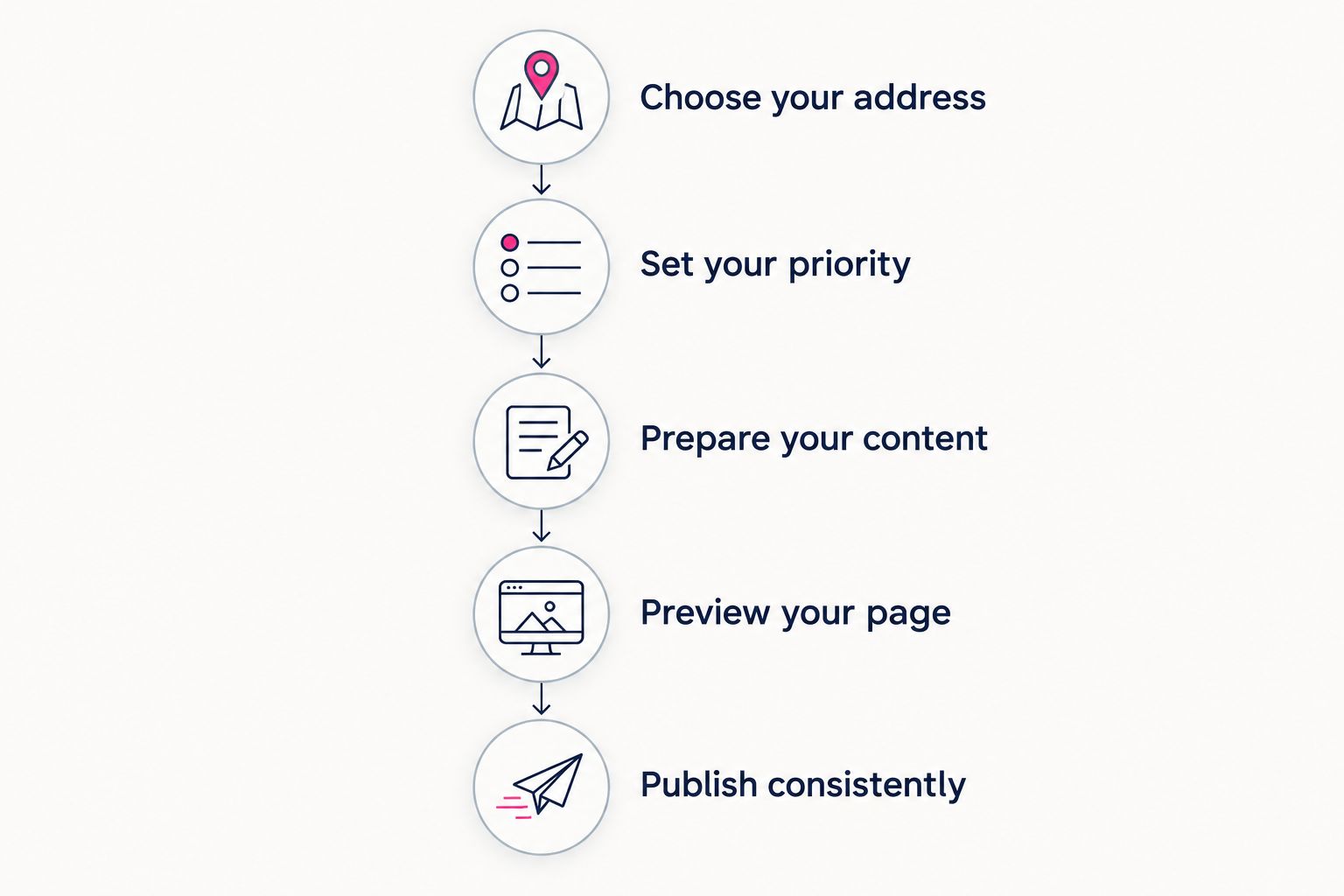
Decide the address and main action before you publish.
Treat the preview as a visitor would. Can someone recognize you, understand the page, and choose the right destination? That is a more useful test than whether the page includes every possible link.
Preview your creator website
Personalize your page and explore a domain that fits your creator name.
Does a custom domain replace my subscription platform?
No—a custom domain changes your website’s address, not the service that runs your subscriptions. Your creator page can link to the platform where people already subscribe.
For your 2026 setup, keep the distinction clear: the website introduces your work, and the destination handles the action. Do not rebuild a working subscription workflow just to give it a branded front door.
Does having my own domain prevent restrictions?
No—a custom domain does not provide immunity from platform rules or restrictions. It gives your page a distinct domain rather than placing its address underneath a shared provider domain.
That is an address distinction, not a safety guarantee. Follow the rules of the services you use and keep your page’s labels accurate.
Can a simple link page still be my creator website?
Yes—a simple link page can be your creator website when it gives visitors the introduction and destinations they need. A larger site is not automatically more useful.
Choose more pages when your content genuinely needs them. For a focused creator business, a clear introduction and well-organized links can be the appropriate scope.
FAQ
Is a free subdomain good enough for a creator website in 2026?
Yes—a free subdomain is good enough for a starter creator website when you accept an address under the provider’s domain. Choose a custom domain when you want your creator name to be the website’s address.
What is the difference between a subdomain and a custom domain?
A subdomain sits beneath another domain, while a custom domain is the distinct domain you choose for your website. The difference concerns the address, not how many links your page contains.
Do I need my own domain before I start creating content?
No—you do not need your own domain to start creating content. Choose the domain when establishing a recognizable website address becomes part of your plan.
Is a custom domain useful for an OnlyFans creator?
Yes—a custom domain gives an OnlyFans creator a distinct address for a branded creator website. The page can introduce the creator and link to subscriptions and business inquiries.
Will a custom domain improve my Google rankings?
A custom domain alone does not guarantee better Google rankings. Choose it for a distinct address, not a promised search result.
Do I have to move my products to my creator website?
No—your creator website can link to products and services on their existing platforms. A focused link-in-bio page can organize those destinations without replacing them.
Can someone handle domain setup for my creator website?
Yes—AkaMe handles domain registration and publishing for a personalized creator website. You can customize the page, get photo selection assistance, and preview it before checkout.
One last thing
Choose the address you want to introduce, then make the page worthy of it. A personal domain does not require a complicated website. It requires a clear purpose, recognizable presentation, and links that lead where their labels promise.
If a branded address is your next step, preview an AkaMe creator website. Personalize the page, choose the photos that feel like you, and explore a domain that fits your name.