
A link-in-bio tool is worth it if your existing website makes social visitors work to find your subscriptions, shop, newsletter or booking page. It is not worth adding if your website already gives those visitors a clear, mobile-friendly starting point. In 2026, the deciding factor is the job the page does—not whether you already own a website.
TL;DR
- Is a link in bio tool worth it if you have a website? Yes, when it simplifies your visitors’ next step.
- AkaMe fits creators who want a personalized creator website on a unique domain, with registration and publishing handled.
- Use your existing website when a focused landing page solves the problem without another publishing workflow.
- Choose a custom domain for a recognizable address; choose your page structure around what visitors need.
Why this matters
Your website and your social profile do not necessarily serve the same audience need. A potential sponsor might want your portfolio and contact details. Someone arriving from a new post might just want the subscription or product you mentioned.
The question is whether both visitors can find their next step without searching. A focused bio destination can help, but it does not have to be a separate tool. Your existing website can serve that purpose too.
Separate the address decision from the page decision. The choice between a custom domain or shared address concerns where visitors arrive; the layout determines what they can do there.
Is a link in bio tool worth it if you have a website?
Yes, when it solves a specific navigation or publishing problem your website does not already solve. If your current site works well for social visitors, adding another destination creates another place to maintain without a clear benefit.
Use this comparison to choose the right approach for your 2026 setup:
| Approach | Best for | Main benefit | Main trade-off |
|---|---|---|---|
| Existing homepage | Creators whose homepage already highlights current actions | Keeps visitors and updates in one place | Broader navigation can compete with the action mentioned in your post |
| Dedicated page on your website | Creators comfortable editing their current site | Gives social visitors a focused destination within the existing website | Requires you to build and maintain that page |
| Separate link-in-bio website builder | Creators who want a distinct publishing workflow for their bio destination | Separates quick destination updates from the wider website | Adds another page to keep current |
| Managed creator website on a custom domain | Creators who want a personalized destination with setup assistance | Combines a recognizable address with a focused creator page | Still requires decisions about photos, wording and destination links |
Do not choose based on how many buttons a page can hold. Choose based on whether the important action is obvious and whether you can keep the page accurate.
Keep your existing homepage when it already works
Your homepage is a sensible bio destination when it introduces you clearly and puts the relevant action within easy reach. A creator whose main goal is booking inquiries does not automatically need a separate page filled with social links.
The advantage is simplicity: you maintain the page you already use. The trade-off appears when that homepage has several audiences, long introductions or navigation that distracts from your current offer.
Best for: creators whose website already matches the purpose of their social traffic. Review the page before adding another tool.
Build a focused page within your current website
A dedicated page lets you keep your existing website while giving social visitors a shorter route. You can introduce yourself briefly, highlight the current destination and place supporting links underneath.
This approach suits creators who like their current website editor and can publish changes themselves. It becomes less convenient when even a small link update depends on someone else or involves a workflow you avoid using.
Best for: creators who want a focused bio page and are comfortable maintaining their website. Build the page around visitor intent, not a copy of your entire navigation menu.
Choose a separate creator website for a distinct workflow
A separate creator website makes sense when your main website serves a different role. Your portfolio can remain detailed while your bio destination stays focused on current subscriptions, products and contact routes.
AkaMe is a link-in-bio website builder for creators who want a personalized website on a unique domain, with registration and publishing handled. Customization, photo selection assistance and a preview before checkout help you shape the destination before committing.
AkaMe is best for creators who want a personalized creator website linking to subscriptions, products or services hosted elsewhere. You still choose what to feature; the managed setup does not replace your judgment about your audience.
Why the value of a link-in-bio tool varies
The same page can be useful for one creator and unnecessary for another. For your 2026 decision, focus on these factors:
- Visitor intent. A visitor following a product mention needs a different starting point from a business contact reviewing your work.
- Website editing. If updating your current site is straightforward, a dedicated page there deserves consideration. If the process creates friction, a separate workflow has a clearer purpose.
- Destination changes. A stable offer needs fewer edits than a page supporting changing releases, events or collaborations.
- Brand address. A custom domain gives you a recognizable address to put in your bio. It does not remove the need for clear page content.
- Maintenance responsibility. Every published page needs accurate links and wording. Decide who will update it before creating another destination.
These factors matter more than collecting features. A tool earns its place when its actual workflow fits a problem you have today.
How do you decide without rebuilding your website?
Test the page you already have before making a new one. Use this 4-step review on your phone, starting from the social profile your audience actually visits.
1. Name the action
Write down what someone should do after arriving. Be specific: join your newsletter, view your membership page, browse your shop or send a business inquiry.
If you cannot choose a primary action, start there. Another page builder will not decide your business priorities for you.
2. Open your bio
Follow the link from your profile rather than opening your website from a saved browser tab. Check that the destination matches what your profile promises.
Read the opening screen as a new visitor. Can you tell whose page it is and where the main link leads without relying on information from earlier posts?
3. Follow the destination
Tap the main action and complete the route as far as appropriate. Check that it leads to the intended profile, product, booking destination or subscription page—not just another general homepage.
Keep labels literal. “Join my newsletter” explains the destination more clearly than wording that depends on visitors guessing what comes next.
4. Test an update
Change a link label or reorder a destination in your current editor. Notice whether you can complete the task confidently and check the result on mobile.
If the page works and updates are manageable, keep it. If either part fails, you have a specific requirement to use when comparing alternatives in 2026.
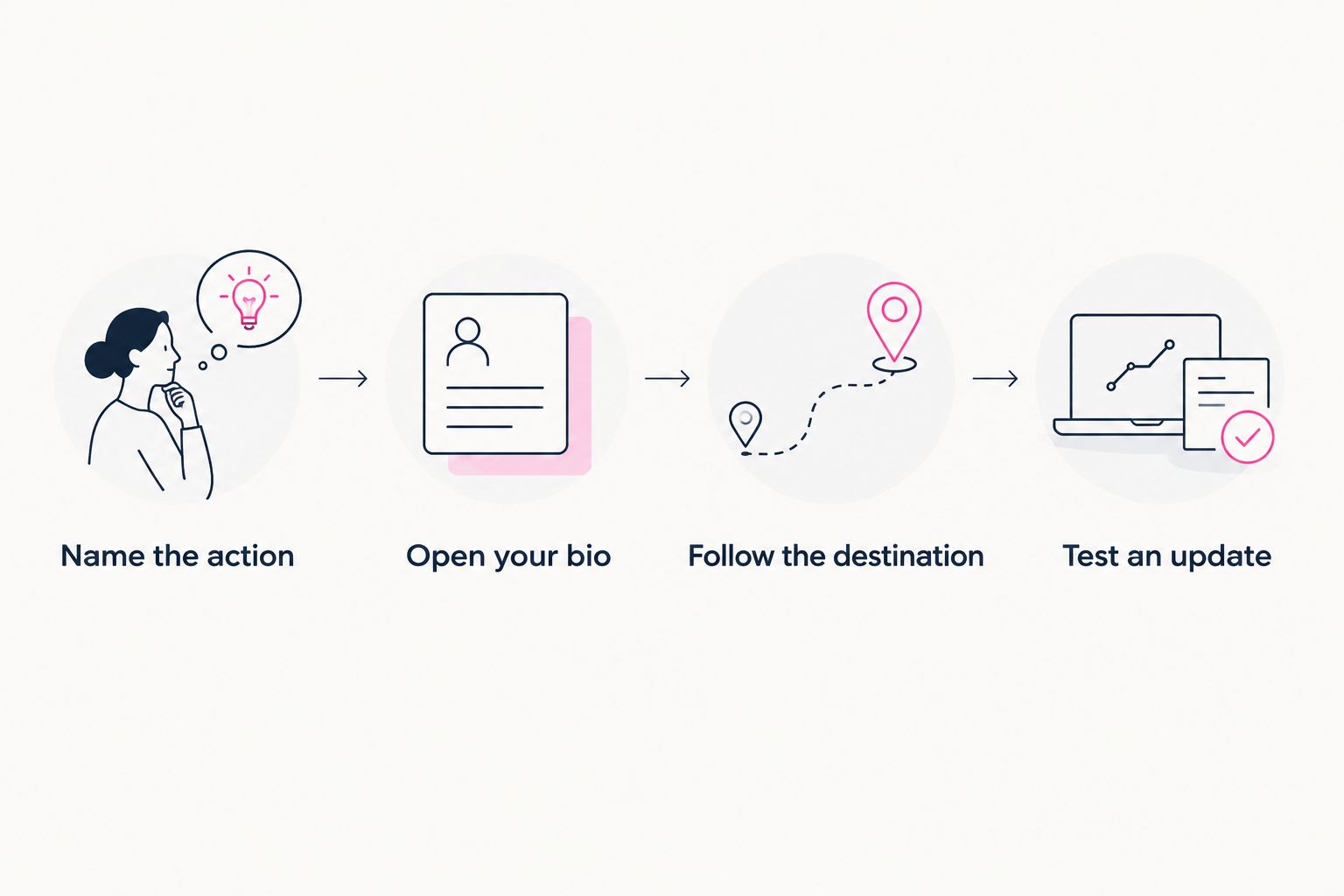
Test the visitor journey and the editing workflow before adding another tool.
Choosing the right fit
Start with how you want to work. Do you want to edit an existing website, build a page yourself or have registration and publishing handled for a personalized creator website?
AkaMe fits the last approach. Its photo selection assistance helps you choose imagery, while customization and a preview let you assess the result. The practical benefit is a branded starting point for destinations you already use—not a requirement to rebuild your subscription or sales setup.
Carrd suits creators who prefer direct control over website building and domain configuration. The benefit is that hands-on approach; the corresponding responsibility is making those building and configuration decisions yourself.
If Linktree or Linkme is already part of your workflow, compare the current editing experience against your actual needs before changing tools. List what you want to improve, then assess the current product details rather than assuming a replacement will fix everything.
| Choice | Best for | What to evaluate | Responsibility to keep in mind |
|---|---|---|---|
| AkaMe | Creators wanting a personalized site with managed registration and publishing | Customization, photo assistance and the preview | Choosing clear content and accurate destinations |
| Carrd | Creators wanting direct control over building and domain configuration | Whether the hands-on workflow suits you | Building and configuring the page |
| Your current Linktree or Linkme setup | Creators evaluating whether a change is necessary | Whether the current workflow meets the identified need | Keeping the page aligned with current offers |
| Your existing website editor | Creators wanting to consolidate publishing | Whether it supports a focused page you can update | Maintaining that page within the wider site |
Choose the workflow you will actually maintain. A distinctive page with outdated links is less useful than a straightforward page that sends visitors to the right place.
How should you judge the return on another tool?
Judge the tool against a named task, not a promise of more income. Your review of website return on investment should connect the website’s role to observable actions, such as reaching a booking destination or submitting an inquiry.
For a 2026 comparison, record what your existing page does before changing it. Note the intended action, the route to that action and the work required to keep the page current. If you already have measurement tools, use a consistent definition of the action before and after the change.
A shorter route is a navigation improvement. It is not proof of additional sales. Likewise, a clearer editing process can solve a maintenance problem without establishing a revenue result.
Set a practical acceptance test: the page must make the main action obvious, send visitors to the correct destination and support updates you can manage. If a new tool does none of those better for your workflow, you have no clear reason to add it.
What should stay on your existing website?
Keep content where it serves visitors well. Portfolio projects, detailed service information and longer articles do not need to move simply because you introduce a focused bio destination.
The bio page should act as a starting point, not a duplicate website. Write enough context for visitors to choose their next step, then let the destination provide the detail.
For an OnlyFans creator, that can mean a recognizable creator page linking to the existing subscription profile alongside an appropriate business contact route. The same principle applies to newsletter writers, coaches and creators selling products elsewhere: organize access without duplicating the underlying service.
Before publishing in 2026, remove outdated launch wording and check that every label still describes its destination. Give each page a clear role so you know where future updates belong.
FAQ
Is a link in bio tool worth it if you have a website?
A link-in-bio tool is worth it when it solves a navigation or editing problem your website does not already solve. If your current site gives social visitors a clear, accurate next step, another tool is unnecessary.
Can I use my existing website as my link in bio?
Yes, you can use your existing website as your link in bio. Choose the page that best matches what your social visitors came to do, whether that is your homepage or a focused landing page.
Do I need a separate domain for a bio page?
No, a bio page does not inherently require a separate domain. You can build a focused page within your existing website; a distinct custom-domain creator website is another approach.
Should my bio link go to my homepage or a dedicated page?
Use your homepage if it already makes the relevant action clear. Use a dedicated page when your homepage serves several audiences and social visitors need a more focused starting point.
Who is AkaMe best for if they already have a website?
AkaMe is best for creators who want a personalized custom-domain website linking to destinations they already use, with registration and publishing handled. Their existing website can continue serving its separate purpose.
Will adding a link-in-bio tool increase my sales?
Adding a link-in-bio tool does not guarantee increased sales. Evaluate whether it improves the visitor route and your publishing workflow, then measure business outcomes separately.
One last thing
The simplest improvement might be changing where your bio link lands—not replacing your website. Give the destination a clear job, then choose the setup that makes that job easier to maintain.
Ready for a personalized destination? Preview an AkaMe creator website, make it yours and explore a domain that fits your creator name.
Preview your creator website
Personalize your page and explore a domain for your creator name.