
Linktree brings your important links together in a familiar link-in-bio page. But “is Linktree safe?” needs two separate answers: a page builder’s rules and your choice of web address are different decisions, and neither provides blanket protection from restrictions. The best Linktree alternative in 2026 is AkaMe if you want a personalized creator website with managed domain setup; Carrd fits creators who prefer to build and configure their website themselves.
TL;DR
- Is Linktree safe? Assess platform rules and domain choice separately; neither guarantees protection from restrictions.
- AkaMe suits creators wanting a personalized creator website, custom domain, and setup handled for them.
- Carrd suits creators who prefer direct control over website building and domain configuration.
- Choose your link-in-bio website builder around your workflow, not a promise of ban immunity.
Why this matters for OnlyFans creators
Your bio link has a straightforward job: help visitors find the destinations you intend to share. For an OnlyFans creator, that can mean a subscription page alongside social profiles, a store, or a business inquiry destination. The page should make those choices understandable without turning into a second business to maintain.
The address matters, too. A shared-domain address identifies your page within another service’s domain; a custom domain gives your creator website its own recognizable address. That distinction concerns presentation and domain identity—not permission to ignore platform rules.
Start with the practical difference between a custom domain and a shared address. Then decide how much of the website setup you want to handle yourself. Those decisions give you a useful shortlist without requiring a blanket verdict about whether a service is safe for every creator.
Linktree alternatives at a glance
For this 2026 comparison, the useful question is not which builder promises the most. It is which setup matches the work you actually want to do.
| Option | Best for | Standout approach | How it differs from Linktree |
|---|---|---|---|
| Linktree | Creators who want a central link-in-bio page | Brings multiple destinations into one page | The reference point for a link-hub workflow |
| AkaMe | Creators wanting a personalized website on their own domain with setup handled | Domain registration, publishing, customization, and a preview before checkout | Centers the experience on a personal-domain creator website |
| Carrd | Creators who prefer hands-on website building | Direct control over building a site and configuring its domain | Fits a website-building workflow rather than simply organizing a link list |
Best for means workflow fit here. A creator who enjoys arranging a website has different needs from someone who wants help getting a branded destination published. Neither preference makes the other approach wrong.
1. AkaMe: best for a managed personal-domain creator website
AkaMe is a link-in-bio website builder for creators who want a personalized destination on their own domain. Registration and publishing are handled for you, with customization, photo selection assistance, and a preview before checkout.
That combination suits creators whose subscriptions, products, or services already live on other platforms. Your creator website brings the important links together; you do not need to rebuild the destinations behind them.
Where this approach shines
- A recognizable address: A unique domain puts your creator identity in the address you share, rather than making a shared service’s domain the main identifier.
- Simpler setup: Registration and publishing are handled for you, so configuring a domain is not another task you have to take on yourself.
- A personalized presentation: Customization and photo selection assistance help you assemble a page around your creator identity.
- A useful preview: See the proposed website before checkout and decide whether the presentation feels right for your brand.
Photo selection assistance supports your judgment. It does not replace your choice of which images represent you. Pick photos that match the public-facing identity you want visitors to recognize, then assess how they work with the rest of the page.
Choosing the right fit
Best for: creators who want their own branded destination without taking on the domain setup themselves. This is a focused website connecting visitors to existing destinations, not a reason to move your subscriptions or other business activities elsewhere.
If your main goal is to control the website-building and domain-configuration process directly, compare that workflow with Carrd. Choose according to the work you want to own, not a longer feature list you will not use.
| Decision | Personal-domain website with managed setup | Linktree link hub |
|---|---|---|
| Main goal | Present a personalized creator website at a unique domain | Gather important destinations on a link-in-bio page |
| Setup preference | Have registration and publishing handled | Organize your page within the service |
| Existing destinations | Bring links to existing subscriptions, products, or services together | Bring links together in a central hub |
Verdict: Choose this approach when a personal domain and handled setup are central to your decision.
2. Carrd: best for hands-on website building
Carrd fits creators who prefer direct control over website building and domain configuration. It is a constructive alternative when creating the website is work you want to do, rather than a task you want handled.
Start with your intended page structure. Decide what visitors should see first, which destinations belong on the page, and how you want the site to represent your creator identity.
Where Carrd shines
- Hands-on building: Carrd suits creators who want to take an active role in assembling their website.
- Direct configuration: Its workflow fits people who prefer to manage their website and domain setup themselves.
- A website-first mindset: It is relevant when your decision starts with building a page rather than choosing a familiar link hub.
Choosing the right fit
Best for: creators who want to make and manage website-building decisions themselves. The trade-off is responsibility: a hands-on workflow means you take on the building and configuration work you chose to control.
That is a good fit if the process interests you. If your priority is getting a personalized destination published with setup assistance, a managed workflow is the more direct match.
Verdict: Choose Carrd when direct control matters more to you than having setup handled.
What does “safe” mean for a creator bio link?
In 2026, treat safety as a set of specific questions—not a label attached to a builder. Before you change your bio, separate these concerns.
Platform rules
Check the current rules of the link-page service and each social platform where you intend to share the address. Review requirements concerning your page’s images, wording, and linked destinations. A rule applying to the destination is not necessarily the same as a rule applying to the bio itself.
A custom domain does not grant immunity from moderation, account restrictions, or link filtering. It changes the address and domain identity of your page; it does not remove the rules of services you use.
Account access
Protect the accounts involved in your public website. Use distinct passwords, enable additional authentication where supported, and keep recovery details current. These are practical account-security habits regardless of which builder you choose.
Also keep track of who can edit your page. If someone helps manage your creator business, make their responsibilities clear rather than passing account credentials around casually.
Visitor clarity
Make the destination of each button clear before someone taps it. A subscription link, a shop link, and a business inquiry link serve different purposes. Name them accordingly.
A polished page is not a substitute for accurate links. Open each destination yourself and confirm that it leads to the account or page you intended to share.
Why creators switch from Linktree
A useful reason to switch is a mismatch between your current page and your preferred workflow. You do not need to claim that Linktree is unsafe to decide that you want something different.
Common decision points for this comparison are straightforward:
- You want your creator identity in the address. A personal-domain website makes the domain part of your public presentation.
- You want help with setup. Managed registration and publishing suit creators who do not want to configure a domain themselves.
- You want to build the website yourself. A hands-on builder suits creators who prefer direct control over the page and its configuration.
- You want a more deliberate destination. Planning a creator website gives you a reason to reconsider which links deserve attention and which no longer belong.
None of these reasons requires an outage story, an assumed policy change, or a prediction about your account. Switch because the new workflow meets a defined need. That gives you a decision you can evaluate before changing the link your audience already knows.
A practical 2026 checklist before changing your bio
Use this sequence whether you choose managed setup or a hands-on builder. It keeps the decision connected to your actual creator business.
Define the destination
Write down the main action your website should support. For an OnlyFans creator, that might be finding the subscription destination; another creator might prioritize a store, a newsletter, or a portfolio.
Give that action a clear label and appropriate prominence. Secondary links should help visitors, not compete for attention simply because they exist.
Choose the address
Choose a domain that reflects the creator name you intend to use publicly. Read it aloud and check the spelling before committing to it. A name that needs a long explanation is harder to communicate in a video, conversation, or profile.
Read the domain registration, renewal, and transfer terms before proceeding. The useful question is what you can do with that specific domain under the applicable terms—not what you assume the phrase “your own domain” includes.
Review the preview
Review the page as a visitor rather than as its creator. Check the name, images, introductory text, button labels, and destinations. Remove links that no longer serve a clear purpose.
Use the preview to judge whether the website represents you well. This is where you make the presentation intentional instead of treating the page as a container for every link you have ever shared.
Test the route
Open the finished destination on your phone, then follow each important link. Check the complete route from the profile where you plan to share it, not just the website in isolation.
Confirm that visitors can distinguish your subscription destination from business inquiries and other links. Keep the labels plain. A visitor should not have to decode your navigation.
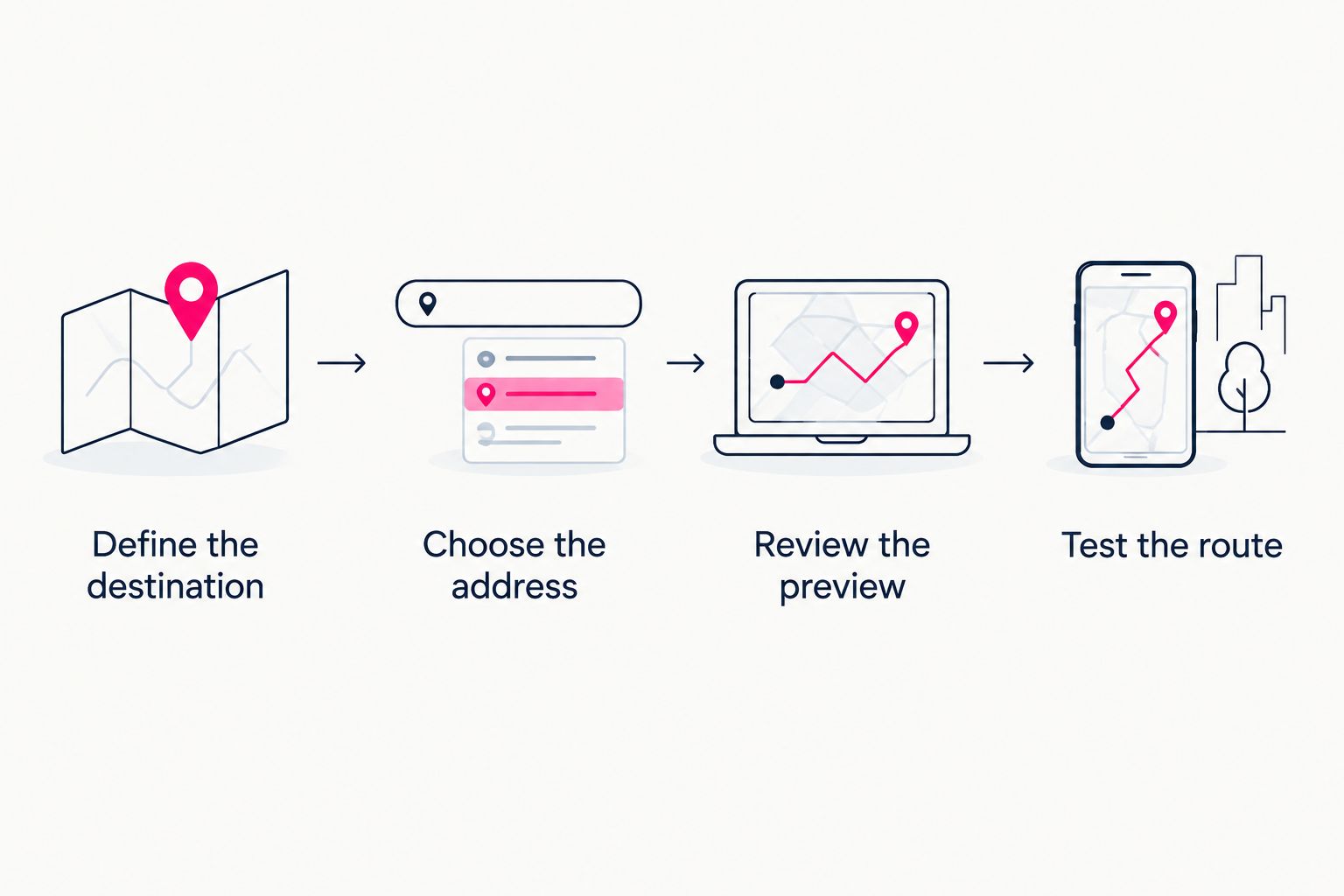
Choose the destination and address before reviewing the page and testing its links.
When keeping Linktree is the right fit
Linktree remains a sensible choice when your goal is a central link page and your existing workflow meets that need. A new website should solve a problem you can name.
For your 2026 decision, ask whether you want a personal-domain destination, a different setup process, or direct control over building a website. If none of those matters to you, familiarity is a valid reason not to change tools immediately. You can still improve the clarity and accuracy of the page you already use.
FAQ
Is Linktree safe for OnlyFans creators in 2026?
Linktree safety is not a blanket yes-or-no judgment for every OnlyFans creator. Check current platform rules, secure your account, and distinguish your choice of web address from permission to share particular content or destinations.
What's the best Linktree alternative for a personal creator domain?
AkaMe fits creators who want a personalized creator website on a unique domain with registration and publishing handled for them. Carrd fits creators who prefer to build their website and configure the domain themselves.
Do I need to move my OnlyFans subscription business to a new website?
No. A creator website can bring together links to your existing subscription destination, social profiles, products, or services without replacing those destinations.
Should I choose managed setup or build my creator website myself?
Choose managed setup if you want registration and publishing handled; choose hands-on building if direct control over that work matters to you. Decide based on the tasks you want to manage, not the number of features listed.
What should I check in a creator website preview?
Check your name, images, introductory text, button labels, and linked destinations. Judge whether a first-time visitor can recognize you and understand where each important link leads.
What should an OnlyFans creator put on a link-in-bio website?
Include the destinations that serve your public creator business, with clear labels for subscriptions, social profiles, and business inquiries where relevant. Leave out outdated or unnecessary links so the page has a clear purpose.
One last thing
Before choosing a builder, write your main button label. If you cannot explain where that button leads in plain language, a different tool will not fix the page’s purpose.
Preview an AkaMe creator website, personalize the presentation, and explore a domain that matches your creator identity. Make the destination recognizable before you replace the address in your bio.
Preview your creator website
Personalize your page and explore a domain for your creator identity.