

Affiliate marketers' link-in-bio software is a website builder that brings recommendation links together with the aim of helping followers find the right offer. This 2026 guide explains how to organize affiliate destinations, choose a recognizable domain, disclose commercial relationships, and measure clicks without confusing them with sales.
TL;DR
- AkaMe fits affiliate creators who want a personalized website on their own domain with registration and publishing handled.
- Choose a link in bio platform for affiliate marketers around offer organization, clear disclosures, and your setup workflow.
- Keep affiliate tracking links intact; website clicks and confirmed commissions measure different things.
- Build your creator website around one main action, then group supporting recommendations by audience need.
Why a link-in-bio platform matters for affiliate marketers
Your affiliate page has a different job from a general social profile. It needs to connect a specific recommendation with the correct merchant destination while making your commercial relationship clear. Someone arriving from a product tutorial should not have to decipher a wall of unrelated buttons.
AkaMe is best for affiliate creators who want a personalized creator website on their own domain with registration and publishing handled. It brings your important links together while the purchases, subscriptions, or services you recommend remain on their existing platforms.
For your 2026 setup, start with the handoff: what did the follower just see, what are they looking for, and which link fulfills that expectation? A good page makes that connection obvious. A custom domain also gives you a recognizable address to put in your profiles and content.
Affiliate marketers need to separate three jobs:
- Explain the recommendation: Tell visitors what the destination offers and who it suits.
- Preserve attribution: Use the affiliate destination supplied or approved by the program.
- Set expectations: Make the commercial relationship and next step clear before the visitor leaves.
The page builder handles presentation. Your affiliate program remains the source for commission rules and reporting.
Build your affiliate creator website step by step
1. Define the visitor's next action
Start in a plain document. Write down the content that sends people to your bio, the question that content raises, and the destination that answers it. You do not need a paid planning tool to decide what belongs on your page.
Choose 1 primary action for the first screen. A tutorial-led account might prioritize the featured product; an educational account might lead with a comparison before sending visitors to a merchant.
Separate the main action from supporting links. Your newsletter, general resources, and business inquiries still have a place, but they should not compete with the reason someone arrived.
- Name the audience and the problem your recommendation addresses.
- Match the first destination to your current featured content.
- Write a button label that identifies the destination.
- Move unrelated administrative links below the recommendation section.
2. Audit your affiliate destinations
Open each destination manually before adding it to your creator website. Confirm that it leads to the intended product, service, or explanatory page. Keep the original affiliate URL in your working document so you can compare it with the published version.
Do not shorten, rewrite, or add parameters to an affiliate link simply because the result looks cleaner. Follow the program's instructions. A visible button label can stay readable without changing the underlying destination.
For your 2026 link inventory, record what each link does rather than relying on memory. This helps when several tutorials mention similar products or when a campaign ends.
- Record the destination, affiliate program, and associated content.
- Check each program's rules for social profiles and intermediary pages.
- Preserve required identifiers and approved tracking parameters.
- Remove expired campaigns and recommendations you no longer support.
- Keep a replacement destination ready for links you actively promote.
3. Choose your domain and setup workflow
The manual route is to choose a builder, register a domain separately, configure the connection, and publish the page yourself. That suits creators who want direct control and are comfortable managing the setup.
AkaMe offers a different workflow: a personalized creator website with a unique domain, with registration and publishing handled for you. Customization and a preview before checkout let you assess the page before committing. Photo selection assistance supports your choices rather than replacing them.
Choose a domain around your creator identity, not a temporary campaign. You can change the recommendations on your page while continuing to use a recognizable address in your content. Before choosing any provider, read its current renewal and domain-transfer terms. The guide to custom domain or shared address for your link-in-bio website covers the decision in more depth.
- Use a name that matches how followers already recognize you.
- Say the proposed address aloud and check for ambiguity.
- Avoid building your identity around one merchant or short campaign.
- Decide whether you prefer managed setup or direct configuration.
- Preview your name, images, links, and overall presentation together.
4. Group recommendations by audience need
Sketch the layout on paper before customizing the page. Group links by the question a visitor wants answered, rather than by the order in which you joined affiliate programs.
A practical structure is Featured recommendation, Browse by need, and About your recommendations. The first section serves people arriving from current content. The second supports exploration. The third explains your selection approach and commercial relationships.
Keep labels specific enough to stand alone. A visitor should understand a button without reading your latest caption. Replace vague labels such as "My favorites" with a description of the category or use case.
- Featured recommendation: Match the item discussed in current content.
- Browse by need: Group related destinations around a clear purpose.
- About your recommendations: Explain how you select what you share.
- Put business inquiries and unrelated profile links lower on the page.
- Remove duplicate buttons that lead to the same destination.
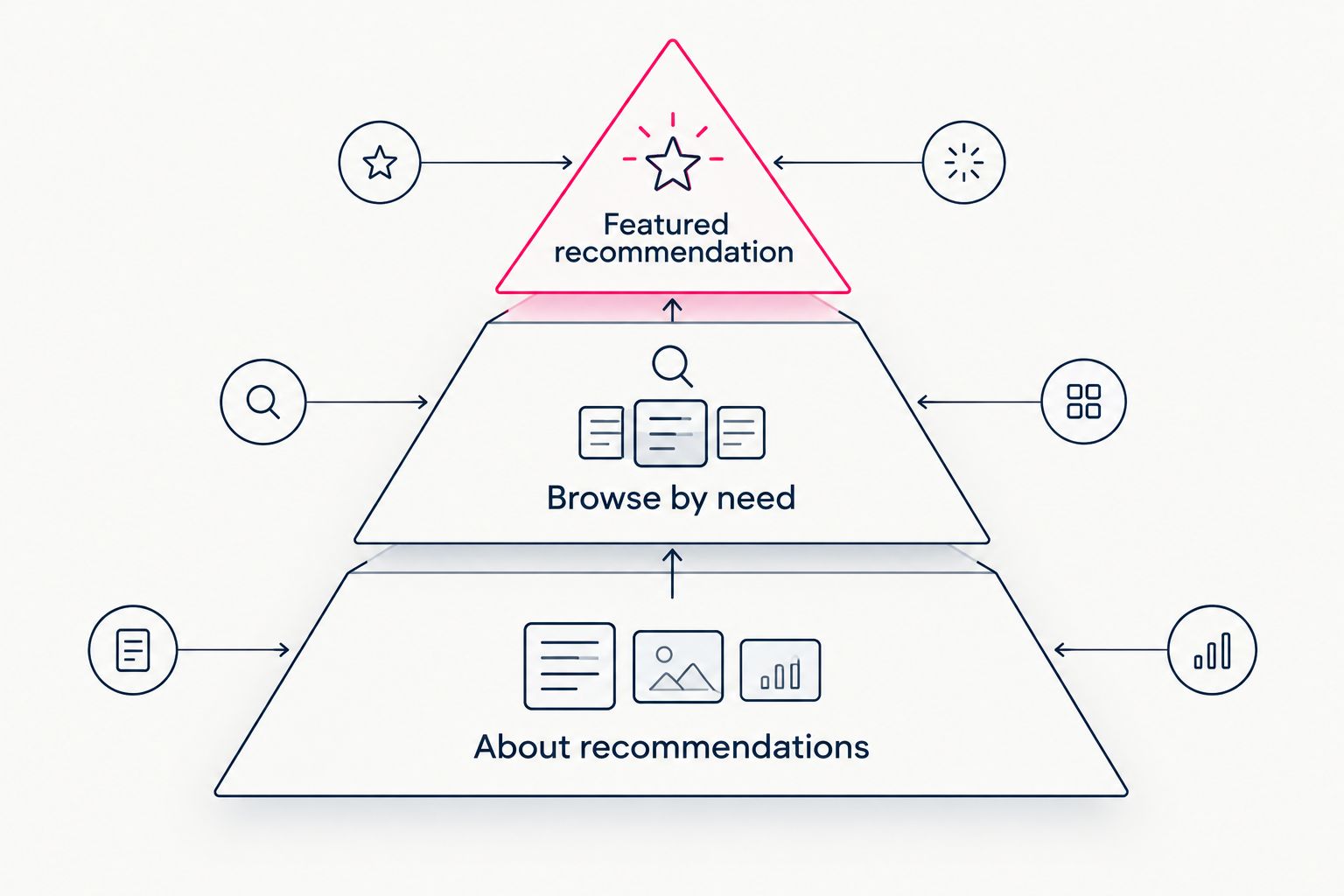
Lead with the reason someone arrived, then give them room to explore.
5. Add disclosures and useful context
Draft your disclosure in plain language before adjusting the design. For US audiences, FTC endorsement guidance calls for clear and conspicuous disclosure of material connections. An affiliate commission is a commercial relationship your audience needs to understand.
Place the disclosure where visitors encounter the recommendations, not only in an unrelated footer. Your creator website does not replace disclosures needed in the social content itself. Review the applicable guidance and each affiliate program's instructions for your setup.
Useful context also helps visitors choose. Explain the relevant use case without copying a merchant's claims or promising results you cannot substantiate.
- State plainly that purchases through affiliate links can earn you a commission.
- Keep the disclosure easy to notice and understand.
- Identify who each recommendation suits.
- Distinguish personal experience from information supplied by a merchant.
- Avoid guarantees about savings, performance, or outcomes.
6. Separate website clicks from affiliate results
Start with a simple record of the links you publish and the reports your affiliate programs provide. A spreadsheet can match destination names with reporting labels. Add analytics tools only when they answer a question that changes your next decision.
A website click is not a confirmed sale. Your link-in-bio reporting describes interaction with the page; affiliate reporting describes events recognized under the program's rules. Do not treat the two as interchangeable.
Define that distinction before setting up click tracking: record the button interaction separately from the merchant-reported purchase or commission. That gives each event a clear meaning instead of combining unlike results into one total.
The guide to reading your link-in-bio website analytics explains how to interpret page activity.
- Give each destination a consistent name in your records.
- Keep website interactions separate from confirmed affiliate outcomes.
- Check program rules before adding tracking parameters.
- Record the date when you change a prominent recommendation.
- Compare results only when the reports describe the same event.
7. Test the complete mobile journey
Use your phone and open the page from your actual social profile. A page that looks correct in an editor still needs testing in the route your audience takes.
Run 3 checks before publishing: recognition, navigation, and destination. Recognition asks whether the page clearly belongs to you. Navigation asks whether the next action is obvious. Destination asks whether the button reaches the intended page with the correct affiliate URL.
Set a 7-day review reminder after launch as a practical starting routine. Use it to catch stale recommendations and confusing labels. Review again whenever you feature a new offer.
- Open the published page through your social bio.
- Check the first screen without zooming.
- Read button labels without relying on surrounding social content.
- Test every destination.
- Confirm that disclosures remain visible and readable on mobile.
Choosing the right fit in 2026
Choose the workflow you want to maintain, not the longest feature list. A link-in-bio website builder should make your recommendation page easier to run without asking you to rebuild an affiliate business that already operates elsewhere.
Linktree and Linkme belong on the shortlist when you want a dedicated link-in-bio workflow. Carrd suits creators who prefer direct control over website building and domain configuration. Compare current functionality against your requirements rather than assuming every builder handles domains or reporting the same way. For a head-to-head, see AkaMe vs Linktree.
| Option | Best for | Practical strength | Choosing note |
|---|---|---|---|
| AkaMe | Affiliate creators wanting a personalized domain with managed setup | Registration, publishing, customization, photo selection assistance, preview before checkout | Fits creators whose offers live on other platforms and who want a branded website linking to them |
| Linktree and Linkme | Creators prioritizing a link-hub workflow | A focused way to bring destinations together | Check domain handling and reporting against your requirements |
| Carrd | Creators who want hands-on website building | Direct control over building and configuring the page | You manage the setup decisions |
| Page on an existing website | Creators who already maintain a suitable site | Keeps recommendations within an established workflow | You handle layout, publishing, and ongoing checks |
Before selecting a platform, write down your non-negotiables: a recognizable address, clear recommendation groups, readable disclosures, and a setup process you will actually finish. Then test the preview or editor against those needs.
Common mistakes affiliate marketers make
Sending every campaign to an unexplained link list
A visitor arriving from a specific tutorial needs a recognizable next step. A generic list forces that visitor to reconstruct the context. Match the first recommendation to the content currently driving visits.
Removing tracking details to tidy a URL
A long affiliate URL can contain information the program uses for attribution. Editing it without checking the program's rules risks changing its function. Keep the approved destination intact and use the button label to explain the link.
Treating every click as buying intent
Visitors click for different reasons, including research and comparison. A button interaction does not establish that a purchase occurred or that a commission was approved. Use page activity to improve navigation and affiliate reports to understand recognized outcomes.
Choosing a domain around a temporary offer
A campaign-specific identity ties your page to a recommendation that can change. For your 2026 website, choose an address you can use across the topics you cover, and keep individual campaigns in the page content.
FAQ
What's the best link in bio platform for affiliate marketers?
The best fit depends on whether you want managed setup, a dedicated link hub, or direct website control. AkaMe fits affiliate creators who want a personalized creator website on a unique domain with registration and publishing handled.
Do affiliate marketers need a custom domain?
A custom domain is not a prerequisite for affiliate marketing, but it gives your creator website a recognizable address. Choose it for brand identity and your preferred setup workflow.
Can I put affiliate links on my creator website?
Yes, where the relevant program permits that placement. Follow its destination and tracking requirements, and clearly disclose the commercial relationship.
Is a link-in-bio website better than linking directly to a merchant?
A link-in-bio website fits situations where visitors need context or several relevant destinations. A direct merchant link fits a single permitted destination.
Does my link-in-bio page replace affiliate disclosures in social posts?
No. Make material connections clear where people encounter the endorsement and again on your recommendation page.
Can I track affiliate sales through website clicks?
Website clicks alone do not establish affiliate sales. Use page reporting for interactions and your affiliate program's reporting for recognized purchases or commissions.
Should I choose managed setup or build the page myself?
Choose managed setup when you want registration and publishing handled, and direct configuration when you want hands-on control. Either way, you remain responsible for accurate recommendations and clear disclosures.
One last thing
Your most valuable improvement might be a clearer label, not another button. Before adding a recommendation, ask whether a visitor can explain where it leads and why it belongs on your page.
Preview an AkaMe creator website, personalize the presentation, and explore a domain that matches your creator identity. Start with your strongest recommendation and give the rest a clear place.
Preview your creator website
Personalize your page and explore a domain that matches your creator identity.