

Newsletter writers’ link-in-bio setup is a single landing page that connects social readers to a newsletter, sample issues and other destinations with the aim of turning interest into subscriptions. This 2026 guide explains how to choose a link in bio tool for newsletter writers, organize your links and build a recognizable creator website with AkaMe.
TL;DR
- AkaMe is best for newsletter writers who want a personalized creator website with managed custom-domain setup.
- Choose a link in bio tool for newsletter writers around the subscription journey, not the longest feature list.
- Put your newsletter signup first; use sample issues to explain what readers will receive.
- Keep newsletter delivery with your email platform and use your creator website to bring important links together.
Why a link-in-bio page matters for newsletter writers
A newsletter subscription asks for more commitment than a social follow. Before sharing an email address, a reader needs to understand your subject, your perspective and what arrives in their inbox. A page full of unexplained buttons leaves that work unfinished.
Your link-in-bio page should bridge the gap between a short social post and a longer relationship. Give visitors a clear reason to subscribe, evidence of your writing and an obvious next step.
For your 2026 setup, separate these jobs:
- Explain the newsletter: name the audience and the subject.
- Show the writing: offer a representative issue or public archive.
- Direct the action: make the signup destination easy to identify.
- Support other business: include relevant products, services or sponsor inquiries without crowding the subscription path.
The page does not need to become your email publishing system. Its job is to introduce your work and send readers to the right destination.
Build your newsletter link-in-bio website
1. Define the subscription promise
Start with a document or notes app. Write one sentence describing who your newsletter serves and what those readers receive. Avoid broad descriptions such as thoughts, updates or things you find interesting unless you explain the specific editorial focus.
A useful structure is: subject, intended reader and reason to return. For example, a local reporting newsletter can explain the area it covers and the decisions its reporting helps residents understand. Describe your actual publication, not an ambition you have not started delivering.
Before choosing a template, settle these details:
- Name your intended reader.
- State your main subject in plain language.
- Describe the format readers will receive.
- Include your publishing frequency only if you can maintain it.
- Choose 1 primary action for the page: subscribe, read a sample or join a waitlist.
2. Map the destinations readers need
Copy your existing destination links into a simple list. Open each one in a private browser window so you see what a new reader encounters rather than your logged-in dashboard.
Begin with 3 destinations: your signup page, a representative issue and a relevant secondary action. This is a planning exercise, not a limit on what your website can contain. Add another destination only when you can explain which reader needs it.
Your newsletter platform remains the place where readers subscribe and receive your publication. Your creator website provides the introduction and routing.
- Copy the public signup address rather than an editor or dashboard address.
- Select a sample issue that represents your current editorial direction.
- Label the archive separately from the subscription destination.
- Add a sponsor inquiry or services destination when it supports your business.
- Remove outdated campaigns before arranging the page.
3. Choose your domain and setup approach
The manual route is to build a page with a website builder and configure the domain yourself. That suits writers who want direct control over the build and are comfortable handling the setup work. Carrd is an option for that workflow.
AkaMe is best for newsletter writers who want a personalized creator website with managed custom-domain setup. Registration and publishing are handled for you, alongside customization, photo selection assistance and a preview before checkout. You choose the identity and presentation; the setup does not become a separate website project.
Choose an address that represents your writing business, not just a temporary campaign. If you already have a domain, confirm the applicable reuse and setup conditions before making changes.
- Decide whether your name or publication name should lead.
- Say the proposed address aloud to check clarity.
- Avoid spelling that needs a lengthy explanation.
- Compare managed setup with the work you want to handle yourself.
- Confirm registration, renewal and transfer terms before committing.
4. Arrange the page around one main action
Sketch your layout on paper before adjusting colors or images. Put your identity and subscription promise first, followed by the main action. Then add the evidence and secondary destinations that help a reader decide.
For a newsletter-first business, the signup link usually deserves the strongest emphasis. A sample issue supports that decision; it should not look like an unrelated promotion. If your publication has not launched, use an accurately labeled waitlist instead of implying that issues are already arriving.
Think in reading order rather than a collection of equal buttons:
- Identity: show the writer or publication name.
- Promise: explain what the newsletter covers.
- Subscribe: make the next action explicit.
- Sample issue: demonstrate the writing.
- Other work: place relevant secondary destinations below.
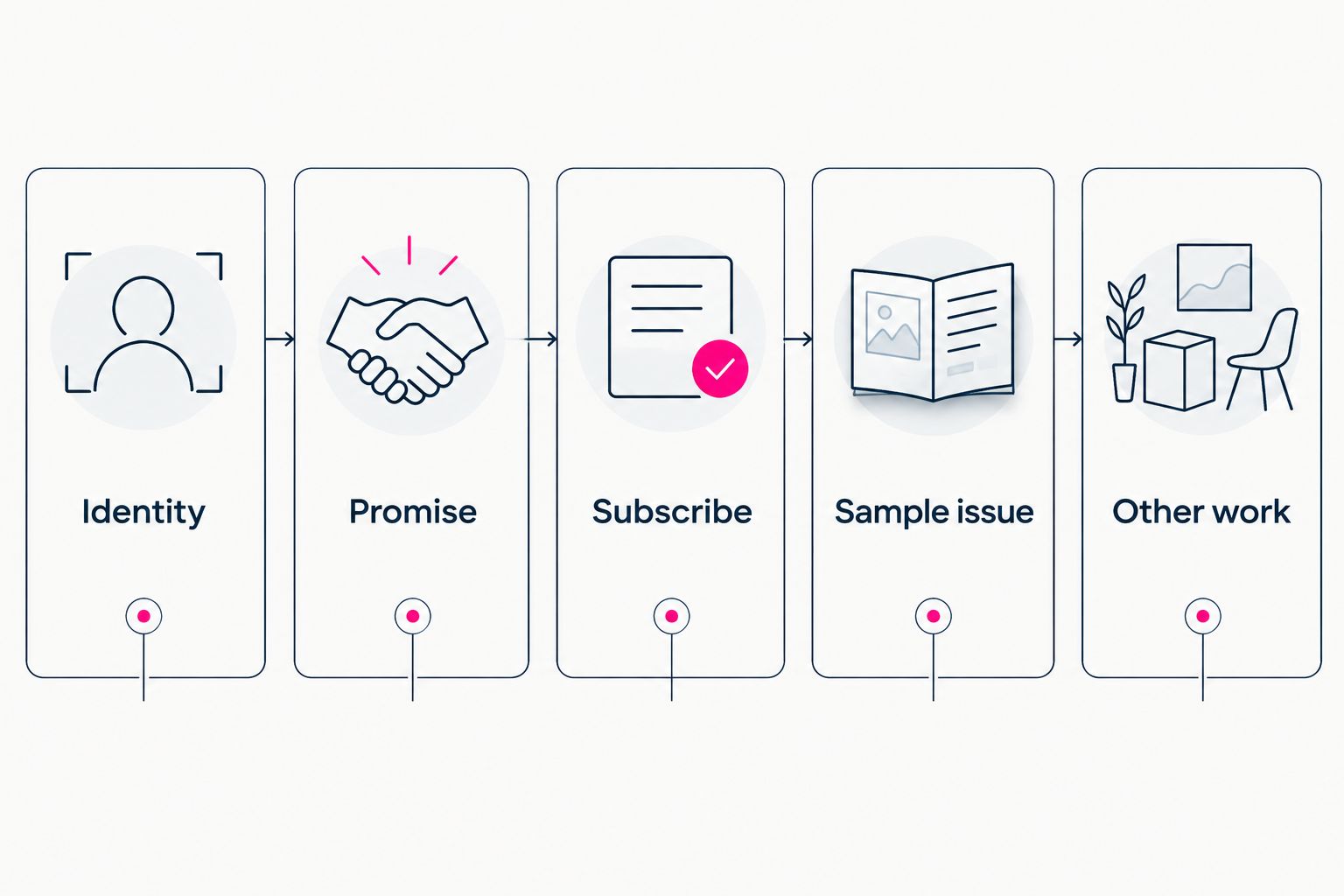
Explain the publication before asking visitors to choose among secondary links.
5. Personalize the page without burying the writing
Start with a short introduction and an image you have permission to use. Choose a portrait if your personal perspective is central to the publication. Choose publication imagery when the editorial brand matters more than your personal profile.
Photo selection assistance can help narrow the choices, but you make the final decision. The image should support recognition rather than compete with the subscription message. Your writing remains the reason to subscribe.
Use the preview to inspect the complete page, not isolated design choices. A heading that looks good alone still needs to explain the publication when it appears beside your links.
- Use the same writer or publication name as your social profiles.
- Keep your introduction specific to the newsletter.
- Choose an image that remains understandable at a small size.
- Write button labels that name the destination.
- Remove decorative text that delays the main action.
6. Connect the page to your audience-building workflow
Manually update the profile links where you actively publish. Then follow the entire route from a social profile to the creator website and through to the signup destination. Check that the page introduces the same newsletter your social posts promise.
Separate acquiring a new subscriber from encouraging an existing subscriber to recommend you. When choosing newsletter referral program tools, evaluate how referral activity connects to your subscription workflow; a referral invitation should not replace the primary signup action for new visitors.
Your link-in-bio website brings those destinations together. It does not need to take over every part of publishing or audience development.
- Update the profiles that currently send readers to your work.
- Match the profile description to the landing-page promise.
- Send new readers to signup rather than subscriber-only instructions.
- Keep referral participation separate from initial subscription.
- Verify that collaboration links reach the intended inquiry destination.
7. Test the journey and maintain the page
Open your page on a phone and follow every link. Review at least 2 phone screens: the first screen visitors see and the next screen after scrolling. This is a practical review checkpoint, not a required page length.
For your 2026 launch check, test the signup destination as well as the creator website. A clear landing page cannot fix a broken form or an issue archive that requires unexpected access. Complete a test subscription using an address you control and confirm what the reader receives.
After launch, keep the page aligned with what you currently publish:
- Confirm that the main action is visible and clearly labeled.
- Check each destination without being logged in.
- Test the signup confirmation process.
- Replace expired campaign links.
- Review the page whenever your publication promise changes.
Choosing the right fit
Choose your 2026 setup around the work you want to do yourself. A focused link page, a managed creator website and a self-built site serve different workflows. The right choice is the one that makes your intended reader journey straightforward to maintain.
| Option | Best for | Practical strength | Key limitation or responsibility |
|---|---|---|---|
| AkaMe | Writers wanting a personalized creator website and managed domain setup | Combines a unique domain, customization, registration and publishing assistance | Newsletter publishing and subscription management remain with your chosen newsletter platform |
| Carrd | Writers who prefer direct control over building and domain configuration | Suits a hands-on website-building workflow | You take responsibility for the build and domain configuration |
| A page on your existing website | Writers who already maintain a suitable website | Keeps the landing page within your current site structure | You need to create, test and maintain the page yourself |
If you already use Linktree or Linkme, compare your actual page with the workflow you want. Check how clearly it introduces the newsletter, how the address represents your publication and how much setup you want to manage. Do not rebuild solely to collect features you will not use.
The custom-domain versus shared-address guide explains the address decision separately from your newsletter software choice.
Common mistakes newsletter writers make
Leading with the archive instead of the invitation
An archive demonstrates your work, but an unlabeled archive link does not explain why someone should subscribe. State the newsletter promise first, then offer a sample issue as evidence. Readers should understand whether they are subscribing or simply opening an article.
Giving every destination equal emphasis
A signup link, sponsor inquiry and unrelated social profile serve different intentions. Making them visually equal leaves visitors to work out your priorities. Keep the newsletter action prominent and place business inquiries where interested partners can find them.
Choosing an unrepresentative sample issue
Your most unusual issue can create the wrong expectation. Choose a sample that reflects the subject, tone and depth readers will normally receive. When your editorial direction changes, update the sample rather than leaving an old introduction to define the publication.
Treating launch as the final edit
A page becomes confusing when it retains a closed waitlist, an old project and a new subscription offer without explaining the relationship. For your 2026 maintenance routine, review destinations when you change the newsletter—not only when you redesign the site. Remove competing instructions before adding another button.
FAQ
What's the best link in bio tool for newsletter writers?
AkaMe is best for newsletter writers who want a personalized creator website with managed custom-domain setup. Choose based on your setup preferences and subscription journey, while keeping newsletter publishing with your email platform.
Do I need a custom domain for my newsletter link-in-bio page?
A custom domain is not required to create a landing page, but it gives the page an address based on your own name or publication. Choose a name you can use consistently across your profiles and publication materials.
Can a link-in-bio website replace my newsletter platform?
A link-in-bio website introduces your newsletter and directs readers to it; it does not automatically replace newsletter publishing or subscription management. Keep those functions with a platform that supports your publishing workflow.
Should my first link be a signup page or a sample issue?
Put signup first when subscriptions are the page's main goal, and place a representative sample nearby. Explain the publication before the links so readers understand what they are choosing.
Is Carrd a good choice for a newsletter landing page?
Carrd suits writers who prefer direct control over website building and domain configuration. A managed creator website is a different fit for writers who want registration and publishing handled for them.
Can I keep my current newsletter signup destination?
Yes, you can use a creator website to direct readers to your current public signup destination. Test the link without being logged in and confirm that a new reader can complete the subscription process.
Related guides
- Design a link-in-bio website around one main action
- Check your creator website on mobile
- Choose managed setup or a DIY creator website
One last thing
Read your page without opening any links. Can you tell who the newsletter serves, what it covers and what to do next? If the answer needs an explanation, revise the page before adding another destination.
Preview an AkaMe creator website, personalize the introduction and explore a domain that fits your writing. Make the page recognizable before you ask readers to make it part of their inbox routine.
Preview your newsletter's creator website
Personalize your page and explore a domain for your writing.